



需求:
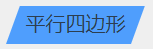
要点:通过transform: skew(-20deg); //设置倾斜度
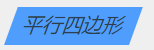
注意点:不要直接给最外层容器设置倾斜角度,否则会导致容器里的子元素也会随之倾斜,如下图:(文字会跟随倾斜)
实现:
<template>
  <div class="parallelogram">
    <div class="parallelogram-1">平行四边形</div>
    <div class="parallelogram-2">
      <span class="bg"></span>
      <span class="title">平行四边形</span>
    </div>
  </div>
</template>

<script>
export default {
  name: "",
  components: {},
  data() {
    return {};
  },
  created() {},
  mounted() {},
  methods: {},
  computed: {},
  watch: {},
};
</script>

<style lang='scss' scoped>
.parallelogram {
  height: 100px;
  .parallelogram-1 {
    width: 100px;
    height: 30px;
    line-height: 30px;
    text-align: center;
    transform: skew(-20deg); //设置倾斜度为-20
    background: #4f9efd;
    margin-left: 20px;
  }
  .parallelogram-2 {
    margin-top: 20px;
    margin-left: 20px;
    width: 100px;
    height: 30px;
    line-height: 30px;
    // background: #4f9efd;
    position: relative;
    .bg {
      position: absolute;
      left: 0;
      top: 0;
      display: inline-block;
      width: 100px;
      height: 30px;
      transform: skew(-20deg); //设置倾斜度为-20
      background: #4f9efd;
    }
    .title {
      position: absolute;
      left: 0;
      top: 0;
      width: 100px;
      height: 30px;
      display: inline-block;
      text-align: center;
    }
  }
}
</style>
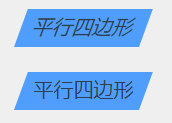
最终效果对比:





 扫一扫
扫一扫


 3769
3769

 被折叠的 条评论
为什么被折叠?
被折叠的 条评论
为什么被折叠?
 到【灌水乐园】发言





