示例
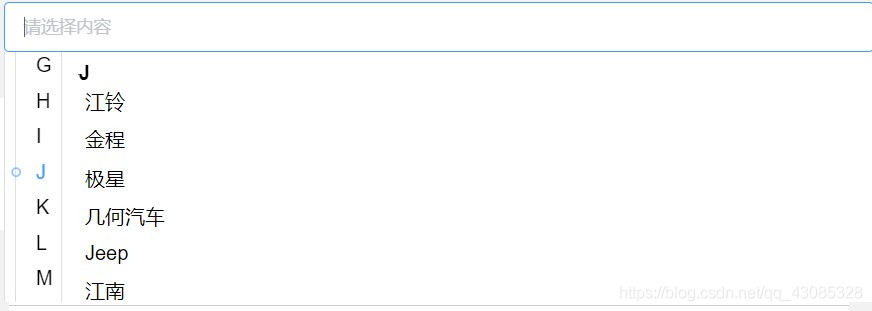
话不多说直接上代码
<template>
<div class="brand-f-s">
<el-input
placeholder="请选择内容"
v-model="input"
clearable
@focus="focus"
@blur="blur">
</el-input>
<div class="brand" id="brand" v-show="show" @click="brand">
<div class="left" id="left">
<div class="left-item" id="left-item" v-for="(item,index) in letters" :key="index" :class="cur_letter==item?'active':''"
@click="selectLetter(item, index)">
<div v-if="cur_letter==item" class="yuan"></div>
{{ item }}
</div>
</div>
<div class="right" id="right" >
<div ref="aTop" class="right-item" v-for="(item1,index) in letters" :key="index">
<a class="title default" href="javascript:void(0);">{{ fixedTitle }}</a>
<a class="title" href="javascript:void(0);">{{ item1 }}</a>
<div v-for="(item2,index) in dataList" :key="index"
@click="selectBrand(item2)">
<div class="right-item" v-if="item1 == item2.groupName">{{ item2.makeName }}</div>
</div>
</div>
</div>
</div>
</div>
</template>
<script>
export default {
data(){
return {
input: '',
cur_letter: 'A',
letters: [],
dataList: [],
listHeight: [],
currentIndex: 0,
fixedTitle: 'A',
flag: true,
flag2: true,
show: false,
ispageshow: true
}
},
props: {
data: {}
},
mounted(){
this.dataList = [
{
"groupName": "A",
"makeName": "文案A",
},
{
"groupName": "A",
"makeName": "文案",
},
{
"groupName": "A",
"makeName": "文案A",
},
{
"groupName": "A",
"makeName": "文案A",
},
{
"groupName": "A",
"makeName": "文案A",
},
{
"groupName": "B",
"makeName": "文案B",
},
{
"groupName": "B",
"makeName": "文案B",
},
{
"groupName": "B",
"makeName": "文案B",
},
{
"groupName": "C",
"makeName": "文案C",
},
{
"groupName": "C",
"makeName": "文案C",
},
]
this.getletters()
document.getElementById('right').onscroll = this.onscroll
document.body.addEventListener("click",()=> {
if(!this.flag2){
this.show = false
this.flag2 = true
}else{
this.show = true
setTimeout(()=>{
this.flag2 = false
})
}
})
},
updated(){
},
methods:{
getletters(){
for(let i = 0;i < this.dataList.length;i++){
let ele = this.dataList[i]
if(this.letters.indexOf(ele.groupName) == -1){
this.letters.push(ele.groupName)
}
}
},
focus(){
this.show = true
if(this.ispageshow){
this.ispageshow = false
setTimeout(()=>{
this.getHeight()
})
}
},
brand(){
this.show = true
},
selectLetter(item,index){
console.log(item)
let distance = 0
this.flag2 = true
for(let i = 0;i < this.$refs.aTop.length;i++){
let ele = this.$refs.aTop[i]
if(index > i){
distance = ele.offsetHeight + distance
}else{
break
}
}
let left = document.getElementById('left');
let leftItem = document.getElementById('left-item');
for (let i = 0; i < this.letters.length - 1; i++) {
if(this.cur_letter != 'A' && this.cur_letter != 'B' && this.cur_letter != 'C'){
if (this.letters[i] == this.cur_letter) {
left.scrollTo(0,(leftItem.offsetHeight*index)-(leftItem.offsetHeight*3))
break
}
}
}
document.getElementById('right').scrollTo(0,distance)
this.cur_letter = item
this.fixedTitle = item
this.flag = false
setTimeout(()=>{
this.flag = true
})
},
selectBrand(item){
console.log(item)
this.input = item.makeName
setTimeout(()=>{
this.show = false
})
},
getHeight(){
let distance = 0;
this.listHeight.push(distance)
if(!this.$refs.aTop) return
for(let i = 0;i < this.$refs.aTop.length;i++){
let ele = this.$refs.aTop[i]
distance = ele.offsetHeight + distance
this.listHeight.push(distance)
}
},
onscroll(){
if(!this.flag) {
return
}
let right = document.getElementById('right')
let newY = document.getElementById('right').scrollTop;
let left = document.getElementById('left');
let leftItem = document.getElementById('left-item');
right.height = '100%'
if (newY <= 0) {
this.currentIndex = 0
return
}
for (let i = 0; i < this.listHeight.length - 1; i++) {
var height1 = this.listHeight[i]
var height2 = this.listHeight[i + 1]
if (!height2 || (newY >= height1 && newY < height2)) {
this.currentIndex = i
this.cur_letter = this.letters[i]
this.fixedTitle = this.letters[i]
if(this.cur_letter != 'A' && this.cur_letter != 'B' && this.cur_letter != 'C'){
left.scrollTo(0,(leftItem.offsetHeight*i)-(leftItem.offsetHeight*3))
}
return
}
}
this.currentIndex = this.listHeight.length - 1
this.cur_letter = this.letters[this.listHeight.length - 1]
this.fixedTitle = this.letters[this.listHeight.length - 1]
},
}
}
</script>
<style lang="scss" scoped>
.default{
position: absolute;
display: block;
background-color: #fff;
width: 100%;
padding-top: .5rem;
top: 0;
}
.brand-f-s{
padding-left: 1rem;
position: relative;
flex: 1;
}
.active{
color: #409eff;
}
.yuan{
width: 5px;
height: 5px;
border-radius: 50%;
border: 1px solid #409eff;
}
.brand{
display: flex;
height: 12.5rem;
position: absolute;
background-color: #fff;
width: 100%;
box-sizing: border-box;
}
.left{
cursor:pointer;
height: 100%;
overflow-y: scroll;
border-left: 1px solid #DCDFE6;
border-right: 1px solid #DCDFE6;
padding-left: .5rem;
.left-item{
padding: .3125rem .3125rem .3125rem 1rem;
position: relative;
border-left: 1px solid #DCDFE6;
div{
position: absolute;
left: 0;
z-index: 999;
top: 50%;
transform: translate(-50%,-50%);
}
}
}
.right{
background: #fff;
flex: 1;
overflow-y: scroll;
padding-left: .5rem;
}
.right-item{
padding: .3125rem;
cursor:pointer;
}
.left::-webkit-scrollbar,.right::-webkit-scrollbar {
display: none;
}
.title{
text-decoration: none;
outline: none;
color: #000;
font-weight: 700;
}
a {
text-decoration: none;
}
a:link {
text-decoration: none;
}
a:visited {
text-decoration: none;
}
a:hover {
text-decoration: none;
}
a:active {
text-decoration: none;
}
</style>



 本文通过示例展示了如何使用 Vue.js 编写一个类似于通讯录的字母索引功能,直接提供代码帮助理解实现过程。





 扫一扫
扫一扫


 1178
1178

 被折叠的 条评论
为什么被折叠?
被折叠的 条评论
为什么被折叠?
 到【灌水乐园】发言





