



 本文介绍如何在SpringMVC中实现文件上传功能,包括配置上传解析器、使用commons-fileupload和commons-io库、创建上传表单及处理上传的控制器。同时,详细讲解了如何在成功上传后回显图片。
在登录时上传一个图片以及回显。之前,需要导入两个jar包:commons-fileupload-1.3.1和commons-io-2.4。
Index.jsp页面:
一定要写 enctype="multipart/form-data",否则springmvc就会解析失败。这个的作用就是将form表单的数据以二进制的方式传输。
<body>
	<form action="${pageContext.request.contextPath }/user/upload.do" method="post" enctype="multipart/form-data">
 		<table>
 			<tr>
 				<td>用户名:</td>
 				<td><input type="text" name="name"></td>
 			</tr>
 			<tr>
 				<td>密码:</td>
 				<td><input type="password" name="password"></td>
 			</tr>
 			<tr>
 				<td>图片:</td>
 				<td><input type="file" name="file"></td>
 			</tr>
 			<tr>
 				<td></td>
 				<td><input type="submit" value="上传"></td>
 			</tr>
 		</table>
 	</form>
</body>
success.jsp回显页面 :
<body>
<c:forEach items="${userList}" var="userList" >
	用户名:${userList.name}<br>
	密码:${userList.password }<br>
	<!--拼接图片回显的的URL-->
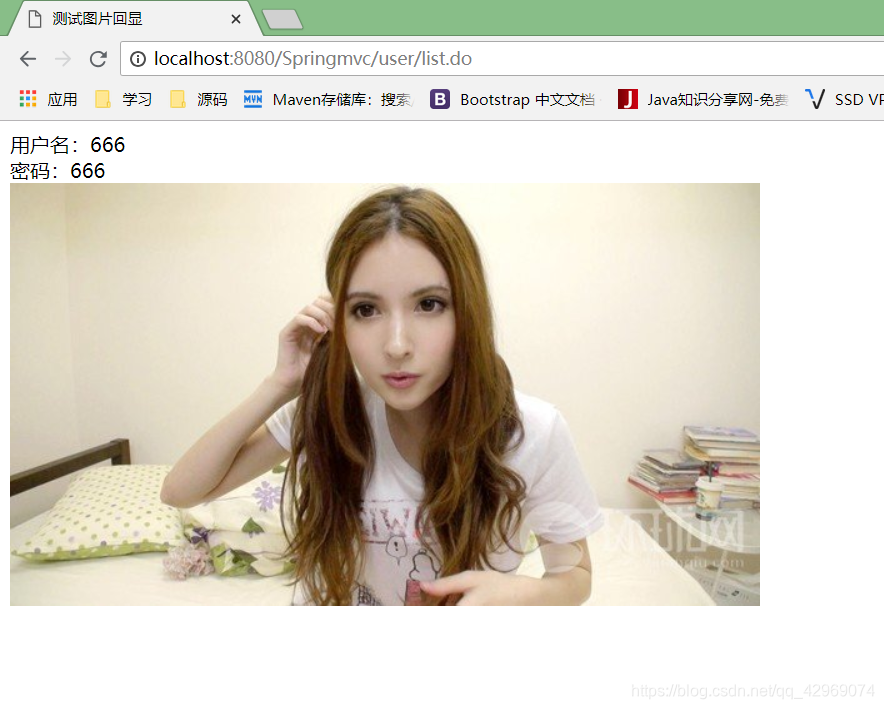
	<img  src="${pageContext.request.contextPath }/${userList.image}"><br>
</c:forEach>
</body>
</html>
Springmvc的配置加入上传文件的配置:
<!-- 视图解析器 -->
	<bean id="viewResolver"
		class="org.springframework.web.servlet.view.InternalResourceViewResolver">
		<property name="prefix" value="/" />
		<property name="suffix" value=".jsp"></property>
	</bean>

	<bean id="multipartResolver"
    class="org.springframework.web.multipart.commons.CommonsMultipartResolver">
    <!-- 设置上传文件的最大尺寸为1MB -->
    <property name="maxUploadSize">
        <value>1048576</value>
    </property>
</bean>
实体类:
private Integer id;

    private String name;

    private String password;

    private String image;
Controller:
@Controller
@RequestMapping("/user")
public class UserController {

	@Autowired
	private UserService userService;

	@RequestMapping(value="/upload",method=RequestMethod.POST)
    private String fildUpload(User user,@RequestParam(value="file",required=false) MultipartFile file,
            HttpServletRequest request)throws Exception{
				//使用UUID给图片重命名,并去掉四个“-”
				String name = UUID.randomUUID().toString().replaceAll("-", "");
				//获取图片名称
				String imageName=file.getOriginalFilename();
				//获得文件类型(可以判断如果不是图片,禁止上传)
		        //String contentType=file.getContentType();
		        //获得文件后缀名
		        //String suffixName=contentType.substring(contentType.indexOf("/")+1);
				//获取文件的扩展名
				String ext = FilenameUtils.getExtension(file.getOriginalFilename());
				//设置图片上传路径
				String filePath = request.getSession().getServletContext().getRealPath("/upload");
				System.out.println(filePath);
				//以绝对路径保存重名命后的图片
				file.transferTo(new File(filePath+"/"+name + "." + ext));
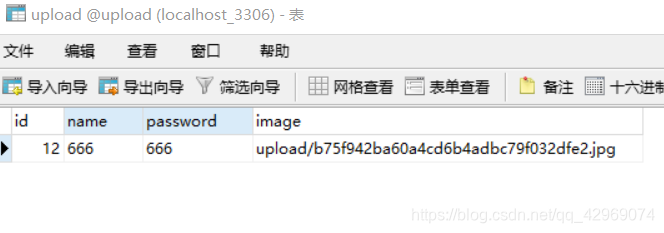
				//把图片存储路径保存到数据库
				user.setImage("upload/"+name + "." + ext);

				userService.add(user);
				//重定向到查询所有用户的Controller,测试图片回显
				return "redirect:/user/list.do";
	}
	//查询所有用户
	@RequestMapping(value = "/list")
	public String getAll(Model model) throws Exception{
		List<User> userList = userService.list();
		model.addAttribute("userList",userList);
		return "success";
	}

}
显示图片:





 扫一扫
扫一扫


 1274
1274

 被折叠的 条评论
为什么被折叠?
被折叠的 条评论
为什么被折叠?
 到【灌水乐园】发言





