


 本文介绍了一个用于自动化搭建Samba服务的bash脚本,包括网络检查、防火墙及SELinux关闭、软件安装状态判断及安装、Samba服务启动等步骤,确保Samba服务在Linux环境下快速稳定地部署。
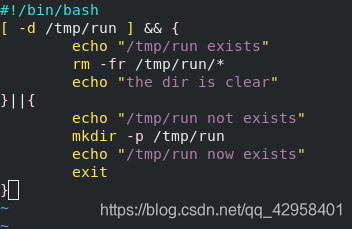
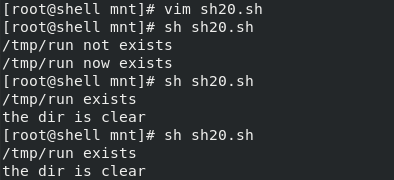
1.判断/tmp/run目录是否存在,如果不存在就建立,如果存在就删除目录里所有文件
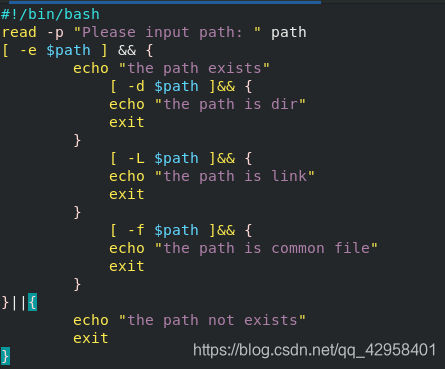
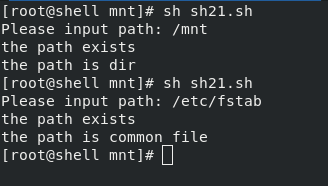
2.输入一个路径,判断路径是否存在,而且输出是文件还是目录,如果是链接文件,还得输出是有效的连接还是无效的连接
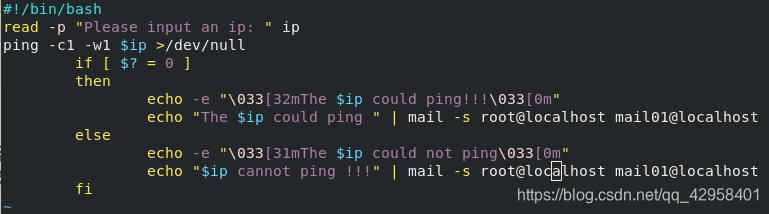
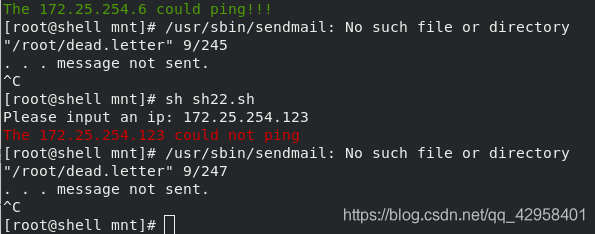
3.交互模式要求输入一个ip,然后脚本判断这个IP对应的主机是否能ping通,输出结果类似于: Server 10.1.1.20 is Down! 最后要求把结果邮件到本地管理员root@localhost mail01@localhost
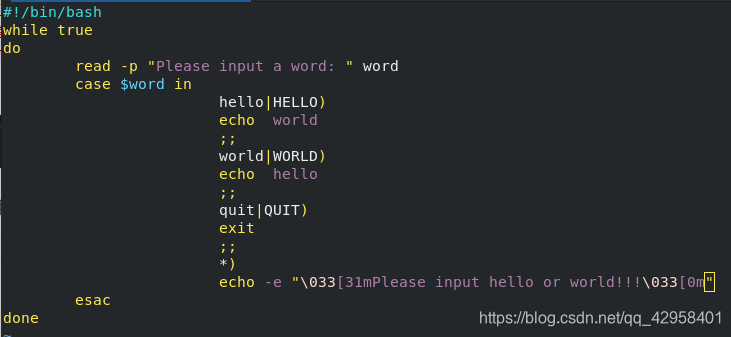
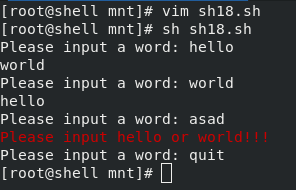
4.判断用户输入的字符串,如果是"hello",则显示"world";如果是"world", 则显示"hello"。
而脚本没有参数或者参数错误时,屏幕上输出 “usage:please input hello or world”
5.编辑一个脚本,实现自动搭建samba服务
#!/bin/bash
echo -e “\033[32m#######judge the network!!!\033[0m”
ping -c1 172.25.254.6 &>/dev/null
if [ $? -eq 0 ]
then
echo “the network is ok”
else
echo “Error:the network is not working”
exit 1
fi
echo -e "\033[32m######turnnig down the firewall and seliux!!!\033[0m "
setenforce 0 &>/dev/null
if [ $? -eq 0 ]
then
echo “selinux is disabled”
fi
systemctl stop firewalld &>/dev/null
if [ $? -eq 0 ]
then
echo “firewalld is stoped”
fi
echo -e " \033[32m#####judgeing wheather the sofeware install\033[0m"
rpm -q samba-common &>/dev/null
if [ $? -eq 0 ]
then
echo “samba-common is installed”
else
echo “samba-common is not installed”
dnf install samba-common -y
rpm -q samba-common &>/dev/null
if [ $? -eq 0 ]
then
echo “samba-common is now installed”
else
echo “samba-common installed failed”
exit 1
fi
fi
rpm -q samba &>/dev/null
if [ $? -eq 0 ]
then
echo “samba is installed”
else
echo “samba is not installed”
dnf install samba -y
rpm -q samba &>/dev/null
if [ $? -eq 0 ]
then
echo “samba is now installed”
else
echo “samba installed failed”
exit 1
fi
fi
rpm -q samba-client &>/dev/null
if [ $? -eq 0 ]
then
echo “samba-client is installed”
else
echo “samba-client is not installed”
dnf install samba-client -y
rpm -q samba-client &>/dev/null
if [ $? -eq 0 ]
then
echo “samba-client is now installed”
else
echo “samba-client installed failed”
exit
fi
fi
echo -e “\033[32m######startting the samba.service…\033[0m”
systemctl status smb.service | grep active &>/dev/null
if [ $? -eq 0 ]
then
systemctl restart smb
echo “smb.service restart success”
else
systemctl enable --now smb
fi
echo -e “\033[32m######add user and dir …!!!\033[0m”
read -p "please input a user: " user
read -p "please input a path: " path
useradd $user
mkdir -p $path





 扫一扫
扫一扫


 395
395

 被折叠的 条评论
为什么被折叠?
被折叠的 条评论
为什么被折叠?
 到【灌水乐园】发言





