

uniapp-APP服务协议和隐私政策

本文介绍了如何在uni-app中创建APP服务协议和隐私政策页面。首先,需在项目的static目录下创建HTML文件,或者在hybrid/html文件夹内新建文件。确保在HTML头部添加必要代码以实现真机内容自动换行。此外,需在pages.json配置文件中启用原生导航栏。

1.uniapp隐私政策和服务协议,在static下新建html文件,或者新建hybrid->html->文件名.html

在html中头信息加下面的代码,不然的话在真机下内容不能自动换行

<head>
		<meta http-equiv="Content-Type" content="text/html; charset=utf-8" />
		<meta http-equiv="Content-Style-Type" content="text/css" />
		<meta name="generator" content="Aspose.Words for .NET 15.1.0.0" />
		<!-- //禁止旋转缩放 -->
		<meta content="width=device-width,initial-scale=1.0,maximum-scale=1.0,user-scalable=no,minimal-ui" name="viewport">
		<!-- //删除默认的苹果工具栏和菜单栏 -->
		<meta content="yes" name="apple-mobile-web-app-capable">
		<!-- //状态栏黑色 -->
		<meta content="black" name="apple-mobile-web-app-status-bar-style">
		<!-- //手机号不能链接 -->
		<meta content="telephone=no" name="format-detection">
		<!-- //邮箱不能链接 -->
		<meta content="email=no" name="format-detection">
	</head>
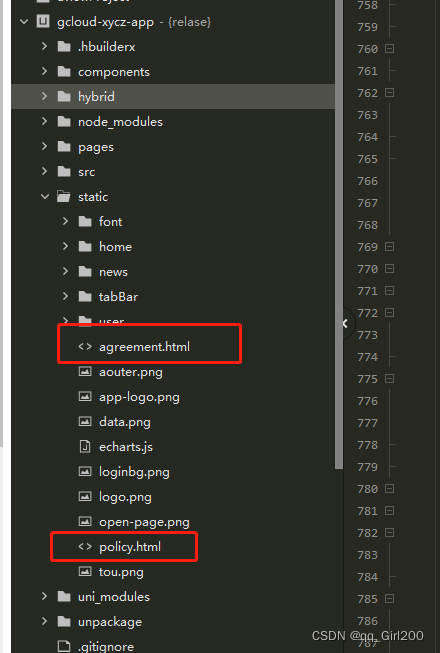
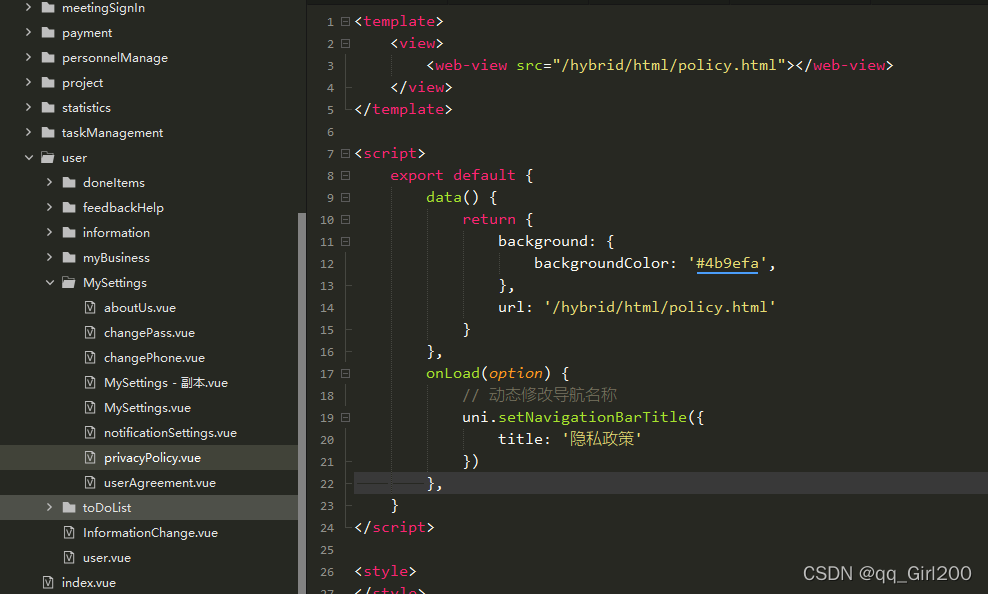
 使用
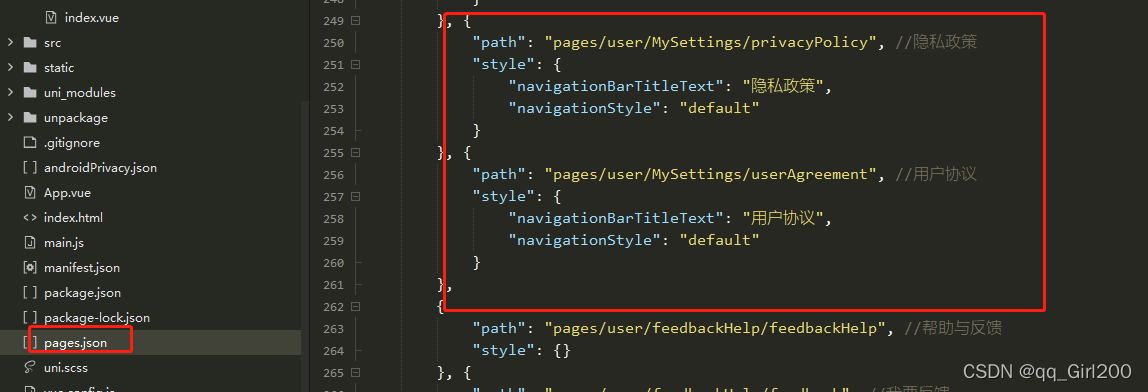
 pages.json里需使用原生导航栏配置
 

UniApp 开发的 App 中实现用户平台协议隐私政策弹窗可以按照以下步骤进行: ### 1. 创建弹窗组件 首先,在项目中创建一个弹窗组件,用于显示平台协议隐私政策的内容。可以在 `components` 目录下创建一个名为 `AgreementPopup.vue` 的组件。 ```vue <template> <view class="agreement-popup"> <!-- 遮罩层 --> <view class="mask" @click="closePopup"></view> <!-- 弹窗内容 --> <view class="popup-content"> <view class="popup-title">平台协议隐私政策</view> <view class="popup-text"> <!-- 这里可以放置平台协议隐私政策的具体内容 --> 欢迎使用我们的 App,在使用前请仔细阅读以下平台协议隐私政策...... </view> <view class="button-group"> <button @click="closePopup">拒绝</button> <button @click="acceptAgreement">同意</button> </view> </view> </view> </template> <script> export default { data() { return { // 可以在这里定义一些状态变量 }; }, methods: { closePopup() { // 关闭弹窗的逻辑 this.$emit('close'); }, acceptAgreement() { // 同意协议的逻辑 this.$emit('accept'); } } }; </script> <style scoped> .agreement-popup { position: fixed; top: 0; left: 0; width: 100%; height: 100%; display: flex; justify-content: center; align-items: center; } .mask { position: absolute; top: 0; left: 0; width: 100%; height: 100%; background-color: rgba(0, 0, 0, 0.5); } .popup-content { background-color: #fff; padding: 20px; border-radius: 10px; width: 80%; max-height: 80%; overflow-y: auto; z-index: 1; } .popup-title { font-size: 18px; font-weight: bold; margin-bottom: 10px; text-align: center; } .popup-text { font-size: 14px; line-height: 1.5; margin-bottom: 20px; } .button-group { display: flex; justify-content: space-around; } </style> ``` ### 2. 在页面中使用弹窗组件 在需要显示弹窗的页面中引入并使用该组件。例如,在 `pages/index/index.vue` 中: ```vue <template> <view> <!-- 页面内容 --> <view class="page-content"> <!-- 这里可以放置页面的其他内容 --> </view> <!-- 引入弹窗组件 --> <AgreementPopup v-if="showPopup" @close="closePopup" @accept="acceptAgreement" /> </view> </template> <script> import AgreementPopup from '@/components/AgreementPopup.vue'; export default { components: { AgreementPopup }, data() { return { showPopup: true // 控制弹窗的显示与隐藏 }; }, methods: { closePopup() { // 关闭弹窗 this.showPopup = false; // 可以在这里添加拒绝协议后的逻辑,如退出 App 等 }, acceptAgreement() { // 同意协议 this.showPopup = false; // 可以在这里添加同意协议后的逻辑,如记录用户已同意等 } }, onLoad() { // 在页面加载时显示弹窗 this.showPopup = true; } }; </script> <style scoped> .page-content { padding: 20px; } </style> ``` ### 3. 本地存储用户同意状态 为了避免每次打开 App 都显示弹窗,可以使用本地存储来记录用户是否已经同意协议。在 `acceptAgreement` 方法中添加本地存储的逻辑: ```javascript acceptAgreement() { // 同意协议 this.showPopup = false; // 记录用户已同意协议 uni.setStorageSync('agreementAccepted', true); // 可以在这里添加同意协议后的逻辑,如跳转到主页面等 } ``` 在 `onLoad` 方法中检查本地存储的状态: ```javascript onLoad() { const agreementAccepted = uni.getStorageSync('agreementAccepted'); if (!agreementAccepted) { // 用户未同意协议,显示弹窗 this.showPopup = true; } else { // 用户已同意协议,不显示弹窗 this.showPopup = false; } } ```
评论
添加红包

请填写红包祝福语或标题

红包个数最小为10个

红包金额最低5元

当前余额3.43前往充值 >
需支付:10.00
成就一亿技术人!
领取后你会自动成为博主和红包主的粉丝 规则
hope_wisdom
发出的红包
实付
使用余额支付
点击重新获取
扫码支付
钱包余额 0

抵扣说明:

1.余额是钱包充值的虚拟货币,按照1:1的比例进行支付金额的抵扣。
2.余额无法直接购买下载,可以购买VIP、付费专栏及课程。

余额充值


