



 本文深入讲解Java集合框架,包括泛型、List、Set、Map等核心接口与其实现类,如ArrayList、LinkedList、HashMap、TreeMap的特性及使用场景,同时探讨了容器操作、迭代器遍历以及自定义容器实现。
基于尚学堂视频课程的学习
目录
Irerator迭代器遍历容器元素(LIst,map,set)
数组也是一种容器,可以用来放对象或是基本数据类型
- 优点:
- 快速访问数组,效率高
- 简单的线性序列
- 缺点:
- 不灵活,数组需要实现定义好容量
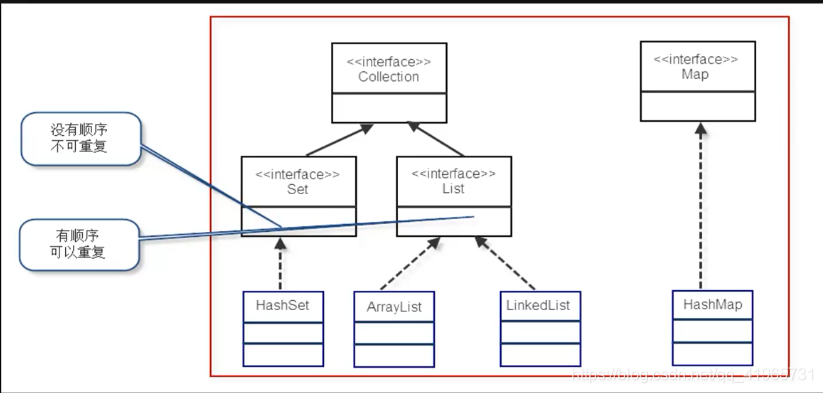
泛型:
泛型是JDK1.5后加入的,它是帮助我们建立类型安全的集合;
泛型的本质是“ 数据类型的参数化 ”,可以把泛型理解为数据类型的一个占位符(形式参数),告诉编译器,在传入的时候一定要传入实际类型。
public class test3 {
    public static void main(String[] args) {
        CollectionTest<String> ct = new CollectionTest<String>();
        ct.setData("1111",0);
        //如果我们没有用泛型,因为在CollectionTest定义的结合为Object,我们需要
        //String i =(String)ct.getData(0);
        String i = ct.getData(0);
    }
}
//类似于是一个集合类(满足存取的功能)
class CollectionTest<E>{        //字符可以是任何标识符,一般采用<T,V,E>
    Object[] obj = new Object[5];
    public void setData(E o,int index){
        obj[index] = o;
    }

    public E getData(int index){
        return (E)obj[index];
    }
}
Collection接口中的方法
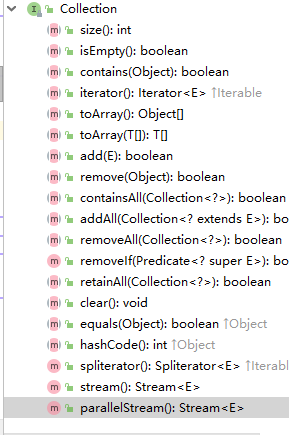
import java.util.ArrayList;
import java.util.Arrays;
import java.util.Collection;

public class CollectionTest0 {
    public static void main(String[] args) {
        Collection<String> ct = new ArrayList<String>();
        System.out.println(ct.size());
        System.out.println(ct.isEmpty());

        ct.add("田坤");
        ct.add("田大坤");
        ct.add("田小坤");
        System.out.println(ct.size());
        System.out.println(ct);

        Object[] a= ct.toArray();
        System.out.println(Arrays.toString(a));

        ct.remove("田大坤");
        System.out.println(ct);

        System.out.println(ct.contains("田坤"));
        ct.clear();
        System.out.println(ct.isEmpty());

        //这里面有的方法没有写到,后面再说。
        //因为后面的讲的LIST SET 都是Collection的子类,所以,这些以上方法都是类似的,后不在重复
    }
}
0
true
3
[田坤, 田大坤, 田小坤]
[田坤, 田大坤, 田小坤]
[田坤, 田小坤]
true
true
多个容器的操作
import java.util.ArrayList;
import java.util.Arrays;
import java.util.Collection;

public class CollectionTest0 {
    public static void main(String[] args) {
        Collection<Integer> ct1 = new ArrayList<Integer>();
        ct1.add(1);
        ct1.add(2);
        ct1.add(3);
        Collection<Integer> ct2 = new ArrayList<Integer>();
        ct2.add(1);
        ct2.add(2);
        ct2.add(6);

//      ct1.addAll(ct2);
        System.out.println(ct1);
        //在ct1中移除所以含有ct2中的数据
//      ct1.removeAll(ct2);
        System.out.println(ct1);

        ct1.retainAll(ct2);
        System.out.println(ct1);

    }
}
List
有序,可重复的容器
有序:LIst中每个元素都有索引标记,可以根据元素的索引标记(List中的位置)访问元素,从而精确的控制这些元素
可重复:List加入重复的元素, 满足 e1.equals(e2) 的元素重复加入容器
List接口的三个实现类:
- ArrayList(数组)
- LinkedList(链表)
- Vector
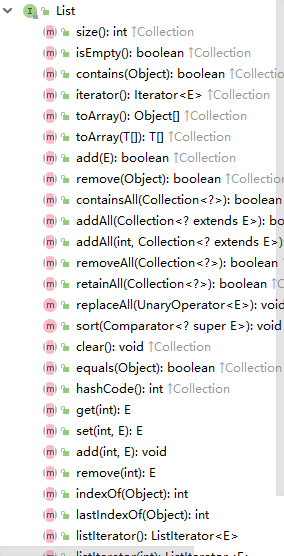
import java.util.ArrayList;
import java.util.Arrays;
import java.util.Collection;
import java.util.List;

public class CollectionTest0 {
    public static void main(String[] args) {
        test1();
    }
    public static void test1(){
        List<String> list1 = new ArrayList<String>();
        list1.add("A");
        list1.add("B");
        list1.add("C");

        list1.add(2,"田坤");
        System.out.println(list1);

        list1.remove(3);
        System.out.println(list1);

        list1.set(1,"E");
        System.out.println(list1);

        list1.add("C");
        list1.add("E");
        System.out.println(list1);
        System.out.println(list1.indexOf("E"));
        System.out.println(list1.lastIndexOf("E"));
    }
}
[A, B, 田坤, C]
[A, B, 田坤]
[A, E, 田坤]
[A, E, 田坤, C, E]
1
4
手工方法实现ArrayList
package com.tk.collection;

/**
 * 手工实现Arraylist的简单原理   get add set toString remove size
 * @data :2019-5-11上午10:14:42
 * @author :田坤
 */
public class List02<E> {

	//定义一个数组
	Object[] arr = null;
	//数据的默认大小
	private static final int ARRAY_OPACITY = 10;

	//容器的大小
	private int size = 0;

	public List02() {
		arr = new Object[ARRAY_OPACITY];
	}

	public List02(int count){
		if(count <0)
			throw new RuntimeException("数组个数不能小于0");
		else if(count == 0)
			arr = new Object[ARRAY_OPACITY];
		else arr = new Object[count];
	}

	//取
	public E get(int index){
		return (E)arr[index];
	}

	//放
	public void add(E obj){
		//扩容
		if(size == arr.length){
			Object[] newarr = new Object[size+(size>>1)];  //size + size/2
			System.arraycopy(arr, 0, newarr, 0, size);
			arr = newarr;
		}
		arr[size] = (E)obj;
		size++;
	}

	//移除某个元素
	public void remove(int index){
		if(index <0 || index >=size)
			throw new RuntimeException("索引越界");
		System.arraycopy(arr, index+1, arr, index,size-index-1);
		arr[size] = null;
		size --;
	}

	//修改某个索引的数据
	public void set(int index,E obj){
		if(index<0 || index >=size)
			throw new RuntimeException("索引越界");
		arr[index] = obj;
	}

	//数组的大小
	public int size(){
		return size;
	}

	//
	public String toString(){
		StringBuilder sb = new StringBuilder();
		sb.append("[");
		for (int i = 0; i < arr.length; i++) {
			if(arr[i]!= null)
				sb.append(""+arr[i]+",");
		}
		sb.setCharAt(sb.length()-1, ']');
		return sb.toString();
	}

	public static void main(String args[]) {

		List02<String> list = new List02<>(0);
		for(int i = 0; i < 20; i++){
			list.add("田坤"+i);
		}
		System.out.println(list.get(2));
		list.set(2, "宋旭东");
		list.remove(-1);
		System.out.println(list.toString());
	}
}
LinkedList
linkedList底层使用双向链表实现的存储。
特点:查询效率低,增删效率高,线程不安全
双向链表:每个数据节点都有俩个指针,分别指向前一个和后一个节点
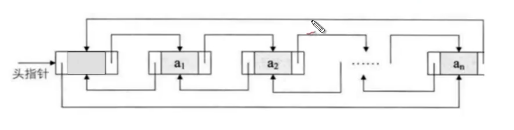
每个节点中的内容
public class Node {

	public Node previous;	//前指针
	public Object value;	//节点数据
	public Node next;		//后指针
package com.tk.collection;

/**
 * 自定义一个链表
 * @data :2019-5-11上午11:28:30
 * @author :田坤
 */
public class LinkedList01<E>{
	private Node first;
	private Node last;

	private int size = 0;


	public E get(int index){
		if(index < 0 || index >= size)
			throw new RuntimeException("索引越界");
		Node node = new Node();
		node = first;
		for(int i = 0; i < index;i++ ){
			node = node.next;
		}
		return (E) node.value;
	}

	public Node getNode(int index){
		if(index < 0 || index >= size)
			throw new RuntimeException("索引越界");
		Node node = new Node();
		node = first;
		for(int i = 0; i < index;i++ ){
			node = node.next;
		}
		return node;
	}

	//添加数据
	public void add(E obj){
		Node node = new Node(obj);

		if(first == null){
			first = node;
			last = node;
			size ++;
		}else{
			node.previous = last;
			node.next = null;

			last.next = node;
			last = node;
			size ++;
		}
	}

	public int size(){
		return size;
	}


	public void ToString() {
		Node node = new Node();
		node = first;
		while(node!=null){
			System.out.println(node.value);
			node = node.next;
		}
	}


	public void remove(int index){
		if(index < 0 || index >= size)
			throw new RuntimeException("索引越界");

		Node node = getNode(index);

		node.next.previous = node.previous;
		node.previous.next = node.next;
		size --;
	}

	public void insert(int index,E value){
		if(index < 0 || index >= size)
			throw new RuntimeException("索引越界");

		Node node = new Node(value);
		Node temp = getNode(index);

		node.previous = temp.previous;
		node.next = temp;
		temp.previous.next = node;
		temp.previous = node;

		size ++;

	}


	public static void main(String args[]) {
		LinkedList01<String> ll = new LinkedList01();
		ll.add("11");
		ll.add("22");
		ll.add("33");
		ll.ToString();
		System.out.println(ll.get(2));
		System.out.println(ll.size());
		ll.remove(1);
		ll.insert(1, "4444");
		ll.ToString();
	}
}
Vector
底层启用数组实现了List接口,相关方法加入了同步检测,所以“效率低,安全性高”
Vector中的 get方法
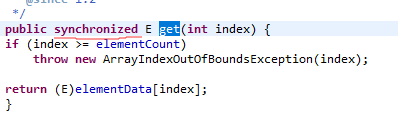
如何选择AarryLis、LiinkedLst、Vector
- 需要线程安全时,使用vector
- 不存在多线程安全问题,并且查找比较多用ArrayList
- 不存在多线程安全问题,并且增加和删除元素多用LinkedList
Map接口
package com.tk.collection;

import java.util.HashMap;
import java.util.Map;

public class Map01 {
	public static void main(String args[]) {
		Map<Integer, String> m1 = new HashMap<Integer, String>();
		m1.put(1, "111");
		m1.put(2, "222");
		m1.put(3, "333");
		System.out.println(m1.toString());
		System.out.println(m1.get(1));
		System.out.println(m1.size());
		System.out.println(m1.isEmpty());
		System.out.println(m1.containsKey(1));
		System.out.println(m1.containsValue(222));

		Map<Integer, String> m2 = new HashMap<Integer, String>();
		m2.put(4, "444");
		m2.put(5, "555");

		m1.putAll(m2);
		System.out.println(m1);

		//map键不能重复,如果有重复的(根据equals来判断),则新的覆盖旧的
		m1.put(2, "666");
		System.out.println(m1);

	}
}
HashMap
HashMap底层实现使用了Hash表,这是一种非常重要的数据结构,对于我们很多的技术都有帮助(如:redis的核心技术和HashMap一样)。
数据结构中由数组和链表来实现对数据的存储:
数组:占用中间连续,寻址容易,查询速度快,但是增加和删除效率低
链表:占用空间不连续,寻址困难,查询速度慢,但是,增加和删除效率非常高
哈希表的本质就是= 数组 + 链表
HashMap源码中数据的初始化
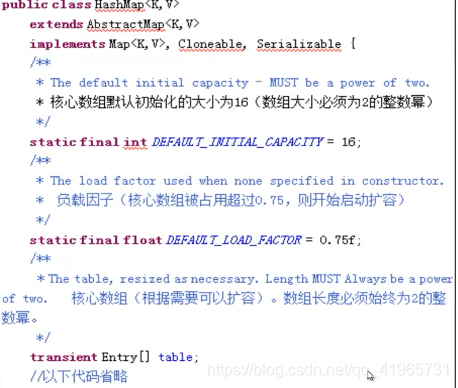
Entry[ ] table是HashMap的核心数组结构,我们称之为“位桶结构”,Entry是HashMap中的静态内部类。数据的初始化
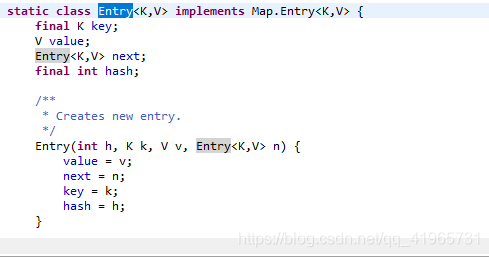
Entry中的对象:
- key :键对象
- value : 值对象
- next :下一个节点
- hash :键对象的Hash值
每一个Entry都是一个单向链表结构,

Entry [] 的数组结构为:(HashMap的结构)
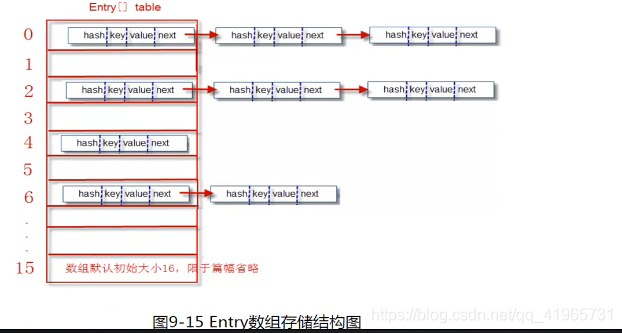
1、存储数据的过程:put(key , value)
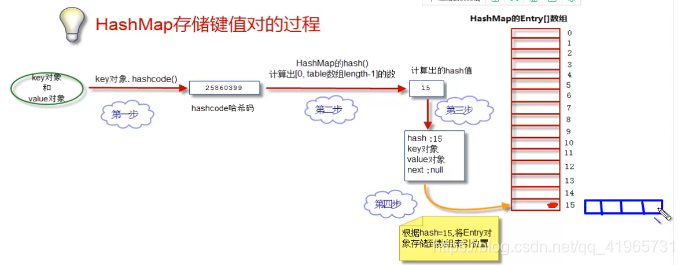
我们的目的是将"ket value"俩个对象存储到Entry数组中去
1、获取key对象的hashcode()
hashcode()方法
2、根据hashcode方法计算出hash值(要求在【0-数组长度-1】区间中)
(1)、计算算法
hash = hashcode / hashcode
键值对对象都会存储到索引值为1的位置,每存储一个对象,就会发生 hash冲突 hashMap会 退化成一个链表
(2)、简单和常用的算法(相除取余算法)
hash = hashcode / 数组长度
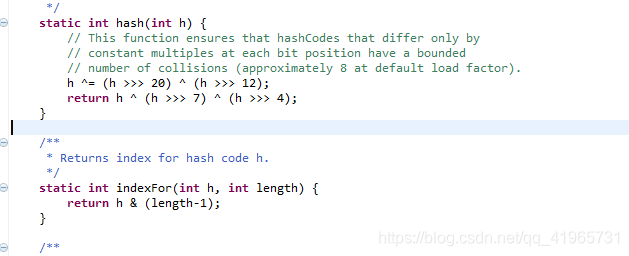
但是除法效率低下,JDK在后来改进了算法,首先约定数组的长度必须是2的整数幂,然后采用位运算进行取余
hash值 = hashcode & (数组长度-1)
为了更好的散列效果,JDK对hashcode进行了俩次散列处理(核心目的是为了分布的更加均匀)
(3)、生成Entry对象
(4)、将Entry对象放到table数组中
如果数组中没有值,直接将entry对象放到数组中去,并且entry对象的next值为 null ,如果数组对应位置有数据,将其放在next后
JDK8时,如果链表长度大于8时,链表就换成了红黑树,大大提高了查询的效率
2、获取数据的过程:get(key )
先需要获取键值对对象,进而在返回value值
(1)、获取键对象的hashcode,获取到hash值。定位到数组的位置
(2)、在链表上个挨个比较key对象(equals比较)
(3)、返回equals为true的节点对象
JAVA规定俩个内容相同(equals为true)的对象必须有相同的hashcode.
手动实现一个HashMap
1、HashMap的节点类
/**
 * HashCode的节点类
 * @data :2019-5-11下午4:44:16
 * @author :田坤
 */
public class Node0 {
	public int hash;
	public Object key;
	public Object value;
	public Node0 next;
2、HashMap的实现
package com.tk.collection;

/**
 * 自定义实现HashMap
 * @data :2019-5-11下午4:43:42
 * @author :田坤
 */
public class MyMap<K,V> {

	Node0[] table;  //位桶数组
	int size = 0;   //节点的个数
	private static final int HASHMAP_OPACITY = 16;   //HashMap数组的默认大小   2的整数幂

	public MyMap(){
		table = new Node0[HASHMAP_OPACITY];
	}


	public void put(K key,V value){
		Node0 node = new Node0();
		node.hash = myHash(key.hashCode(), HASHMAP_OPACITY);
		node.value = value;
		node.key = key;
		node.next = null;

		Node0 lastNode = null;  //在遍历的最后一个节点

		//根据此节点的hash值获取到hash值相对应的链表中
		Node0 temp = new Node0();
		temp = table[node.hash];
		//如果索引为hash索引的下标没有数据
		if(temp == null){
			//节点为空直接将节点放进去
			table[node.hash] = node;
		}else{
			//数组元素不为空,遍历
			while(temp != null){
				if(temp.key.equals(key)){
					temp.value = value;
				}
				else{
					lastNode = temp;
					temp = temp.next;
				}

			}

			lastNode.next = node;
		}
	}


	private int myHash(int hashCode,int length){
		System.out.println("hash in myHash"+(hashCode%(length-1)));  //取模运算效率低
		System.out.println("hash in myHash"+(hashCode&(length-1)));  //直接位运算,效率高

		return hashCode&(length-1);
	}


	@Override
	public String toString() {
		StringBuffer sb = new StringBuffer();
		sb.append("{");
		for (int i = 0; i < table.length; i++) {
			Node0 temp = table[i];
			while(temp != null){
				sb.append(""+temp.key+":"+temp.value+",");
				temp = temp.next;
			}
		}
		sb.setCharAt(sb.length()-1, '}');
		return sb.toString();
	}

	public K get(K key){
		int hash = myHash(key.hashCode(), HASHMAP_OPACITY);
		Node0 temp = table[hash];
		while(temp != null){
			if(temp.key.equals(key))
				break;
			temp = temp.next;
		}

		return (K)temp.value;
	}


	public static void main(String args[]) {
		MyMap<Integer,String> mm = new MyMap<>();
		mm.put(1, "111");
		mm.put(2, "222");
		mm.put(3, "333");
		mm.put(16, "333");
		mm.put(17, "333");

		System.out.println(mm.toString());
		System.out.println(mm.get(3));
	}
}
HashMap和HashTable的区别
HashMap:线程不安全,效率高 。允许key和value为null
HashTable:线程安全,效率低。 允许key和value为null
TreeMap
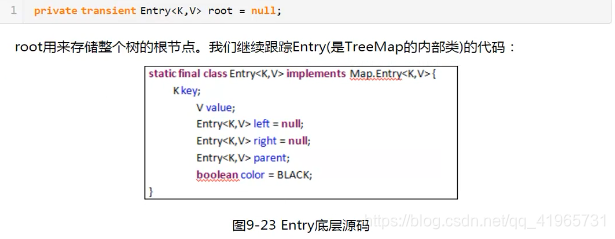
TreeMap是红黑二叉树的经典实现
package com.tk.collection;

import java.util.HashMap;
import java.util.Map;
import java.util.TreeMap;

public class TreeMapTest {
	public static void main(String args[]) {
		Map<Integer,String> map = new TreeMap<>();
		map.put(1, "11");
		map.put(3, "33");
		map.put(6, "66");
		map.put(4, "44");

		System.out.println(map.toString());

		Map<Student, String> stumap = new HashMap<Student, String>();
		stumap.put(new Student(1, 88), "张三");
		stumap.put(new Student(3, 99), "李四");
		stumap.put(new Student(5, 88), "王五");
		stumap.put(new Student(15, 55), "赵六");

		for (Student stu : stumap.keySet()) {
			System.out.println(stu);
		}
	}
}

class Student implements Comparable<Student>{
	int id;
	int grade;
	public int getId() {
		return id;
	}
	public void setId(int id) {
		this.id = id;
	}
	public int getGrade() {
		return grade;
	}
	public void setGrade(int grade) {
		this.grade = grade;
	}
	@Override
	public String toString() {
		return "Student [id=" + id + ", grade=" + grade + "]";
	}
	public Student(int id, int grade) {
		super();
		this.id = id;
		this.grade = grade;
	}
	public Student() {
		super();
	}
	@Override
	public int compareTo(Student o) {   //负数: 小于          0 :等于             正数:大于
 		if(this.grade>o.grade)
			return 1;
		else if(this.grade<o.grade)
			return -1;
		else if(this.id > o.id)
			return 1;
		else if(this.id < o.id)
			return -1;
		return 0;
	}


}
Tree
Set

HashSet源码
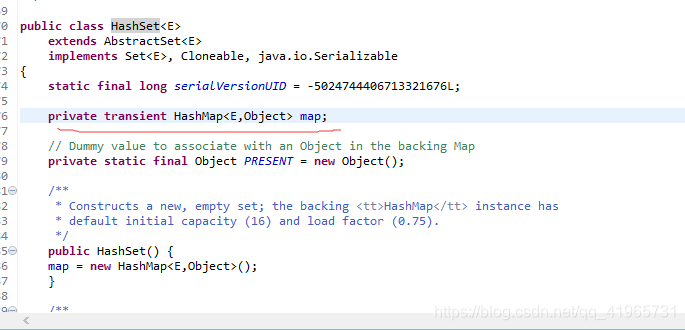
hashset是基于hashmap实现的
Irerator迭代器遍历容器元素(LIst,map,set)
package com.tk.collection;

import java.util.ArrayList;
import java.util.HashMap;
import java.util.HashSet;
import java.util.Iterator;
import java.util.List;
import java.util.Map;
import java.util.Map.Entry;
import java.util.Set;

public class iteratorTest {

	public static void main(String args[]) {
			map1();
			list1();
			set();
	}

	public static void map1(){
		Map<Integer,String> map = new HashMap<>();
		map.put(1, "111");
		map.put(2, "222");
		map.put(3, "333");

		Set<Entry<Integer, String>> entrySet = map.entrySet();
		Iterator<Entry<Integer, String>> iterator = entrySet.iterator();
		while(iterator.hasNext()){
			Entry<Integer, String> next = iterator.next();
			System.out.println(next.getKey()+"-------"+next.getValue());
		}

		Set<Integer> keySet = map.keySet();
		Iterator<Integer> iterator2 = keySet.iterator();
		while(iterator2.hasNext()){
			int key = iterator2.next();
			System.out.println(key+"-------"+map.get(key));
		}
	}


	public static void list1(){
		List<String> ls = new ArrayList<String>();
		ls.add("11");
		ls.add("22");
		ls.add("33");
		ls.add("44");

		Iterator<String> iterator = ls.iterator();

		while(iterator.hasNext()){
			System.out.println(iterator.next());
		}
	}

	public static void set(){
		Set<String> set= new HashSet<>();
		set.add("11");
		set.add("22");
		set.add("33");

		Iterator<String> iterator = set.iterator();

		while(iterator.hasNext()){
			System.out.println(iterator.next());
		}
	}

}
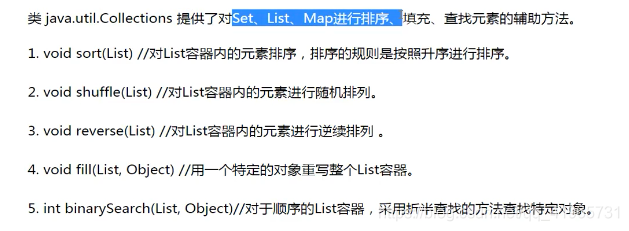
Connections工具类的使用





 扫一扫
扫一扫


 352
352

 被折叠的 条评论
为什么被折叠?
被折叠的 条评论
为什么被折叠?
 到【灌水乐园】发言





