


 本文详细介绍了如何使用Vue.js的脚手架创建项目、打包发布,以及如何应用ESLint进行代码规范。重点讲解了组件间的通信,包括props、自定义事件、PubSubJS库和slot通信的使用。同时,文章还涵盖了ajax请求的实现,如vue-resource和axios的使用。
Vue学习笔记->->高级篇
一、基于脚手架编写项目
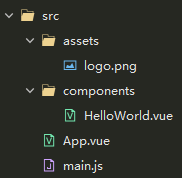
HelloWorld.vue
<template>
  <div class="text">{

  {msg}}</div>
</template>

<script>
  export default {

     //配置对象
    data(){

     //必须写函数
      return {


        msg: '你好啊,阿飞'
      }
    }
  }
</script>

<style>
  .text {


    font-size: 24px;
    color: red;
  }
</style>
App.vue
<template>
  <div>
    <img class="img" src="./assets/logo.png" alt="Vue">
    <!-- 3、使用组件标签 -->
    <HelloWorld/>
  </div>
</template>

<script>
  //1、引入组件
  import HelloWorld from './components/HelloWorld.vue'
  export default {


    components: {


      //2、映射组件标签
      HelloWorld
    }
  }
</script>

<style>
  .img {


    width: 500px;
    height: 300px;
  }
</style>
main.js
/*
入口js
 */

import Vue from 'vue'
import App from './App.vue'

new Vue({


  el: '#app',
  components: {

   App},
  template: '<App/>'
})
二、打包发布项目
1 、打包
输入npm run build
2、发布 1: 使用静态服务器工具包
npm install -g serve
serve dist
访问: http://localhost:5000
发布 2: 使用动态 web 服务器(tomcat)
修改配置: webpack.prod.conf.js
output: {
publicPath: ‘/xxx/’ //打包文件夹的名称
}
重新打包: npm run build
修改 dist 文件夹为项目名称: xxx
将 xxx 拷贝到运行的 tomcat 的 webapps 目录下
访问: http://localhost:8080/xxx
三、eslint
1、说明
- ESLint 是一个代码规范检查工具
- 它定义了很多特定的规则, 一旦你的代码违背了某一规则, eslint会作出非常有用的提示
- 官网: http://eslint.org/
- 基本已替代以前的 JSLint
2、ESLint 提供以下支持
- ES
- JSX
- style 检查
- 自定义错误和提示
3、ESLint 提供以下几种校验
- 语法错误校验
- 不重要或丢失的标点符号,如分号
- 没法运行到的代码块
- 未被使用的参数提醒
- 确保样式的统一规则,如 sass 或者 less
- 检查变量的命名
4、规则的错误等级有三种
- 0:关闭规则。
- 1:打开规则,并且作为一个警告(信息打印黄色字体)
- 2:打开规则,并且作为一个错误(信息打印红色字体)
5、相关配置文件
- .eslintrc.js : 全局规则配置文件
‘rules’: {
‘no-new’: 1
} - 在 js/vue 文件中修改局部规则
/* eslint-disable no-new */
new Vue({
el: ‘body’,
components: { App }
}) - .eslintignore: 指令检查忽略的文件
*.js
*.vue
四、实例练习(组件间通信)
1、初始化显示,交互添加、交互删除(props)
- 在组件内声明所有的 props
- 方式一: 只指定名称
props: [‘name’, ‘age’, ‘setName’] - 方式二: 指定名称和类型
props: { name: String, age: Number, setNmae: Function } - 方式三: 指定名称/类型/必要性/默认值
props: { name: {type: String, required: true, default:xxx}, }
注意
- 此方式用于父组件向子组件传递数据
- 所有标签属性都会成为组件对象的属性, 模板页面可以直接引用
- 问题:
a. 如果需要向非子后代传递数据必须多层逐层传递
b. 兄弟组件间也不能直接 props 通信, 必须借助父组件才可以
main.js
import Vue from 'vue'
import App from './App.vue'

new Vue({


  el: '#app',
  components: {

   App},
  template: '<App/>'
})
App.vue
<template>
  <div>
    <header class="site-header jumbotron">
      <div class="container">
        <div class="row">
          <div class="col-md-12">
            <h1>请发表对Vue的评论</h1>
          </div>
        </div>
      </div>
    </header>
    <div class="container">
      <!-- 将addComment方法传给子组件进行调用-->
      <Add :addComment="addComment"/>
      <!-- 组件间通信,介意使用同名,注意:必须写冒号,要不传过去的就是文本,加冒号,传过去的是变量的值-->
      <List :comments="comments" :deleteComment="deleteComment"/>
    </div>
  </div>
</template>

<script>
  import Add from './components/Add.vue'
  import List from './components/List.vue'
  export default {


    data() {


      return {


        comments: [ //数据在那个组件,更新数据的行为就应该定义在那个组件
          {


            name:'Bob',
            content: 'Vue111111'
          },
          {


            name:'Bob',
            content: 'Vue222222'
          },
          {


            name:'Bob',
            content: 'Vue3333333'
          }
        ]
      }
    },
    methods: {


      //添加评论
      addComment(comment){


        this.comments.unshift(comment);
      },
      //删除指定下标评论
      deleteComment(index){


        this.comments.splice(index,1);
      }
    },
    components: {


      Add,
      List
    }

  }
</script>

<style>
</style>
Add.vue
<template>
  <div class="col-md-4">
    <form class="form-horizontal">
      <div class="form-group">
        <label>用户名</label>
        <input type="text" class="form-control" placeholder="用户名" v-model="name">
      </div>
      <div class="form-group">
        <label>评论内容</label>
        <textarea class="form-control" rows="6" placeholder="评论内容" v-model="content"></textarea>
      </div>
      <div class="form-group">
        <div class="col-sm-offset-2 col-sm-10">
          <button type="button" class="btn btn-default pull-right" @click="add">提交</button>
        </div>
      </div>
    </form>
  </div>
</template>

<script>
  export default {


    data() {


      return {


        name: "",
        content: ""
      }
    },
    //接收传过来的数据
    props: {


      addComment: {

     //指定属性名/属性值的类型/必要性
        type: Function,
        required: true
      }
    },
    methods: {


      add() {


        //1、检查输入的合法性
        const name = this.name.trim();
        const content = this.content.trim();
        if(!name || !content){


          alert("name或content输入有误");
          return;
        }
        //2、根据输入的数据,封装成一个comment对象
        const comment = {


          name,
          content
        }
        //3、添加到comments中
        this.addComment(comment);
        //4、清楚数据
        this.name = "";
        this.content = "";
      }
    }
  }

</script>

<style>
</style>
Item.vue
<template>

    <li class="list-group-item">
      <div class="handle">
        <a href="javascript:;" @click="deleteItem">删除</a>
      </div>
      <p class="user"><span >{

  {comment.name}}</span><span>说:</span></p>
      <p class="centence">{

  {comment.content}}</p>
    </li>

</template>

<script>
  export default {


    //声明接收
    props: {

     //指定属性名和属性值的类型
      comment: Object,
      deleteComment: Function,
      index: Number
    },
    methods: {


      deleteItem() {


        //将要删除的取出来
        const {

    comment,index,deleteComment} = this;
        if(window.confirm('确定删除${comment.name}的评论吗?')){


          deleteComment(index);
        }
      }
    }
  }
</script>

<style>

  li {


    transition: .5s;
    overflow: hidden;
  }

  .handle {


    width: 40px;
    border: 1px solid #ccc;
    background: #fff;
    position: absolute;
    right: 10px;
    top: 1px;
    text-align: center;
  }

  .handle a {


    display: block;
    text-decoration: none;
  }

  .list-group-item .centence {


    padding: 0px 50px;
  }

  .user {


    font-size: 22px;
  }
</style>
List.vue
<template>
<div class="col-md-8">
<h3 class="reply">评论回复:</h3>
<h2 v-show="comments.length===0">暂无评论,点击左侧添加评论!!!</h2>
<ul class="list-group">
<!-- comment要交给Item组件-->
<Item v-for="(comment,index) in comments" :key="index" :comment="comment" :deleteComment="deleteComment" :index="index"/>
</ul>
</div>
</template>
<script>
import Item  最低0.47元/天 解锁文章






 扫一扫
扫一扫


 253
253

 被折叠的 条评论
为什么被折叠?
被折叠的 条评论
为什么被折叠?
 到【灌水乐园】发言





