


 本文介绍了Python内置模块unittest的用例构建步骤,包括导入模块、定义用例类和函数、编写用例脚本以及执行用例。重点讨论了用例的前置和后置处理,提供了三种实现方式:全局变量、类属性传递和自定义对象属性,用于在执行用例前打开浏览器和执行后关闭浏览器。
unittest是Python中的内置模块,使用之前需要导包(import unittest),使用unittest构建用例时,用例类要用Test开头(如TestPage),用例需要用test开头。Python语言是区分大小写的,所以这里需要注意一下。
1、用例构建第一步
新建.py文件后,需要导包
import unittest
2、用例构建第二步
定义用例类和用例函数,用例类要用Test开头(如TestOne),用例需要用test开头(如test_001)。
class TestOne(unittest.TestCase):  #需要继承unittest.TestCase

    def test_001(self):
        print('这是第一个用例')
3、用例构建第三步
编写用例中的脚本,包括元素的定位,元素的输入,元素的点击,元素的断言等
import unittest

from selenium import webdriver

from selenium.webdriver.common.by import By

import time


class TestOne(unittest.TestCase):

    def test_001(self):

        driver=webdriver.Chrome()

        driver.maximize_window()

        driver.get("http://xxx.testedu.com/index.php?s=/index/search/index.html")

        ele=driver.find_element(By.LINK_TEXT,"登录")

        ele.click()

        time.sleep(1)

        ele_account=driver.find_element(By.NAME,"account")

        ele_account.send_keys("test")

        ele_password=driver.find_element(By.NAME,"password")

        ele_password.send_keys("password")

        button_login=driver.find_element(By.XPATH,"//button[@type='submit'][text()='登录']")

        button_login.click()

        time.sleep(1)

        log_success_tip=driver.find_element(By.CSS_SELECTOR,".prompt-msg")

        assert log_success_tip.text=="登录成功"

        driver.quit()
4、用例的执行
点击绿色的箭头,可以执行全部用例,或则单个用例
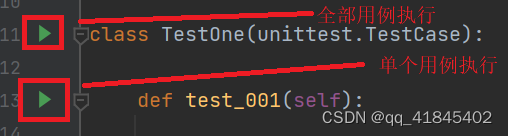
5、用例的前置和后置处理,比如打开浏览器,或则关闭浏览器
在全部用例执行之前需要打开浏览器,在全部用例执行之后需要关闭浏览器。那么用例的前置里面就可以设置打开浏览器,用例的后置就设置关闭浏览器。driver在前置后置中有3中实现方式
第一种方法:
在前置处理器中,升级driver为全局变量(global driver,必须先定义后赋值),这样在不同的函数中就可以使用driver。setUpClass为执行类之前执行,即执行全部用例之前执行。tearDownClass为执行类之后执行,即全部用例执行之后执行。setUpClass和tearDownClass必须要有@classmethod装饰。
import unittest

from selenium import webdriver

from selenium.webdriver.common.by import By

import time


class TestOne(unittest.TestCase):
    @classmethod  # 全局的前置条件,必须要有@classmethod装饰器
    def setUpClass(cls):
        print('执行全部用例之前')
        global driver   #将driver升级为全局变量
        driver = webdriver.Chrome()
        driver.maximize_window()
        driver.get("http://xxx.testedu.com/index.php?s=/index/search/index.html")


    def test_001(self):
        ele = driver.find_element(By.LINK_TEXT, "登录")
        ele.click()
        time.sleep(1)
        ele_account = driver.find_element(By.NAME, "account")
        ele_account.send_keys("test")

        ele_password = driver.find_element(By.NAME, "password")
        ele_password.send_keys("password")
        button_login = driver.find_element(By.XPATH, "//button[@type='submit'][text()='登录']")

        button_login.click()
        time.sleep(1)

        log_success_tip=driver.find_element(By.CSS_SELECTOR,".prompt-msg")

        assert log_success_tip.text=="登录成功"

    @classmethod  # 全局的后置条件,必须要有@classmethod装饰器
    def tearDownClass(cls):
        driver.quit()   #将driver升级为全局变量后的使用
第二种方法:
运用类的对象传递,cls为类的引用,setattr()方法从外部为一个对象设置一个属性,属性名为“driver”,值为driver,即webdriver.Chrome()。getattr()方法获取类的属性。在前置处理中设置一个类的属性,在后置处理中获取设置好的类的属性。
setattr(cls, "driver", driver)
driver=getattr(cls,"driver")
import unittest

from selenium import webdriver

from selenium.webdriver.common.by import By

import time

class TestOne(unittest.TestCase):

    @classmethod  # 全局的前置条件,必须要有@classmethod装饰器
    def setUpClass(cls):
        print('执行全部用例之前')
        driver = webdriver.Chrome()
        driver.maximize_window()
        driver.get("http://xxx.testedu.com/index.php?s=/index/search/index.html")
        # 类的对象传递  cls类的引用
        setattr(cls, "driver", driver)  # setattr() 从外部为一个对象设置一个属性,属性名称为”driver",值为driver,即webdriver.Chrome()

    def test_001(self):
        driver=getattr(self.__class__,"driver")
        ele = driver.find_element(By.LINK_TEXT, "登录")
        ele.click()
        time.sleep(1)
        ele_account = driver.find_element(By.NAME, "account")
        ele_account.send_keys("test")

        ele_password = driver.find_element(By.NAME, "password")
        ele_password.send_keys("password")
        button_login = driver.find_element(By.XPATH, "//button[@type='submit'][text()='登录']")

        button_login.click()
        time.sleep(1)

        log_success_tip=driver.find_element(By.CSS_SELECTOR,".prompt-msg")

        assert log_success_tip.text=="登录成功"

    @classmethod  # 全局的后置条件,必须要有@classmethod装饰器
    def tearDownClass(cls):
        driver=getattr(cls,"driver")
        driver.quit()
        print('执行全部用例之后')
第三种方法:
在用例中,或则单个用例的前置处理中,setattr()方法从外部为一个对象设置一个属性,在后面的方法中如何使用。self.__class__等同于cls,运用这一点就可以在整个类中使用设置好的属性。在setUp函数中定义了file属性,在后面的tearDown函数和tearDownClass类方法中获取file属性。
import unittest

from selenium import webdriver

from selenium.webdriver.common.by import By

import time

class TestOne(unittest.TestCase):
    @classmethod  # 全局的前置条件,必须要有@classmethod装饰器
    def setUpClass(cls):
        print('执行全部用例之前')
        driver = webdriver.Chrome()
        driver.maximize_window()
        driver.get("http://xxx.testedu.com/index.php?s=/index/search/index.html")
        # 类的对象传递  cls类的引用
        setattr(cls, "driver", driver)  # setattr() 从外部为一个对象设置一个属性

    def setUp(self):
        print("每个用例执行之前执行")
        file=open(r"C:\Users\86189\Desktop\test.txt",mode='a+')
        print(file.readline(1))
        setattr(self.__class__,"file",file)  #setattr() 从外部为对象设置一个属性

    def tearDown(self):
        file=getattr(self.__class__,"file")
        file.close()

    def test_001(self):
        driver=getattr(self.__class__,"driver")
        ele = driver.find_element(By.LINK_TEXT, "登录")
        ele.click()
        time.sleep(1)
        ele_account = driver.find_element(By.NAME, "account")
        ele_account.send_keys("test")

        ele_password = driver.find_element(By.NAME, "password")
        ele_password.send_keys("password")
        button_login = driver.find_element(By.XPATH, "//button[@type='submit'][text()='登录']")

        button_login.click()
        time.sleep(1)

        log_success_tip=driver.find_element(By.CSS_SELECTOR,".prompt-msg")

        assert log_success_tip.text=="登录成功"

    @classmethod  # 全局的后置条件,必须要有@classmethod装饰器
    def tearDownClass(cls):
        driver=getattr(cls,"driver")
        driver.quit()
        file=getattr(cls,"file")
        file.close()
        print('执行全部用例之后')





 扫一扫
扫一扫


 996
996

 被折叠的 条评论
为什么被折叠?
被折叠的 条评论
为什么被折叠?
 到【灌水乐园】发言





