


 本文介绍了使用Zrender类库在Canvas上绘制直线、圆弧和曲线,并展示了如何让点在这些图形上动态运动。Zrender是一个强大的二维绘图引擎,支持多种渲染方式。通过实例代码和示例图片,详细讲解了实现过程。
最近在学习Zrender类库,并利用Zrender 让点在直线、圆弧、曲线上运动。大概的写了一些.
Zrender是二维绘图引擎,它提供 Canvas、SVG、VML 等多种渲染方式。ZRender 也是 ECharts 的渲染器.
这里我运用的是Canvas画布去画的.想了解Zrender内的属性,请点击这个ZRender文档链接
若想了解如何画圆、直线等可以参考开始使用ZRender.有些内容是借鉴实现粒子网格动画.
话不多说直接上代码
css样式:
<style>
    #main {
        position: absolute;
        left: 0;
        top: 0;
        background: #000;
        z-index: -1;
    }
</style>
设置全局变量及配置项用到的变量
                    var x=300,y=300,r=200,t=0; //主要针对圆点绕圆弧运动
		    var array=new Array();   //创建一个数组用于储存圆点的位置坐标
                    var winH = window.innerHeight; //同步页面宽、高
		    var winW = window.innerWidth;
                    var opts = {
                        background: '#000', //Canvas背景色
                        circleRadius: 3, //圆点半径
                        circleColor: 'rgb(0, 255, 0)', //圆点颜色
                        circleAmount: 1, //生成的圆点数量
                        speed: 1, //圆点速度
                    };
                    var tid; //setTimeout id,防抖处理
                    var circledots = []; //用于存储partical对象

                    var zr = zrender.init(main, { width: winW, height: winH });
画圆弧、直线、贝塞尔曲线:
                        var line=new Line({
                            shape:{
                                x1:300,
                                y1:100,
                                x2:900,
                                y2:100
                                },
                            style:{
                                stroke: '#F00'
                                }
                            });
                            zr.add(line);
                        var line=new Line({
                            shape:{
                                x1:300,
                                y1:500,
                                x2:900,
                                y2:500
                                },
                            style:{
                                stroke: '#F00'
                                }
                            });
                            zr.add(line);
                       var BC = new BezierCurve({
                            shape: {
                                x1: 300, //起始
                                y1: 500, //坐标
                                cpx1: 1200 / 2,
                                cpy1: 500,//贝塞尔中心坐标
                                cpx2: 1200 / 2,
                                cpy2: 100,//贝塞尔中心坐标
                                x2: 900, //终点
                                y2: 100  //坐标
                            },
                            style: {
                                stroke: 'green', //贝塞尔曲线显示 并赋予绿色
                                lineWidth: 2
                            }
                        });
                            zr.add(BC);

                        var bc = new BezierCurve({
                            shape: {
                                x1: 300, //起始
                                y1: 100, //坐标
                                cpx1: 1200 / 2,
                                cpy1: 100, //贝塞尔中心坐标
                                cpx2: 1200 / 2,
                                cpy2: 500, //贝塞尔中心坐标
                                x2: 900, //终点
                                y2: 500  //坐标
                            },
                              style: {
                                stroke: 'green',
                                lineWidth: 2
                            }
                        });
                            zr.add(bc);
			var arcc = new Arc({
			    shape: {
			    cx: 300,
			    cy: 300,
			    r: 200,
                            startAngle:4.8,
			    endAngle:1.5,
                            clockwise:false
			},
                              style: {
			        fill: 'none',
				stroke:    '#F00',
				lineWidth:2
			}
			});

                            zr.add(arcc);
			var arci = new Arc({
			    shape: {
				cx: 900,
				cy: 300,
				r: 200,
                                startAngle:1.6,
				endAngle:4.7,
                                clockwise:false
			},
			    style: {
				fill: 'none',
				stroke: '#F00',
				lineWidth:2
			}
			});
				zr.add(arci);
所有函数:
                            function arc() { //圆弧运动公式
			        var tr = t*Math.PI/360;
                                var tx = x-Math.cos(tr)*r;
                                var ty = y+Math.sin(tr)*r;
                                this.x=tx;
                                this.y=ty;
			        array[0]=this.x;
			        array[1]=this.y;
			        t+=1;
			        return array;
			    }

                            function straightline(){ //直线运动
			        if(this.y==500||this.y==100){
				    if(this.y==500){
                                        this.x=this.x+1;
					this.y=500;
				    }else{
                                        this.x=this.x-1;
					this.y=100;
				    }
				    if(this.x==900){
                                        this.y=this.y-1;
				    }else if(this.x==300){
                                        this.y=this.y-1;
				    }
			    }
				    array[0]=this.x;
				    array[1]=this.y;
				    return array;
			}

			var init = function () { //初始化圆点对象
                            for (let i = 0; i < opts.circleAmount; i++) {
                            let p = new Circledot();
                            circledots.push(p); //将实例化的对象添加到圆点类
                            zr.add(p.element); //将圆点显示在画布上
                            }
                        };

                        function loop() {
                        for (let i = 0; i < circledots.length; i++) {
                            let p = circledots[i];
                            p.updatePosition();
                        }
                        window.requestAnimationFrame(loop);//有了这句话,就形成了递归调用,设置应为这个函数多用在持续的动画中
                    };
                        init();
                        loop();

                });
创建类和方法:
                        class Circledot {  //圆点类
                        constructor() { //构造方法 new一个实例 就会运行构造方法
                                //圆点坐标初始化

                            this.x = winW * Math.random();
                            this.y = winH * Math.random();
                            this.color = opts.circleColor;
                            this.radius = opts.circleRadius + Math.random();
                            //画圆点 this.只能在本类下使用
                            this.element = new Circle({
                                shape: {
                                    cx: this.x,
                                    cy: this.y,
                                    r: this.radius,
                                },
                                style: {
                                    fill: this.color,
                                }
                            });
                        };


                        updatePosition() { //修改圆点的坐标位置
                            if(array[1]==100||array[1]==500){
				straightline();
			    }else if(array[0]==300){
				      t=0;
				    x=array[0];
				    arc();
			    }else if(array[0]==900&&array[1]==499){
				    x=array[0];
				    arc();
			    }else{
				    arc();
			    }

			    this.x=array[0];
			    this.y=array[1];


			this.element.shape.cx = this.x; //将修改的x抽坐标赋予圆点
			this.element.shape.cy = this.y; //将修改的y抽坐标赋予圆点
			this.element.dirty();

                        };
                    }
所有代码:
    <!DOCTYPE html PUBLIC "-//W3C//DTD XHTML 1.0 Transitional//EN" "http://www.w3.org/TR/xhtml1/DTD/xhtml1-transitional.dtd">
    <html xmlns="http://www.w3.org/1999/xhtml">
    <head>
    <meta http-equiv="Content-Type" content="text/html; charset=utf-8" />
    <title>点按固定轨迹运动</title>
    <script src="Scripts/esl.js" ></script>
    <style>
    #main {
        position: absolute;
        left: 0;
        top: 0;
        background: #000;
        z-index: -1;
    }
    </style>
    </head>

    <body>
    <canvas id="main"></canvas>  <!-- 画布 内含有坐标系 -->
    <script>
            require.config({
                packages: [
                    {
                        name: 'zrender',
                        location: 'Scripts/src', <!-- 引入zrender类库 -->
                        main: 'zrender',
                    },
                ],
            });

            require(['zrender',
                'zrender/graphic/shape/Circle',
                'zrender/graphic/shape/Line',   <!-- 引入zrender类库里的函数 -->
                'zrender/graphic/shape/BezierCurve',
				'zrender/graphic/shape/Arc'],function (zrender, Circle, Line, BezierCurve, Arc) {
             //-----全局var-----{
                    var x=300,y=300,r=200,t=0; //主要针对圆点绕圆弧运动
		    var array=new Array();   //创建一个数组用于储存圆点的位置坐标
                    var winH = window.innerHeight; //同步页面宽、高
		    var winW = window.innerWidth;
                    var opts = {
                        background: '#000', //Canvas背景色
                        circleRadius: 3, //圆点半径
                        circleColor: 'rgb(0, 255, 0)', //圆点颜色
                        circleAmount: 1, //生成的圆点数量
                        speed: 1, //圆点速度
                    };
                    var tid; //setTimeout id,防抖处理
                    var circledots = []; //用于存储partical对象

                    var zr = zrender.init(main, { width: winW, height: winH });

                    zr.dom.style.backgroundColor = opts.background;

                    window.addEventListener('resize', function () { //监听器 300ms触发一次
                    clearTimeout(tid);

                    var tid = setTimeout(function () {
                          winW = zr.dom.width = window.innerWidth;
                          winH = zr.dom.height = window.innerHeight;

                            zr.refresh();
                        }, 300); //这里设置了300ms的防抖间隔
                    }, false);
                        var line=new Line({
                            shape:{
                                x1:300,
                                y1:100,
                                x2:900,
                                y2:100
                                },
                            style:{
                                stroke: '#F00'
                                }
                            });
                            zr.add(line);
                        var line=new Line({
                            shape:{
                                x1:300,
                                y1:500,
                                x2:900,
                                y2:500
                                },
                            style:{
                                stroke: '#F00'
                                }
                            });
                            zr.add(line);
                       var BC = new BezierCurve({
                            shape: {
                                x1: 300, //起始
                                y1: 500, //坐标
                                cpx1: 1200 / 2,
                                cpy1: 500,//贝塞尔中心坐标
                                cpx2: 1200 / 2,
                                cpy2: 100,//贝塞尔中心坐标
                                x2: 900, //终点
                                y2: 100  //坐标
                            },
                            style: {
                                stroke: 'green', //贝塞尔曲线显示 并赋予绿色
                                lineWidth: 2
                            }
                        });
                            zr.add(BC);

                        var bc = new BezierCurve({
                            shape: {
                                x1: 300, //起始
                                y1: 100, //坐标
                                cpx1: 1200 / 2,
                                cpy1: 100, //贝塞尔中心坐标
                                cpx2: 1200 / 2,
                                cpy2: 500, //贝塞尔中心坐标
                                x2: 900, //终点
                                y2: 500  //坐标
                            },
                              style: {
                                stroke: 'green',
                                lineWidth: 2
                            }
                        });
                            zr.add(bc);
							var arcc = new Arc({
								shape: {
									cx: 300,
									cy: 300,
									r: 200,
									startAngle:4.8,
									endAngle:1.5,
									clockwise:false
								},
								style: {
									fill: 'none',
									stroke: '#F00',
									lineWidth:2
								}
							});
							zr.add(arcc);
							var arci = new Arc({
								shape: {
									cx: 900,
									cy: 300,
									r: 200,
									startAngle:1.6,
									endAngle:4.7,
									clockwise:false
								},
								style: {
									fill: 'none',
									stroke: '#F00',
									lineWidth:2
								}
							});
							zr.add(arci);
                    class Circledot {  //圆点类
                        constructor() { //构造方法 new一个实例 就会运行构造方法
                                //圆点坐标初始化

                            this.x = winW * Math.random();
                            this.y = winH * Math.random();
                            this.color = opts.circleColor;
                            this.radius = opts.circleRadius + Math.random();
                            //画圆点 this.只能在本类下使用
                            this.element = new Circle({
                                shape: {
                                    cx: this.x,
                                    cy: this.y,
                                    r: this.radius,
                                },
                                style: {
                                    fill: this.color,
                                }
                            });
                        };


                        updatePosition() { //修改圆点的坐标位置
							if(array[1]==100||array[1]==500){
								straightline();
							}else if(array[0]==300){
								t=0;
								x=array[0];
								arc();
							}else if(array[0]==900&&array[1]==499){
								x=array[0];
								arc();
							}else{
								arc();
							}

							this.x=array[0];
							this.y=array[1];


							this.element.shape.cx = this.x; //将修改的x抽坐标赋予圆点
							this.element.shape.cy = this.y; //将修改的y抽坐标赋予圆点
							this.element.dirty();

                        };
                    }
						function arc() { //圆弧运动公式

							var tr = t*Math.PI/360;
							//window.alert("tr:"+tr);
                            var tx = x-Math.cos(tr)*r;
							//alert("tx:"+tx);
                            var ty = y+Math.sin(tr)*r;
							//window.alert("tx:"+tx);
							//window.alert("ty:"+ty);
                            this.x=tx;
                            this.y=ty;
							array[0]=this.x;
							array[1]=this.y;
							t+=1;
							return array;
						}
						function straightline(){ //直线运动
							if(this.y==500||this.y==100){
								if(this.y==500){
									this.x=this.x+1;
									this.y=500;
								}else{
									this.x=this.x-1;
									this.y=100;
								}
								if(this.x==900){
									this.y=this.y-1;
								}else if(this.x==300){
									this.y=this.y-1;
								}
							}
							array[0]=this.x;
							array[1]=this.y;
							return array;
						}
						var init = function () { //初始化圆点对象
                        for (let i = 0; i < opts.circleAmount; i++) {
                            let p = new Circledot();
                            circledots.push(p); //将实例化的对象添加到圆点类
                            zr.add(p.element); //将圆点显示在画布上
                        }
                    };

                        function loop() {
                        for (let i = 0; i < circledots.length; i++) {
                            let p = circledots[i];

                            p.updatePosition();
                        }
                        window.requestAnimationFrame(loop);//有了这句话,就形成了递归调用,设置应为这个函数多用在持续的动画中
                    };
                    init();
                    loop();

                });
                </script>
    </body>
    </html>
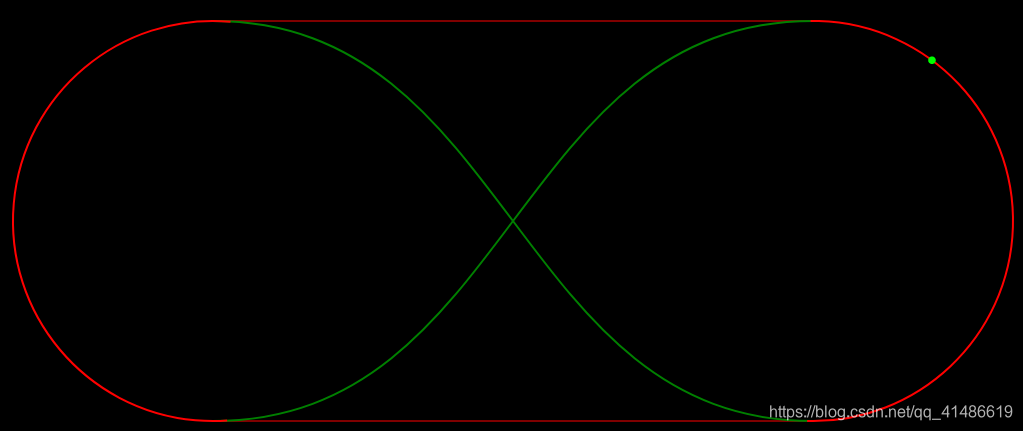
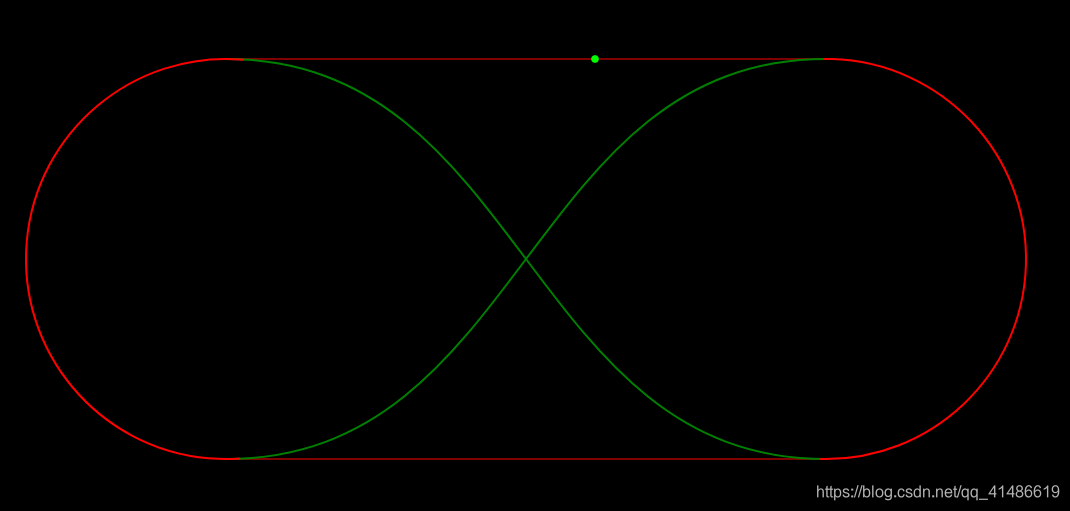
结果如图所示:
图一:
 图二:
图二:





 扫一扫
扫一扫


 被折叠的 条评论
为什么被折叠?
被折叠的 条评论
为什么被折叠?
 到【灌水乐园】发言





