


WPF之MaterialDesign使用相关控件
xmlns:mah="http://metro.mahapps.com/winfx/xaml/controls"
xmlns:materialDesign="http://materialdesigninxaml.net/winfx/xaml/themes"
  <ResourceDictionary>
            <ResourceDictionary.MergedDictionaries>
                <!-- MahApps -->
                <!--MahApps的控件样式-->
                <ResourceDictionary Source="pack://application:,,,/MahApps.Metro;component/Styles/Controls.xaml" />
                <!--MahApps的字体样式-->
                <ResourceDictionary Source="pack://application:,,,/MahApps.Metro;component/Styles/Fonts.xaml" />
                <!--MahApps主体样式-->
                <ResourceDictionary Source="pack://application:,,,/MahApps.Metro;component/Styles/Themes/Light.Blue.xaml" />
                <!-- Material Design -->
                <!--MaterialDesignThemes-->
                <ResourceDictionary Source="pack://application:,,,/MaterialDesignThemes.Wpf;component/Themes/MaterialDesignTheme.Light.xaml" />
                <ResourceDictionary Source="pack://application:,,,/MaterialDesignThemes.Wpf;component/Themes/MaterialDesign3.Defaults.xaml" />
                <!--MaterialDesignColors-->
                <ResourceDictionary Source="pack://application:,,,/MaterialDesignColors;component/Themes/Recommended/Primary/MaterialDesignColor.Blue.xaml" />
                <ResourceDictionary Source="pack://application:,,,/MaterialDesignColors;component/Themes/Recommended/Secondary/MaterialDesignColor.Lime.xaml" />

                <!-- Material Design: MahApps Compatibility -->
                <ResourceDictionary Source="pack://application:,,,/MaterialDesignThemes.MahApps;component/Themes/MaterialDesignTheme.MahApps.Fonts.xaml" />
                <ResourceDictionary Source="pack://application:,,,/MaterialDesignThemes.MahApps;component/Themes/MaterialDesignTheme.MahApps.Flyout.xaml" />


     		  </ResourceDictionary.MergedDictionaries>
   </ResourceDictionary>
WPF-MaterialDesign-优美UI控件程序
链接: https://pan.baidu.com/s/1fr47NOBjpCnZPdbA9Oa_vw?pwd=1234 提取码: 1234

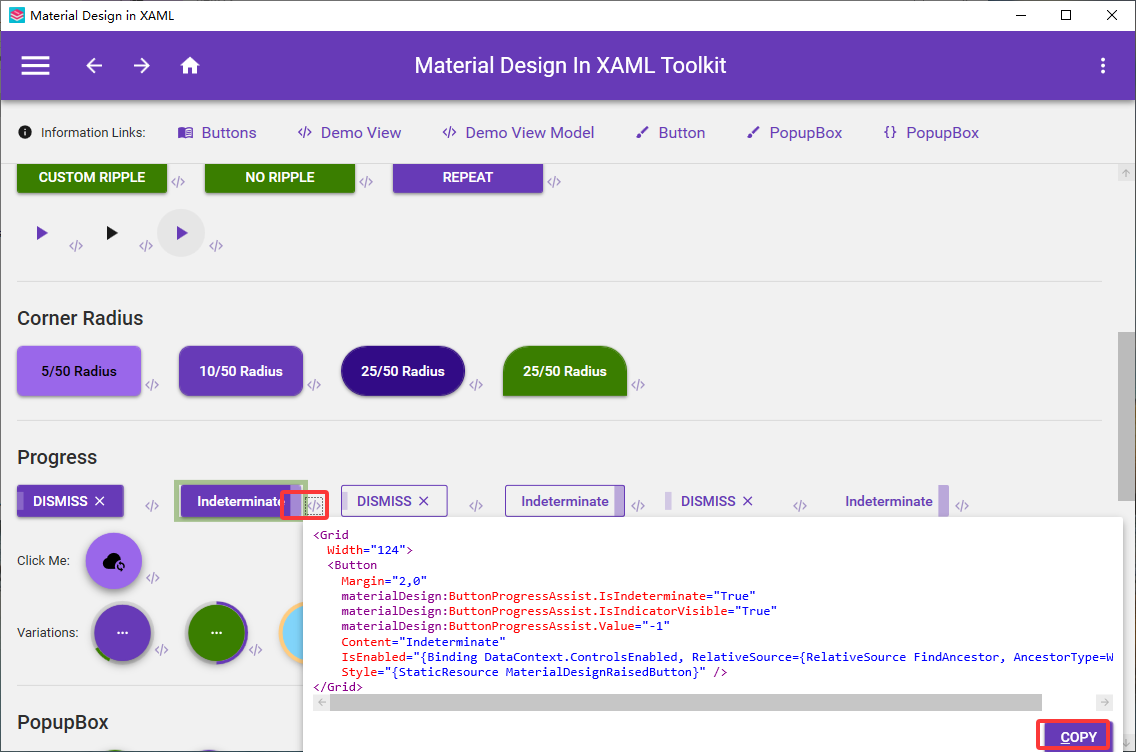
引入主题命名空间
xmlns:materialDesign="http://materialdesigninxaml.net/winfx/xaml/themes"
<mah:MetroWindow x:Class="优美的UI控件库.MainWindow"
        xmlns:mah="http://metro.mahapps.com/winfx/xaml/controls"
        xmlns:materialDesign="http://materialdesigninxaml.net/winfx/xaml/themes"
        xmlns="http://schemas.microsoft.com/winfx/2006/xaml/presentation"
        xmlns:x="http://schemas.microsoft.com/winfx/2006/xaml"
        xmlns:d="http://schemas.microsoft.com/expression/blend/2008"
        xmlns:mc="http://schemas.openxmlformats.org/markup-compatibility/2006"
        xmlns:local="clr-namespace:优美的UI控件库"
        mc:Ignorable="d"
        Title="MainWindow" Height="450" Width="800">
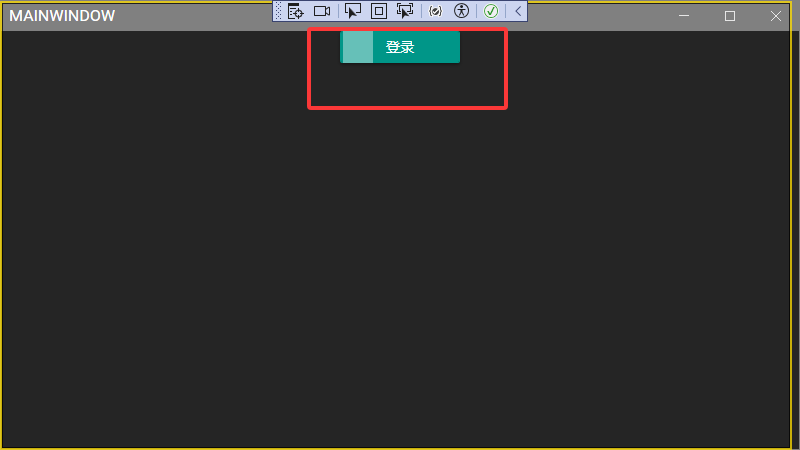
    <StackPanel>
        <Grid
  Width="124">
            <Button
                Margin="2,0"
                materialDesign:ButtonProgressAssist.IsIndeterminate="True"
                materialDesign:ButtonProgressAssist.IsIndicatorVisible="True"
                materialDesign:ButtonProgressAssist.Value="-1"
                Content="登录"
                IsEnabled="{Binding DataContext.ControlsEnabled, RelativeSource={RelativeSource FindAncestor, AncestorType=Window}}"
                Style="{StaticResource MaterialDesignRaisedButton}" />
        </Grid>
    </StackPanel>
</mah:MetroWindow>
<Application x:Class="优美的UI控件库.App"
             xmlns="http://schemas.microsoft.com/winfx/2006/xaml/presentation"
             xmlns:x="http://schemas.microsoft.com/winfx/2006/xaml"
             xmlns:local="clr-namespace:优美的UI控件库"
             StartupUri="MainWindow.xaml">
    <Application.Resources>
        <ResourceDictionary>
            <ResourceDictionary.MergedDictionaries>
                <!-- MahApps -->
                <!--MahApps的控件样式-->
                <ResourceDictionary Source="pack://application:,,,/MahApps.Metro;component/Styles/Controls.xaml" />
                <!--MahApps的字体样式-->
                <ResourceDictionary Source="pack://application:,,,/MahApps.Metro;component/Styles/Fonts.xaml" />
                <!--MahApps主体样式-->
                <ResourceDictionary Source="pack://application:,,,/MahApps.Metro;component/Styles/Themes/Dark.Blue.xaml" />
                <!-- Material Design -->
                <!--MaterialDesignThemes-->
                <ResourceDictionary Source="pack://application:,,,/MaterialDesignThemes.Wpf;component/Themes/MaterialDesignTheme.Dark.xaml" />
                <ResourceDictionary Source="pack://application:,,,/MaterialDesignThemes.Wpf;component/Themes/MaterialDesign3.Defaults.xaml" />
                <!--MaterialDesignColors-->
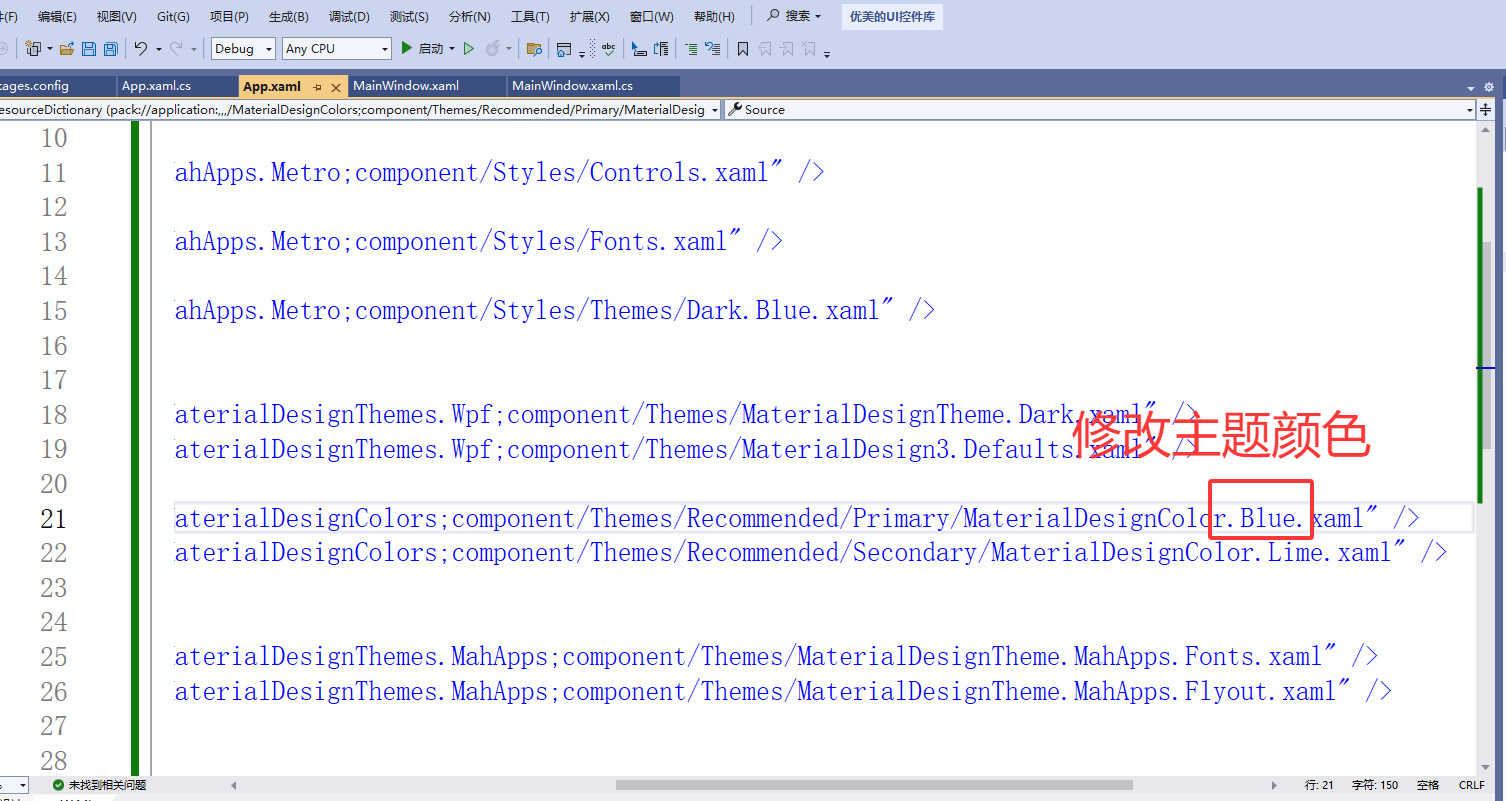
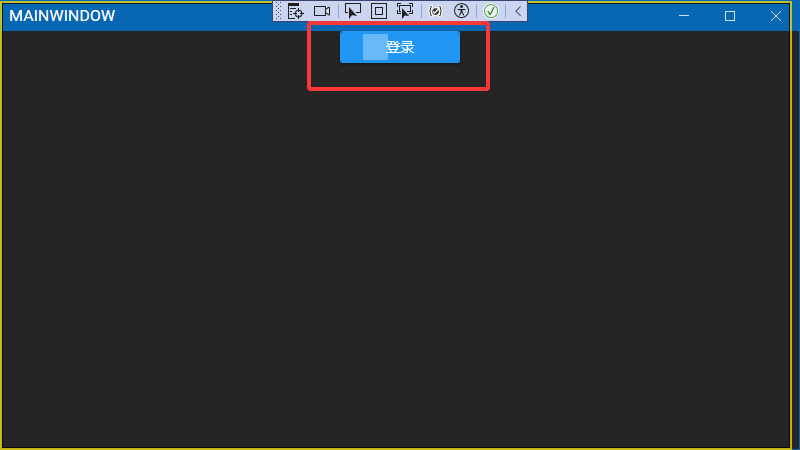
                <ResourceDictionary Source="pack://application:,,,/MaterialDesignColors;component/Themes/Recommended/Primary/MaterialDesignColor.Blue.xaml" />
                <ResourceDictionary Source="pack://application:,,,/MaterialDesignColors;component/Themes/Recommended/Secondary/MaterialDesignColor.Lime.xaml" />

                <!-- Material Design: MahApps Compatibility -->
                <ResourceDictionary Source="pack://application:,,,/MaterialDesignThemes.MahApps;component/Themes/MaterialDesignTheme.MahApps.Fonts.xaml" />
                <ResourceDictionary Source="pack://application:,,,/MaterialDesignThemes.MahApps;component/Themes/MaterialDesignTheme.MahApps.Flyout.xaml" />


            </ResourceDictionary.MergedDictionaries>
        </ResourceDictionary>

    </Application.Resources>


</Application>
轻主题
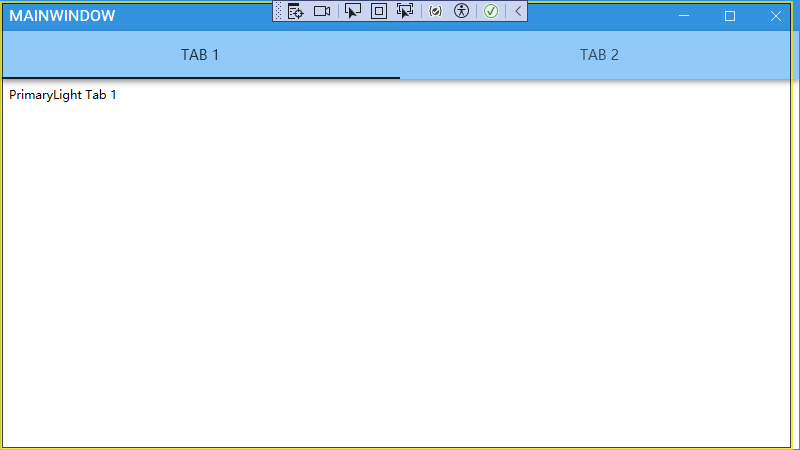
<Application x:Class="优美的UI控件库.App"
             xmlns="http://schemas.microsoft.com/winfx/2006/xaml/presentation"
             xmlns:x="http://schemas.microsoft.com/winfx/2006/xaml"
             xmlns:local="clr-namespace:优美的UI控件库"
             StartupUri="MainWindow.xaml">
    <Application.Resources>
        <ResourceDictionary>
            <ResourceDictionary.MergedDictionaries>
                <!-- MahApps -->
                <!--MahApps的控件样式-->
                <ResourceDictionary Source="pack://application:,,,/MahApps.Metro;component/Styles/Controls.xaml" />
                <!--MahApps的字体样式-->
                <ResourceDictionary Source="pack://application:,,,/MahApps.Metro;component/Styles/Fonts.xaml" />
                <!--MahApps主体样式-->
                <ResourceDictionary Source="pack://application:,,,/MahApps.Metro;component/Styles/Themes/Light.Blue.xaml" />
                <!-- Material Design -->
                <!--MaterialDesignThemes-->
                <ResourceDictionary Source="pack://application:,,,/MaterialDesignThemes.Wpf;component/Themes/MaterialDesignTheme.Light.xaml" />
                <ResourceDictionary Source="pack://application:,,,/MaterialDesignThemes.Wpf;component/Themes/MaterialDesign3.Defaults.xaml" />
                <!--MaterialDesignColors-->
                <ResourceDictionary Source="pack://application:,,,/MaterialDesignColors;component/Themes/Recommended/Primary/MaterialDesignColor.Blue.xaml" />
                <ResourceDictionary Source="pack://application:,,,/MaterialDesignColors;component/Themes/Recommended/Secondary/MaterialDesignColor.Lime.xaml" />

                <!-- Material Design: MahApps Compatibility -->
                <ResourceDictionary Source="pack://application:,,,/MaterialDesignThemes.MahApps;component/Themes/MaterialDesignTheme.MahApps.Fonts.xaml" />
                <ResourceDictionary Source="pack://application:,,,/MaterialDesignThemes.MahApps;component/Themes/MaterialDesignTheme.MahApps.Flyout.xaml" />


            </ResourceDictionary.MergedDictionaries>
        </ResourceDictionary>

    </Application.Resources>


</Application>
<mah:MetroWindow x:Class="优美的UI控件库.MainWindow"
        xmlns:mah="http://metro.mahapps.com/winfx/xaml/controls"
        xmlns:materialDesign="http://materialdesigninxaml.net/winfx/xaml/themes"
        xmlns="http://schemas.microsoft.com/winfx/2006/xaml/presentation"
        xmlns:x="http://schemas.microsoft.com/winfx/2006/xaml"
        xmlns:d="http://schemas.microsoft.com/expression/blend/2008"
        xmlns:mc="http://schemas.openxmlformats.org/markup-compatibility/2006"
        xmlns:local="clr-namespace:优美的UI控件库"
        mc:Ignorable="d"
        Title="MainWindow" Height="450" Width="800">
    <Grid>
            <TabControl

    materialDesign:ColorZoneAssist.Mode="PrimaryLight"
    Style="{StaticResource MaterialDesignFilledTabControl}">
                <TabItem
      Header="TAB 1">
                    <TextBlock
        Margin="8"
        Text="PrimaryLight Tab 1" />
                </TabItem>
                <TabItem
      Header="TAB 2">
                    <TextBlock
        Margin="8"
        Text="PrimaryLight Tab 2" />
                </TabItem>
            </TabControl>

    </Grid>
</mah:MetroWindow>





 扫一扫
扫一扫


 7498
7498

 被折叠的 条评论
为什么被折叠?
被折叠的 条评论
为什么被折叠?
 到【灌水乐园】发言





