



 本文档展示了如何在Spring Boot应用中使用缓存,通过`@Cacheable`和`@CacheEvict`注解实现数据缓存,并进行缓存测试。例子包括根据入参缓存、清除指定缓存以及条件性缓存。通过测试用例,演示了缓存的存取和清除流程。
适用于同一入参的缓存:
 <!--web-->
        <dependency>
            <groupId>org.springframework.boot</groupId>
            <artifactId>spring-boot-starter-web</artifactId>
            <version>2.4.0</version>
        </dependency>

        <!--mybatis-plus-->
        <dependency>
            <groupId>com.baomidou</groupId>
            <artifactId>mybatis-plus-boot-starter</artifactId>
            <version>3.4.1</version>
        </dependency>

        <dependency>
            <groupId>com.alibaba</groupId>
            <artifactId>druid-spring-boot-starter</artifactId>
            <version>1.1.22</version>
        </dependency>

        <dependency>
            <groupId>mysql</groupId>
            <artifactId>mysql-connector-java</artifactId>
            <version>8.0.20</version>
        </dependency>

        <!--swagger2文档-->
        <dependency>
            <groupId>io.springfox</groupId>
            <artifactId>springfox-swagger2</artifactId>
            <version>2.9.2</version>
        </dependency>

        <dependency>
            <groupId>io.springfox</groupId>
            <artifactId>springfox-swagger-ui</artifactId>
            <version>2.9.2</version>
        </dependency>

        <dependency>
            <groupId>com.yzgu.</groupId>
            <artifactId>common</artifactId>
            <version>1.0-SNAPSHOT</version>
        </dependency>

        <dependency>
            <groupId>org.springframework.boot</groupId>
            <artifactId>spring-boot-starter-cache</artifactId>
            <version>2.1.3.RELEASE</version>
        </dependency>


        <!--springboot单元测试-->
        <dependency>
            <groupId>org.springframework.boot</groupId>
            <artifactId>spring-boot-starter-test</artifactId>
            <scope>test</scope>
        </dependency>
编写 缓存测试类
/**
 *  springboot-cache  yzgu
 */

@RequestMapping("/cache")
@Controller
public class HomeCacheController {

    @Autowired
    private TransportRecordService transportRecordService;

    @RequestMapping("/hello")
    @ResponseBody
    @Cacheable(value = "helloCache")
    public String home(){
        System.out.println("测试是否走缓存");
        return "hello world!";
    }

    /**
     * 这里根据入参可以缓存数据,只要是name 多次访问,就直接从缓存中获取,不会一直查询数据库
     * @param name
     * @return
     */
    @RequestMapping("/list")
    @ResponseBody
    public Object test(String name){
        List<TransportRecord> list = transportRecordService.getList(name);
        System.out.println("测试list是否走缓存");
        return list;
    }


        /**
         *  这里 指定的list  是 上面方法 设置的缓存
         *  cacheNames  list 上面缓存的大key
         *   key:指定要清除缓存中的某条数据 key ="123" name 参数 为123的缓存
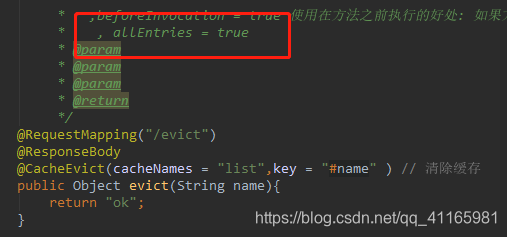
          * allEntries=true:删除缓存中的所有数据
         *
         *   ,beforeInvocation = true 使用在方法之前执行的好处: 如果方法出现异常,缓存依旧会被删除
         *    , allEntries = true
         * @param
         * @param
         * @param
         * @return
         */
    @RequestMapping("/evict")
    @ResponseBody
    @CacheEvict(cacheNames = "list",key = "#name" ) // 清除缓存
    public Object evict(String name){
        return "ok";
    }

    /**
     *   当 name 的长度小于4  才缓存
     * @param name
     * @return
     */
    @RequestMapping("/condition")
    @ResponseBody
    @org.springframework.cache.annotation.Cacheable(value = "conditionCache", condition = "#name.length() <= 4")
    public Object test2(String name){
        System.out.println("测试condition是否走缓存");
        return "abc" + name;
    }
上面的方法
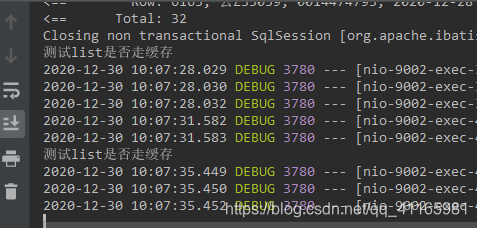
1: 调用 http://localhost:9002/yzgu/cache/list?name=123
后端会缓存 name =123的那条记录
2: 再次查询,不会走service 层
调用结果如下
3、调用 name = 456 也会缓存
http://localhost:9002/yzgu/cache/list?name=456
4、 然后清除单条缓存 123的缓存
http://localhost:9002/yzgu/cache/evict?name=123
再次调用 http://localhost:9002/yzgu/cache/list?name=123
还是会走数据库查询

如果 想清楚所有缓存 可以指定





 扫一扫
扫一扫


 548
548


 到【灌水乐园】发言



