





 本文深入探讨Java I/O流的基础概念,详细解析FileInputStream、FileOutputStream、ByteArrayInputStream、ByteArrayOutputStream、BufferedInputStream和BufferedOutputStream等核心类的API及应用实例,包括文件复制和性能对比。
介绍:
OutputStream是字节输出流的基类,InputStream是字节输入流的基类。这两个类的实现类基本都是成对存在的,下面就成对讲解。
字节流与字符流区别请查看:字节流与字符流区别
体系图:
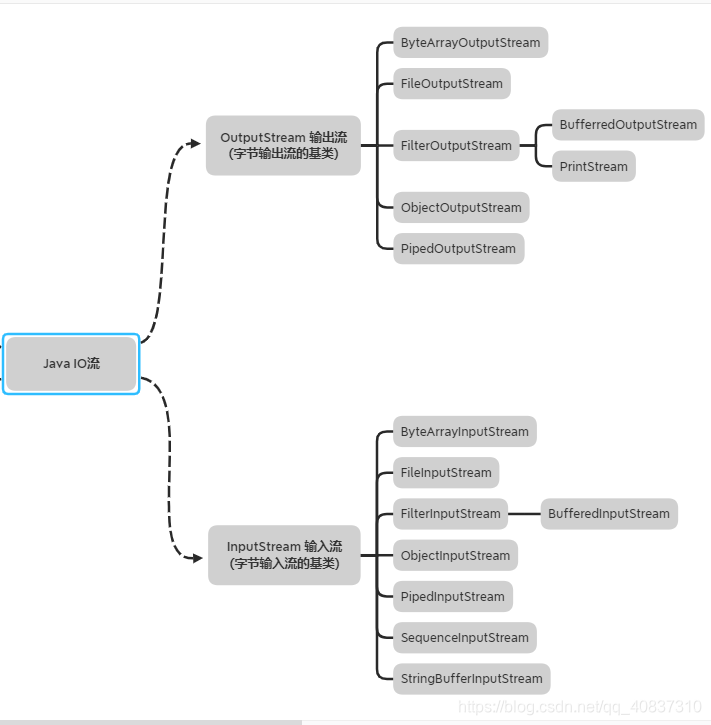
对常见实现类API的讲解:
FileOutputStrem和FileInputStream:
- FileOutputStrem和FileInputStream是对磁盘文件操作的输出流和输入流,联通这磁盘与内存。
主要API解析:
//这里是FileInputStream的API。

//构造器:
/**
* 参数文件路径,可以绝对路径也可以相对路径
*/
public FileOutputStream(String name) throws FileNotFoundException

//参数是文件File对象。
public FileOutputStream(File file) throws FileNotFoundException
/**
*这个是从流中度字节的方法。
*参数:
*1. byte[] 将数据读入这个字节数组中,相当于一个缓冲区,避免了一次只读一个*字节。频繁与磁盘交互的情况,提高了效率。
*2. 第二个int参数表示读取的字节流数据从byte数组的第几个下标开始放。
*3. 第三个int参数表示每次读取的byte字节数。
*返回值是读取到的字节数。如果返回-1,说明读到了文件尾。
*/
public int java.io.FileInputStream.read(byte[],int,int) throws java.io.IOException
/**
*这个是从流中度字节的方法。
*参数:
*1. byte[] 将数据读入这个字节数组中,相当于一个缓冲区,避免了一次只读一个*字节。频繁与磁盘交互的情况,提高了效率。
*返回值是读取到的字节数。如果返回-1,说明读到了文件尾。
*/
public int java.io.FileInputStream.read(byte[]) throws java.io.IOException
/**
*这个是从流中度字节的方法。每次读取1个字节
*返回值是读取到的字节数据。如果返回-1,说明读到了文件尾。
*/
public int java.io.FileInputStream.read() throws java.io.IOException
/**
*该方法关闭流。
*每次使用完流都必须要关闭流,释放资源,防止该流一直占用着该文件的句柄,导 *致其他程序无法操作该文件。
*/
public void java.io.FileInputStream.close() throws java.io.IOException
/**
*以下是FileOutputStream的主要API
*/

/**
*参数是要写出的文件路径。可以绝对路径也可以相对路径。
*/
 public FileOutputStream(String name)
 /**
*	参数:
*	1. name是要写出的文件路径。可以绝对路径也可以相对路径。
*	2. append表示如果文件已存在,是否在原来文件后面追加数据,true表示追 *加,false表示不追加,重新写入。
*/
 public FileOutputStream(String name, boolean append)
 /**
*参数是File对象
*/
 public FileOutputStream(File file)
 /**
*	参数:
*	1. file是File对象
*	2. append表示如果文件已存在,是否在原来文件后面追加数据,true表示追 *加,false表示不追加,重新写入。
*/
 public FileOutputStream(File file, boolean append)


/**
* 这是往文件里面写数据的方法:
* 参数:
* 1. byte[],字节数组,相当于一个写出缓冲区,当数组满了之后才会自动刷到磁*盘上,否则只能使用close()方法或者flush方法强制刷到磁盘上。避免了每写一个*字节,频繁与磁盘交互的情况,提高了效率。
*/
public void java.io.FileOutputStream.write(byte[]) throws java.io.IOException
*/
/**
* 这是往文件里面写数据的方法:
* 参数:
* 1. byte[],字节数组,相当于一个写出缓冲区,当数组满了之后才会自动刷到磁*盘上,否则只能使用close()方法或者flush方法强制刷到磁盘上。避免了每写一个*字节,频繁与磁盘交互的情况,提高了效率。
* 2. int参数:这个参数是从字节数组的第n位字节开始写到磁盘。
* 3. int参数:这个参数是写的长度。
*/
public void java.io.FileOutputStream.write(byte[],int,int) throws java.io.IOException
/**
*这是往文件里面写数据的方法,一次写一个字节。
*参数:
*int 参数:要写到磁盘的数据
*/
public void java.io.FileOutputStream.write(int) throws java.io.IOException
/**
* 关闭流,伴随着刷盘操作。
*/
public void java.io.FileOutputStream.close() throws java.io.IOException
/**
* 将缓冲区的数据强制刷到磁盘中,无需等缓冲区满。
*/
public void java.io.OutputStream.flush() throws java.io.IOException
以下代码是一个对图片进行复制的简单demo:
public class FileOutPutStreamAndFileInputStreamDemo {
    public static void main(String[] args) {
        //jdk1.7之后把流创建卸载try的括号里面,会自动关闭流
       try(FileOutputStream fileOutputStream = new FileOutputStream("C:\\Users\\oligei\\Desktop\\a.png");
            FileInputStream fileInputStream = new FileInputStream("C:\\Users\\oligei\\Desktop\\1587907710.png");){

            byte[] bytes = new byte[256];
            int len = -1;
            while ((len = fileInputStream.read(bytes))!=-1){
                //这里限制长度为了防止最后一次读取时不够256字节,导致文件写出失败
                fileOutputStream.write(bytes,0,len);
            }

       }catch (IOException e){

       }
    }


}
ByteOutputStream和ByteInputStream:
- 这个是字节数组的输出流和输入流,是纯内存的操作,不涉及到磁盘。主要用途是在要创建临时文件,数据网络传输,数据压缩后传输等情况下可以避免访问磁盘,直接在内存操作,提高运行效率。该类也不涉及底层操作,纯java代码。这里直接就用源码来讲吧。
public
class ByteArrayInputStream extends InputStream {

    /**
    * 该输入流的底层数据结构,从内存中读取字节数组就是存在这。
    */
    protected byte buf[];

   /**
   * 相当于该字节数组的游标。值下一个读取的字节的下标。
   * 该值为非负数并且小于count值。
   *
    protected int pos;


    protected int mark = 0;

    /**
    * 数据长度,但不是数组长度。
    */
    protected int count;

    /**
     *传入一个字节数组
     *
     */
    public ByteArrayInputStream(byte buf[]) {
    	//设置底层数组
        this.buf = buf;
        //设置游标为0
        this.pos = 0;
        //设置数据长度为传入的数组的长度
        this.count = buf.length;
    }

    /**
     * buf[] :具体数据
     * offset:初始游标
     * count:使用该数组的长度
     *
     */
    public ByteArrayInputStream(byte buf[], int offset, int length) {
        this.buf = buf;
        this.pos = offset;
        //这个设置偏移量+length跟传入数组长度,取较小值。
        this.count = Math.min(offset + length, buf.length);
        this.mark = offset;
    }


    public synchronized int read() {
    	//读取一个字节数据,当游标pos比数据长度大时,表示读到数据尾,返回-1。
    	//否则反正当前数据与0xff与的结果,目的是把除了低8位之外的其他高位置0.
        return (pos < count) ? (buf[pos++] & 0xff) : -1;
    }

   /**
   * 读取多个字节数据到字节数组b中。
   * 参数:
   * 1. b[] :要将数据读到这个数组中。
   * 2. 将数据读取到b数组的从off下标开始。
   * 3. 读取数据的长度。
   */
    public synchronized int read(byte b[], int off, int len) {
        if (b == null) {
        //判空
            throw new NullPointerException();
        } else if (off < 0 || len < 0 || len > b.length - off) {
        //判断边界
            throw new IndexOutOfBoundsException();
        }

        if (pos >= count) {
        //读到数据尾
            return -1;
        }


		//计算剩余可读数据长度
        int avail = count - pos;
        if (len > avail) {
        	//如果想要读取的长度大于可读取长度,读取长度设置为可读取长度
            len = avail;
        }
        if (len <= 0) {
            return 0;
        }
        //将buf数组部分数据复制到b数组
        System.arraycopy(buf, pos, b, off, len);
        //设置游标
        pos += len;
        //返回读取的长度
        return len;
    }

    //过滤一定长度数组
    public synchronized long skip(long n) {
    	//获取剩余的数据长度
        long k = count - pos;
        if (n < k) {
            k = n < 0 ? 0 : n;
        }

        pos += k;
        return k;
    }


    public synchronized int available() {
    	//获取剩余长度
        return count - pos;
    }


    public boolean markSupported() {
        return true;
    }

   //标记当前游标
    public void mark(int readAheadLimit) {
        mark = pos;
    }

    //将游标设置为标记出,如果没有用mark方法标记过游标,则mark等于0,相当于重置游标
    public synchronized void reset() {
        pos = mark;
    }

    //关闭流,因为纯内存操作,该方法无用。
    public void close() throws IOException {
    }
public class ByteArrayOutputStream extends OutputStream {

    /**
     * 底层存储数据数组缓冲区
     */
    protected byte buf[];

    /**
     * 缓冲区数据大小
     */
    protected int count;

    /**
     *
     */
    public ByteArrayOutputStream() {
    	//缓冲区默认大小为32
        this(32);
    }

   	//指定缓冲区大小的构造器
    public ByteArrayOutputStream(int size) {
        if (size < 0) {
            throw new IllegalArgumentException("Negative initial size: "
                                               + size);
        }
        buf = new byte[size];
    }

    /**
     *缓冲区扩容,侧重点不在这,具体与ArrayList的扩容差不多
     */
    private void ensureCapacity(int minCapacity) {
        // overflow-conscious code
        if (minCapacity - buf.length > 0)
            grow(minCapacity);
    }

    //缓冲区最大容量
    private static final int MAX_ARRAY_SIZE = Integer.MAX_VALUE - 8;

    /**
    * 扩容相关
    **/
    private void grow(int minCapacity) {
        // overflow-conscious code
        int oldCapacity = buf.length;
        int newCapacity = oldCapacity << 1;
        if (newCapacity - minCapacity < 0)
            newCapacity = minCapacity;
        if (newCapacity - MAX_ARRAY_SIZE > 0)
            newCapacity = hugeCapacity(minCapacity);
        buf = Arrays.copyOf(buf, newCapacity);
    }

/**
*扩容相关
*/
    private static int hugeCapacity(int minCapacity) {
        if (minCapacity < 0) // overflow
            throw new OutOfMemoryError();
        return (minCapacity > MAX_ARRAY_SIZE) ?
            Integer.MAX_VALUE :
            MAX_ARRAY_SIZE;
    }

    /**
     *每次写出一个字节数据
     */
    public synchronized void write(int b) {
    	//是否扩容
        ensureCapacity(count + 1);

        buf[count] = (byte) b;
        count += 1;
    }

    /**
    *写入一个字节数组
    *参数:
    *1. b[] 要写入的字节数组
    *2. off:从b数组的off位置开始写入。
    *3. len:写入长度
    */
    public synchronized void write(byte b[], int off, int len) {
        if ((off < 0) || (off > b.length) || (len < 0) ||
            ((off + len) - b.length > 0)) {
            //
            throw new IndexOutOfBoundsException();
        }
        ensureCapacity(count + len);
        System.arraycopy(b, off, buf, count, len);
        count += len;
    }


    public synchronized void writeTo(OutputStream out) throws IOException {
    	//将流写出到其他流中。
        out.write(buf, 0, count);
    }


    public synchronized void reset() {
    	//重置流,相当于重写开始写流
        count = 0;
    }

    /**
     * 获取缓冲区数据
     */
    public synchronized byte toByteArray()[] {
        return Arrays.copyOf(buf, count);
    }

    /**
     * 获取数据长度
     */
    public synchronized int size() {
        return count;
    }

    /**
     *
     */
    public synchronized String toString() {
    	//转成string,使用默认编码规则
        return new String(buf, 0, count);
    }

    /**
    * 转为字符串,指定编码规则
    */
    public synchronized String toString(String charsetName)
        throws UnsupportedEncodingException
    {
        return new String(buf, 0, count, charsetName);
    }

    /**
    *
    /**
     * 关闭流,无作用 在这里空方法。
     */
    public void close() throws IOException {
    }

}
public class ByteArrayStreamDemo {
    /**
     * 这里实现了一个序列化和反序列化的demo,关注点使用了ByteArrayOutputStream 和 ByteArrayInputStream,避免与磁盘交互
     * @param args
     */
    public static void main(String[] args) {
        Apple apple = new Apple(5);
        System.out.println(apple.i);
        ObjectInputStream ois = null;
        ObjectOutputStream ops = null;
        ByteArrayOutputStream bos = new ByteArrayOutputStream(1024);
        try {
            //这里将序列化字节流存储在ByteArrayOutputStream 流里面,而避免了在FileOutputStream,避免了与磁盘进行交互,提高了效率
            ops = new ObjectOutputStream(bos);
            ops.writeObject(apple);
            //这里读取序列化字节流是从ByteArrayInputStream流中读取,避免了与磁盘交互
            ois = new ObjectInputStream(new ByteArrayInputStream(bos.toByteArray()));
            Apple apple1 = (Apple) ois.readObject();
            System.out.println(apple1.i);

        }catch (Exception e){
            e.printStackTrace();
        }finally {
            try {
                ois.close();
                ops.close();
            } catch (IOException e) {
                e.printStackTrace();
            }
        }
    }
}
FilterInputStream和FilterOutputStream:
- Java I/O中用了很多的装饰器模式,来对流进行封装,比如BufferedInputStream就是使用装饰器模式对流进行了缓冲区的封装。而FilterInputStream和FilterOutputStream就是字节输入流和字节输出流包装器的规范类。包装器都继承该类。
- 装饰器模式的装饰器简单来说就是:是它、还有它,这里的它是指被装饰者。具体去搜搜其他教程博文。
- 但是这个类并没有做任何的装饰,仅仅只是把转入的对象方法直接执行,装饰都交给它的实现类去实现。
//该类继承了InputStream ,也就是说的是它。
public
class FilterInputStream extends InputStream {

     //拥有一个InputStream 成员变量 ,也就是还有它。
    protected volatile InputStream in;

    //这个传入要装饰的对象
    protected FilterInputStream(InputStream in) {
        this.in = in;
    }


    public int read(byte b[]) throws IOException {
        return read(b, 0, b.length);
    }


   //没有任何装饰,直接调用in.read(b, off, len);
    public int read(byte b[], int off, int len) throws IOException {
        return in.read(b, off, len);
    }

   public int available() throws IOException {
        return in.available();
    }


    public synchronized void reset() throws IOException {
        in.reset();
    }


    public boolean markSupported() {
        return in.markSupported();
    }
}
以下是一个装饰器demo
public class FilterInputStreamDemo extends FilterInputStream{


    protected FilterInputStreamDemo(InputStream in) {
        super(in);
    }

    @Override
    public int read() throws IOException {
    //对该方法进行装饰,每次读取前都会输出提示
        System.out.println("读取字节前");
        return super.read();
    }

    public static void main(String[] args) {
    //执行
        try(FilterInputStreamDemo demo = new FilterInputStreamDemo(new FileInputStream("1.txt"));) {
            System.out.println(demo.read());

        } catch (Exception e) {
            e.printStackTrace();
        }
    }
}
执行结果:

FilterOutPutStream也是这个理,这里就不说了。
BufferedOutputStream和BufferedInputstream:
- 这个是带有缓冲区的字节输出流和字节输入流。从磁盘或者其他设备一次读入多个字节数据到缓冲区或者把缓冲区中多个字节数据一次性写入到磁盘或者其他设备中,减少对设备的访问次数,提高效率。
- 分别继承FilterOutputStream和FilterInputStream,也就是说该缓冲区是通过装饰器模式实现的,对其他字节流提供缓冲区的功能增强。
//以下是BufferedOutputStream API讲解

//构造器

//传入一个OutputStream 对象 这个就是被装饰对象,使用默认缓冲区大小8192
public BufferedOutputStream(OutputStream out)

//传入OutputStream 对象,并指定缓冲区大小
public BufferedOutputStream(OutputStream out, int size)

//写一个字节数据到缓冲区中
public synchronized void java.io.BufferedOutputStream.write(int) throws java.io.IOException

/**
*把一个字节数组写到缓冲区。
*参数:
*byte[] :要写到缓冲区的字节数组
* int : 从byte[]数组的off偏移量开始。
* int:写入的数据长度
*/
public synchronized void java.io.BufferedOutputStream.write(byte[],int,int) throws java.io.IOException

//把缓冲区数据强制刷到磁盘或其他设备中。缓冲区只有满了之后才会刷到磁盘,
//所以往往要手动刷盘
public synchronized void java.io.BufferedOutputStream.flush() throws java.io.IOException

//把一个字节数组写到缓冲区。
public void java.io.FilterOutputStream.write(byte[]) throws java.io.IOException

//关闭流,伴随着刷盘操作。
public void java.io.FilterOutputStream.close() throws java.io.IOException
//以下是BufferedInputStream API

//构造器:

//传入一个InputStream 对象 这个就是被装饰对象,使用默认缓冲区大小8192
public BufferedInputStream(InputStream in )

//传入InputStream对象,并指定缓冲区大小
public BufferedInputStream(InputStream in, int size)

/**
*从缓冲区类读取数据到byte[]数组中。
*参数:
*1. byte[] :把缓冲区数据读取到该数组中。
*2. int : 把数据读取到byte[]的off偏移量开始。
*3. 读取数据长度。
*返回读取到的数据的长度,如果是-1,则表示到达文件尾。
*/
public synchronized int java.io.BufferedInputStream.read(byte[],int,int) throws java.io.IOException

//从缓冲区中读取一个字节的数据,返回值是读取到的字节数据。返回-1表示到达文//件尾
public synchronized int java.io.BufferedInputStream.read() throws java.io.IOException
//关闭流
public void java.io.BufferedInputStream.close() throws java.io.IOException
//获取缓冲区可读取数据长度
public synchronized int java.io.BufferedInputStream.available() throws java.io.IOException
//标记当前游标。mark值默认为。
public synchronized void java.io.BufferedInputStream.mark(int)
//是否支持mark。
public boolean java.io.BufferedInputStream.markSupported()
//把游标重置为mark值。如果没有调用过mark方法,则游标重置0.
public synchronized void java.io.BufferedInputStream.reset() throws java.io.IOException
//过滤掉/舍弃掉一定长度数据
public synchronized long java.io.BufferedInputStream.skip(long) throws java.io.IOException
//从缓冲区读取数据到byte[]数组,返回值是读取到的字节长度,-1表示文件尾。
public int java.io.FilterInputStream.read(byte[]) throws java.io.IOException
以下是使用带缓冲区的进行文件复制和普通流复制文件进行效率比较的Demo,对一个500m的视频文件进行复制:
public class BufferedStreamDemo {
    public static void main(String[] args) {
        BufferedDemo();
        //withOutBufferedDemo();
    }

    public static void BufferedDemo(){
        long start = System.currentTimeMillis();
        try (BufferedInputStream in = new BufferedInputStream(new FileInputStream("C:\\Users\\Yehaocong\\Desktop\\111.mp4"));
             BufferedOutputStream out = new BufferedOutputStream(new FileOutputStream("C:\\Users\\Yehaocong\\Desktop\\222.mp4"))
        ){

            byte[] bytes = new byte[8192];
            int len = -1;
            while ((len = in.read(bytes))!=-1){
                out.write(bytes,0,len);
            }
            System.out.println("使用缓冲区类耗时:" + (System.currentTimeMillis()-start) + "毫秒");
        }catch (Exception e){

        }
    }

    public static void withOutBufferedDemo(){
        long start = System.currentTimeMillis();
        try (FileInputStream in = new FileInputStream("C:\\Users\\Yehaocong\\Desktop\\111.mp4");
             FileOutputStream out = new FileOutputStream("C:\\Users\\Yehaocong\\Desktop\\333.mp4");
        ){


            int len = -1;
            while ((len = in.read())!=-1){
                out.write(len);
            }

            System.out.println("不使用缓冲区类耗时:" + (System.currentTimeMillis()-start) + "毫秒");
        }catch (Exception e){

        }
    }
}
执行结果:

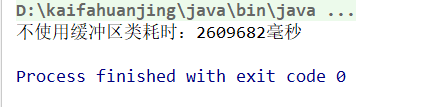
差的也太远了,并且随着文件越大。差距越大。





 扫一扫
扫一扫


 1849
1849

 被折叠的 条评论
为什么被折叠?
被折叠的 条评论
为什么被折叠?
 到【灌水乐园】发言





