
requests请求访问java服务,参数中带null

本文介绍在跨语言调用中,如何处理Java传来的null参数,在Python中将其转换为等价的None。这对于理解不同编程语言间的数据类型转换至关重要。

访问java网站的时候,某些参数会传null,如:在这里插入图片描述
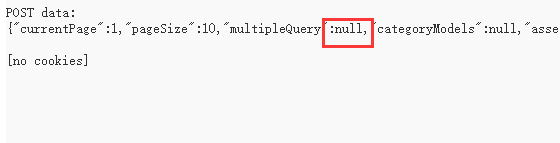
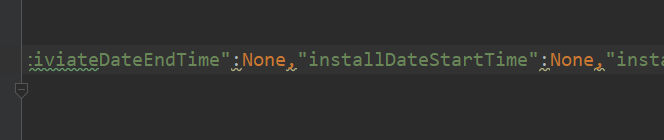
传空类型null,对应在python的为None,把请求中的null替换成None即可:
在这里插入图片描述

在这里插入图片描述

Java 中可以借助不同方式实现 HTTP 的 GET、POST、PUT 等常见请求,以下给出几种实现方法。 ### 使用 HttpURLConnection 实现 `HttpURLConnection` 属于 Java 标准库的一部分,可用于发起各类 HTTP 请求。 #### GET 请求示例 ```java import java.io.BufferedReader; import java.io.InputStreamReader; import java.net.HttpURLConnection; import java.net.URL; public class HttpGetExample { public static void main(String[] args) throws Exception { URL url = new URL("http://example.com/api/data"); HttpURLConnection connection = (HttpURLConnection) url.openConnection(); connection.setRequestMethod("GET"); int responseCode = connection.getResponseCode(); if (responseCode == HttpURLConnection.HTTP_OK) { BufferedReader in = new BufferedReader(new InputStreamReader(connection.getInputStream())); String inputLine; StringBuilder response = new StringBuilder(); while ((inputLine = in.readLine()) != null) { response.append(inputLine); } in.close(); System.out.println(response.toString()); } else { System.out.println("GET request failed. Response Code: " + responseCode); } } } ``` #### POST 请求示例 ```java import java.io.DataOutputStream; import java.io.InputStreamReader; import java.net.HttpURLConnection; import java.net.URL; import java.nio.charset.StandardCharsets; public class HttpPostExample { public static void main(String[] args) throws Exception { URL url = new URL("http://example.com/api/submit"); HttpURLConnection connection = (HttpURLConnection) url.openConnection(); connection.setRequestMethod("POST"); connection.setDoOutput(true); String postData = "param1=value1&param2=value2"; byte[] postDataBytes = postData.getBytes(StandardCharsets.UTF_8); connection.setRequestProperty("Content-Type", "application/x-www-form-urlencoded"); connection.setRequestProperty("Content-Length", String.valueOf(postDataBytes.length)); DataOutputStream wr = new DataOutputStream(connection.getOutputStream()); wr.write(postDataBytes); wr.flush(); wr.close(); int responseCode = connection.getResponseCode(); if (responseCode == HttpURLConnection.HTTP_OK) { BufferedReader in = new BufferedReader(new InputStreamReader(connection.getInputStream())); String inputLine; StringBuilder response = new StringBuilder(); while ((inputLine = in.readLine()) != null) { response.append(inputLine); } in.close(); System.out.println(response.toString()); } else { System.out.println("POST request failed. Response Code: " + responseCode); } } } ``` #### PUT 请求示例 ```java import java.io.DataOutputStream; import java.io.InputStreamReader; import java.net.HttpURLConnection; import java.net.URL; import java.nio.charset.StandardCharsets; public class HttpPutExample { public static void main(String[] args) throws Exception { URL url = new URL("http://example.com/api/update"); HttpURLConnection connection = (HttpURLConnection) url.openConnection(); connection.setRequestMethod("PUT"); connection.setDoOutput(true); String putData = "param1=newValue1&param2=newValue2"; byte[] putDataBytes = putData.getBytes(StandardCharsets.UTF_8); connection.setRequestProperty("Content-Type", "application/x-www-form-urlencoded"); connection.setRequestProperty("Content-Length", String.valueOf(putDataBytes.length)); DataOutputStream wr = new DataOutputStream(connection.getOutputStream()); wr.write(putDataBytes); wr.flush(); wr.close(); int responseCode = connection.getResponseCode(); if (responseCode == HttpURLConnection.HTTP_OK) { BufferedReader in = new BufferedReader(new InputStreamReader(connection.getInputStream())); String inputLine; StringBuilder response = new StringBuilder(); while ((inputLine = in.readLine()) != null) { response.append(inputLine); } in.close(); System.out.println(response.toString()); } else { System.out.println("PUT request failed. Response Code: " + responseCode); } } } ``` ### 使用 Apache HttpClient 实现 Apache HttpClient 是一个功能强大的 HTTP 客户端库,能让 HTTP 请求的实现更为简便。 #### 添加依赖 若使用 Maven 项目,在 `pom.xml` 中添加以下依赖: ```xml <dependency> <groupId>org.apache.httpcomponents</groupId> <artifactId>httpclient</artifactId> <version>4.5.13</version> </dependency> ``` #### GET 请求示例 ```java import org.apache.http.HttpResponse; import org.apache.http.client.HttpClient; import org.apache.http.client.methods.HttpGet; import org.apache.http.impl.client.HttpClients; import org.apache.http.util.EntityUtils; public class HttpClientGetExample { public static void main(String[] args) throws Exception { HttpClient httpClient = HttpClients.createDefault(); HttpGet httpGet = new HttpGet("http://example.com/api/data"); HttpResponse response = httpClient.execute(httpGet); int statusCode = response.getStatusLine().getStatusCode(); if (statusCode == 200) { String responseBody = EntityUtils.toString(response.getEntity()); System.out.println(responseBody); } else { System.out.println("GET request failed. Status Code: " + statusCode); } } } ``` #### POST 请求示例 ```java import org.apache.http.HttpResponse; import org.apache.http.NameValuePair; import org.apache.http.client.HttpClient; import org.apache.http.client.entity.UrlEncodedFormEntity; import org.apache.http.client.methods.HttpPost; import org.apache.http.impl.client.HttpClients; import org.apache.http.message.BasicNameValuePair; import org.apache.http.util.EntityUtils; import java.util.ArrayList; import java.util.List; public class HttpClientPostExample { public static void main(String[] args) throws Exception { HttpClient httpClient = HttpClients.createDefault(); HttpPost httpPost = new HttpPost("http://example.com/api/submit"); List<NameValuePair> params = new ArrayList<>(); params.add(new BasicNameValuePair("param1", "value1")); params.add(new BasicNameValuePair("param2", "value2")); httpPost.setEntity(new UrlEncodedFormEntity(params)); HttpResponse response = httpClient.execute(httpPost); int statusCode = response.getStatusLine().getStatusCode(); if (statusCode == 200) { String responseBody = EntityUtils.toString(response.getEntity()); System.out.println(responseBody); } else { System.out.println("POST request failed. Status Code: " + statusCode); } } } ``` #### PUT 请求示例 ```java import org.apache.http.HttpResponse; import org.apache.http.NameValuePair; import org.apache.http.client.HttpClient; import org.apache.http.client.entity.UrlEncodedFormEntity; import org.apache.http.client.methods.HttpPut; import org.apache.http.impl.client.HttpClients; import org.apache.http.message.BasicNameValuePair; import org.apache.http.util.EntityUtils; import java.util.ArrayList; import java.util.List; public class HttpClientPutExample { public static void main(String[] args) throws Exception { HttpClient httpClient = HttpClients.createDefault(); HttpPut httpPut = new HttpPut("http://example.com/api/update"); List<NameValuePair> params = new ArrayList<>(); params.add(new BasicNameValuePair("param1", "newValue1")); params.add(new BasicNameValuePair("param2", "newValue2")); httpPut.setEntity(new UrlEncodedFormEntity(params)); HttpResponse response = httpClient.execute(httpPut); int statusCode = response.getStatusLine().getStatusCode(); if (statusCode == 200) { String responseBody = EntityUtils.toString(response.getEntity()); System.out.println(responseBody); } else { System.out.println("PUT request failed. Status Code: " + statusCode); } } } ```
评论
添加红包

请填写红包祝福语或标题

红包个数最小为10个

红包金额最低5元

当前余额3.43前往充值 >
需支付:10.00
成就一亿技术人!
领取后你会自动成为博主和红包主的粉丝 规则
hope_wisdom
发出的红包
实付
使用余额支付
点击重新获取
扫码支付
钱包余额 0

抵扣说明:

1.余额是钱包充值的虚拟货币,按照1:1的比例进行支付金额的抵扣。
2.余额无法直接购买下载,可以购买VIP、付费专栏及课程。

余额充值




