





由于element-ui的自定义header一直不生效(当type未selection时slot / rende-header 都不生效),所以还是使用element-ui原生API去做。
示例
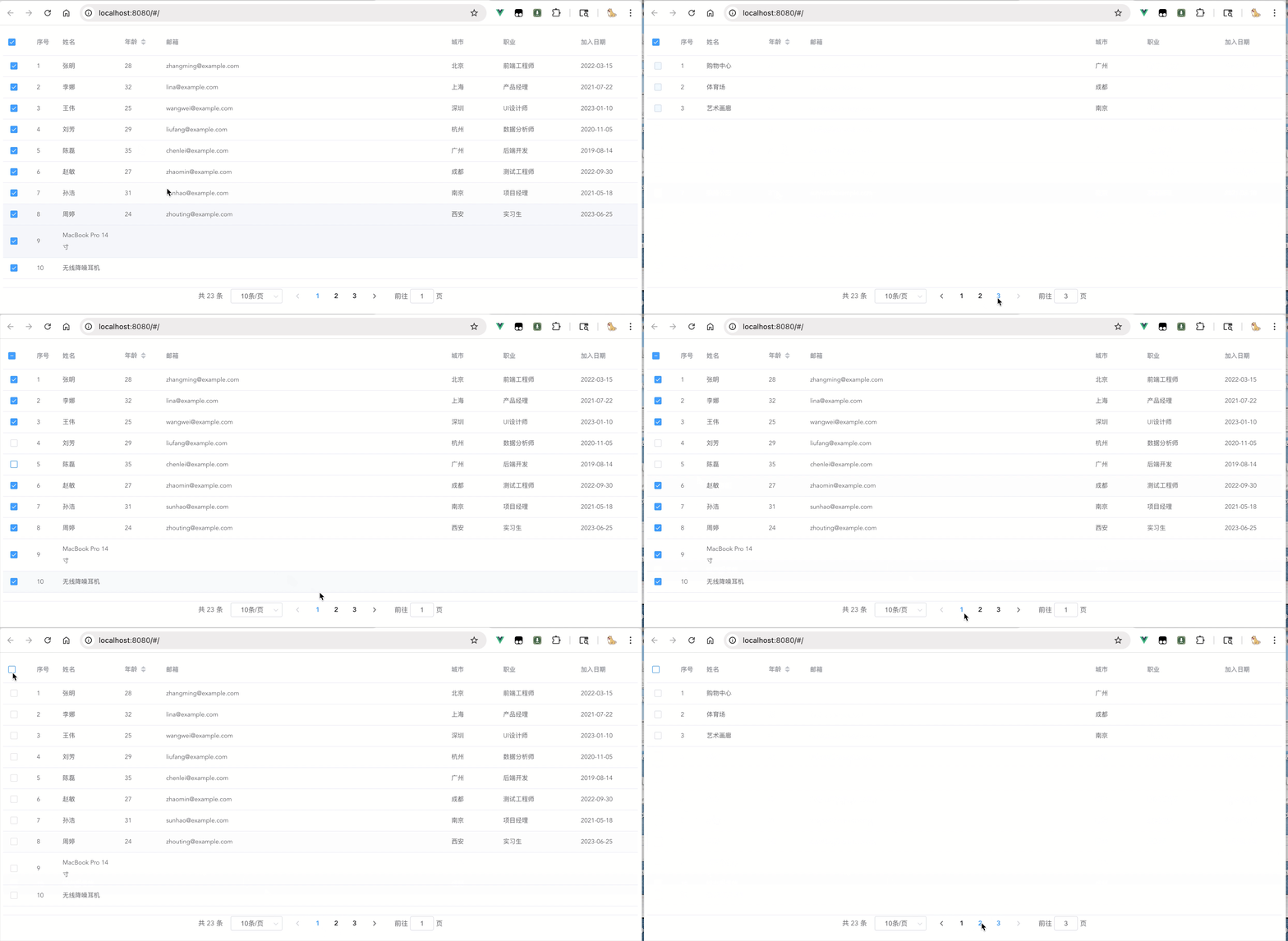
代码
el-table row-key 属性是必要的。
<template>
  <div>
    <el-table
      ref="table"
      :data="tableDataFilter"
      style="width: 100%"
      row-key="id"
      height="500"
      @select="handleSelect"
      @select-all="handleSelectAll">
      <el-table-column type="selection" width="55"></el-table-column>
      <el-table-column type="index" width="50" label="序号" />
      <el-table-column prop="name" label="姓名" width="120" />
      <el-table-column prop="age" label="年龄" width="80" sortable />
      <el-table-column prop="email" label="邮箱" min-width="180" />
      <el-table-column prop="city" label="城市" width="100" />
      <el-table-column prop="occupation" label="职业" width="150" />
      <el-table-column prop="joinDate" label="加入日期" width="120" />
    </el-table>

    <el-pagination
    :current-page.sync="currentPage"
    :page-sizes="[10, 20, 50]"
    :page-size.sync="pageSize"
    layout="total, sizes, prev, pager, next, jumper"
    :total="total"
    @size-change="handleSizeChange"
    @current-change="handleCurrentChange"
    >
    </el-pagination>
  </div>
</template>

<script>
export default {
  data() {
    return {
    		// 存放完整数据
      tableData: [],
      multipleSelection: [],
      currentPage: 1,
      pageSize: 10,

      /*
        选择Set 是因为在这个场景使用起来比较方便,也能优化些许性能。
        如果需要使用watch来监听selectedIds 的变化,可以改用为数组。
        如改用数组 select等方法中的判断就需要相对繁琐。
        或是对Set 进行包装。
      */
      selectedIds: new Set(),
      isSelectAll: false
    };
  },

  computed: {
    total() {
      return this.tableData.length
    },

    // 前端分页
    tableDataFilter() {
      const s = (this.currentPage - 1) * this.pageSize,
      e = s + this.pageSize
      return this.tableData.slice(s, e)
    }
  },

  // 默认全选;如果有需要;此代码可以放在接口调用数据赋值后
  async mounted() {
    await this.$nextTick()
    this.handleSelectAll()
  },

  methods: {
    // 当勾选状态改变做后续的逻辑处理
    change() {
      // 已选中列表
      const selectList = this.tableData.filter(x => this.selectedIds.has(x.id))
      // do something...
    },

    // 勾选/取消单行
    handleSelect(selection, row) {
      if (this.selectedIds.has(row.id)) {
        this.selectedIds.delete(row.id)
      } else {
        this.selectedIds.add(row.id)
      }

      this.checkStatus()
      // 因为 Set 数据结构 不能够被Vue所监听到
      // 所以在每次修改选中状态之后手动调用一次callback
      this.change()
    },
    checkStatus() {
      this.isSelectAll = this.selectedIds.size === this.total
    },
    // 全选事件
    handleSelectAll() {
      // 当前是全选状态 -> 全部取消
      if (this.isSelectAll) {
        this.selectedIds.clear()
        this.$refs.table?.clearSelection?.()
      } else {
        this.tableData.forEach(x => {
          this.selectedIds.add(x.id)
          // ?. 在每次调用接口会清楚选中状态;防止在created中调用接口时table dom还未挂载。
          this.$refs.table?.toggleRowSelection?.(x, true)
        })
      }
      this.checkStatus()
      this.change()
    },
    handleSizeChange() {
      this.setSelection()
    },
    handleCurrentChange() {
      this.setSelection()
    },
    // 分页切换 -> 处理当前页面勾选状态
    async setSelection() {
      await this.$nextTick()
      const tableRef = this.$refs.table
      if (!tableRef) return
      this.tableData.forEach(x => {
        tableRef.toggleRowSelection(x, this.selectedIds.has(x.id))
      })
    },
  },
};
</script>





 扫一扫
扫一扫


 627
627

 被折叠的 条评论
为什么被折叠?
被折叠的 条评论
为什么被折叠?
 到【灌水乐园】发言





