



 本文介绍如何使用原生HTML、CSS和JS(包括jQuery)从零开始构建一个模态框,用于数据的新增和修改。文章详细展示了模态框的HTML结构、CSS样式和JS交互代码。
原生html css js(jquery)模态框的实现
最近在项目上用原生的html css js(jquery)进行页面的开发 有需求要用用到弹出模态框来实现数据的新增和修改,这东西放在vue、react上都会有ui组件的支持,但苦于项目都不是用框架来开发的,就需要自己手动来写一个模态框。
下面是我的模态框的实现
html
<!DOCTYPE html>
<html lang="en">

<head>
    <meta charset="UTF-8">
    <meta name="viewport" content="width=device-width, initial-scale=1.0">
    <meta http-equiv="X-UA-Compatible" content="ie=edge">
    <script src="https://cdn.bootcss.com/jquery/3.4.0/jquery.min.js"></script>
    <link rel="stylesheet" href="./rolemanage.css">
    <link rel="stylesheet" href="https://cdn.bootcss.com/font-awesome/4.7.0/css/font-awesome.css">
    <title>rolemanage</title>
</head>

<body>
    <!-- 页面总布局 -->
    <div class="wrapper">
        <!-- 页面的头部 -->
        <div class="header">
            <img src="../../image/system-img/logo.png" alt="">
            <span>后台管理系统</span>
            <div class="right">
                <div class="setting">
                    <i class="fa fa-cog" aria-hidden="true"></i>
                    设置</div>
                <div class="logout">
                    <i class="fa fa-power-off" aria-hidden="true"></i>
                    注销</div>
                <div class="name">
                    <i class="fa fa-user-o" aria-hidden="true"></i>
                    谢秀英</div>
            </div>
        </div>
        <div class="nav">
            <span class="crumb">门户主页 / 设置 / 用户角色管理</span><br>
            <span class="edit">用户角色管理</span>
        </div>
        <div class="content">
            <div class="addrole">
                <button onclick="addRole()">新增</button>
            </div>
            <div class="table">
                <div class="thead">
                    <div class="tr">
                        <div class="th">
                            用户名
                        </div>
                        <div class="th">
                            角色名
                        </div>
                        <div class="th edit">
                            操作
                        </div>
                    </div>
                </div>
                <div class="tbody">
                    <div class="tr">
                        <div class="td">
                            陈兰秀
                        </div>
                        <div class="td">
                            财务
                        </div>
                        <div class="td edit">
                            <span onclick="editRole()">编辑</span> | <span onclick="delRole()">删除</span>
                        </div>
                    </div>
                    <div class="tr">
                        <div class="td">
                            吕洋
                        </div>
                        <div class="td">
                            技术经理
                        </div>
                        <div class="td edit">
                            <span>编辑</span> | <span>删除</span>
                        </div>
                    </div>
                    <div class="tr">
                        <div class="td">
                            吕洋
                        </div>
                        <div class="td">
                            技术经理
                        </div>
                        <div class="td edit">
                            <span>编辑</span> | <span>删除</span>
                        </div>
                    </div>
                    <div class="tr">
                        <div class="td">
                            吕洋
                        </div>
                        <div class="td">
                            技术经理
                        </div>
                        <div class="td edit">
                            <span>编辑</span> | <span>删除</span>
                        </div>
                    </div>
                    <div class="tr">
                        <div class="td">
                            吕洋
                        </div>
                        <div class="td">
                            技术经理
                        </div>
                        <div class="td edit">
                            <span>编辑</span> | <span>删除</span>
                        </div>
                    </div>
                    <div class="tr">
                        <div class="td">
                            吕洋
                        </div>
                        <div class="td">
                            技术经理
                        </div>
                        <div class="td edit">
                            <span>编辑</span> | <span>删除</span>
                        </div>
                    </div>
                </div>
            </div>
        </div>
        <!-- 页面的蒙层 -->
        <div id="mask" style="display: none;"></div>
        <!-- 新增角色模态框 -->
        <div id="model" style="display: none;">
            <form action="#" method="GET">
                <div class="getName">
                    <input type="text" value="" placeholder="输入用户名" name="username">
                </div>
                <div class="getRole">
                    <select name="role" id="">
                        <option value="">请选择角色</option>
                        <option value="请选择">选择</option>
                    </select>
                </div>
                <div class="operate">
                    <button class="confirm" onclick="confirm()">确定</button>
                    <button class="cancel" onclick="cancel()">取消</button>
                </div>
            </form>
        </div>

    </div>
</body>
<script src="./rolemanage.js"></script>
</html>
css
*{
    padding: 0;
    margin: 0;
}
html,body{
    height: 100%;
    background-color: rgba(228, 232, 240, 0.8);
}
.wrapper {
    margin: auto;
    width: 100%;
    max-width: 1366px;
    min-width: 960px;
    height: 100%;
}

.header {
    position: relative;
    width: 100%;
    height: 50px;
    background-color: #FF5661;
    /* margin-bottom: px; */
    display: flex;
    align-items: center;
    color: #fff;

}

.header img {
    height: 25px;
    width: 40px;
    margin: 0 30px;
}

.header .right {
    position: absolute;
    right: 20px;

}

.header .right div {
    float: right;
    font-size: 14px;
    margin: 0 10px;
    cursor: pointer;
}

.nav {
    width: 100%;
    height: 55px;
    background-color: rgba(255, 255, 255, 0.4);
}

.nav span {
    margin-left: 20px;
}

.nav .crumb {
    height: 20px;
    font-size: 10px;
    line-height: 20px;
    opacity: .4;
}

.nav .edit {
    height: 35px;
    font-size: 16px;
    line-height: 35px;
    color: #FF7533;
    font-weight: bolder;
}

.content {
    margin: 10px;
    margin-bottom: 0;
    background-color: rgba(255, 255, 255, 0.8);
    height: calc(100% - 150px);
    /* height: 100%; */
    padding: 20px;
}
.content .addrole {
    width: 100%;
    height: 30px;
    display: flex;
    align-items: center;
    justify-content: flex-end;
    margin-bottom: 10px;
}
.content .addrole button{
    width: 65px;
    height: 30px;
    background-color: #FF7002;
    border: 1px solid #FF7002;
    margin: 0;
    padding: 0;
    outline: none;
    font-size: 10px;
    /* margin-right: 20px; */
    border-radius: 5px;
    color: #fff;
}
.thead {
    width: 100%;
    display: flex;
    border-bottom: 1px solid #ccc;
    border-bottom-color: rgba(205, 206, 207, 0.5);
    align-items: center;
}

.tbody .tr,.thead .tr{
    width: 100%;
    display: flex;
    justify-content: space-between;
    align-items: center;
    font-size: 10px;
    font-weight: bolder;

}
.tbody .tr{
    height: 40px;
    border-bottom: 1px solid #ccc;
    border-bottom-color: rgba(205, 206, 207, 0.5);
}
.tr .td,.tr .th {
    flex:8;
}
.tr .edit {
    flex:1;
    cursor: pointer;
    color: #FF7002;
}
.thead .tr .edit {
    display: flex;
    justify-content: center;
    cursor: none;
    color: #000;
}
.content .table .thead{
    height: 45px;
    background-color: rgba(189, 188, 188,0.1);
}
.content .table .tbody {
    font-weight: lighter;
}

/* 蒙层样式 */
#mask {
    width: 100%;
    height: 100%;
    z-index: 2;
    position: absolute;
    top: 0;
    bottom: 0;
    right: 0;
    left: 0;
    background-color: rgba(228, 232, 240, 0.8);
}
/* 模态框的样式 */
#model {
    width: 600px;
    height: 300px;
    z-index: 2;
    position: absolute;
    top: 50%;
    left: 50%;
    transform: translate(-50%,-50%);
    background-color: rgba(245, 246, 248, 1);
}


/* 模态框内部表单的样式 */


#model form {
    position: relative;
    opacity: 0.6;
    width: 200px;
    margin: 0 auto;
    padding-top: 30px;
}

input[type=text]:focus,
select:focus {
    outline: 0px;
}

input,
select {
    border: none;
    height: 20px;
    /*很关键:将默认的select选择框样式清除*/
    appearance: none;
    -moz-appearance: none;
    -webkit-appearance: none;
    width: 95%;
    padding-left: 10px;

}

select {
    /*在选择框的最右侧中间显示小箭头图片*/
    background: url("../../image/setting-img/down.png") no-repeat scroll right center transparent;
    /*为下拉小箭头留出一点位置,避免被文字覆盖*/
    padding-right: 14px;
}

select::-ms-expand {
    display: none;
}

.getName {
    /* position: absolute; */
    /* left: 0; */
    margin: 20px 0;
    /* margin-left: -47px; */
    width: 260px;
    height: 24px;
    border-radius: 3px;
    border: 1px solid #ccc;
    border-color: rgba(153, 129, 129, 0.5);
}

.getRole {
    margin: 20px 0;
    /* margin-left: -39px; */
    width: 260px;
    height: 24px;
    border-radius: 3px;
    border: 1px solid #ccc;
    border-color: rgba(153, 129, 129, 0.5);

}

.getName::before {
    content: '用户名 :';
    font-size: 12px;
    margin-left: -47px;
}

.getRole::before {
    content: '角 色 :';
    font-size: 12px;
    margin-left: -40px;

}

.operate button {
    height: 26px;
    width: 64px;
    border-radius: 3px;
    border: 1px solid #FF7002;
    margin: 0;
    padding: 0;
    outline: none;
    font-size: 10px;
    margin-right: 20px;
}


.operate .confirm {
    background-color: #FF7002;
    color: #fff;
}

.operate .cancel {
    background-color: #fff;
    color: #FF7002;
}
js 代码
// 点击添加按钮,打开模态框,显示页面的蒙层
function addRole(){
    console.log($('.mask'))
    $('#mask').css("display",'block')
    $('#model').css("display",'block')
}

// 点击确定按钮,进行数据的提交,关闭模态框,关闭页面的蒙层
function confirm(){
    // 获取输入框的数据
    // 调用后台接口,进行数据的添加
    $('#mask').css("display",'none')
    $('#model').css("display",'none')
}

// 点击取消按钮,关闭模态框,关闭页面的蒙层,将输入框置空
function cancel(){
    // 将将输入框置空

    $('#mask').css("display",'none')
    $('#model').css("display",'none')
}
// 点击编辑按钮,打开模态框
function editRole(){

    $('#mask').css("display",'block')
    $('#model').css("display",'block')
}
// 点击删除进行删除
function delRole(){
    alert("对角色进行删除")
}
效果
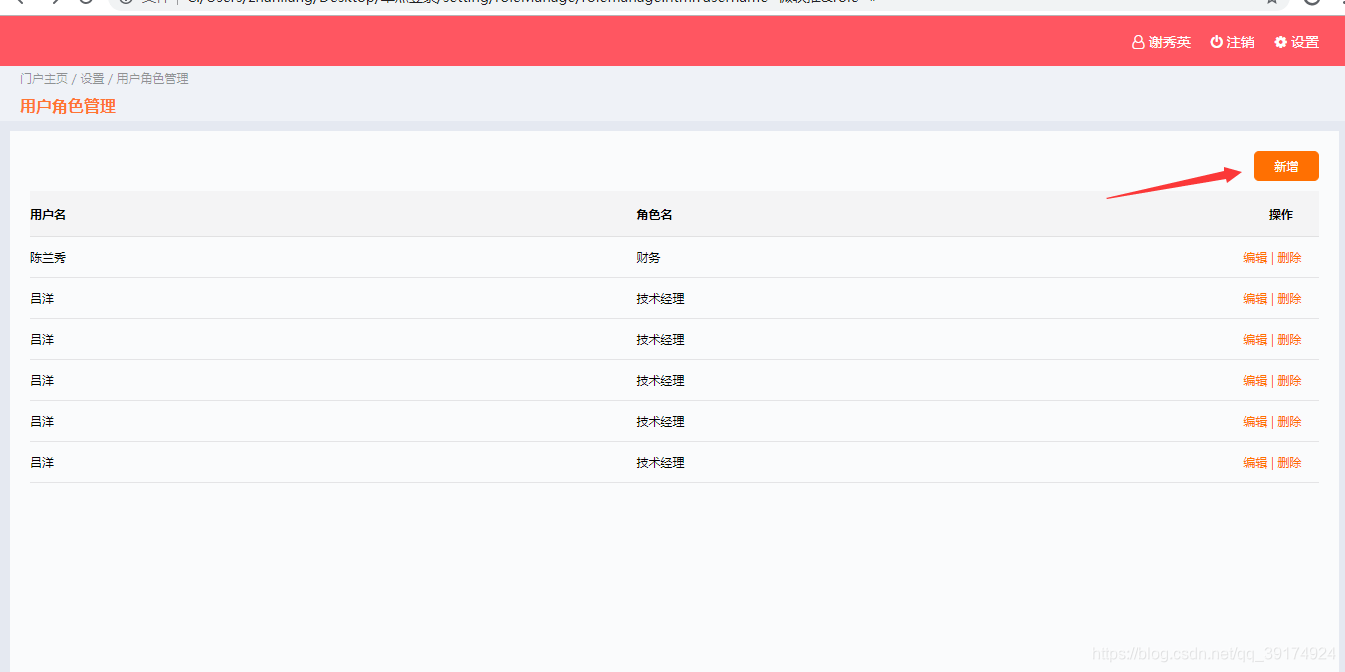
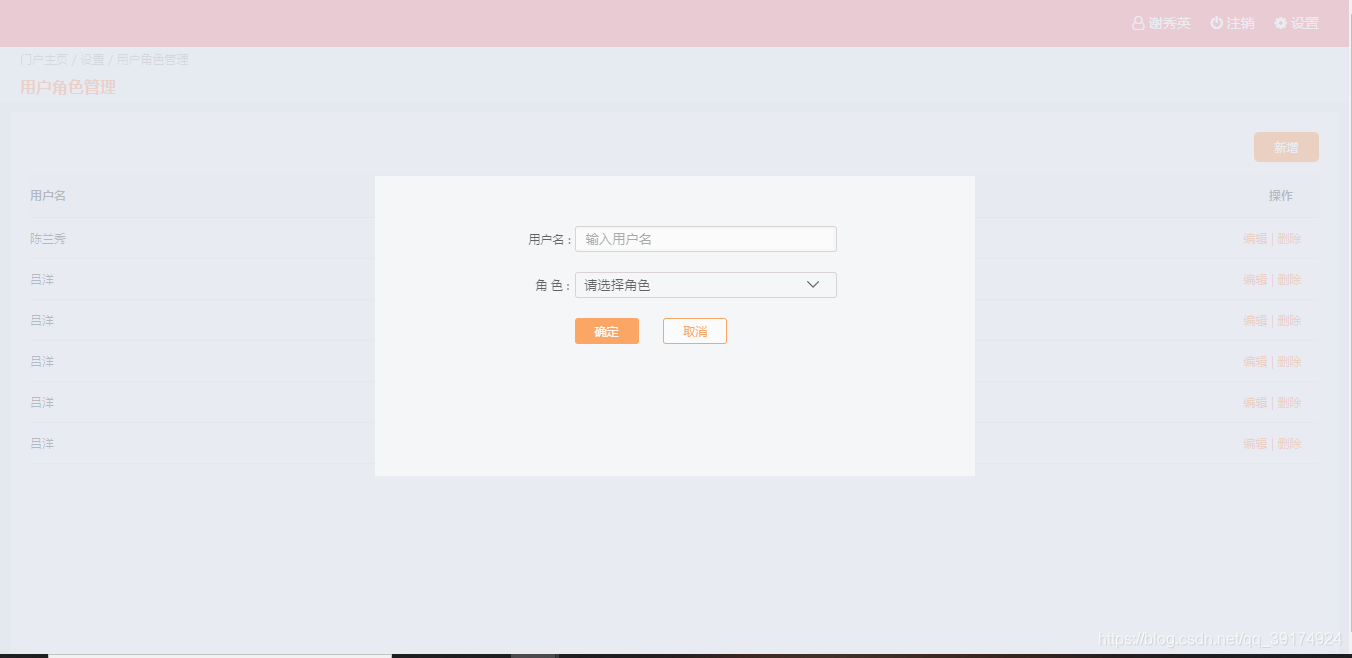





 扫一扫
扫一扫


 703
703

 被折叠的 条评论
为什么被折叠?
被折叠的 条评论
为什么被折叠?
 到【灌水乐园】发言





