table-call布局

CSS布局技巧精讲

学习了旭哥的文章总结

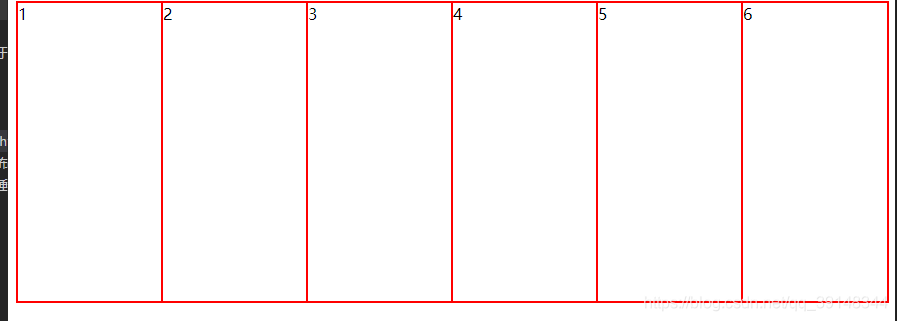
等分

  <style>
    .container {
      display: table;
      height: 300px;
      width: 100%;
      border: 1px solid red;
    }

    .child {
      display: table-cell;
      border: 1px solid red;
    }
  </style>

<body>
  <div class="container">
    <div class="child">1</div>
    <div class="child">2</div>
    <div class="child">3</div>
    <div class="child">4</div>
    <div class="child">5</div>
    <div class="child">6</div>
  </div>
</body>

效果

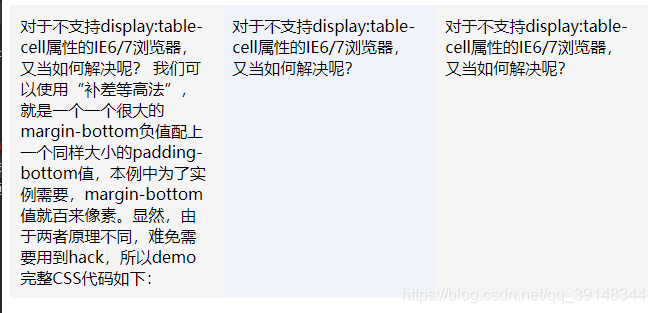
等高布局

  <style>
    .list_row {
      display: table-row;
    }

    .list_cell {
      display: table-cell;
      width: 30%;
      padding: 1.6%;
      background-color: #f5f5f5;
    }

    /*中间一个元素背景淡蓝,有别于两边的淡灰色*/
    .list_center {
      background-color: #f0f3f9;
    }
  </style>

<body>
  <div class="list_row">
    <div class="list_cell">对于不支持display:table-cell属性的IE6/7浏览器,又当如何解决呢?
      我们可以使用“补差等高法”,就是一个一个很大的margin-bottom负值配上一个同样大小的padding-bottom值,本例中为了实例需要,margin-bottom值就百来像素。显然,由于两者原理不同,难免需要用到hack,所以demo完整CSS代码如下:
    </div>
    <div class="list_cell list_center">对于不支持display:table-cell属性的IE6/7浏览器,又当如何解决呢?</div>
    <div class="list_cell ">对于不支持display:table-cell属性的IE6/7浏览器,又当如何解决呢?</div>
  </div>
</body>

效果

多行文字居中

  <style>
    .parent {
      display: table;
      height: 300px;
      width: 1000px;
      border: 1px solid red;
    }

    .child {
      display: table-cell;
      /* 类似于表格中的单元格 */
      /* 使元素的中部与父元素的基线加上父元素x-height(译注:x高度)的一半对齐。 */
      vertical-align: middle;
    }
  </style>

<body>
  <div class="parent">
    <div class="child">
      假如我现在有一个div,高度固定,里面有一段文本,差不多跟上面的第二个差不多,但是不知道到底有多少行。如果用第二种方法,并且文本超过了一行,那肯定超出父元素了,如图
    </div>
  </div>
</body>

左右布局

  <style>
    .box {
      width: 60%;
      margin: 60px auto 0;
      padding: 20px;
      background: #f5f5f5;
    }

    p {
      margin: 0;
    }

    a img {
      width: 100px;
      margin-right: 10px;
      float: left;
    }

    .content {
      display: table-cell;
      /* *display: inline-block; */
    }
  </style>

<body>
  <div class="box f9 fix">
    <a class="l mr10"><img src="./images/1.jpg" /></a>
    <div class="content">
      <p><a></a>大美女一枚</a> 来自上海</p>
      <p class="mt5">签名:想找个保鲜盒把你给我的那些感动都装起来。当你让我伤心的时候就拿出来回味一下。</p>
      <p class="mt5">
        微博:坐在办公室,只听轰隆隆几声巨响,晴天也能打雷吗?原来街对面的芭莎咖啡厅被炸成了两截。这定点爆破也太失败了,也不清下场,把路过的汽车震得灰头土脸,愣在路中央不知如何是好。其次,房子只炸了一半,另一半屹立不倒,是乍药太水还是房子质量太好?
      </p>
    </div>
  </div>

注意:设置display: table-cell;后消除BFC同时,不会像inline-block和absolute效果一样

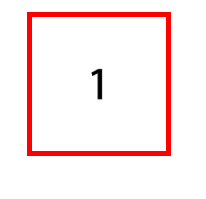
图片居中

  <style>
    ul {
      list-style: none;
    }

    .zxx_align_box_4 div {
      background-color: red;
      display: table-cell;
      width: 144px;
      height: 144px;
      line-height: 1.14;
      text-align: center;
      vertical-align: middle;
    }

    .zxx_align_box_4 div img {
      height: 134px;
      vertical-align: middle;
    }
  </style>
<body>
  <ul class="zxx_align_box_4 fix">
    <div><img src="./images/1.jpg" /></div>
  </ul>
</body>

效果


内容过长自动换行, <xsl:template match=“TableReport”> <fo:block > <fo:table text-align="left" border-collapse="collapse" letter-spacing="1px" width="100%" border-width="1pt" font-size="2.6mm"> <fo:table-column border-width="0pt" column-width="0.7cm"/> <fo:table-column border-width="0pt" column-width="0.8cm"/> <fo:table-column border-width="0pt" column-width="2.5cm"/> <fo:table-column border-width="0pt" column-width="1.5cm"/> <fo:table-column border-width="0pt" column-width="1cm"/> <fo:table-column border-width="0pt" column-width="1.6cm"/> <fo:table-column border-width="0pt" column-width="1.6cm"/> <fo:table-column border-width="0pt" column-width="3cm"/> <fo:table-column border-width="0pt" column-width="4.7cm"/> <fo:table-column border-width="0pt" column-width="0.8cm"/> <fo:table-column border-width="0pt" column-width="1.1cm"/> <fo:table-header> <fo:table-row height="5mm"> <fo:table-cell xsl:use-attribute-sets="border-cell-left-style"> <fo:block text-align="center">序号</fo:block> </fo:table-cell> <fo:table-cell xsl:use-attribute-sets="border-cell-left-style"> <fo:block text-align="center">组织</fo:block> </fo:table-cell> <fo:table-cell xsl:use-attribute-sets="border-cell-left-style"> <fo:block text-align="center">申请单号</fo:block> </fo:table-cell> <fo:table-cell xsl:use-attribute-sets="border-cell-left-style"> <fo:block text-align="center">类型</fo:block> </fo:table-cell> <fo:table-cell xsl:use-attribute-sets="border-cell-left-style"> <fo:block text-align="center">状态</fo:block> </fo:table-cell> <fo:table-cell xsl:use-attribute-sets="border-cell-style"> <fo:block text-align="center">工号</fo:block> </fo:table-cell> <fo:table-cell xsl:use-attribute-sets="border-cell-style"> <fo:block text-align="center">姓名</fo:block> </fo:table-cell> <fo:table-cell xsl:use-attribute-sets="border-cell-style"> <fo:block text-align="center">物料编码</fo:block> </fo:table-cell> <fo:table-cell xsl:use-attribute-sets="border-cell-style"> <fo:block text-align="center">物料描述</fo:block> </fo:table-cell> <fo:table-cell xsl:use-attribute-sets="border-cell-style"> <fo:block text-align="center">销数</fo:block> </fo:table-cell> <fo:table-cell xsl:use-attribute-sets="border-cell-style"> <fo:block text-align="center">原数量</fo:block> </fo:table-cell> </fo:table-row> </fo:table-header> <!--表明细--> <fo:table-body> <xsl:apply-templates select="TableRow"/> </fo:table-body> </fo:table> </fo:block> <fo:block id="end"/> </xsl:template> <xsl:template match="TableRow"> <fo:table-row height="5mm"> <fo:table-cell xsl:use-attribute-sets="border-cell-left-style"> <fo:block><xsl:value-of select="no"/></fo:block> </fo:table-cell> <fo:table-cell xsl:use-attribute-sets="border-cell-left-style"> <fo:block><xsl:value-of select="orgCode"/></fo:block> </fo:table-cell> <fo:table-cell xsl:use-attribute-sets="border-cell-left-style" font-size="2.2mm"> <fo:block><xsl:value-of select="requestNo"/></fo:block> </fo:table-cell> <fo:table-cell xsl:use-attribute-sets="border-cell-left-style"> <fo:block><xsl:value-of select="noteType"/></fo:block> </fo:table-cell> <fo:table-cell xsl:use-attribute-sets="border-cell-left-style"> <fo:block><xsl:value-of select="state"/></fo:block> </fo:table-cell> <fo:table-cell xsl:use-attribute-sets="border-cell-style"> <fo:block><xsl:value-of select="empNo"/></fo:block> </fo:table-cell> <fo:table-cell xsl:use-attribute-sets="border-cell-style" font-size="2.2mm"> <fo:block><xsl:value-of select="empName"/></fo:block> </fo:table-cell> <fo:table-cell xsl:use-attribute-sets="border-cell-style" font-size="2.2mm"> <fo:block><xsl:value-of select="itemCode"/></fo:block> </fo:table-cell> <fo:table-cell xsl:use-attribute-sets="border-cell-style" font-size="2.2mm"> <fo:block wrap-option="wrap" language="zh"><xsl:value-of select="itemDesc"/></fo:block> </fo:table-cell> <fo:table-cell xsl:use-attribute-sets="border-cell-style" font-size="2.2mm"> <fo:block wrap-option="wrap" language="zh"><xsl:value-of select="qty"/></fo:block> </fo:table-cell> <fo:table-cell xsl:use-attribute-sets="border-cell-style"> <fo:block><xsl:value-of select="holdQty"/></fo:block> </fo:table-cell> </fo:table-row> </xsl:template>
08-02
itemCode过长会超出格子并且好像没换行,<xsl:template match="TableRow"> <fo:table-row height="5mm"> <fo:table-cell xsl:use-attribute-sets="border-cell-left-style"> <fo:block><xsl:value-of select="no"/></fo:block> </fo:table-cell> <fo:table-cell xsl:use-attribute-sets="border-cell-left-style"> <fo:block><xsl:value-of select="orgCode"/></fo:block> </fo:table-cell> <fo:table-cell xsl:use-attribute-sets="border-cell-left-style" font-size="2.2mm"> <fo:block><xsl:value-of select="requestNo"/></fo:block> </fo:table-cell> <fo:table-cell xsl:use-attribute-sets="border-cell-left-style"> <fo:block><xsl:value-of select="noteType"/></fo:block> </fo:table-cell> <fo:table-cell xsl:use-attribute-sets="border-cell-left-style"> <fo:block><xsl:value-of select="state"/></fo:block> </fo:table-cell> <fo:table-cell xsl:use-attribute-sets="border-cell-style"> <fo:block><xsl:value-of select="empNo"/></fo:block> </fo:table-cell> <fo:table-cell xsl:use-attribute-sets="border-cell-style" font-size="2.2mm"> <fo:block><xsl:value-of select="empName"/></fo:block> </fo:table-cell> <fo:table-cell xsl:use-attribute-sets="border-cell-style" font-size="2.2mm"> <fo:block wrap-option="wrap"><xsl:value-of select="itemCode"/></fo:block> </fo:table-cell> <fo:table-cell xsl:use-attribute-sets="border-cell-style" font-size="2.2mm"> <fo:block wrap-option="wrap" language="zh"><xsl:value-of select="itemDesc"/></fo:block> </fo:table-cell> <fo:table-cell xsl:use-attribute-sets="border-cell-style" font-size="2.2mm"> <fo:block wrap-option="wrap" language="zh"><xsl:value-of select="qty"/></fo:block> </fo:table-cell> <fo:table-cell xsl:use-attribute-sets="border-cell-style"> <fo:block><xsl:value-of select="holdQty"/></fo:block> </fo:table-cell> </fo:table-row> </xsl:template>
08-02
<template> <div class="home-container"> <el-tabs @tab-click="handleTabChange"> <el-tab-pane label="总览"> <div class="tab-content"> <div class="stats-row"> <el-col :span="6"> <el-card class="stat-card danger"> <div class="stat-title">当前通话数</div> <div class="stat-value">0</div> <div class="stat-sub"> 较昨日: <span style="color: #f56c6c">0</span> </div> </el-card> </el-col> <el-col :span="6"> <el-card class="stat-card"> <div class="stat-title">今日通话数</div> <div class="stat-value">0</div> <div class="stat-sub"> 较昨日: <span style="color: #67c23a">0</span> </div> </el-card> </el-col> <el-col :span="6"> <el-card class="stat-card"> <div class="stat-title">历史通话数</div> <div class="stat-value">0</div> <div class="stat-sub"> 较昨日: <span style="color: #67c23a">0</span> </div> </el-card> </el-col> <el-col :span="6"> <el-card class="stat-card"> <div class="stat-title">当前线路数</div> <div class="stat-value">0</div> <div class="stat-sub"> 较昨日: <span style="color: #67c23a">0</span> </div> </el-card> </el-col> </div> <div class="table-card"> <el-table :data="summaryTable" border> <el-table-column prop="label" label="指标"></el-table-column> <el-table-column prop="value" label="数值"></el-table-column> </el-table> </div> </div> </el-tab-pane> <el-tab-pane label="省份统计"> <div class="tab-content"> <el-table :data="provinceTable" border> <el-table-column prop="province" label="省份"></el-table-column> <el-table-column prop="currentCall" label="当前通话数" ></el-table-column> <el-table-column prop="todayCall" label="今日通话数" ></el-table-column> <el-table-column prop="historyCall" label="历史通话数" ></el-table-column> <el-table-column prop="currentLine" label="当前线路数" ></el-table-column> <el-table-column prop="circuit" label="电路线路数" ></el-table-column> <el-table-column prop="network" label="网络线路数" ></el-table-column> <el-table-column prop="todayLine" label="今日线路数" ></el-table-column> <el-table-column prop="todayCircuit" label="今日电路线路数" ></el-table-column> <el-table-column prop="todayNetwork" label="今日网络线路数" ></el-table-column> <el-table-column prop="historyLine" label="历史线路数" ></el-table-column> <el-table-column prop="historyCircuit" label="历史电路线路数" ></el-table-column> <el-table-column prop="historyNetwork" label="历史网络线路数" ></el-table-column> </el-table> </div> </el-tab-pane> <el-tab-pane label="趋势分析"> <div class="tab-content"> <div class="chart-placeholder"> <div class="mock-chart"> <div class="chart-line-container"> <div class="chart-line通话"></div> <div class="chart-line线路"></div> </div> <div class="chart-legend"> <span style="color: teal">通话数</span> | <span style="color: purple">线路数</span> </div> <div class="chart-buttons"> <el-button size="mini">近7天</el-button> <el-button size="mini">近30天</el-button> </div> </div> </div> </div> </el-tab-pane> </el-tabs> </div> </template> <script> import { userlist, getsuperes } from "@/utils/https.js"; export default { name: "HomeView", data() { return { summaryTable: [], provinceTable: [ { province: "江苏", currentCall: 0, todayCall: 0, historyCall: 0, currentLine: 0, circuit: 0, network: 0, todayLine: 0, todayCircuit: 0, todayNetwork: 0, historyLine: 0, historyCircuit: 0, historyNetwork: 0, }, { province: "上海", currentCall: 0, todayCall: 0, historyCall: 0, currentLine: 0, circuit: 0, network: 0, todayLine: 0, todayCircuit: 0, todayNetwork: 0, historyLine: 0, historyCircuit: 0, historyNetwork: 0, }, { province: "浙江", currentCall: 0, todayCall: 0, historyCall: 0, currentLine: 0, circuit: 0, network: 0, todayLine: 0, todayCircuit: 0, todayNetwork: 0, historyLine: 0, historyCircuit: 0, historyNetwork: 0, }, { province: "安徽", currentCall: 0, todayCall: 0, historyCall: 0, currentLine: 0, circuit: 0, network: 0, todayLine: 0, todayCircuit: 0, todayNetwork: 0, historyLine: 0, historyCircuit: 0, historyNetwork: 0, }, ], superEnterpriseList: [], // 新增的超级企业列表数据 }; }, mounted() { this.loadHomeData(); this.loadSuperEnterpriseList(); // 调用获取超级企业列表的方法 }, methods: { loadHomeData() { userlist() .then(data => { this.summaryTable = data.summary || []; this.provinceTable = data.provinces || this.provinceTable; }) .catch(error => { console.error("加载首页数据失败:", error); this.$message.error("加载数据失败"); }); }, loadSuperEnterpriseList() { getsuperes() .then(response => { this.superEnterpriseList = response.data || []; console.log('超级企业列表:', this.superEnterpriseList); }) .catch(error => { console.error('获取超级企业列表失败:', error); this.$message.error('获取超级企业列表失败'); }); }, handleTabChange(tab) { console.log("切换到:", tab.name); }, handleSizeChange(val) { this.pageSize = val; }, handleCurrentChange(val) { this.currentPage = val; }, }, }; </script> <style scoped> :root { --main-bg-color: #f5f7fa; --tab-bg-color: #ffffff; --stat-border-color: #f56c6c; } .home-container { padding: 20px; background: var(--main-bg-color); min-height: calc(100vh - 64px); } .tab-wrapper { background: var(--tab-bg-color); border: 1px solid #ebeef5; border-radius: 4px; } .tab-content { padding: 20px; border-top: none; } .stats-row { margin-top: 10px; } .stat-card { height: 160px; display: flex; flex-direction: column; justify-content: center; align-items: center; } .stat-card.danger { border-left: 4px solid var(--stat-border-color); } .stat-title { font-size: 16px; font-weight: 500; margin-bottom: 10px; } .stat-value { font-size: 24px; color: #303133; margin-bottom: 10px; } .stat-sub { font-size: 14px; color: #909399; } .table-card { padding: 20px; } .chart-placeholder { text-align: center; padding: 40px 0; } .mock-chart { position: relative; height: 300px; width: 100%; } .chart-line-container { position: absolute; bottom: 40px; left: 10%; width: 80%; height: 200px; border-bottom: 1px solid #e0e0e0; border-left: 1px solid #e0e0e0; } .chart-line通话 { position: absolute; bottom: 0; width: 100%; height: 30%; background: linear-gradient(to top, rgba(0, 128, 128, 0.2) 0%, teal 100%); clip-path: polygon( 0% 100%, 5% 80%, 10% 60%, 15% 70%, 20% 50%, 25% 60%, 30% 40%, 35% 50%, 40% 30%, 45% 40%, 50% 20%, 55% 30%, 60% 10%, 65% 20%, 70% 0%, 75% 10%, 80% 30%, 85% 20%, 90% 40%, 95% 30%, 100% 50%, 100% 100% ); } .chart-line线路 { position: absolute; bottom: 0; width: 100%; height: 60%; background: linear-gradient(to top, rgba(128, 0, 128, 0.2) 0%, purple 100%); clip-path: polygon( 0% 100%, 5% 90%, 10% 70%, 15% 80%, 20% 60%, 25% 70%, 30% 50%, 35% 60%, 40% 40%, 45% 50%, 50% 30%, 55% 40%, 60% 20%, 65% 30%, 70% 10%, 75% 20%, 80% 40%, 85% 30%, 90% 50%, 95% 40%, 100% 60%, 100% 100% ); } .chart-legend { position: absolute; bottom: 20px; left: 50%; transform: translateX(-50%); } .chart-buttons { position: absolute; bottom: -20px; left: 50%; transform: translateX(-50%); } .server-select, .province-select { width: 160px; margin-bottom: 20px; } </style>纠错
08-01
评论
添加红包

请填写红包祝福语或标题

红包个数最小为10个

红包金额最低5元

当前余额3.43前往充值 >
需支付:10.00
成就一亿技术人!
领取后你会自动成为博主和红包主的粉丝 规则
hope_wisdom
发出的红包
实付
使用余额支付
点击重新获取
扫码支付
钱包余额 0

抵扣说明:

1.余额是钱包充值的虚拟货币,按照1:1的比例进行支付金额的抵扣。
2.余额无法直接购买下载,可以购买VIP、付费专栏及课程。

余额充值