



 本文档介绍了如何在Vue项目中使用微信开放标签`wx-open-subscribe`,包括在index.html引入SDK,配置微信config,全局引用并在main.js中设置。在创建的页面中调用公共函数并添加标签。重点讨论了如何通过样式修改保持原有按钮样式,例如使用相对定位的父级div,以及绝对定位的开放标签,并提供了样例代码进行演示。最终,样式调整应在测试或生产环境的真机上验证模板消息的点击效果。
这里是官方参考文档:参考文档
- 首先在index.html引入sdk
<script src="https://res.wx.qq.com/open/js/jweixin-1.6.0.js"></script>
- 封装微信config文件:具体可看文档有详细说明
import Reqs from "@api/common.js";
export function wxSubscribe() {
  const url = window.location.href.split("#")[0];
  const params = {
    url,
  };
  console.log("params___", params);
  Reqs.wxConfig(params)
    .then((data) => {
      console.log("配置数据", data);
      wx.config({
        // beta: true,
        debug: false,
        appId: data.appId,
        timestamp: data.timestamp,
        nonceStr: data.nonceStr,
        signature: data.signature,
        jsApiList: ['onMenuShareAppMessage'],
        openTagList: ["wx-open-subscribe"],
      });
      console.log("微信config完成");
    })
    .catch((err) => {
      console.log(err);
    });
}
- 因为要方便使用模板消息所以我就全局引用了,在main.js加上这句
import {wxSubscribe} from '@s-a/js/wxSubscribe'
然后在对应需要加载开放标签的页面,直接在created里面,调用这个公共函数就可以了
created() {
    this.wxSubscribe();
  },
- 重头戏来了,在你需要使用的页面上写入标签,比如我要加在一个轮播卡片里面的按钮:
为了保留原来样式,我在按钮和开放标签外面多包了一层div,父级div记得加positon:relative;我这里就不多赘述,mt-button是原来的按钮,开放标签的样式就是绝对定位到上面去,设置透明,以及最高层,这里宽高我写了50vw和100%,应该两个写100%也是可以的,你们可以试试,我把样式写到行内的目的是测试环境能够好调试样式
<div class="parent-box">
                <mt-button
                  class="dealIllBtn btnCopy subscribe-btn"
                  type="primary"
                  >处理违章</mt-button
                >
                <wx-open-subscribe
                  style="width: 50vw; z-index: 2; height: 100%"
                  @success="subSuccess($event, item)"
                  @error="subError"
                  :template="subTemplateId"
                  id="subscribe-btn"
                >
                  <script type="text/wxtag-template">
                    <style>
                        .btn2 {
                            border: none;
                            position:absolute;
                            z-index:2;
                            opacity: 0;
                            left:0;top:0;
                            right:0;
                            bottom:0;
                            width:100%;
                            height:100%;
                        }
                    </style>
                    <button class="btn2"></button>
                  </script>
                </wx-open-subscribe>
subError(e) {
      console.log("subError", e);
    },
    // 我这里判断是必须把复数模板全部订阅
    subSuccess(e, item) {
      console.log(e, item);
      let attend = false;
      let subscribeDetails = JSON.parse(e.detail.subscribeDetails); // 全部的模板
      for (let i in this.subTemplateId) {
        let subKey = subscribeDetails[this.subTemplateId[i]]; // 获取每个模板的状态
        let status = JSON.parse(subKey);
        let type = false;
        switch (status.status) {
          case "reject":
            console.log(`用户拒绝订阅全部消息`);
            type = false;
            break;
          case "cancel":
            console.log(`用户取消订阅全部消息`);
            type = false;
            break;
          case "filter":
            console.log(`第${i}条消息应该标题同名被后台过滤`);
            type = false;
            break;
          default:
            type = true;
            break;
        }
        if (!type) {
          // 如果其中有一个模板没有订阅,则全部不通过过
          attend = false;
          break;
        } else {
          attend = true;
        }
      }
      if (!attend) {
        console.log("订阅消息才能参与");
        this.goIllegalPage(item);
        return;
      }
      console.log("参与成功");
      this.goIllegalPage(item);
    },
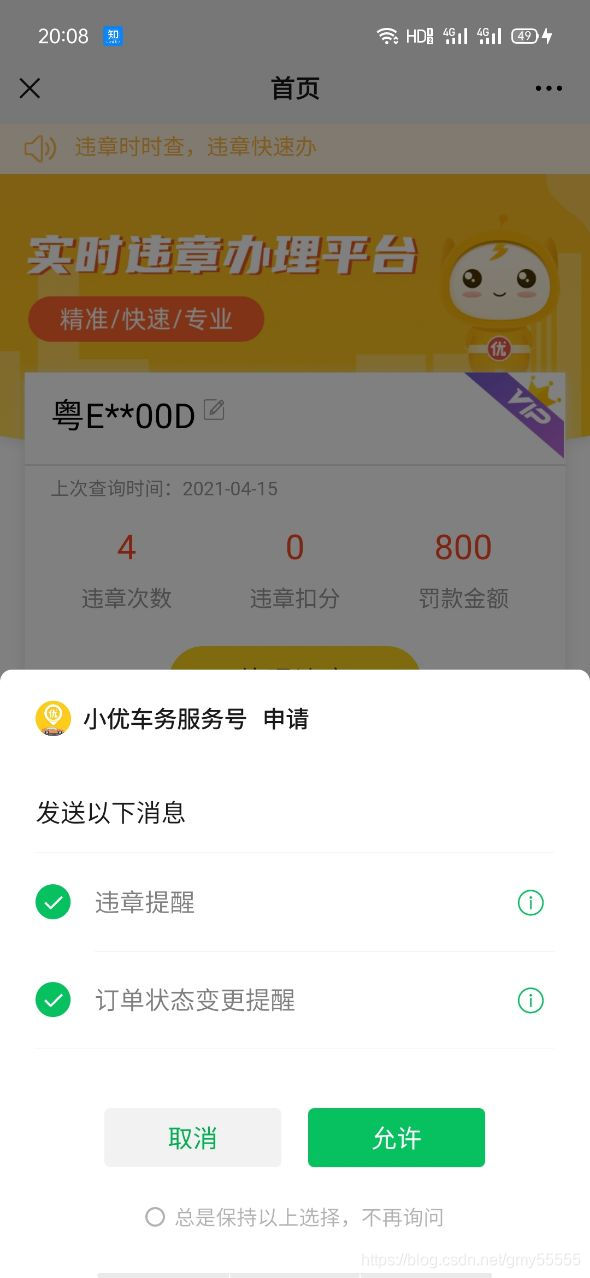
- 最终效果得部署到测试环境或者生产环境的真机上才能测出点击模板的效果:





 扫一扫
扫一扫


 617
617

 被折叠的 条评论
为什么被折叠?
被折叠的 条评论
为什么被折叠?
 到【灌水乐园】发言





