



 Apache CXF是一个开源服务框架,支持多种协议和传输协议,如SOAP、RESTful等。它提供JAX-WS和JAX-RS的实现,方便服务的发布和使用。在实现JAXWS服务时,注意客户端和服务端实现类的包路径需一致。对于JAXRS,文章涵盖了客户端和服务端的发布和调用过程。
Apache CXF 框架介绍
Apache CXF = Celtix + XFire, ApacheCXF 的前身叫做Apache CeltiXfire,现在已经正式更名为Apache CXF了,CXF继承了Celtix 和XFire两大开源项目的精华,提供了对JAX-WS 全面的支持,并且提供了多种Binding、DataBing、Tramsport 以及各种对Format 的支持,并且可以根据实际项目的需要,采用代码有限 (Code First)或者 WSDL 优先(WSDL First) 来轻松实现WebServices 的发布和使用,目前它仍只是Apache 的一个孵化项目。
Apache CXF 是一个开源的 Services 框架,CXF 帮助您利用 Frontend 编程API 来构建和开发 Service,像JAX-WS,这些Services 可以支持多种协议,比如:SOAP、XML/HTTP、RESTful 或者CORBA,并且可以在多种传输协议上运行,比如: HTTP、JMS 或者JBI,CXF 大大简化了Services 的创建,同时它继承了XFire 传统,一样可以天然地和Spring 进行无缝集成。
功能特性
CXF 包含了大量的功能特性,但是主要集中在以下几个方面:
(1)支持webServices 标准,包含SOAP、Basic Profile 、WS=addressing、WS-Policy、WS-ReableMessaging 和WS-Security。
(2)Frontends:CXF支持多种 Frontend 编程模型,CXF 实现了JAX-WS API (遵循JAX-WS 2.0 TCK版本),它包含一个“simple frontend”允许客户端和EndPoint 的创建,而不需要Annotation 注解,CXF 即支持WSDL 优先开发,也支持从Java 的代码优先开发模式。
(3)容易使用:CXF 设计的更加直观与容易使用,有大量简单的API 来快速构建代码优先的Services 各种Maven 的插件也使得集成更加容易,支持JAX-WS API 支持Spring2.0更加简化的XML 配置方式,等等。
实现JAXWS
<?xml version="1.0" encoding="UTF-8"?>

<project xmlns="http://maven.apache.org/POM/4.0.0" xmlns:xsi="http://www.w3.org/2001/XMLSchema-instance"
  xsi:schemaLocation="http://maven.apache.org/POM/4.0.0 http://maven.apache.org/xsd/maven-4.0.0.xsd">
  <modelVersion>4.0.0</modelVersion>

  <groupId>com.demo</groupId>
  <artifactId>jaxws_service</artifactId>
  <version>1.0-SNAPSHOT</version>

  <name>jaxws_service</name>
  <!-- FIXME change it to the project's website -->
  <url>http://www.example.com</url>

  <properties>
    <project.build.sourceEncoding>UTF-8</project.build.sourceEncoding>
    <maven.compiler.source>1.7</maven.compiler.source>
    <maven.compiler.target>1.7</maven.compiler.target>
  </properties>

  <dependencies>
    <dependency>
      <groupId>junit</groupId>
      <artifactId>junit</artifactId>
      <version>4.11</version>
      <scope>test</scope>
    </dependency>
    <!---jaxws-->
    <dependency>
      <groupId>org.apache.cxf</groupId>
      <artifactId>cxf-rt-frontend-jaxws</artifactId>
      <version>3.3.0</version>
    </dependency>
    <dependency>
      <groupId>org.apache.cxf</groupId>
      <artifactId>cxf-rt-transports-http-jetty</artifactId>
      <version>3.1.6</version>
    </dependency>

    <dependency>
      <groupId>org.slf4j</groupId>
      <artifactId>slf4j-log4j12</artifactId>
      <version>1.7.25</version>
    </dependency>
  </dependencies>
  <build>
    <pluginManagement><!-- lock down plugins versions to avoid using Maven defaults (may be moved to parent pom) -->
      <plugins>
        <!-- clean lifecycle, see https://maven.apache.org/ref/current/maven-core/lifecycles.html#clean_Lifecycle -->
        <plugin>
          <artifactId>maven-clean-plugin</artifactId>
          <version>3.1.0</version>
        </plugin>
        <!-- default lifecycle, jar packaging: see https://maven.apache.org/ref/current/maven-core/default-bindings.html#Plugin_bindings_for_jar_packaging -->
        <plugin>
          <artifactId>maven-resources-plugin</artifactId>
          <version>3.0.2</version>
        </plugin>
        <plugin>
          <artifactId>maven-compiler-plugin</artifactId>
          <version>3.8.0</version>
        </plugin>
        <plugin>
          <artifactId>maven-surefire-plugin</artifactId>
          <version>2.22.1</version>
        </plugin>
        <plugin>
          <artifactId>maven-jar-plugin</artifactId>
          <version>3.0.2</version>
        </plugin>
        <plugin>
          <artifactId>maven-install-plugin</artifactId>
          <version>2.5.2</version>
        </plugin>
        <plugin>
          <artifactId>maven-deploy-plugin</artifactId>
          <version>2.8.2</version>
        </plugin>
        <!-- site lifecycle, see https://maven.apache.org/ref/current/maven-core/lifecycles.html#site_Lifecycle -->
        <plugin>
          <artifactId>maven-site-plugin</artifactId>
          <version>3.7.1</version>
        </plugin>
        <plugin>
          <artifactId>maven-project-info-reports-plugin</artifactId>
          <version>3.0.0</version>
        </plugin>
      </plugins>
    </pluginManagement>
  </build>
</project>
服务端:
package com.demo.service.facede;

import com.demo.service.ProductionService;

public class ProductionServiceFacade implements ProductionService {
    /**
     * 对外发布接口的方法
     *
     * @param name 名称
     */
    @Override
    public String sayHello(String name) {
        return "Hello~ "+name;
    }
}
package com.demo.service.facede;

import com.demo.service.ProductionService;

public class ProductionServiceFacade implements ProductionService {
    /**
     * 对外发布接口的方法
     *
     * @param name 名称
     */
    @Override
    public String sayHello(String name) {
        return "Hello~ "+name;
    }
}
发布服务:
package com.demo.service;

import com.demo.service.facede.ProductionServiceFacade;
import org.apache.cxf.jaxws.JaxWsServerFactoryBean;

/**
 * 发布服务
 */
public class RegisterService {
    public static void main(String [] args){
        //发布服务的工厂
        JaxWsServerFactoryBean factory = new JaxWsServerFactoryBean();
        //设置webservice 服务地址
        factory.setAddress("http://localhost:8888/ws/hello");
        //设置提供服务的服务类
        factory.setServiceBean(new ProductionServiceFacade());
        //发布服务
        factory.create();
        System.out.println("服务发成功端口为:8888");
    }
}

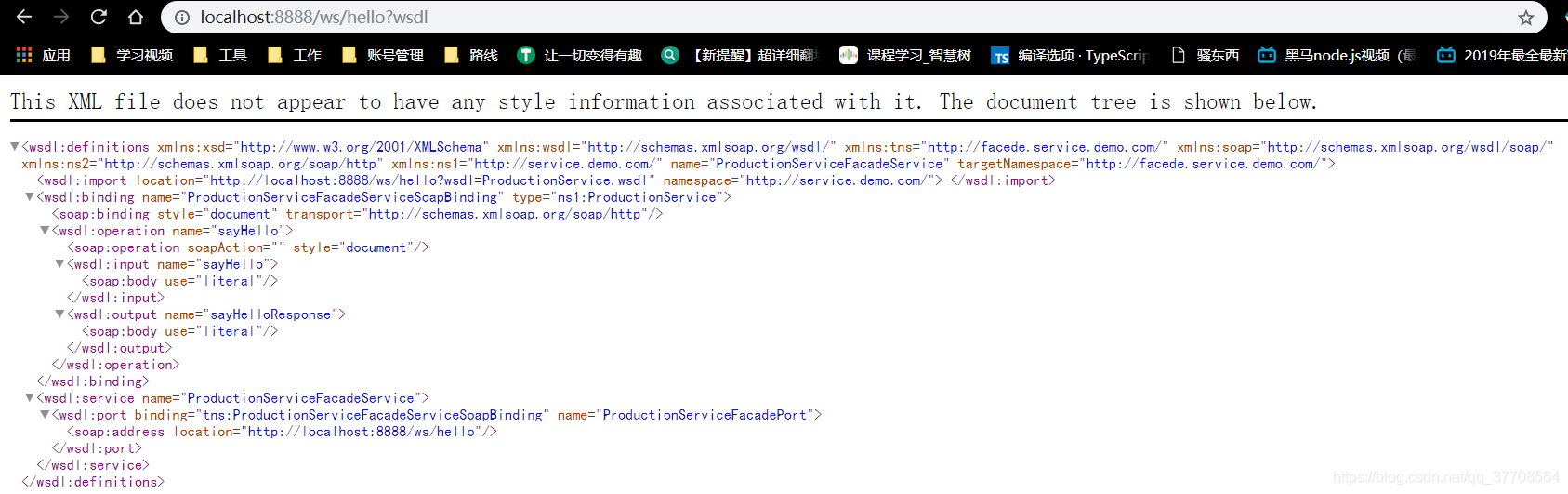
访问WSDL 说明书地址
客户端:
package com.demo.service;

import javax.jws.WebService;

@WebService
public interface ProductionService {
    /**
     * 对外发布接口的方法
     */
    public String sayHello(String name);
}
package com.demo;

import com.demo.service.HelloService;
import org.apache.cxf.jaxws.JaxWsProxyFactoryBean;

public class Client {
    public static void main(String[] args) {
        //创建CXF 代理对象
        JaxWsProxyFactoryBean jaxWsProxyFactoryBean = new JaxWsProxyFactoryBean();
        //设置访问地址
        jaxWsProxyFactoryBean.setAddress("http://localhost:8888/ws/hello");
        //设置接口类型
        jaxWsProxyFactoryBean.setServiceClass(HelloService.class);
        //生成代理对象
        HelloService helloService = jaxWsProxyFactoryBean.create(HelloService.class);
        System.out.println(helloService.getClass());
       String s = helloService.sayHello("ZSF");
        System.out.println(s);
    }
}
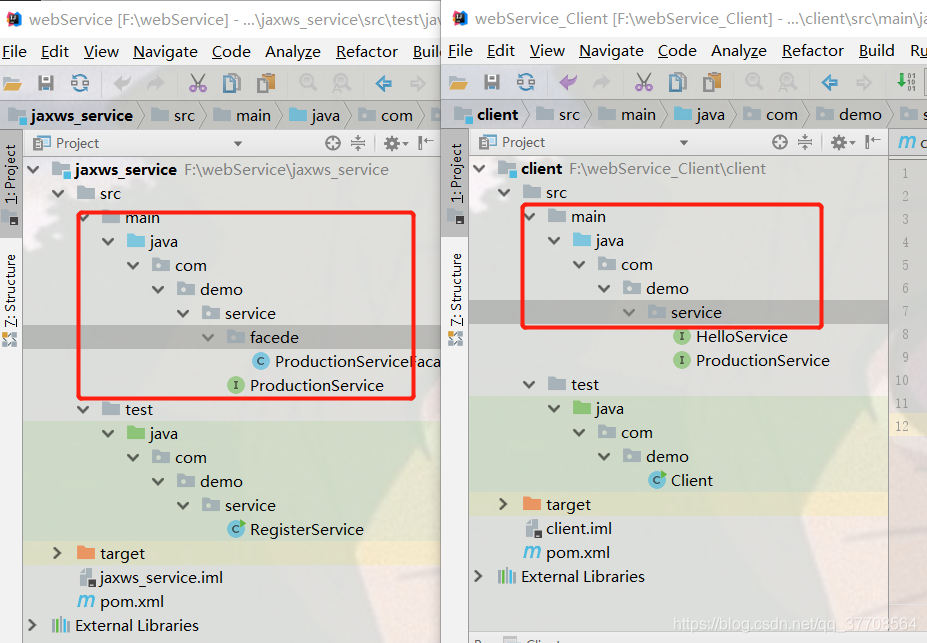
这里要注意的是客户端和服务端的实现类的包路径要一样,不然就会出现 方法找不到,另外一个需要注意的是客户端的实现类名可以随便取。
客户端包结构: 服务端包结构:
结果:
class com.sun.proxy.$Proxy35
Hello~ ZSF
实现JAXRS
客户端:
pom.xml
<?xml version="1.0" encoding="UTF-8"?>

<project xmlns="http://maven.apache.org/POM/4.0.0" xmlns:xsi="http://www.w3.org/2001/XMLSchema-instance"
  xsi:schemaLocation="http://maven.apache.org/POM/4.0.0 http://maven.apache.org/xsd/maven-4.0.0.xsd">
  <modelVersion>4.0.0</modelVersion>

  <groupId>com.demo</groupId>
  <artifactId>JaxRsClient</artifactId>
  <version>1.0-SNAPSHOT</version>

  <name>JaxRsClient</name>
  <!-- FIXME change it to the project's website -->
  <url>http://www.example.com</url>

  <properties>
    <project.build.sourceEncoding>UTF-8</project.build.sourceEncoding>
    <maven.compiler.source>1.7</maven.compiler.source>
    <maven.compiler.target>1.7</maven.compiler.target>
  </properties>

  <dependencies>
    <dependency>
      <groupId>junit</groupId>
      <artifactId>junit</artifactId>
      <version>4.11</version>
      <scope>test</scope>
    </dependency>
    <!---jaxrs-->
    <dependency>
      <groupId>org.apache.cxf</groupId>
      <artifactId>cxf-rt-frontend-jaxrs</artifactId>
      <version>3.0.1</version>
    </dependency>
    <dependency>
      <groupId>org.apache.cxf</groupId>
      <artifactId>cxf-rt-transports-http-jetty</artifactId>
      <version>3.1.6</version>
    </dependency>
    <!--客户端调用restful 风格的依赖-->
    <dependency>
      <groupId>org.apache.cxf</groupId>
      <artifactId>cxf-rt-rs-client</artifactId>
      <version>3.0.1</version>
    </dependency>

    <!--规定数据传输格式的jar包既可以是xml 也可以是json 依赖开始-->
    <dependency>
      <groupId>org.apache.cxf</groupId>
      <artifactId>cxf-rt-rs-extension-providers</artifactId>
      <version>3.0.1</version>
    </dependency>
    <dependency>
      <groupId>org.codehaus.jettison</groupId>
      <artifactId>jettison</artifactId>
      <version>1.3.7</version>
    </dependency>
    <!--规定数据传输格式的jar包既可以是xml 也可以是json 依赖结束-->
  </dependencies>

  <build>
    <pluginManagement><!-- lock down plugins versions to avoid using Maven defaults (may be moved to parent pom) -->
      <plugins>
        <!-- clean lifecycle, see https://maven.apache.org/ref/current/maven-core/lifecycles.html#clean_Lifecycle -->
        <plugin>
          <artifactId>maven-clean-plugin</artifactId>
          <version>3.1.0</version>
        </plugin>
        <!-- default lifecycle, jar packaging: see https://maven.apache.org/ref/current/maven-core/default-bindings.html#Plugin_bindings_for_jar_packaging -->
        <plugin>
          <artifactId>maven-resources-plugin</artifactId>
          <version>3.0.2</version>
        </plugin>
        <plugin>
          <artifactId>maven-compiler-plugin</artifactId>
          <version>3.8.0</version>
        </plugin>
        <plugin>
          <artifactId>maven-surefire-plugin</artifactId>
          <version>2.22.1</version>
        </plugin>
        <plugin>
          <artifactId>maven-jar-plugin</artifactId>
          <version>3.0.2</version>
        </plugin>
        <plugin>
          <artifactId>maven-install-plugin</artifactId>
          <version>2.5.2</version>
        </plugin>
        <plugin>
          <artifactId>maven-deploy-plugin</artifactId>
          <version>2.8.2</version>
        </plugin>
        <!-- site lifecycle, see https://maven.apache.org/ref/current/maven-core/lifecycles.html#site_Lifecycle -->
        <plugin>
          <artifactId>maven-site-plugin</artifactId>
          <version>3.7.1</version>
        </plugin>
        <plugin>
          <artifactId>maven-project-info-reports-plugin</artifactId>
          <version>3.0.0</version>
        </plugin>
      </plugins>
    </pluginManagement>
  </build>
</project>
实体类
package com.demo.entity;

import javax.xml.bind.annotation.XmlRootElement;

@XmlRootElement(name = "User")
public class User {

    private Integer id;
    private String name;
    private String city;

    public Integer getId() {
        return id;
    }

    public void setId(Integer id) {
        this.id = id;
    }

    public String getName() {
        return name;
    }

    public void setName(String name) {
        this.name = name;
    }

    public String getCity() {
        return city;
    }

    public void setCity(String city) {
        this.city = city;
    }


}
接口
package com.demo.service;

import com.demo.entity.User;
import jdk.nashorn.internal.objects.annotations.Constructor;

import javax.ws.rs.*;
import java.util.List;

@Path("userService")
@Produces(value = "*/*")
public interface UserServer {
    @POST
    @Path("/user")
    @Consumes({"application/xml","application/json"})
    public void saveUser(User user);

    @PUT
    @Path("/user")
    @Consumes({"application/xml","application/json"})
    public void updateUser(User user);

    @GET
    @Path("/user")
    @Consumes({"application/xml","application/json"})
    public List<User> queryAllUser();

    @GET
    @Path("/user/{id}")
    @Consumes({"application/xml","application/json"})
    public User queryUser(@PathParam("id") Integer id);

    @DELETE
    @Path("/user/{id}")
    @Consumes({"application/xml","application/json"})
    public void deleteUser(@PathParam("id")Integer id);


}
实现类:
package com.demo.service.facade;

import com.demo.entity.User;
import com.demo.service.UserServer;

import java.util.ArrayList;
import java.util.List;

public class UserServerFacade implements UserServer {
    @Override
    public void saveUser(User user) {
        System.out.println("saveUser:"+user);
    }

    @Override
    public void updateUser(User user) {
        System.out.println("updateUser:"+user);
    }

    @Override
    public List<User> queryAllUser() {
        List<User> userList = new ArrayList<User>();
        User user1 = new User();
        user1.setId(1);
        user1.setName("张三丰");
        user1.setCity("北京");
        User user2 = new User();
        user2.setId(1);
        user2.setName("秦始皇");
        user2.setCity("兰州");
        userList.add(user1);
        userList.add(user2);
        System.out.println("queryAllUser");

        return userList;
    }

    @Override
    public User queryUser(Integer id) {
        System.out.println("queryUser ID:" + id);
        if(id == 1) {
            User user1 = new User();
            user1.setId(1);
            user1.setName("张三丰");
            user1.setCity("北京");
            return user1;
        }else{
            return  null;
        }
    }

    @Override
    public void deleteUser(Integer id) {
        System.out.println("deleteUser ID:"+id);

    }
}
发布服务类
package com.demo;

import com.demo.service.facade.UserServerFacade;
import org.apache.cxf.jaxrs.JAXRSServerFactoryBean;

public class PushService {
    public static void main(String[] args) {
        //创建发布服务工厂
        JAXRSServerFactoryBean jaxrsServerFactoryBean = new JAXRSServerFactoryBean();
        //设置服务地址
        jaxrsServerFactoryBean.setAddress("http://localhost:8001/ws/");
        //设置服务类
        jaxrsServerFactoryBean.setServiceBean(new UserServerFacade());
        //发布服务
        jaxrsServerFactoryBean.create();
        System.out.println("服务发布成功 端口为8001");
    }
}
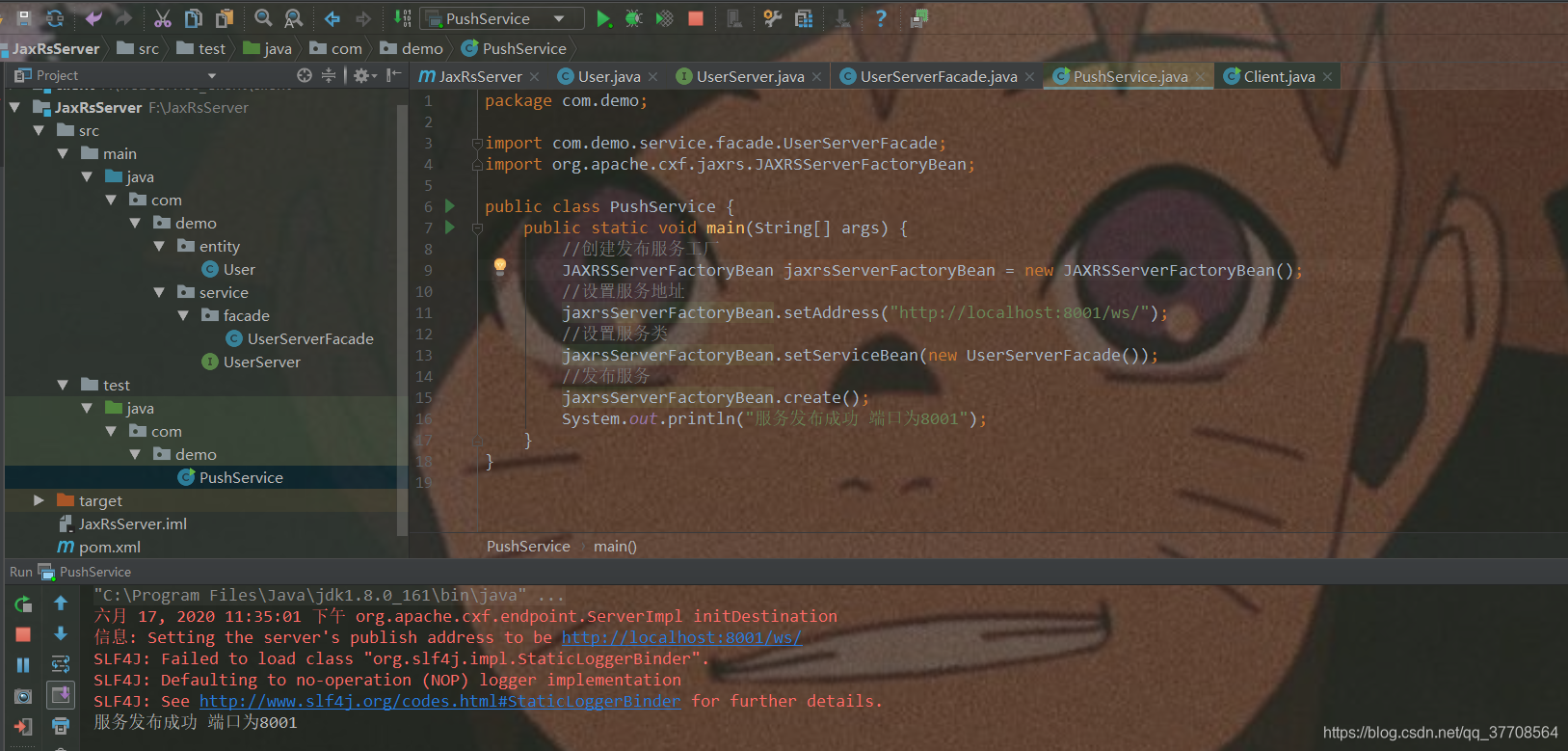
发布服务
客户端:
实体类
package com.demo.entity;

import javax.xml.bind.annotation.XmlRootElement;

@XmlRootElement(name = "User")
public class User {

    private Integer id;
    private String name;
    private String city;

    public Integer getId() {
        return id;
    }

    public void setId(Integer id) {
        this.id = id;
    }

    public String getName() {
        return name;
    }

    public void setName(String name) {
        this.name = name;
    }

    public String getCity() {
        return city;
    }

    public void setCity(String city) {
        this.city = city;
    }

}
客户端
package com.demo;

import com.demo.entity.User;
import org.apache.cxf.jaxrs.client.WebClient;
import org.junit.Test;

import javax.ws.rs.core.MediaType;


public class Client {
    @Test
    public void testSaveUser(){
        User user  = new User();
        user.setId(1);
        user.setName("张无忌");
        user.setCity("大理");
        WebClient.create("http://localhost:8001/ws/userService/user").type(MediaType.APPLICATION_JSON).post(user);

    }
    @Test
    public void testQueryUser(){
     WebClient.create("http://localhost:8001/ws/userService/user/1").type(MediaType.APPLICATION_JSON).get();
    }

    @Test
    public void testQueryAllUser(){
        WebClient.create("http://localhost:8001/ws/userService/user").type(MediaType.APPLICATION_JSON).get();
    }
    @Test
    public void testDeleteUser(){
        WebClient.create("http://localhost:8001/ws/userService/user/1").type(MediaType.APPLICATION_JSON).delete();
    }
    @Test
    public void testUpdateUser(){
        User user  = new User();
        user.setId(1);
        user.setName("张无忌");
        user.setCity("大理");
        WebClient.create("http://localhost:8001/ws/userService/user").type(MediaType.APPLICATION_JSON).put(user);
    }
}
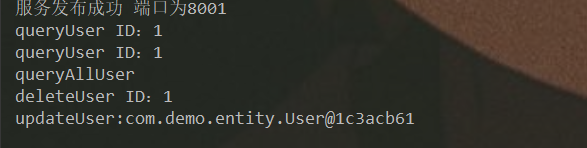
服务端收到请求:
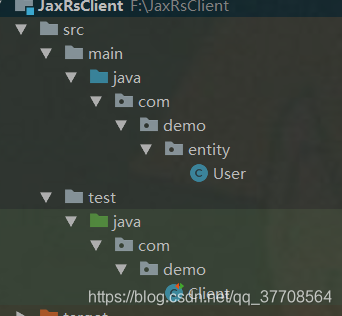
客户端包路径





 扫一扫
扫一扫


 2033
2033

 被折叠的 条评论
为什么被折叠?
被折叠的 条评论
为什么被折叠?
 到【灌水乐园】发言





