



springboot整合websocket
1 引入相关依赖
        <dependency>
            <groupId>org.springframework.boot</groupId>
            <artifactId>spring-boot-starter-web</artifactId>
        </dependency>
        <!--websocket-->
        <dependency>
            <groupId>org.springframework.boot</groupId>
            <artifactId>spring-boot-starter-websocket</artifactId>
        </dependency>
        <dependency>
            <groupId>org.springframework.boot</groupId>
            <artifactId>spring-boot-starter-thymeleaf</artifactId>
        </dependency>
2 配置类
注意这里@ServerEndpoint标注在类上用@Component, 不是@Configuration
@Component
//开启websocket支持
@EnableWebSocket
@ServerEndpoint("/websocket")
public class WebsocketConfig
{

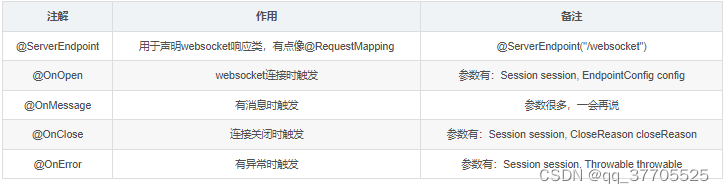
    /*注解	作用	备注
    @ServerEndpoint	用于声明websocket响应类,有点像@RequestMapping	@ServerEndpoint("/websocket")
    @OnOpen	websocket连接时触发	参数有:Session session, EndpointConfig config
    @OnMessage	有消息时触发	参数很多,一会再说
    @OnClose	连接关闭时触发	参数有:Session session, CloseReason closeReason
    @OnError	有异常时触发	参数有:Session session, Throwable throwable*/

    /**
     * 必须要有的
     *
     * @return
     */
    @Bean
    public ServerEndpointExporter serverEndpointExporter()
    {
        return new ServerEndpointExporter();
    }

    /**
     * websocket 配置信息
     *
     * @return
     */
    @Bean
    public ServletServerContainerFactoryBean createWebSocketContainer()
    {
        ServletServerContainerFactoryBean bean = new ServletServerContainerFactoryBean();
        //文本缓冲区大小
        bean.setMaxTextMessageBufferSize(8192);
        //字节缓冲区大小
        bean.setMaxBinaryMessageBufferSize(8192);
        return bean;
    }

    //使用 ConcurrentHashMap, 保证线程安全, static全局共享 session

    //这里之所以static,是因为这个类不是单例的!!
    //他虽然有@Controller注解,但是不适用Ioc容器中拿对象,每一次请求过来都是一个新的对象

    //存放 session
    private final static Map<String, Session> sessions = new ConcurrentHashMap<>();

    //onopen 在连接创建(用户进入聊天室)时触发
    @OnOpen
    public void openSession(Session session, EndpointConfig config)
    {
        //将session存起来, 用于服务器向浏览器发送消息
        sessions.put(session.getId(), session);
        sendAll("[" + session.getId() + "]进入房间");
    }

    //响应字符串
    @OnMessage
    public void onMessage(Session session, String message)
    {
        sendAll("[" + session.getId() + "]" + message);
    }

    //响应字节流
    @OnMessage
    public void onMessage(Session session, byte[] message)
    {
        //这个咱以后再说
    }

    /*细心的小伙伴可能发现,我有两个 @OnMessage,
    这是因为websocket能发送三种请求(我知道的三种),
    一种是字符串,一种是字节流(用于上传文件),一种是ping-pong(乒乓机制),因为js不好发送ping请求,我这里就只有响应字符串和字节流两种方法。*/

    /*接下来的篇幅将只演示字符串的,字节流咱再另一篇说,不然太多了看的头痛*/

    //onclose 在连接断开(用户离开聊天室)时触发
    @OnClose
    public void closeSession(Session session, CloseReason closeReason)
    {
        //记得移除相对应的session
        sessions.remove(session.getId());
        sendAll("[" + session.getId() + "]离开了房间");
    }

    @OnError
    public void sessionError(Session session, Throwable throwable)
    {
        //通常有异常会关闭session
        try {
            session.close();
        }
        catch (IOException e) {
            e.printStackTrace();
        }
    }


    /*1、再OnOpen中将session存起来,并通知其他用户,有人来啦。
    2、有消息来的时候,再OnMessage中,通知其他用户
    3、OnClose中,通知其他用户,别人溜了
    4、OnError中,有异常就关闭websocket*/

    private void sendAll(String message)
    {
        for (Session s : sessions.values()) {
            //获得session发送消息的对象
            //Basic是同步, 会阻塞
            //Async是异步, 这个会有多线程并发导致异常, 发送消息太快也会有并发异常, 需要有 消息队列 来辅助使用
            final RemoteEndpoint.Basic remote = s.getBasicRemote();
            try {
                //发送消息
                remote.sendText(message);
            }
            catch (IOException e) {
                e.printStackTrace();
            }
        }
    }
}
细心的小伙伴可能发现,我有两个 @OnMessage, 这是因为websocket能发送三种请求(我知道的三种),一种是字符串,一种是字节流
(用于上传文件),一种是ping-pong(乒乓机制),因为js不好发送ping请求,我这里就只有响应字符串和字节流两种方法。
接下来的篇幅将只演示字符串的,字节流咱再另一篇说,不然太多了看的头痛
3 页面
<!DOCTYPE html>
<html xmlns:th="http://www.thymeleaf.org" lang="en">
<head>
  <meta charset="UTF-8">
  <title>websocket-demo</title>

  <link rel="stylesheet" href="https://cdn.bootcdn.net/ajax/libs/twitter-bootstrap/4.2.1/css/bootstrap.min.css">
</head>
<body>
  <div class="container py-3">

    <div class="row">

      <div class="col-6">
        <div>
          <label for="messageArea">聊天信息:</label>
        </div>
        <div>
          <textarea id="messageArea" readonly class="w-100" style="height: 75vh;"></textarea>
        </div>
      </div>

      <div class="col">

        <div class="my-1">
          <label for="messageArea">用 户 名:</label>
        </div>

        <div class="my-1">
          <input type="text" id="username" autocomplete="off">
        </div>

        <div class="my-1">
          <button class="btn-info" id="joinRoomBtn">进入聊天室</button>
          <button class="btn-warning" id="leaveRoomBtn">离开聊天室</button>
        </div>

        <hr/>

        <div class="my-1">
          <label for="sendMessage">输入消息:</label>
        </div>
        <div>
          <textarea id="sendMessage" rows="5" class="w-100" style="max-height: 50vh"></textarea>
        </div>

        <div class="my-1">
          <button class="btn-primary" id="sendBtn">发送消息</button>
        </div>

      </div>

    </div>

  </div>

  <script src="https://s3.pstatp.com/cdn/expire-1-M/jquery/3.3.1/jquery.min.js"></script>

  <script>
    let webSocket;
    //ip和端口号用自己项目的
    //{websocket}: 其实是刚刚那个@ServerEndpoint("/websocket")中定义的
    let url = 'ws://127.0.0.1:8080/websocket';

    $('#username').keyup(function (e) {
      let keycode = e.which;
      if (keycode == 13) {
        $('#joinRoomBtn').click();
      }
    });

    //进入聊天室
    $('#joinRoomBtn').click(function () {
      let username = $('#username').val();
      webSocket = new WebSocket(url);
      webSocket.onopen = function () {
        console.log('webSocket连接创建。。。');
      }
      webSocket.onclose = function () {
        console.log('webSocket已断开。。。');
        $('#messageArea').append('websocket已断开\n');
      }
      webSocket.onmessage = function (event) {
        $('#messageArea').append(event.data + '\n');
      }
      webSocket.onerror = function (event) {
        console.log(event)
        console.log('webSocket连接异常。。。');
      }
    });

    //退出聊天室
    $('#leaveRoomBtn').click(function () {
      if (webSocket) {
        //关闭连接
        webSocket.close();
      }
    });

    //发送消息
    $('#sendBtn').click(function () {
      var msg = $('#sendMessage').val();
      if (msg.trim().length === 0) {
        alert('请输入内容');
        return;
      }
      webSocket.send($('#sendMessage').val());

      $('#sendMessage').val('');
    });

  </script>

</body>
</html>
4 @PathParam注解
@ServerEndpoint("/websocket/{username}")
然后这样获得参数(所有方法都可以加),而且可以不止一个
//响应字符串
@OnMessage
public void onMessage(@PathParam("username") String username, Session session, String message)
{
    sendAll("[" + username + "]" + message);
}
再html连接时,url就这么写
let username = $('#username').val();
let url = 'ws://127.0.0.1:8080/websocket';
url = url+'/'+username;





 扫一扫
扫一扫


 6133
6133

 被折叠的 条评论
为什么被折叠?
被折叠的 条评论
为什么被折叠?
 到【灌水乐园】发言





