


错误描述
ubuntu安装toolbox的时候遇到错误:
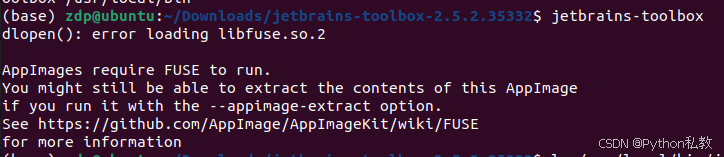
错误描述
dlopen(): error loading libfuse.so.2
AppImages require FUSE to run.
You might still be able to extract the contents of this AppImage
if you run it with the --appimage-extract option.
See https://github.com/AppImage/AppImageKit/wiki/FUSE
for more information
解决方案
根据错误信息,您在尝试运行 JetBrains Toolbox 的 AppImage 时遇到了 dlopen(): error loading libfuse.so.2 的错误。这个错误表明您的系统缺少 FUSE(Filesystem in Userspace)的支持,AppImage 需要 FUSE 来运行。
您可以通过以下步骤来解决这个问题:
-
安装 FUSE:
- 您使用的是 Ubuntu 系统,根据您提供的链接中的信息,您可以按照以下命令来安装 FUSE:
sudo add-apt-repository universe
sudo
- 您使用的是 Ubuntu 系统,根据您提供的链接中的信息,您可以按照以下命令来安装 FUSE:
 最低0.47元/天 解锁文章






 扫一扫
扫一扫


 6986
6986

 被折叠的 条评论
为什么被折叠?
被折叠的 条评论
为什么被折叠?
 到【灌水乐园】发言





