



<!-- Declare the MyVideos class, which belongs to the DataTemplatingLab namespace.-->
<!-- Setting the Directory to the relative path pointing to the Media folder.-->
<!-- Giving this an x:Key. Now controls in this Window can bind to the videos in the Media folder.-->
<Window.Resources>
    <local:MyVideos Directory="../../media" x:Key="Vids" />

    <DataTemplate x:Key="MainScreenTemplate">
        <Border BorderBrush="LimeGreen" BorderThickness="2"
                CornerRadius="3" Margin="15">
            <Grid>
                <!-- Background image if no video is playing. -->
                <Image Source="Images\Crystal.jpg" Stretch="Fill" />
                <!-- The video -->
                <!-- The Source property of the video is bound to the Source property of the current MyVideo object.-->
                <MediaElement Name="mainVideo" Stretch="Fill"
                              Source="{Binding Path=Source}" />
            </Grid>
        </Border>
    </DataTemplate>

    <!-- Must be placed above listBoxTemplate -->
    <ToolTip x:Key="PreviewScreen" x:Shared="True" Background="Transparent"
             Placement="Right" Name="previewToolTip">
        <Border BorderBrush="RoyalBlue" BorderThickness="2" CornerRadius="2">
            <MediaElement Source="{Binding Path=Source}"
                          Opacity="0.8" IsMuted="True" />
        </Border>
    </ToolTip>

    <DataTemplate x:Key="ListBoxTemplate">
        <DataTemplate.Resources>
            <Style TargetType="DockPanel">
                <Setter Property="Cursor" Value="Hand" />
                <Setter Property="ToolTipService.ShowDuration" Value="80000" />
                <Style.Triggers>
                    <Trigger Property="IsMouseOver" Value="True">
                        <Setter Property="ToolTip" Value="{StaticResource PreviewScreen}" />
                    </Trigger>
                </Style.Triggers>
            </Style>
        </DataTemplate.Resources>
        <DockPanel Height="70" Width="160">
            <Border Margin="4,5,0,0" Height="50" Width="50">
                <Image Source="Images\Preview.png" />
            </Border>
            <TextBlock Text="{Binding Path=VideoTitle}" VerticalAlignment="Center"
                       TextBlock.TextTrimming="WordEllipsis" Margin="5,5,0,5"
                       Foreground="White" FontSize="12" FontFamily="Comic Sans MS" />
        </DockPanel>
    </DataTemplate>

    <Style x:Key="{x:Type ListBoxItem}" TargetType="ListBoxItem">
        <Setter Property="Margin" Value="10,10,10,0" />
        <Setter Property="Template">
            <Setter.Value>
                <ControlTemplate TargetType="ListBoxItem">
                    <Grid>
                        <Rectangle x:Name="GelBackground" RadiusX="9" RadiusY="9"
                                   Opacity="1" Fill="{TemplateBinding Background}"
                                   Stroke="#66ffffff" StrokeThickness="1" />
                        <Rectangle x:Name="GelShine" RadiusX="6" RadiusY="6"
                                   Opacity="1" Margin="2,2,2,0" VerticalAlignment="top"
                                   Stroke="transparent" Height="15">
                            <Rectangle.Fill>
                                <LinearGradientBrush StartPoint="0,0" EndPoint="0,1">
                                    <GradientBrush.GradientStops>
                                        <GradientStopCollection>
                                            <GradientStop Color="#ccffffff" Offset="0" />
                                            <GradientStop Color="transparent" Offset="1" />
                                        </GradientStopCollection>
                                    </GradientBrush.GradientStops>
                                </LinearGradientBrush>
                            </Rectangle.Fill>
                        </Rectangle>
                        <ContentPresenter HorizontalAlignment="{TemplateBinding HorizontalContentAlignment}"
                                          VerticalAlignment="{TemplateBinding VerticalContentAlignment}" />
                    </Grid>
                    <ControlTemplate.Triggers>
                        <EventTrigger RoutedEvent="Mouse.MouseEnter">
                            <EventTrigger.Actions>
                                <BeginStoryboard>
                                    <Storyboard TargetName="GelBackground"
                                                TargetProperty="(Shape.Fill).(SolidColorBrush.Color)">
                                        <ColorAnimation To="LimeGreen" Duration="0:0:0.1" />
                                    </Storyboard>
                                </BeginStoryboard>
                            </EventTrigger.Actions>
                        </EventTrigger>
                        <EventTrigger RoutedEvent="Mouse.MouseLeave">
                            <EventTrigger.Actions>
                                <BeginStoryboard>
                                    <Storyboard TargetName="GelBackground"
                                                TargetProperty="(Shape.Fill).(SolidColorBrush.Color)">
                                        <ColorAnimation Duration="0:0:0.1" />
                                    </Storyboard>
                                </BeginStoryboard>
                            </EventTrigger.Actions>
                        </EventTrigger>
                    </ControlTemplate.Triggers>
                </ControlTemplate>
            </Setter.Value>
        </Setter>
        <Style.Triggers>
            <Trigger Property="IsSelected" Value="true">
                <Setter Property="Background" Value="RoyalBlue" />
            </Trigger>
        </Style.Triggers>
    </Style>
</Window.Resources>

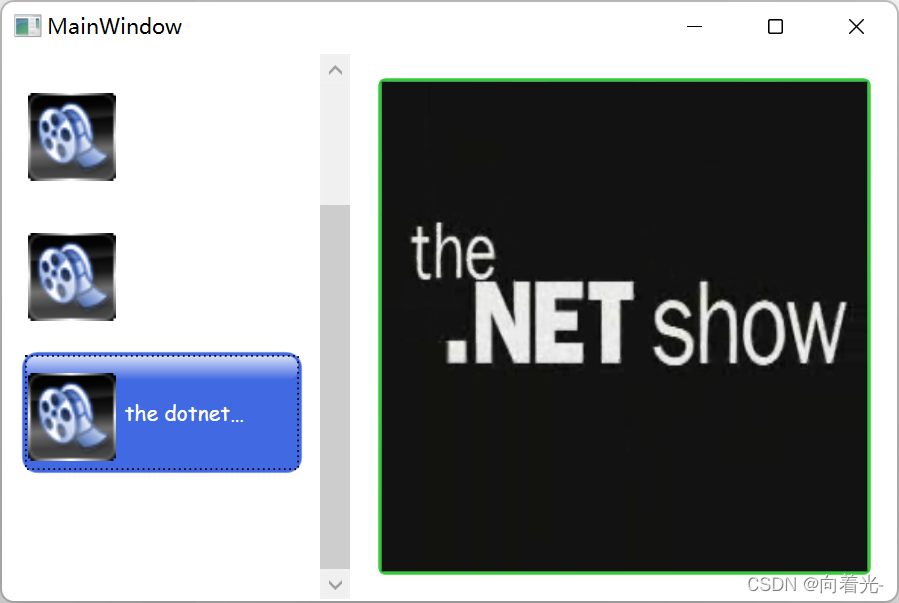
<!-- 1) The ListBox and ContentControl bind to the same source. -->
<!-- 2) IsSynchronizedWithCurrentItem set to true. -->
<!-- With the above 2 conditions satisfied, once the DataTemplates are in place,
   the ContentControl will display the content of the selected list item.-->
<DockPanel>
    <ListBox DockPanel.Dock="Left" Width="200" BorderThickness="0"
             ItemsSource="{Binding Source={StaticResource Vids}}"
             IsSynchronizedWithCurrentItem="True"
             ItemTemplate="{StaticResource ListBoxTemplate}"
             Background="Transparent" />
    <ContentControl Content="{Binding Source={StaticResource Vids}}"
                    ContentTemplate="{StaticResource MainScreenTemplate}" />
</DockPanel>






 扫一扫
扫一扫


 889
889

 被折叠的 条评论
为什么被折叠?
被折叠的 条评论
为什么被折叠?
 到【灌水乐园】发言





