


 本文提供了三个使用iText库生成PDF文件的示例代码。包括创建基本文档、带有中文字体和表格的PDF以及包含图像的PDF。通过这些示例,读者可以了解如何使用iText进行PDF文档的开发。
利用itext生成pdf
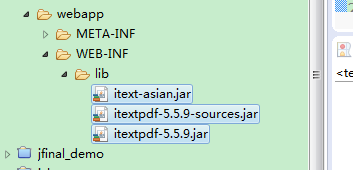
1、引入jar包 :
2、demo1
public static void main(String[] args) throws FileNotFoundException, DocumentException {
// step 1
Document document = new Document();
// step 2
String filename="D:/111.pdf" ;
PdfWriter.getInstance(document, new FileOutputStream(filename));
// step 3
document.open();
// step 4
document.add(new Paragraph("Hello World!"));
// step 5
document.close();
}
demo2
public class PDFTest2 {
private Font FontChinese;
public void simplePDF() {
try {
BaseFont bfChinese = BaseFont.createFont("STSong-Light", "UniGB-UCS2-H", BaseFont.NOT_EMBEDDED);
FontChinese = new Font(bfChinese, 12, Font.NORMAL);
Document document = new Document();
PdfWriter.getInstance(document, new FileOutputStream("F:\\Hello simplePDF.pdf"));
document.open();
PdfPTable table = new PdfPTable(4);
table.addCell(getCell("姓名", 1, 1));
table.addCell(getCell("董亚转", 1, 1));
table.addCell(getCell("编号", 1, 1));
table.addCell(getCell("", 1, 1));
table.addCell(getCell("部门", 1, 1));
table.addCell(getCell("", 1, 1));
table.addCell(getCell("岗位名称", 1, 1));
table.addCell(getCell("", 1, 1));
table.addCell(getCell("到职日期", 1, 1));
table.addCell(getCell("", 1, 1));
table.addCell(getCell("预定离职日期", 1, 1));
table.addCell(getCell("", 1, 1));
table.addCell(getCell("事由", 1, 3));
table.addCell(getCell("", 3, 3));
table.addCell(getCell("部门意见", 1, 3));
table.addCell(getCell("", 3, 3));
document.add(table);
document.close();
} catch (Exception e) {
e.printStackTrace();
}
}
private PdfPCell getCell(String cellValue, int colspan, int rowSpan) {
PdfPCell cell = new PdfPCell();
try {
cell = new PdfPCell(new Phrase(cellValue, FontChinese));
cell.setRowspan(rowSpan);
cell.setColspan(colspan);
cell.setHorizontalAlignment(Element.ALIGN_CENTER);
} catch (Exception e) {
e.printStackTrace();
}
return cell;
}
public static void main(String[] args) {
PDFTest2 pt = new PDFTest2();
pt.simplePDF();
}
}
demo3
public static void main(String[] args) throws Exception
{
Document pdfDoc = new Document();
// 将要生成的 pdf 文件的路径输出流
FileOutputStream pdfFile =
new FileOutputStream(new File("D:/222.pdf"));
// pdf 文件中的一个文字段落
Paragraph paragraph = new Paragraph("My first PDF file with an image ...");
Image image = Image.getInstance("d:/Desert.jpg");
// 用 Document 对象、File 对象获得 PdfWriter 输出流对象
PdfWriter.getInstance(pdfDoc, pdfFile);
pdfDoc.open(); // 打开 Document 文档
// 添加一个文字段落、一张图片
pdfDoc.add(paragraph);
pdfDoc.add(image);
pdfDoc.close();
}
百度云网盘
链接: http://pan.baidu.com/s/1o8IjIlW 密码: ezms





 扫一扫
扫一扫


 753
753

 被折叠的 条评论
为什么被折叠?
被折叠的 条评论
为什么被折叠?
 到【灌水乐园】发言





