


//锁定竖屏
plus.screen.lockOrientation("portrait-primary")
// #endif
首先准备启动图两个
dc_launchscreen_portrait_background@2x.png(750*1624)
dc_launchscreen_portrait_background@3x.png(1125*2436)
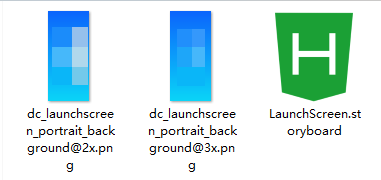
LaunchScreen.storyboard文件内容如下
<?xml version="1.0" encoding="UTF-8"?>
<document type="com.apple.InterfaceBuilder3.CocoaTouch.Storyboard.XIB" version="3.0" toolsVersion="32700.99.1234"
	targetRuntime="iOS.CocoaTouch" propertyAccessControl="none" useAutolayout="YES" launchScreen="YES"
	useTraitCollections="YES" useSafeAreas="YES" colorMatched="YES" initialViewController="01J-lp-oVM">
	<device id="retina6_5" orientation="portrait" appearance="light" />
	<dependencies>
		<deployment identifier="iOS" />
		<plugIn identifier="com.apple.InterfaceBuilder.IBCocoaTouchPlugin" version="22685" />
		<capability name="Safe area layout guides" minToolsVersion="9.0" />
		<capability name="System colors in document resources" minToolsVersion="11.0" />
	</dependencies>
	<scenes>
		<!--View Controller-->
		<scene sceneID="EHf-IW-A2E">
			<objects>
				<viewController id="01J-lp-oVM" sceneMemberID="viewController">
					<view key="view" contentMode="scaleToFill" id="Ze5-6b-2t3">
						<rect key="frame" x="0.0" y="0.0" width="414" height="896" />
						<autoresizingMask key="autoresizingMask" widthSizable="YES" heightSizable="YES" />
						<subviews>
							<!-- 全屏背景图 -->
							<imageView clipsSubviews="YES" userInteractionEnabled="NO" contentMode="scaleAspectFill"
								image="dc_launchscreen_portrait_background.png"
								translatesAutoresizingMaskIntoConstraints="NO" id="Tt8-jS-2H5">
							</imageView>

							<!-- App 图标 -->
							<imageView clipsSubviews="YES" userInteractionEnabled="NO" contentMode="scaleAspectFit"
								image="dc_launchscreen_icon.png" translatesAutoresizingMaskIntoConstraints="NO"
								id="vp6-uo-KS2">
							</imageView>
						</subviews>

						<!-- Safe Area -->
						<viewLayoutGuide key="safeArea" id="IW3-oA-Ytg" />

						<!-- 背景透明(避免闪白) -->
						<color key="backgroundColor" red="0" green="0" blue="0" alpha="0" colorSpace="custom"
							customColorSpace="sRGB" />

						<!-- 约束 -->
						<constraints>
							<!-- 背景图:四边贴满父视图(关键!不要对齐 Safe Area) -->
							<constraint firstItem="Tt8-jS-2H5" firstAttribute="top" secondItem="Ze5-6b-2t3"
								secondAttribute="top" id="FH7-NM-QY8" />
							<constraint firstItem="Tt8-jS-2H5" firstAttribute="leading" secondItem="Ze5-6b-2t3"
								secondAttribute="leading" id="fnt-hE-VMi" />
							<constraint firstItem="Tt8-jS-2H5" firstAttribute="trailing" secondItem="Ze5-6b-2t3"
								secondAttribute="trailing" id="QGW-bk-xBw" />
							<constraint firstItem="Tt8-jS-2H5" firstAttribute="bottom" secondItem="Ze5-6b-2t3"
								secondAttribute="bottom" id="seh-wj-zPF" />

							<!-- App 图标居中 -->
							<constraint firstItem="vp6-uo-KS2" firstAttribute="centerX" secondItem="Ze5-6b-2t3"
								secondAttribute="centerX" id="GM5-vc-qeO" />
							<constraint firstItem="vp6-uo-KS2" firstAttribute="centerY" secondItem="Ze5-6b-2t3"
								secondAttribute="centerY" id="Qji-wc-LLD" />

							<!-- 可选:限制图标最小距离边缘 -->
							<constraint firstItem="vp6-uo-KS2" firstAttribute="top" relation="greaterThanOrEqual"
								secondItem="Ze5-6b-2t3" secondAttribute="top" constant="100" id="M4i-XX-uO2" />
						</constraints>
					</view>
				</viewController>
				<placeholder placeholderIdentifier="IBFirstResponder" id="iYj-Kq-Ea1" userLabel="First Responder"
					sceneMemberID="firstResponder" />
			</objects>
		</scene>
	</scenes>
	<resources>
		<!-- 推荐尺寸:1242x2688 (@3x) 以适配所有 iPhone -->
		<image name="dc_launchscreen_portrait_background.png" width="1242" height="2688" />
		<image name="dc_launchscreen_icon.png" width="120" height="120" />
	</resources>
</document>
将3个文件压缩成zip,hbuilderx中选择zip
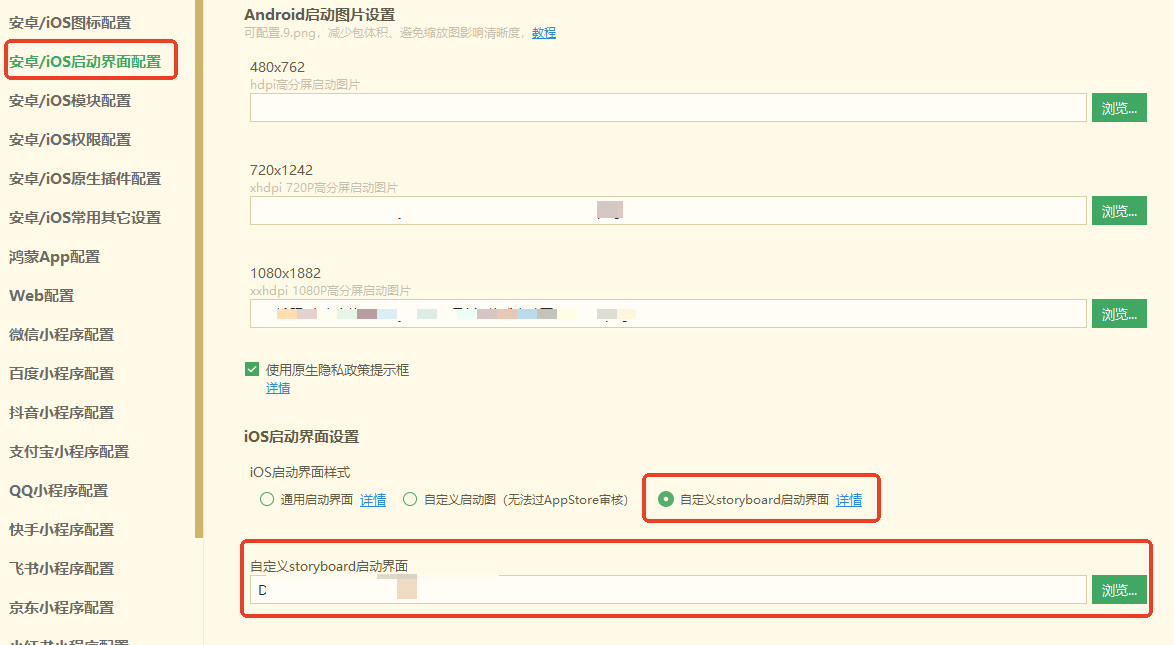
发行-云打包到手机即可,重新自定义基座应该也会生效,不生效就卸载原应用重新安装






 扫一扫
扫一扫


 6173
6173


 到【灌水乐园】发言




