



 本文介绍了SpringCloudConfig的作用,如何解决本地配置文件管理痛点,以及如何在SpringBoot项目中快速入门和配置配置服务器。重点讲解了配置文件存储在GitRepository、ConfigServer的流程和应用配置的步骤。
什么是 Spring Cloud Config
Spring Cloud Config 是最早的配置中心,虽然后面的之秀Nacos可以取代它, 但是Spring Cloud Config还是很多公司在用。
那为什么我们需要一个配置中心呢?我们直接将配置写在本地的yml配置文件中不行吗?
一个新技术的出现,一定是因为它解决了某些痛点,我们来看看将配置信息直接写在本地yml配置文件存在哪些痛点:
如果多个微服务可能使用相同的配置信息,假设有50个微服务,如果配置需要修改配置文件,就意味着我们需要修改50个微服务的yml文件,极其浪费时间。
配置信息修改后,必须重启服务才能生效
Spring Cloud Config解决了这两个痛点:
集中式管理。
在开发中多个微服务可能使用相同的配置,假设有50个微服务,如果配置需要修改配置文件,就意味着我们需要修改50个微服务的yml文件。使用配置中心后,就可以做到一处修改,处处修改。
动态修改配置。
使用配置中心,配合actuator可以实现配置的动态修改,无需重启服务
Spring Cloud Config 流程
1、把配置文件放在Git Repository中。
2、Config Server从Git repository中读取配置信息。
3、其他客户端再从Config Server中加载配置文件
快速入门Spring Cloud Config
项目中使用到的版本:
Spring Boot:2.7.9
Spring Cloud:2021.0.5
版本不同的话可能会出现一点问题。
Config 服务器
引入依赖
<!-- SpringBoot依赖 -->
	<parent>
		<groupId>org.springframework.boot</groupId>
		<artifactId>spring-boot-starter-parent</artifactId>
		<version>2.7.9</version>
	</parent>

	<dependencyManagement>
		<dependencies>
			<dependency>
				<groupId>org.springframework.cloud</groupId>
				<artifactId>spring-cloud-dependencies</artifactId>
				<version>2021.0.5</version>
				<type>pom</type>
				<scope>import</scope>
			</dependency>
		</dependencies>
	</dependencyManagement>

	<dependencies>

		<!-- spring cloud config 服务端包 -->
		<dependency>
			<groupId>org.springframework.cloud</groupId>
			<artifactId>spring-cloud-config-server</artifactId>
		</dependency>
	</dependencies>
application.yml 配置
server:
 port: 8080

spring:
 application:
  name: config-server
 profiles:
  active: test
 cloud:
   config:
     server:
       git:
         uri: https://gitee.com/xxxxxx/configtest.git
         username: xxxxxx
         password: aaaaaa
         default-label: master # 配置文件分支
启动类 加上注解 @EnableConfigServer
@SpringBootApplication
@EnableConfigServer
public class BootConfigApp
{
    public static void main( String[] args )
    {
        SpringApplication.run(BootConfigApp.class, args);
    }
}
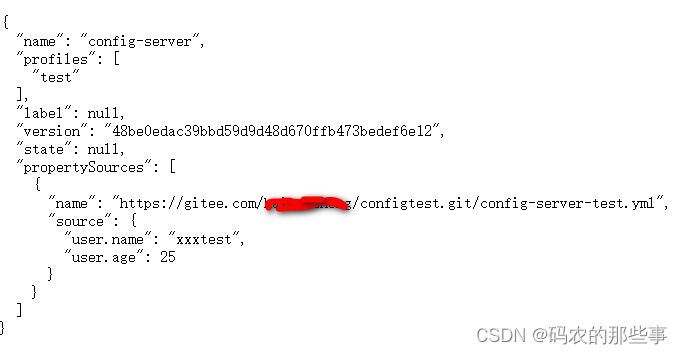
App启动成功后访问
http://localhost:8080/config-server/test





 扫一扫
扫一扫


 167万+
167万+


 到【灌水乐园】发言



