


 本文提供了多个Shell脚本实例,包括暴力破解密码、防御SSH攻击、监控服务状态等,涵盖安全加固、自动化运维等方面。
第七周
作业:
1.暴力破解密码 echo # |md5sum |cut -c1-10
2. 拒绝ip
3.防御ssh攻击
4.彩色三角形
5.拒绝特定用户登录
6. 九九乘法表
7. 监控httpd服务,死掉重启
8.国际象棋棋盘
9. select语法练习
10.进程知识点笔记
暴力破解
#!/bin/bash
if [ ! -f directory.txt ];then
        for i in `seq 32767`;do
                 key=`echo $i |md5sum |cut -c1-10`
                 echo $i $key >>directory.txt
        done
fi
PS3="Do you want to check password or number,please choose:"
select MENU in password number quit;do
        case $MENU in
                password)       echo "your choose is $REPLY"
                                read -p "please input your password:" password
                                for j in $password;do
                                        grep $j directory.txt &>/dev/null
                                        reveal=$?
                                        if [ $reveal -eq 0 ];then
                                                value=`grep $j directory.txt|awk '{print $1}'`
                                                echo " $j source is $value"
                                        else
                                                echo "there is no $j in directory."
                                        fi
                                done
                                ;;
                number)         echo "your choose is $REPLY"
                                read -p "please input your number between 1~32767:" number
                                for j in $number;do
                                        grep $j directory.txt &>/dev/null
                                        reveal=$?
                                        if [ $reveal -eq 0 ];then
                                                value=`grep "\<$j\>" directory.txt|awk '{print $2}'`
                                                echo "$j passwd is $value"
                                        else
                                                echo "there is no $j in directory."
                                        fi
                                done
                                ;;
                quit)           break;;
                *)              echo "please input right choose"
                                ;;
                                esac

done
拒绝ip:
#!/bin/bash
ss -nt | awk '{print $5}'|sed '1d'|cut -d: -f1|sort -n |uniq -c|while read line;do
        time=`echo $line|cut -d" " -f1`
        ip=`echo $line|cut -d: -f2`
        [ $time -gt 2 ] && iptables -A input -s  $ip  -j REJECT
        echo $time_$ip
done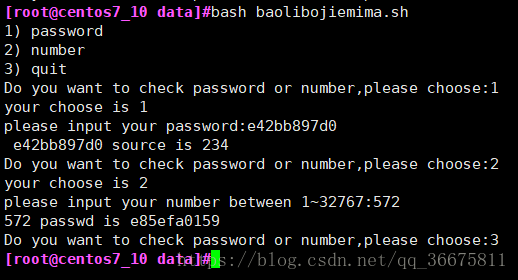
防御ssh攻击:
#!/bin/bash
time=`lastb | awk '{print $3}'|sort -n|uniq -c|cut -d" " -f1`
ip=`lastb | awk '{print $3}'`
if [[ ! $ip =~ "^(172.20)" -o $time -gt 10 ]];then
        echo sshd:$ip >>/etc/hosts.deny
        fi
彩色三角形
#!/bin/bash
read -p "please input line:" line
for i in `seq $line`;do
        for j in `seq $[$line-$i]`;do
                echo -n " "
        done
        echo -n /
        for k in `seq $[($i)*2-1]`;do
                color=$[RANDOM%7+31]
                echo -en "\e[1;5;${color}m*\e[0m"
        done
        echo  \\
        sleep 1
done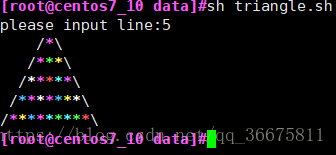
拒绝特定用户登录:
#!/bin/bash
until false;do
        who | grep "^hacker\>" | pkill -U hacker &>/dev/null
        sleep 3
done
九九乘法表:
#!/bin/bash
for i in {1..9};do
        for ((j=1;j<=i;j++));do
                echo -e "$j*$i=$[$i*$j]  \c "
        done
        echo
done
监控httpd服务,进程死掉重启
#!/bin/bash
while true;do
        kill -0 httpd &>/dev/null || systemctl start httpd
        echo "at `date +%F%T` httpd restart" >>/data/httpd.log
        sleep 30
done
国际象棋棋盘:
#!/bin/bash
a=`echo -e "\e[1;41m  \e[0m"`
b=`echo -e "\e[1;47m  \e[0m"`
for i in {1..8};do
        for j in {1..4};do
                if [[ $i%2 -eq 0 ]];then
                        echo -n $a$a$b$b
                else
                        echo -n $b$b$a$a
                fi
        done
        echo
done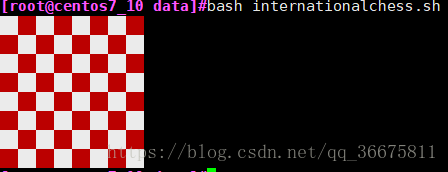
select语法练习:
#!/bin/bash
PS3="please input digit:"
select MENU in mifan miantiao jiaozi tudou quit;do
        case $MENU in
#!/bin/bash
PS3="please input digit:"
select MENU in mifan miantiao jiaozi tudou quit;do
        case $MENU in
        mifan)          echo "your choose is $REPLY"
                        echo "mifan is 18"
                        ;;
        miantiao)       echo "your choose is $REPLY"
                        echo "miantiao is 15"
                        ;;
        jiaozi)         echo "you choose is $REPLY"
                        echo "jiaozi is 20"
                        ;;
        tudou)          echo "you choose is $REPLY"
                        echo "dudou is 10"
                        ;;
        quit)           break;;
        *)              echo "error,please input right digit"
                        ;;
                        esac
done
10,。进程知识点笔记
vi /etc/sysconfig/httpd
ps axo pid,cmd,%cpu,%mem,euser,ruser k %mem
ps -C 指定命令
taskset -p httpd.worker
taskset -cp 0 29263 将进程绑到cpu上
watch -n 1 ‘ps -eo pid,cmd,%cpu,%mem,ppid’
pidof httpd 判断程序是否运行
pgrep -aU majin
pgrep -aP bash 显示制定进程对的子进程
ps -H -p 54971
top -d指定刷新间隔 -n刷新多少次后退出
top -H -p 54971 查看Mysql线程 ps -fLC mysqld 或者top -H -p pidof mysqld
pmap pid 查看占用的内存和库 文件
cat /proc/PID/maps
htop
dstat iotop
lsof /dev/pts2
lsof -p 53727
lsof -i:80 -n
kill -l
vi /etc/httpd/conf/httpd.conf
查看进程的子进程:ps -C httpd
ps -ef |grep httpd
pgrep -l htt
(只有子进程
ps –ppid 2617
pgrep -P 2617
pidof
centos7实现网络组
nmcli connection add con-name team0 type team ifnam team0
ipv4.address 1.1.1.2 ipv4.gateway 1.1.1.1 ipv4.method maunal
config ‘{“runner”:{“name”:”activebackup”}}’;
nmcli connection add con-name team0-eth1 ifname eth1 type team-slave master team0
nmcli connection add con-name team0-eth2 ifname eth2 type team-slave master team0
nmcli connection up team-eth1
nmcli connection up team-eth2
teamdctl team0 state
nmcli dev disconnect eth1
1、Cache是高速存储区域,而Buffer是RAM的临时存储的正常存储区域。
2、Cache是由静态RAM构成的,它比Buffer较慢的动态RAM更快。
3、Buffer主要用于输入/输出过程,而Cache则用于从磁盘读取和写入进程。
4、Cache也可以是磁盘的一部分,而Buffer只是RAM的一部分。
5、在Cache不能使用的情况下,可以在键盘中使用Buffer来编辑打字错误。
chkconfig –list atd
systemctl is-enabled atd
chkconfig atd on
systemctl enable atd
servcie atd status
systemctl status atd
chkconfig iptable off
systemctl disable firewalld
vi /etc/sysconfig/selinux enforcing-disabled
centos6实现时间同步
ntpdate 172.20.0.1
vim /etc/ntp.conf
chkconfig ntpd on
chkconfig –list ntpd
service ntpd start
chrony
vim /etc/chrony.conf
server 172.20.0.1 iburst
chronyc sources -v
chronyc tracing
chronyc sourcestatus -v
ls /var/spool/at
at -l=atq
at -c 1
at now+1minutes
vi /etc/{deny,allow}





 扫一扫
扫一扫


 3418
3418

 被折叠的 条评论
为什么被折叠?
被折叠的 条评论
为什么被折叠?
 到【灌水乐园】发言





