



 本文详细介绍了如何将SpringMVC与Mybatis进行整合,包括数据库连接池配置、SqlSessionFactory设置、mapper包扫描、Service层注解扫描、事务管理、控制器配置、视图解析器设定等关键步骤。
SpringMVC整合Mybatis
思路:
Dao层
- SqlConfig.xml
- applicationContext-dao.xml
- 数据库连接池
- SqlSessionFactroy对象
- 配置mapper包扫描
Service层
- applicationContext-service.xml包扫描其,扫描@Service的注解
- applicationContext-trans.xml配置事务
Controller层
- springmvc.xml
- 包扫描器,扫描@Controller注解
- 配置注解驱动
- 配置视图解析器
- 配置全局异常处理器
- 配置多媒体处理器
- 配置拦截器
Web.xml
- 配置Spring容量监听器(找到spring文件)
- 配置前端控制器(springmvc)
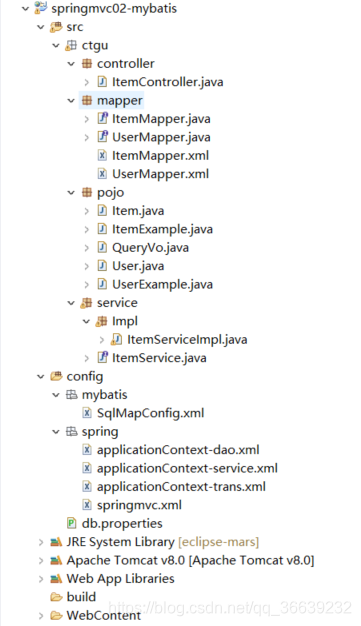
配置文件
1.SqlConfig.xml
空客文件(都在applicationContext中可以完成配置),但是必须要有。
<?xml version="1.0" encoding="UTF-8"?>
<!DOCTYPE configuration
PUBLIC "-//mybatis.org//DTD Config 3.0//EN"
"http://mybatis.org/dtd/mybatis-3-config.dtd">
<configuration>

</configuration>
2.applicationContext-dao.xml
1.数据库连接池的配置;
2.SqlSessionFactroy配置
3.mapper包扫描
<?xml version="1.0" encoding="UTF-8"?>
<beans xmlns="http://www.springframework.org/schema/beans"
	xmlns:context="http://www.springframework.org/schema/context" xmlns:p="http://www.springframework.org/schema/p"
	xmlns:aop="http://www.springframework.org/schema/aop" xmlns:tx="http://www.springframework.org/schema/tx"
	xmlns:xsi="http://www.w3.org/2001/XMLSchema-instance"
	xsi:schemaLocation="http://www.springframework.org/schema/beans http://www.springframework.org/schema/beans/spring-beans-4.0.xsd
	http://www.springframework.org/schema/context http://www.springframework.org/schema/context/spring-context-4.0.xsd
	http://www.springframework.org/schema/aop http://www.springframework.org/schema/aop/spring-aop-4.0.xsd http://www.springframework.org/schema/tx http://www.springframework.org/schema/tx/spring-tx-4.0.xsd
	http://www.springframework.org/schema/util http://www.springframework.org/schema/util/spring-util-4.0.xsd">

	<!-- 加载配置文件 -->
	<context:property-placeholder location="classpath:db.properties" />

	<!-- 数据库连接池 -->
	<bean id="dataSource" class="org.apache.commons.dbcp.BasicDataSource"
		destroy-method="close">
		<property name="driverClassName" value="${jdbc.driver}" />
		<property name="url" value="${jdbc.url}" />
		<property name="username" value="${jdbc.username}" />
		<property name="password" value="${jdbc.password}" />
		<property name="maxActive" value="10" />
		<property name="maxIdle" value="5" />
	</bean>
	<!-- sqlSessionFactory配置 -->
	<bean id="sqlSessionFactory" class="org.mybatis.spring.SqlSessionFactoryBean">
		<!--配置mybatis的核心文件 -->
		<property name="configLocation" value="classpath:mybatis/SqlMapConfig.xml" />
		<!-- 配置数据库的数据源 -->
		<property name="dataSource" ref="dataSource" />
		<!-- 配置别名包扫描 -->
		<property name="typeAliasesPackage" value="ctgu.pojo" />
	</bean>
	<!-- 配置包扫描mapper -->
	<bean class="org.mybatis.spring.mapper.MapperScannerConfigurer">
		<property name="basePackage" value="ctgu.mapper" />
		<!-- optional unless there are multiple session factories defined -->
		<property name="sqlSessionFactoryBeanName" value="sqlSessionFactory" />
	</bean>
</beans>
3.applicationContext-service.xml
配置Service注解扫描
<?xml version="1.0" encoding="UTF-8"?>
<beans xmlns="http://www.springframework.org/schema/beans"
	xmlns:context="http://www.springframework.org/schema/context" xmlns:p="http://www.springframework.org/schema/p"
	xmlns:aop="http://www.springframework.org/schema/aop" xmlns:tx="http://www.springframework.org/schema/tx"
	xmlns:xsi="http://www.w3.org/2001/XMLSchema-instance"
	xsi:schemaLocation="http://www.springframework.org/schema/beans http://www.springframework.org/schema/beans/spring-beans-4.0.xsd
	http://www.springframework.org/schema/context http://www.springframework.org/schema/context/spring-context-4.0.xsd
	http://www.springframework.org/schema/aop http://www.springframework.org/schema/aop/spring-aop-4.0.xsd http://www.springframework.org/schema/tx http://www.springframework.org/schema/tx/spring-tx-4.0.xsd
	http://www.springframework.org/schema/util http://www.springframework.org/schema/util/spring-util-4.0.xsd">
	<!-- 配置service扫描 -->
	<context:component-scan base-package="ctgu.service"></context:component-scan>
</beans>
4.applicationContext-trans.xml
<?xml version="1.0" encoding="UTF-8"?>
<beans xmlns="http://www.springframework.org/schema/beans"
	xmlns:context="http://www.springframework.org/schema/context" xmlns:p="http://www.springframework.org/schema/p"
	xmlns:aop="http://www.springframework.org/schema/aop" xmlns:tx="http://www.springframework.org/schema/tx"
	xmlns:xsi="http://www.w3.org/2001/XMLSchema-instance"
	xsi:schemaLocation="http://www.springframework.org/schema/beans http://www.springframework.org/schema/beans/spring-beans-4.0.xsd
	http://www.springframework.org/schema/context http://www.springframework.org/schema/context/spring-context-4.0.xsd
	http://www.springframework.org/schema/aop http://www.springframework.org/schema/aop/spring-aop-4.0.xsd http://www.springframework.org/schema/tx http://www.springframework.org/schema/tx/spring-tx-4.0.xsd
	http://www.springframework.org/schema/util http://www.springframework.org/schema/util/spring-util-4.0.xsd">

	<!-- 事务管理器 -->
	<bean id="transactionManager"
		class="org.springframework.jdbc.datasource.DataSourceTransactionManager">
		<!-- 数据源 -->
		<property name="dataSource" ref="dataSource" />
	</bean>

	<!-- 通知 -->
	<tx:advice id="txAdvice" transaction-manager="transactionManager">
		<tx:attributes>
			<!-- 传播行为 -->
			<tx:method name="save*" propagation="REQUIRED" />
			<tx:method name="insert*" propagation="REQUIRED" />
			<tx:method name="delete*" propagation="REQUIRED" />
			<tx:method name="update*" propagation="REQUIRED" />
			<tx:method name="find*" propagation="SUPPORTS" read-only="true" />
			<tx:method name="get*" propagation="SUPPORTS" read-only="true" />
			<tx:method name="query*" propagation="SUPPORTS" read-only="true" />
		</tx:attributes>
	</tx:advice>

	<!-- 切面 -->
	<aop:config>
		<aop:advisor advice-ref="txAdvice"
			pointcut="execution(* cn.itcast.ssm.service.*.*(..))" />
	</aop:config>
</beans>
5.springmvc.xml
1.包扫描器,扫描@Controller注解
2.配置注解驱动
3.配置视图解析器
<?xml version="1.0" encoding="UTF-8"?>
<beans xmlns="http://www.springframework.org/schema/beans"
	xmlns:xsi="http://www.w3.org/2001/XMLSchema-instance" xmlns:p="http://www.springframework.org/schema/p"
	xmlns:context="http://www.springframework.org/schema/context"
	xmlns:mvc="http://www.springframework.org/schema/mvc"
	xsi:schemaLocation="http://www.springframework.org/schema/beans http://www.springframework.org/schema/beans/spring-beans-4.0.xsd
        http://www.springframework.org/schema/mvc http://www.springframework.org/schema/mvc/spring-mvc-4.0.xsd
        http://www.springframework.org/schema/context http://www.springframework.org/schema/context/spring-context-4.0.xsd">
	<!-- 配置@Controller处理器,包扫描器 -->
	<context:component-scan base-package="ctgu.controller" />
	<!-- =================配置处理器映射器=========================== -->
	<bean class="org.springframework.web.servlet.mvc.method.annotation.RequestMappingHandlerMapping"/>
	<!-- =================配置处理器适配器============================-->
	<bean class="org.springframework.web.servlet.mvc.method.annotation.RequestMappingHandlerAdapter" />

	<!-- =================配置注解驱动,可以一次性代替上述过程============ -->
	<mvc:annotation-driven/>
	<!-- =================配置视图解析器================================ -->
	<bean class="org.springframework.web.servlet.view.InternalResourceViewResolver">
		<!-- 配置视图响应前缀 -->
		<property name="prefix" value="/WEB-INF/jsp/"/>
		<!-- 配置视图响应后缀 -->
		<property name="suffix" value=".jsp"/>
		<!-- 比如逻辑视图名为itemList,最终返回的jsp地址为/WEB-INF/jsp/itemList.jsp -->
	</bean>
</beans>
6.Web.xml
1.spring容量监听器
2.解决乱码
3.前端控制器
<?xml version="1.0" encoding="UTF-8"?>
<web-app xmlns:xsi="http://www.w3.org/2001/XMLSchema-instance" xmlns="http://java.sun.com/xml/ns/javaee" xsi:schemaLocation="http://java.sun.com/xml/ns/javaee http://java.sun.com/xml/ns/javaee/web-app_2_5.xsd" id="WebApp_ID" version="2.5">
  <display-name>springmvc-web</display-name>
  <welcome-file-list>
    <welcome-file>index.jsp</welcome-file>
  </welcome-file-list>

  <context-param>
    <param-name>contextConfigLocation</param-name>
    <param-value>classpath:spring/applicationContext*.xml</param-value>
  </context-param>
  <!-- 自动装配ApplicationContext.xml的配置信息。 -->
  <listener>
    <listener-class>org.springframework.web.context.ContextLoaderListener</listener-class>
  </listener>
  <!-- Spring提供的过滤器 解决乱码问题 -->
  <filter>
		<filter-name>encoding</filter-name>
		<filter-class>org.springframework.web.filter.CharacterEncodingFilter</filter-class>
		<!-- 设置编码参是UTF8 -->
		<init-param>
			<param-name>encoding</param-name>
			<param-value>UTF-8</param-value>
		</init-param>
	</filter>
	<filter-mapping>
		<filter-name>encoding</filter-name>
		<url-pattern>/*</url-pattern>
	</filter-mapping>

  <servlet>
    <servlet-name>springmvc-web</servlet-name>
    <servlet-class>org.springframework.web.servlet.DispatcherServlet</servlet-class>
    <init-param>
      <param-name>contextConfigLocation</param-name>
      <param-value>classpath:spring/springmvc.xml</param-value>
    </init-param>
  </servlet>
  <servlet-mapping>
    <servlet-name>springmvc-web</servlet-name>
    <url-pattern>*.action</url-pattern>
  </servlet-mapping>
</web-app>
controller类
注意:Autowired是把ItemService注入(参考mybatis学习(2)中是必须要从spring获取接口,而在spring已经扫描了mapper包)
package ctgu.controller;
import ctgu.pojo.*;
import ctgu.service.ItemService;
//标识这是一个控制类
@Controller
public class ItemController {
	@Autowired
	private ItemService itemService;
	//绑定请求地址
	@RequestMapping("/itemList")
	public ModelAndView queryItemList(){
		List<Item> list = itemService.queryItemList();
		ModelAndView modelAndView = new ModelAndView();
		modelAndView.addObject("itemList",list);
		//设置逻辑视图,告诉要返回到哪一个jsp
		modelAndView.setViewName("itemList");
		return modelAndView;
	}
}





 扫一扫
扫一扫


 1450
1450

 被折叠的 条评论
为什么被折叠?
被折叠的 条评论
为什么被折叠?
 到【灌水乐园】发言





