



0.首先生成docx文档,可以看我得上一篇文章
导出word文档生成docx格式,包含freemarker遍历多张图片
1.用到依赖前两个生成docx会用到,后两个生成pdf
<!-- freemarker依赖 -->
        <dependency>
            <groupId>org.freemarker</groupId>
            <artifactId>freemarker</artifactId>
            <version>2.3.23</version>
        </dependency>
        <!-- https://mvnrepository.com/artifact/dom4j/dom4j -->
        <dependency>
            <groupId>dom4j</groupId>
            <artifactId>dom4j</artifactId>
            <version>1.6.1</version>
        </dependency>
        <dependency>
            <groupId>fr.opensagres.xdocreport</groupId>
            <artifactId>org.apache.poi.xwpf.converter.pdf</artifactId>
            <version>1.0.6</version>
        </dependency>
        <!-- https://mvnrepository.com/artifact/commons-io/commons-io -->
        <dependency>
            <groupId>commons-io</groupId>
            <artifactId>commons-io</artifactId>
            <version>2.4</version>
        </dependency>
2.前端请求关键代码
//导出PDF
    function download_reportPDF() {
// json为拼接的json对象
   //json对象
        $.ajax({
//第一次请求生成pdf临时文件
            url: '${base}/report/reportView/reportExportPDF.do',
            method: 'POST',
            contentType: 'application/json;charset=utf-8',
            data: JSON.stringify(json),
            success: function (data) {
                if (data.status == 0) {
//第二次请求读取文件写入response输出流,实现下载。
                    window.location.href =  '${base}/report/reportView/reportExportLast.do'+ "?filepath=" + data.retinfo ;
                } else {
                    alert("下载pdf失败!");
                }
            },
            error: function (data) {
                alert('文件下载失败' + data);
            }
        })

    }
3.第一次请求生成pdf临时文件:后台controller类
/**
     * @param
     * @Description 报表导出PDF
     * @Date 2019/11/20 11:53
     * @Param map 填入模板的数据
     * @Author
     */
    @PostMapping("/reportExportPDF")
    public void reportExportPDF(HttpServletRequest request, HttpServletResponse response, @RequestBody Map<String,
            Object> map) throws IOException {
        WebResult res = new WebResult();
        try {
//生成docx文档 详细看上一篇文章
            String lastFilePath = reportViewService.createWordDocx(map);
            String lastFilePDFPath = lastFilePath.replace("docx", "pdf");
//docx转换成pdf的工具类
            WordToPfd.wordConverterToPdf(lastFilePath,lastFilePDFPath);
            String lastPDFPath = lastFilePDFPath.replace(SEPARATOR,"~");
         String text=lastPDFPath ;
//生成的文件名放到response中返回(此处根据自己需要可直接返回text)  ---------start
        PrintWriter out = null;
        try {
            response.setContentType("application/json;charset=UTF-8");
            out = response.getWriter();
            out.write(text);
        } catch (IOException var9) {
            LOGGER.error(var9.getMessage(), var9);
        } finally {
            if (out != null) {
                out.print("");
                out.close();
            }
        }
//生成的文件名放到response中返回(此处根据自己需要可直接返回text)  ---------end
        } catch (Exception e) {
            e.printStackTrace();
        }
    }
4.要将字体文件拷贝出来
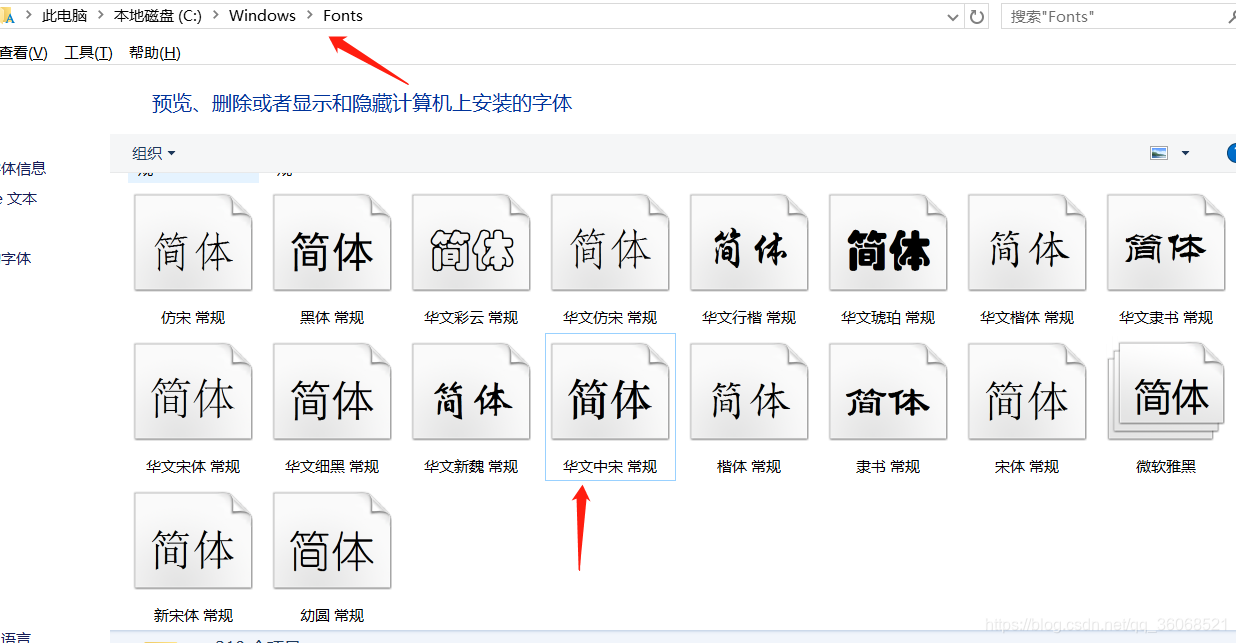
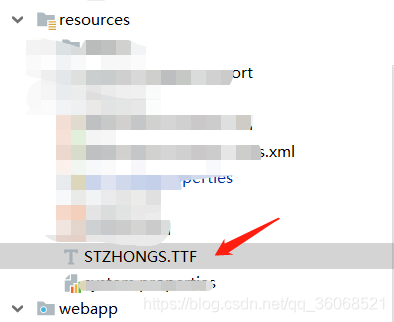
STZHONGS.TTF文件在自己的电脑中就有的字体文件:华文中宋
一般在C:/Windows/Fonts/STZHONGS.TTF目录下,拷贝到resources目录下就可以了
一定是 resources目录,不然读不到
也可下载https://download.youkuaiyun.com/download/haier0717/9505560
5.wordToPdf类
import com.lowagie.text.Font;
import com.lowagie.text.pdf.BaseFont;
import fr.opensagres.xdocreport.itext.extension.font.IFontProvider;
import org.apache.commons.io.IOUtils;
import org.apache.poi.xwpf.converter.pdf.PdfConverter;
import org.apache.poi.xwpf.converter.pdf.PdfOptions;
import org.apache.poi.xwpf.usermodel.XWPFDocument;

import java.awt.*;
import java.io.*;

/**
 * @Author:
 * @Description:
 * @Date: 2019/11/22 14:33
 * @Version: 1.0
 */
public class WordToPfd {
    /**
     * 将word文档, 转换成pdf
     * 宋体:STSong-Light
     *  STZHONGS.TTF文件从自己的电脑中就有的字体文件:华文中宋
     *  一般在C:/Windows/Fonts/STZHONGS.TTF目录下,拷贝到resources目录下就可以了
     * 一定是  resources目录,不然读不到
     * @param tmp        源为word文档, 必须为docx文档
     * @param target     目标输出
     * @throws Exception
     */
    public static void   wordConverterToPdf(String tmp, String target) {
        InputStream sourceStream = null;
        OutputStream targetStream = null;
        XWPFDocument doc = null;
        String classPath= WordToPfd.class.getResource("/").getPath().toString();
        tmp = classPath + tmp;
        target = classPath + target;
        String fontPath =classPath+"STZHONGS.TTF";
        try {
            sourceStream = new FileInputStream(tmp);
            targetStream = new FileOutputStream(target);
            doc = new XWPFDocument(sourceStream);
            PdfOptions options = PdfOptions.create();
            //中文字体处理
            options.fontProvider(new IFontProvider() {
                @Override
                public Font getFont(String familyName, String encoding, float size, int style, Color color) {
                    try {
                        //中文字体
                        BaseFont bfChinese = BaseFont.createFont(fontPath, BaseFont.IDENTITY_H, BaseFont.NOT_EMBEDDED);
                        Font fontChinese = new Font(bfChinese, size, style, color);
                        if (familyName != null){
                            fontChinese.setFamily(familyName);
                        }
                        return fontChinese;
                    } catch (Exception e) {
                        e.printStackTrace();
                        return null;
                    }
                }
            });
            PdfConverter.getInstance().convert(doc, targetStream, options);
        } catch (IOException e) {
            e.printStackTrace();
        } finally {
            IOUtils.closeQuietly(targetStream);
            IOUtils.closeQuietly(sourceStream);
        }
    }

}
6.第二次请求读取文件写入response输出流,实现下载。将文件输出到response中,浏览器实现下载
/**
     * @param
     * @Description 报表导出
     * @Date 2019/11/13 11:53
     * @Author zhangchao
     */
    @RequestMapping("/reportExportLast")
    public void reportExportLast(HttpServletRequest request, HttpServletResponse response) throws IOException {
        String templateName = request.getParameter("filepath");
        if (templateName.isEmpty()) {
            templateName = "report" + System.currentTimeMillis();
        }
        String classPath=ReportViewAction.class.getResource("/").getPath().toString();
        String fileName = templateName.replace("~",SEPARATOR);
        String filePath = classPath+fileName;
        String name = "";
        //文件后缀名
        String fileExt = fileName.substring(fileName.lastIndexOf(".")+1);
        File file = new File(filePath);
        try (InputStream inputStream = new FileInputStream(file);
             ServletOutputStream out = response.getOutputStream()) {
            if (SUFFIX_DOCX.equals(fileExt)){
                name = new String("大数据报告.docx".getBytes("UTF-8"),"UTF-8");
                response.setContentType("application/msword;charset=UTF-8");
            }else if (SUFFIX_PDF.equals(fileExt)){
                name = new String("大数据报告.pdf".getBytes("UTF-8"),"UTF-8");
                response.setContentType("application/pdf;charset=UTF-8");
            }
            name = URLEncoder.encode(name,"UTF-8");
            response.setHeader("Content-Disposition", "attachment;filename=" + name);
            byte[] buffer = new byte[1024];
            int bytesToRead;
            while ((bytesToRead = inputStream.read(buffer)) != -1) {
                out.write(buffer, 0, bytesToRead);
            }
        } catch (IOException e) {
            e.printStackTrace();
        } finally {
            //删除临时文件
            String outputPath = filePath.substring(0,filePath.lastIndexOf(SEPARATOR)+1);
            WordUtils.delFiles(outputPath);
        }
    }
代码
JavaUtilsProject: java工具类,生成word文档,doc,docx,表格等
主要类
src/main/java/com/sl/utils/office/pdf/WordToPfd.java · 张超/JavaUtilsProject - Gitee.com






 扫一扫
扫一扫


 5万+
5万+

 被折叠的 条评论
为什么被折叠?
被折叠的 条评论
为什么被折叠?
 到【灌水乐园】发言





