



 本文介绍了在React Native中添加阴影的三种方法:RN自带的阴影样式(仅iOS支持),react-native-shadow插件(需原生支持,兼容iOS和Android)以及react-native-shadow-cards库(无需原生支持,兼容双平台)。详细阐述了每种方法的优缺点及使用注意事项,并提供了相关源码和参考资料。

一 RN自带阴影
RN提供了阴影样式属性,但其仅支持ios平台,在Android中需要使用elevation属性实现,但elevation仅提供一个灰色阴影,视觉效果不好。
部分源码
shadowColor: "#000",
shadowOffset: {
	width: 0,
	height: 2,
},
shadowOpacity: 0.25,
shadowRadius: 3.84,

elevation: 5,
二 react-native-shadow
react-native-shadow插件是广为使用的一种阴影插件,ios于Android均兼容。但该插件需要原生支持,如果项目为非原生,则无法使用该方法。
需要加载第三份组件
nom install react-native-shadow
nom install react-native-svg
原生需要link(link如果运行不起来可以看我另一篇踩过的坑,手动link了)
react-native link react-native-shadow
react-native link react-native-svg
部分源码
//导入模块
import {BoxShadow} from 'react-native-shadow';

//布局
export default class Fenceing extends Component {

    render() {
        return (
            <View style={styles.container}>
                <BoxShadow setting={shadowOpt} >
                    <View style={styles.cell}>
                        <Text>需要在外部边缘添加阴影的布局</Text>
                    </View>
                </BoxShadow>
            </View>
        );
    }
}

//样式
const shadowOpt = {
    width:Dimensions.get('window').width-16,
    height:170,
    color:'#000',
    border:10,
    radius:4,
    opacity:0.1,
    x:0,
    y:1,
    style:{marginVertical:5}
};

export const styles = StyleSheet.create({
    container: {
        flex: 1,
        paddingTop: 8,
        paddingLeft: 8,
        paddingRight: 8,
        backgroundColor:'#F7F8FA',
    },
    cell :{
        backgroundColor:'#FFFFFF',
        borderRadius: 4,
        height:170,
    }
});
三 react-native-shadow-cards
react-native-shadow-cards实现了一个阴影框,ios与Android均兼容。其不需要原生支持,可实现一般效果的阴影,可满足通常阴影需求。
贴一个npm 地址,里面有文档,有一些参数说明
https://www.npmjs.com/package/react-native-shadow-cards
github地址
https://github.com/Aamirali86/react-native-shadow-cards
需要加载第三份组件
nom install react-native-shadow-cards
这个不需要原生支持
部分源码
import {Card} from 'react-native-shadow-cards';

render(){
  return (
    <View style={styles.container}>
      <Card style={{padding: 10, margin: 10}}>
        <Text>Open up App.js to start working on your app!</Text>
        <Text>Changes you make will automatically reload.</Text>
        <Text>Shake your phone to open the developer menu.</Text>
      </Card>
      <Card style={{padding: 10, margin: 10}}>
        <Button
          onPress={()=>{}}
          title="Learn More"
          color="#841584"
          accessibilityLabel="Learn more about this purple button"
        />
      </Card>
      <Card style={{padding: 10, margin: 10, height: 50}}>
      </Card>
    </View>
  );
}
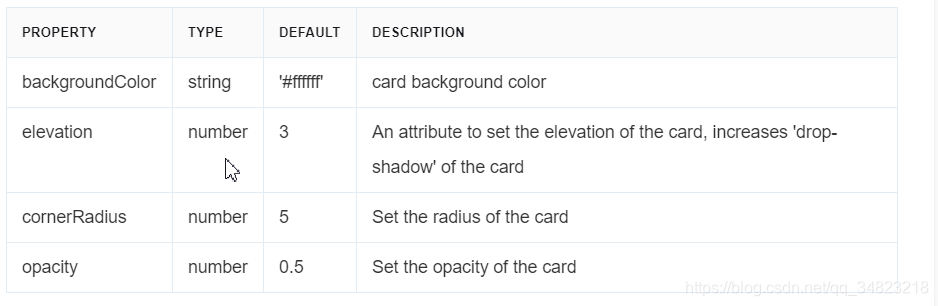
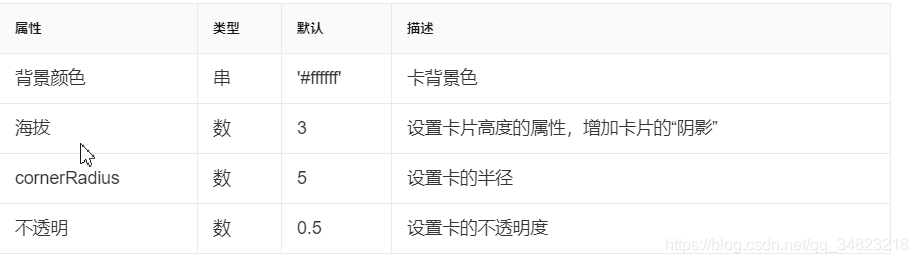
部分参数
中文
参考链接:https://www.jianshu.com/p/bd9de0e14951
参考链接:https://blog.youkuaiyun.com/kuixuemei8325/article/details/88145250
参考链接:https://reactnativeexample.com/simple-card-view-component-for-react-native/(需翻墙)
参考链接:https://ethercreative.github.io/react-native-shadow-generator/





 扫一扫
扫一扫


 731
731

 被折叠的 条评论
为什么被折叠?
被折叠的 条评论
为什么被折叠?
 到【灌水乐园】发言





