



 本文围绕Vue组件展开,介绍了组件定义、本质、优缺点及使用场景,阐述了全局和私有组件的定义方式,还讲解了组件切换、动画,以及父组件向子组件、子组件向父组件、兄弟组件、祖先和后代之间的传值方法,此外涉及函数式组件、混入、插件等内容,最后给出轮播图组件案例。
定义Vue组件
什么是组件: 组件是可复用的 Vue 实例,准确讲它们是VueComponent的实例,继承自Vue。
优点:组件化可以增加代码的复用性、可维护性和可测试性。
使用场景:
(1)通用组件:实现最基本的功能,具有通用性、复用性,例如按钮组件、输入框组件、布局组件等。
(2)业务组件:它们完成具体业务,具有一定的复用性,例如登录组件、轮播图组件。
(3)页面组件:组织应用各部分独立内容,需要时在不同页面组件间切换,例如列表页、详情页组件
组件化和模块化的不同:
- 模块化: 是从代码逻辑的角度进行划分的;方便代码分层开发,保证每个功能模块的职能单一;
- 组件化: 是从UI界面的角度进行划分的;前端的组件化,方便UI组件的重用;
组件的本质
vue中的组件经历如下过程
组件配置 => VueComponent实例 => render() => Virtual DOM=> DOM
所以组件的本质是产生虚拟DOM
全局组件定义的三种方式
- 使用 Vue.extend 配合 Vue.component 方法:
(1)使用 Vue.extend 来创建全局的Vue组件
(2)通过 template 属性,指定了组件要展示的HTML结构
var login = Vue.extend({
      template: '<h1>登录</h1>'
    });
    Vue.component('login', login);
-
直接使用 Vue.component 方法:
使用 Vue.component(‘组件的名称’, 创建出来的组件模板对象)
Vue.component('register', {
      template: '<h1>注册</h1>'
    });
- 将模板字符串,定义到script标签种:
<template id="tmpl">
    <h1>这是私有的 login 组件</h1>
</template>
同时,需要使用 Vue.component 来定义组件:
 Vue.component('mycom3', {
      template: '#tmpl'
    })
注意:
- 如果使用 Vue.component 定义全局组件的时候,组件名称使用了 驼峰命名,则在引用组件的时候,需要把 大写的驼峰改为小写的字母,同时,两个单词之前,使用 - 链接;
- 不论是哪种方式创建出来的组件,组件的 template 属性指向的模板内容,必须有且只能有唯一的一个根元素
私有组件定义的方式
<script>
    var vm = new Vue({
      el: '#app',
      data: {},
      methods: {},
      components: { // 定义子组件
        account: { // account 组件
          template: '<div><h1>这是Account组件{{name}}</h1><login></login></div>', // 在这里使用定义的子组件
          components: { // 定义子组件的子组件
            login: { // login 组件
              template: "<h3>这是登录组件</h3>"
            }
          }
        }
      }
    });
  </script>
组件中的data
- 组件可以有自己的 data 数据,组件中的 data 必须是一个方法,这个方法内部必须返回一个对象;
- 组件中 的data 数据,使用方式和实例中的 data 使用方式完全一样。
<!DOCTYPE html>
<html lang="en">
<head>
  <meta charset="UTF-8">
  <meta name="viewport" content="width=device-width, initial-scale=1.0">
  <meta http-equiv="X-UA-Compatible" content="ie=edge">
  <title>Document</title>
  <script src="./lib/vue-2.4.0.js"></script>
</head>
<body>
  <div id="app">
    <counter></counter>
    <hr>
    <counter></counter>
  </div>

  <template id="tmpl">
    <div>
      <input type="button" value="+1" @click="increment">
      <h3>{{count}}</h3>
    </div>
  </template>

  <script>
    var dataObj = { count: 0 }
    // 这是一个计数器的组件, 身上有个按钮,每当点击按钮,让 data 中的 count 值 +1
    //为了保证每个实例中的data都是独立的,所以返回对象
    Vue.component('counter', {
      template: '#tmpl',
      data: function () {
        // return dataObj
        return { count: 0 }
      },
      methods: {
        increment() {
          this.count++
        }
      }
    })

    var vm = new Vue({
      el: '#app'
    });
  </script>
</body>
</html>
组件切换
方式1:使用flag标识符结合v-if和v-else切换组件
该方法只能实现两个组件的切换
<!DOCTYPE html>
<html lang="en">
<head>
  <meta charset="UTF-8">
  <meta name="viewport" content="width=device-width, initial-scale=1.0">
  <meta http-equiv="X-UA-Compatible" content="ie=edge">
  <title>Document</title>
  <script src="./lib/vue-2.4.0.js"></script>
</head>

<body>
  <div id="app">
    <a href="" @click.prevent="flag=true">登录</a>
    <a href="" @click.prevent="flag=false">注册</a>

    <login v-if="flag"></login>
    <register v-else="flag"></register>

  </div>

  <script>
    Vue.component('login', {
      template: '<h3>登录组件</h3>'
    })
    Vue.component('register', {
      template: '<h3>注册组件</h3>'
    })

    var vm = new Vue({
      el: '#app',
      data: {
        flag: false
      },
      methods: {}
    });
  </script>
</body>
</html>
方法2:is属性来切换不同的子组件,并添加切换动画
<!DOCTYPE html>
<html lang="en">
<head>
  <meta charset="UTF-8">
  <meta name="viewport" content="width=device-width, initial-scale=1.0">
  <meta http-equiv="X-UA-Compatible" content="ie=edge">
  <title>Document</title>
  <script src="./lib/vue-2.4.0.js"></script>
</head>
<body>
  <div id="app">
    <a href="" @click.prevent="comName='login'">登录</a>
    <a href="" @click.prevent="comName='register'">注册</a>

    <!-- Vue提供了 component ,来展示对应名称的组件 -->
    <!-- component 是一个占位符, :is 属性,可以用来指定要展示的组件的名称 -->
    <component :is="comName"></component>
  </div>

  <script>
    // 组件名称是 字符串
    Vue.component('login', {
      template: '<h3>登录组件</h3>'
    })

    Vue.component('register', {
      template: '<h3>注册组件</h3>'
    })

    var vm = new Vue({
      el: '#app',
      data: {
        comName: 'login' // 当前 component 中的 :is 绑定的组件的名称
      },
      methods: {}
    });
  </script>
</body>
</html>
组件切换动画
<!DOCTYPE html>
<html lang="en">
<head>
  <meta charset="UTF-8">
  <meta name="viewport" content="width=device-width, initial-scale=1.0">
  <meta http-equiv="X-UA-Compatible" content="ie=edge">
  <title>Document</title>
  <script src="./lib/vue-2.4.0.js"></script>
  <style>
    .v-enter,
    .v-leave-to {
      opacity: 0;
      transform: translateX(150px);
    }
    .v-enter-active,
    .v-leave-active {
      transition: all 0.5s ease;
    }
  </style>
</head>

<body>
  <div id="app">
    <a href="" @click.prevent="comName='login'">登录</a>
    <a href="" @click.prevent="comName='register'">注册</a>

    <!-- 通过 mode 属性,设置组件切换时候的模式,先出后进 -->
    <transition mode="out-in">
      <component :is="comName"></component>
    </transition>

  </div>

  <script>
    Vue.component('login', {
      template: '<h3>登录组件</h3>'
    })
    Vue.component('register', {
      template: '<h3>注册组件</h3>'
    })

    var vm = new Vue({
      el: '#app',
      data: {
        comName: 'login'
      },
      methods: {}
    });
  </script>
</body>

</html>
父组件向子组件传值
子组件中,默认无法访问到 父组件中的 data 上的数据 和 methods 中的方法,方法如下:
- 组件实例定义方式,注意:一定要使用props属性来定义父组件传递过来的数据
<script>
    var vm = new Vue({
      el: '#app',
      data: {
        msg: '这是父组件中的消息'
      },
      components: {
        son: {
          template: '<h1>这是子组件 --- {{finfo}}</h1>',
          props: ['finfo']// 把父组件传递过来的 parentmsg 属性,先在 props 数组中,定义一下,这样才能使用这个数据
           //  props:{
		  //    title:String,
		  //    del:{
		  //      type:Boolean,   //也可以通过这种方式定义数据,并指定数据的类型
		  //      default:false
		  //    }
		  //  }
        }
      }
    });
  </script>
- 通过属性绑定(v-bind:) 的形式,将数据传递到子组件中:
<div id="app">
    <son :finfo="msg"></son>
  </div>
注意:
data 上的数据,都是可读可写的;
props 中的数据,都是只读的,无法重新赋值;
注意:父向子传值,如果父的值是异步操作的结果,如果直接使用该值,则会使undifined,因为还未请求到该值,这种情况,子组件可以使用watch来监听该值变化后再赋值
子组件向父组件传值
- 原理:父组件将方法的引用,传递到子组件内部,子组件在内部调用父组件传递过来的方法,同时把要发送给父组件的数据,在调用方法的时候当作参数传递进去;
- 父组件将方法的引用传递给子组件,其中,getMsg是父组件中methods中定义的方法名称,func是子组件调用传递过来方法时候的方法名称
  <div id="app">
    <!-- 父组件,可以在引用子组件的时候, 通过 属性绑定(v-bind:) 的形式, 把 需要传递给 子组件的数据,以属性绑定的形式,传递到子组件内部,供子组件使用 -->
    <com1 v-bind:parentmsg="msg"></com1>
  </div>
- 子组件内部通过this.$emit(‘方法名’, 要传递的数据)方式,来调用父组件中的方法,同时把数据传递给父组件使用
<div id="app">
    <!-- 引用父组件 -->
    <son @func="getMsg"></son>

    <!-- 组件模板定义 -->
    <script type="x-template" id="son">
      <div>
        <input type="button" value="向父组件传值" @click="sendMsg" />
      </div>
    </script>
  </div>

  <script>
    // 子组件的定义方式
    Vue.component('son', {
      template: '#son', // 组件模板Id
      methods: {
        sendMsg() { // 按钮的点击事件
          this.$emit('func', 'OK'); // 调用父组件传递过来的方法,同时把数据传递出去
        }
      }
    });

    var vm = new Vue({
      el: '#app',
      data: {},
      methods: {
        getMsg(val){ // 子组件中,通过 this.$emit() 实际调用的方法,在此进行定义
          alert(val);
        }
      }
    });
  </script>
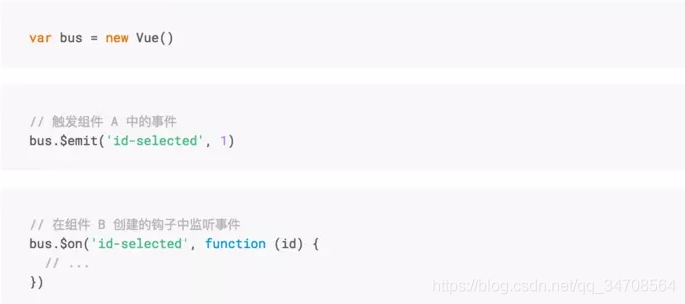
兄弟组件通信之Bus
在组件中,可以使用$emit, $on, $off 分别来分发、监听、取消监听事件
一般来说事件的派发者和监听者应该是同一个
兄弟组件通信之$parent/$root
兄弟组件之间的通信可以通过共同祖辈搭桥,父组件$parent或根组件$root
$parent与Bus相似,可完全替换
	//brother 1  监听事件
	this.$parent.$on('foo',msg=>{
		console.log('brother 2'+msg)
	})
	//brother 2  触发事件
	this.$parent.$emit('foo','hello')
# 父子组件通信之$children
父组件可以通过$children访问子组件实现父子通信。
// parent
this.$children[0].xx = 'xxx'
注意:$children不能保证子元素顺序,如组件时异步组件,是通过加载的方式添加,所以不能保证组件的顺序,不推荐该方法
父子组件通信之$attrs/$listeners
-
$attrs
当子组件没有在props声明要使用的变量时,又要接受父组件通过属性接收来的值,可以使用$attr,除了props的特性都会收纳到$attrs//父组件 <template> <div > <child msg="some msg"></child> </div> </template> //子组件child 不用在props钟声明msg也能直接使用 <template> <div > <p>{{$attr.msg}}</p> </div> </template> -
$listeners
$listeners会被展开并监听//父组件 <template> <div > <child @click="onClick"></child> </div> </template> <script> export default { data() { return { } }, methods: { onClick() { console.log("hee",this) //此处的this是父组件 } }, } </script> //子组件 child <template> <div > <!-- $listeners会被展开并监听 --> <p v-on='$listeners'>child</p> </div> </template>
祖先和后代之间传值provide/inject
可以跨层级传值,在开发通用组件库时可以用来传递一些深层次的值
// 祖先
<script>
	export default {
		provide() {
			return {foo: 'foo'},
			cop:this     //此处的this是祖先,可以传给后代,但很少这么用,他不是响应式
		}
	}
</script>

// 后代
<template>
    <div >
		<p>{{foo}}</p>
    </div>
</template>
<script>
	export default {
		inject: ['foo']
	}
</script>
为了避免父组件传递过来的值与子组件命名冲突,可以给子组件中接收时给它取别名,修改如下所示:
// 后代
<template>
    <div >
		<p>{{bar}}</p>
    </div>
</template>
<script>
	export default {
		inject: {bar : {from:'foo'}}
	}
</script>
在组件上使用v-model
<!-- 自定义组件支持v-model需要实现内部input的:value和@input,相当于以下写法 -->
<!-- <course-add :value="course" @input="course=$event" @add-course="addCourse"></course-add> -->
<course-add v-model="course" @add-course="addCourse"></course-add>


<script>
Vue.component('course-add', {
	// 接收父组件传递value,不需要额外维护course
	props: ['value'],
	template: `
		<div>
		<!-- 需要实现input的:value和@input -->
		<input :value="value" @input="onInput"
		@keydown.enter="addCourse"/>
		<button v-on:click="addCourse">新增课程</button>
		</div>
		`,
	methods: {
		addCourse() {
		// 派发事件不再需要传递数据
		this.$emit('add-course')
		// this.course = ''
		},
		onInput(e) {
		this.$emit('input', e.target.value)
		}
	},
})
const app = new Vue({
	data: {
		course: '', // 还原course
	},
	methods: {
		addCourse() {// 还原addCourse
		this.courses.push(this.course);
		this.course = '';
	}
	}
})
</script>
v-model默认转换是:value和@input,如果想要修改这个行为,可以通过定义model选项
Vue.component('course-add', {
	model: {
	prop: 'value',
	event: 'change'
	}
})
函数式组件
组件没有管理任何状态,也没有监听任何传递给它的状态,也没有生命周期方法时,可以将组件标记为
functional ,这意味它无状态 (没有响应式数据),也没有实例 (没有 this 上下文),好处是更加轻量,消耗资源更少。
Vue.component('heading', {
	functional: true, //标记函数式组件
	props: ['level', 'title', 'icon'],
	render(h, context) { //上下文传参
		let children = [];
		// 属性获取
		const {icon, title, level} = context.props
		if (icon) {
			children.push(h(
			'svg',
			{ class: 'icon' },
			[h('use', { attrs: { 'xlink:href': '#icon-' + icon } })]))
			// 子元素获取
			children = children.concat(context.children)//context.children是函数式组件获取插槽的内容的方式
		}
		vnode = h(
			'h' + level,
			{ attrs: { title } },
			children
		)
		console.log(vnode);
		return vnode
	}
})
混入
混入 (mixin) 提供了一种非常灵活的方式,来分发 Vue 组件中的可复用功能。一个混入对象可以包含任
意组件选项。当组件使用混入对象时,所有混入对象的选项将被“混合”进入该组件本身的选项。
// 定义一个混入对象
var myMixin = {
	created: function () {
		this.hello()
	},
	methods: {
		hello: function () {
			console.log('hello from mixin!')
		}
	}
}
// 定义一个使用混入对象的组件
Vue.component('comp', {
	mixins: [myMixin]
})
插件
范例
//定义插件
const MyPlugin = {
	install (Vue, options) {
		Vue.component('heading', {...})
	}
}
//使用插件
if (typeof window !== 'undefined' && window.Vue) {
	window.Vue.use(MyPlugin)
}
插件的使用:Vue.use(MyPlugin)
render——在 webpack 中导入组件
在 webpack 中,如果想要通过 vue, 把一个组件放到页面中去展示,vm 实例中的 render 函数可以实现;
通过el指定容器,把容器替换成render中的login。
<!DOCTYPE html>
<html lang="en">
<head>
  <meta charset="UTF-8">
  <meta name="viewport" content="width=device-width, initial-scale=1.0">
  <meta http-equiv="X-UA-Compatible" content="ie=edge">
  <title>Document</title>
  <script src="./lib/vue-2.4.0.js"></script>
</head>

<body>
  <div id="app">
    <p>444444</p>
  </div>
  <script>
    var login = {
      template: '<h1>这是登录组件</h1>'
    }

    var vm = new Vue({
      el: '#app',
      render: function (createElements) { // createElements 是一个 方法,调用它,能够把 指定的 组件模板,渲染为 html 结构
        return createElements(login)
        //注意:这里 return 的结果,会替换页面中 el 指定的那个 容器
      }
    });
  </script>
</body>
</html>
vue-loader——webpack中解析后缀为.vue文件(vue的组件)的插件
- 步骤
-
运行
cnpm i vue-loader vue-template-compiler -D,vue-template-compiler为vue-loader的内部依赖,也要安装。 -
在
webpack.config.js文件中配置插件节点和匹配规则const VueLoaderPlugin = require('vue-loader/lib/plugin') //第一步:引入插件 module.exports = { plugins: [ // 第二步:配置插件的节点 new VueLoaderPlugin() ], module: { // 第三步:配置以.vue结尾的匹配规则 rules: [ { test:/\.vue$/, use: 'vue-loader' } ] } }; -
在js入口文件
main,js中引入以“.vue”结尾的vue文件index.html
<!DOCTYPE html>
<html lang="en">
<head>
    <meta charset="UTF-8">
    <meta name="viewport" content="width=device-width, initial-scale=1.0">
    <title>Document</title>
    <!-- <script src="/bundle.js"></script> -->
</head>
<body>
    <div id="app">
        <login></login>
     </div>
</body>
main.js
注意:如果引入的vue包为默认配置的包,即vue.runtime.common.js时,则不支持以componets的形式引入组件,而应该使用render函数。import Vue from 'vue' import login from './login.vue' var vm = new Vue({ el: '#app', data: { msg: '123' }, // components: { // login // }, render: function (createElements) { return createElements(login) } // render: c => c(login) //以上方式的简写 }) ``` login.vue ``` <template> <div> <h1>这是登录组件,使用 .vue 文件定义出来的 --- {{msg}}</h1> </div> </template> <script> export default { data() { // 注意:组件中的 data 必须是 function return { msg: "123" }; }, methods: { show() { console.log("调用了 login.vue 中的 show 方法"); } } }; </script> <style> </style>
-
“.vue”文件——VUE的组件文件
```
<template>
  <div>
    <h1>这是组件</h1>
  </div>
</template>

<script>
	export default {
		  data() {
		    // 注意:组件中的 data 必须是 function
		    return {
		      msg: "123"
		    };
		  },
		  methods: {
		    show() {
		      console.log("调用了 login.vue 中的 show 方法");
		    }
		  }
	};
</script>

<style scoped lang="scss">

</style>
```
- 注意:在“.vue”组件定义中,推荐都为
style开启scoped,scoped属性可以实现组件的私有化,不对全局造成样式污染,表示当前style属性只属于当前模块。如果想在style中使用scss语言,则需要给lang属性指定语言,当前,使用的前提是webpack必须安装了scss-loader匹配规则。
抽离组件–轮播图组件案例
- 创建组件轮播图组件
swiper.vue
- 在组件中,使用v-for循环的话,一定要使用 key
- 用props定义父组件传递过来的数据
<template>
  <div>
    <mt-swipe :auto="4000">
      <!-- 将来,谁使用此 轮播图组件,谁为我们传递 lunbotuList -->
      <!-- lunbotuList:轮播图的数据 -->
      <!-- isfull:如果为真,将轮播图的宽度设为100% -->
      <mt-swipe-item v-for="item in lunbotuList" :key="item.url">
        <img :src="item.img" alt="" :class="{'full': isfull}">
      </mt-swipe-item>
    </mt-swipe>
  </div>
</template>

<script>
export default {
  props: ["lunbotuList", "isfull"]
};
</script>

<style lang="scss" scoped>
.mint-swipe {
  height: 200px;
  .mint-swipe-item {
    text-align: center;
    img {
      height: 100%;
    }
  }
}
.full {
  width: 100%;
}
</style>
- 使用组件
swiper.vue
-
(1)导入组件
import swiper from "../subcomponents/swiper.vue"; -
(2)建立components节点,引入
swipercomponents: { swiper } -
(3)在界面中引入组件,并传入所需的数据
<div class="mui-card"> <div class="mui-card-content"> <div class="mui-card-content-inner"> <swiper :lunbotuList="lunbotu" :isfull="false"></swiper> </div> </div> </div> -
(4)完整案例
<template>
<div>
<!-- 商品轮播图区域 -->
<div class="mui-card">
<div class="mui-card-content">
<div class="mui-card-content-inner">
<!-- :isfull="false"宽度不设为百分百 -->
<swiper :lunbotuList="lunbotu" :isfull="false"></swiper>
</div>
</div>
</div>
</div>
</template>
<script>
// 导入轮播图组件
import swiper from "../subcomponents/swiper.vue";
export default {
data() {
return {
lunbotu: [], // 轮播图的数据
};
},
created() {
this.getLunbotu();
},
methods: {
getLunbotu() {
this.$http.get("api/getthumimages/" + this.id).then(result => {
if (result.body.status === 0) {
this.lunbotu = result.body.message;
}
});
},
},
components: {
    swiper
  }
};
</script>
<style lang="scss" scoped>
</style>





 扫一扫
扫一扫


 1662
1662

 被折叠的 条评论
为什么被折叠?
被折叠的 条评论
为什么被折叠?
 到【灌水乐园】发言





