




TypeScript特点
-
类型注解
let var1: string; // 类型注解
var1 = "哈哈"; // 正确
var1 = 4; // 错误
// 编译器类型推断可省略这个语法
let var2 = true;
注:常见原始类型: string,number,boolean,undefined,null,symbol
-
类型基础
// 类型数组 let arr: string[]; arr = ['Tom']; // 或Array<string> // 任意类型any let varAny: any; varAny = 'xx'; varAny = 3; // any类型也可用于数组 let arrAny: any[]; arrAny = [1, true, "free"]; arrAny[1] = 100; // 函数中的类型约束 function greet(person: string): string { return 'hello, ' + person; } greet("张三") // void类型,常用于没有返回值的函数 function warn(): void {} // 对象object:不是原始类型的就是对象类型 function fn1(o: object) {} fn1({ prop: 0 }); // OK fn1(1); // Error fn1("string"); // Error // 更好的约束方式应该是下面这样 function fn2(o: { prop: number }) {} fn2({ prop: 0 }) // OK // 类型别名type:自定义类型 type Prop = { prop: number } // fn3变得更清爽了 function fn3(o: Prop) {} -
类型断言
某些情况下用户会比编译器更确定某个变量的具体类型,可用类型断言asconst someValue: any = "this is a string"; const strLength = (someValue as string).length; -
联合类型
希望某个变量或参数的类型是多种类型其中之一let union: string | number; union = '1'; // ok union = 1; // ok -
交叉类型
想要定义某种由多种类型合并而成的类型使用交叉类型type First = {first: number}; type Second = {second: number}; type FirstAndSecond = First & Second; function fn3(param: FirstAndSecond): FirstAndSecond { return {first:1, second:2} } -
函数
必填参:参数一旦声明,就要求传递,且类型需符合function greeting(person: string): string { return "Hello, " + person; } greeting('tom')可选参数:参数名后面加上问号,变成可选参数
function greeting(person: string, msg?: string): string {
 return "Hello, " + person;
}
默认值
function greeting(person: string, msg = ''): string {
 return "Hello, " + person;
}
*函数重载:以参数数量或类型区分多个同名函数
// 重载1 function watch(cb1: () => void): void; // 重载2 function watch(cb1: () => void, cb2: (v1: any, v2: any) => void): void; // 实现 function watch(cb1: () => void, cb2?: (v1: any, v2: any) => void) { if (cb1 && cb2) { console.log('执行watch重载2'); } else { console.log('执行watch重载1'); } } -
类
ts中的类和es6中大体相同,这里重点关注ts带来的访问控制等特性class Parent { private _foo = "foo"; // 私有属性,不能在类的外部访问 protected bar = "bar"; // 保护属性,可以在子类中访问 // 参数属性:构造函数参数加修饰符,能够定义为成员属性 constructor(public tua = "tua") {} // 方法也有修饰符 private someMethod() {} // 存取器:属性方式访问,可添加额外逻辑,控制读写性 get foo() { return this._foo; } set foo(val) { this._foo = val; } }
Vue+TypeScript
-
新建一个基于ts的vue项目
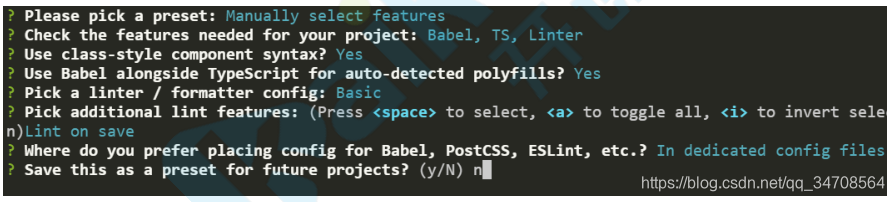
或在已存在项目中安装typescriptvue add @vue/typescript- 模板
<template> <div> <ul> <li v-for="feature in features" :key="feature">{{feature}}</li> </ul> </div> </template> <script lang='ts'> import { Component, Prop, Vue } from "vue-property-decorator"; @Component export default class Hello extends Vue { //data数据定义 features: string[] = ["类型注解", "编译型语言"]; //生命周期的使用 created() { this.features = [{ id: 1, name: "类型注解" }]; } //计算属性的使用 get count() { return this.features.length; } } </script>- 类型断言案例:
<div>
<input type="text" placeholder="输入新特性" @keyup.enter="addFeature">
</div>
addFeature(e: KeyboardEvent) { // e.target是EventTarget类型,需要断言为HTMLInputElement const inp = e.target as HTMLInputElement; this.features.push(inp.value); inp.value = '' }- 接口
接口仅约束结构,不要求实现,使用更简单
// Person接口定义了解构
interface Person {
 firstName: string;
 lastName: string;
}
// greeting函数通过Person接口约束参数解构
function greeting(person: Person) {
 return 'Hello, ' + person.firstName + ' ' + person.lastName;
}
greeting({firstName: 'Jane', lastName: 'User'}); // 正确
greeting({firstName: 'Jane'}); // 错误
范例:修改Feature为接口形式
(1)定义接口数据的形式//./types/index.ts export interface Feature { id: number; name: string; desc?: string; //可选参数 }(2)使用接口
<template>
 <div>
  <!--修改模板-->
  <li v-for="feature in features" :key="feature.id">{{feature.name}}</li>
 </div>
</template>
<script lang='ts'>
// 导入接口
import { Feature } from "@/types";  //引入接口文档

@Component
export default class Hello extends Vue {
 // 修改数据结构
 features: Feature[] = [{ id: 1, name: "类型注解" }];
 addFeature(e: KeyboardEvent) {
  // 新增的数据也要符合Feature结构
  this.features.push({ id: this.features.length + 1, name: inp.value });
}
}
</script>
使用接口的好处是数据类型错误时会提醒,重构的时候不担心出错。
- 泛型
泛型(Generics)是指在定义函数、接口或类的时候,不预先指定具体的类型,而在使用的时候再指定类型的一种特性。以此增加代码通用性。
泛型优点:函数和类可以支持多种类型,更加通用;不必编写多条重载,冗长联合类型,可读性好;灵活控制类型约束;不仅通用且能灵活控制,泛型被广泛用于通用库的编写。
// 不用泛型
// interface Result {
//  ok: 0 | 1;
//  data: Feature[];
// }
// 使用泛型
interface Result<T> {
 ok: 0 | 1;
 data: T;
}
// 泛型方法
function getResult<T>(data: T): Result<T> {
 return {ok:1, data};
 }
// 用尖括号方式指定T为string
getResult<string>('hello')
// 用类型推断指定T为number
getResult(1)
范例:用axios获取数据
安装axios:npm i axios -S
配置一个模拟接口,vue.config.jsmodule.exports = { devServer: { before(app) { app.get('/api/list', (req, res) => { res.json([ { id: 1, name: "类型注解", version: "2.0" }, { id: 2, name: "编译型语言", version: "1.0" } ]) }) } } }
创建服务,api/feature.ts
import axios from 'axios';
import Feature from '@/models/feature';
export function getFeatures() {
  // 通过泛型约束返回值类型,这里是Promise<AxiosResponse<Feature[]>>
  return axios.get<Feature[]>('/api/list')
}
使用接口,Hello.vue
created() {
  // getFeatures()返回Promise<AxiosResponse<Feature[]>>
  // res类型推断为AxiosResponse<Feature[]>
  // res.data类型推断为Feature[]
  getFeatures().then(res => {
    this.features = res.data
 })
}
- 声明文件
使用ts开发时如果要使用第三方js库的同时还想利用ts诸如类型检查等特性就需要声明文件,类似xx.d.ts同时,vue项目中还可以在shims-vue.d.ts中编写声明,从而扩展模块,这个特性叫模块补充
范例:挂载$axios到vue原型上在组件里面直接用
// main.ts
import axios from 'axios'
Vue.prototype.$axios = axios;
// shims-vue.d.ts
import Vue from "vue";
import { AxiosInstance } from "axios";
declare module "vue/types/vue" {
 interface Vue {
  $axios: AxiosInstance;
}
}
范例:解决main中vue选项警告,shims-vue.d.ts
import VueRouter from "vue-router";
import { Store } from "vuex";
declare module "vue/types/options" {
 interface ComponentOptions<V extends Vue> {
  router?: VueRouter;
  store?: Store<any>;
}
}
- 装饰器
装饰器用于扩展类或者它的属性和方法。@xxx就是装饰器的写法
属性声明:@Prop
除了在@Component中声明,还可以采用@Prop的方式声明组件属性
export default class HelloWorld extends Vue {
 // Props()参数是为vue提供属性选项
 // !称为明确赋值断言,它是提供给ts的
 @Prop({type: String, required: true})
 private msg!: string;
}
事件处理:@Emit
新增特性时派发事件通知,Hello.vue
// 通知父类新增事件,若未指定事件名则函数名作为事件名(羊肉串形式)
@Emit()
private addFeature(event: any) {// 若没有返回值形参将作为事件参数
  const feature = { name: event.target.value, id: this.features.length + 1 };
  this.features.push(feature);
  event.target.value = "";
  return feature;// 若有返回值则返回值作为事件参数
}
变更监测:@Watch
@Watch('msg')
onMsgChange(val:string, oldVal:any){
  console.log(val, oldVal);
}





 扫一扫
扫一扫


 605
605

 被折叠的 条评论
为什么被折叠?
被折叠的 条评论
为什么被折叠?
 到【灌水乐园】发言





