



组件通信的常用方式
组件通信常用方式
props
eventbus
vuex
自定义事件
-
List item
边界情况
$parent
$children
$root
$refs
provide/inject -
非prop特性
$attrs
$listeners
父组件向子组件传值之props
子组件中,默认无法访问到 父组件中的 data 上的数据 和 methods 中的方法,方法如下:
- 组件实例定义方式,注意:一定要使用props属性来定义父组件传递过来的数据
<script>
    var vm = new Vue({
      el: '#app',
      data: {
        msg: '这是父组件中的消息'
      },
      components: {
        son: {
          template: '<h1>这是子组件 --- {{finfo}}</h1>',
          props: ['finfo']// 把父组件传递过来的 parentmsg 属性,先在 props 数组中,定义一下,这样才能使用这个数据
           //  props:{
		  //    title:String,
		  //    del:{
		  //      type:Boolean,   //也可以通过这种方式定义数据,并指定数据的类型
		  //      default:false
		  //    }
		  //  }
        }
      }
    });
  </script>
- 通过属性绑定(v-bind:) 的形式,将数据传递到子组件中:
<div id="app">
    <son :finfo="msg"></son>
  </div>
注意:
data 上的数据,都是可读可写的;
props 中的数据,都是只读的,无法重新赋值;
注意:父向子传值,如果父的值是异步操作的结果,如果直接使用该值,则会使undifined,因为还未请求到该值,这种情况,子组件可以使用watch来监听该值变化后再赋值
子组件向父组件传值之$emit
- 原理:父组件将方法的引用,传递到子组件内部,子组件在内部调用父组件传递过来的方法,同时把要发送给父组件的数据,在调用方法的时候当作参数传递进去;
- 父组件将方法的引用传递给子组件,其中,getMsg是父组件中methods中定义的方法名称,func是子组件调用传递过来方法时候的方法名称
  <div id="app">
    <!-- 父组件,可以在引用子组件的时候, 通过 属性绑定(v-bind:) 的形式, 把 需要传递给 子组件的数据,以属性绑定的形式,传递到子组件内部,供子组件使用 -->
    <com1 v-bind:parentmsg="msg"></com1>
  </div>
- 子组件内部通过this.$emit(‘方法名’, 要传递的数据)方式,来调用父组件中的方法,同时把数据传递给父组件使用
<div id="app">
    <!-- 引用父组件 -->
    <son @func="getMsg"></son>

    <!-- 组件模板定义 -->
    <script type="x-template" id="son">
      <div>
        <input type="button" value="向父组件传值" @click="sendMsg" />
      </div>
    </script>
  </div>

  <script>
    // 子组件的定义方式
    Vue.component('son', {
      template: '#son', // 组件模板Id
      methods: {
        sendMsg() { // 按钮的点击事件
          this.$emit('func', 'OK'); // 调用父组件传递过来的方法,同时把数据传递出去
        }
      }
    });

    var vm = new Vue({
      el: '#app',
      data: {},
      methods: {
        getMsg(val){ // 子组件中,通过 this.$emit() 实际调用的方法,在此进行定义
          alert(val);
        }
      }
    });
  </script>
兄弟组件通信之Bus
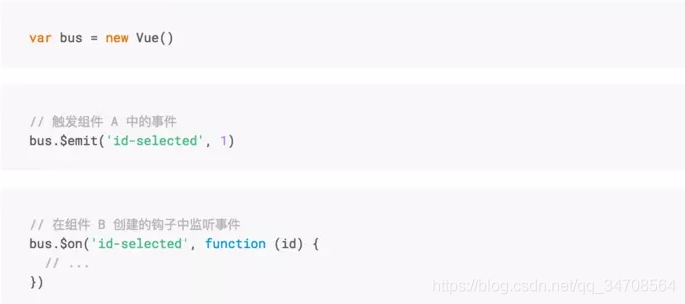
在组件中,可以使用$emit, $on, $off 分别来分发、监听、取消监听事件
一般来说事件的派发者和监听者应该是同一个
案例:批量清楚多消息弹窗
css:
.message-box {
  padding: 10px 20px;
}
.success {
  background: #4fc08d;
  border: 1px solid #42b983;
}
.warning {
  background: #f66;
  border: 1px solid #d63200;
}
html
<!--给之前新增成功消息添加.success-->
<message :show.sync="show" class="success">...</message>
<!--新增警告提示窗-->
<message :show.sync="showWarn" class="warning">
  <template v-slot:title>
    <strong>警告</strong>
  </template>
  <template v-slot:default>
   请输入课程名称!
  </template>
</message>
警告信息
const app = new Vue({
  data() {
    return {
      // 控制警告信息显示状态
      showWarn: false,
   }
 },
  methods: {
    addCourse() {
      // 增加输入校验
      if (this.course) {
        // ...
     } else {
        // 提示警告信息
        this.showWarn = true
     }
   }
 },
})
实现功能:
(1)弹窗子组件监听
Vue.component('message', {
  // ...
  // 监听关闭事件
  mounted () {
    this.$bus.$on('message-close', () => {
      this.$emit('update:show', false)
   });
 },
})
(2)点击清空派发事件
<div class="toolbar">
  <button @click="$bus.$emit('message-close')">清空提示框</button>
</div>
兄弟组件通信之$parent/$root
兄弟组件之间的通信可以通过共同祖辈搭桥,父组件$parent或根组件$root
$parent与Bus相似,可完全替换
	//brother 1  监听事件
	this.$parent.$on('foo',msg=>{
		console.log('brother 2'+msg)
	})
	//brother 2  触发事件
	this.$parent.$emit('foo','hello')
# 父子组件通信之$children
父组件可以通过$children访问子组件实现父子通信。
// parent
this.$children[0].xx = 'xxx'
注意:$children不能保证子元素顺序,如组件时异步组件,是通过加载的方式添加,所以不能保证组件的顺序,不推荐该方法
父子组件通信之$attrs/$listeners
-
$attrs
当子组件没有在props声明要使用的变量时,又要接受父组件通过属性接收来的值,可以使用$attr,除了props的特性都会收纳到$attrs//父组件 <template> <div > <child msg="some msg"></child> </div> </template> //子组件child 不用在props钟声明msg也能直接使用 <template> <div > <p>{{$attr.msg}}</p> </div> </template>vue组件的inheritAttrs属性:如果你不希望组件的根元素继承特性,你可以在组件的选项中设置 inheritAttrs: false。
父组件 parent-component.vue:
<template>
 <div class="parent">
    <child-component aaa="1111"></child-component>
  </div>
</template>
<script>
import ChildComponent from './child-component'
export default {
  components: {
    ChildComponent
  }
}
</script>
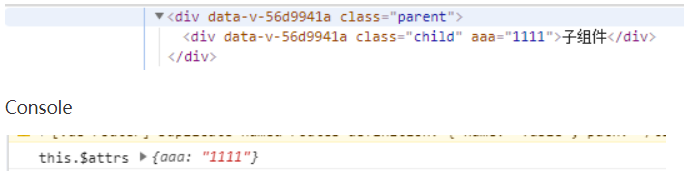
子组件 child-component.vue 设置 inheritAttrs: true(默认)
<template>
  <div class="child">子组件</div>
</template>
<script>
export default {
  inheritAttrs: true,
  mounted() {
    console.log('this.$attrs', this.$attrs)
  }
}
</script>
最后渲染的结果:
Elements
子组件 child-component.vue 设置 inheritAttrs: false<template> <div class="child">子组件</div> </template> <script> export default { inheritAttrs: fasle, mounted() { console.log('this.$attrs', this.$attrs) } } </script>最后渲染的结果:
Elements
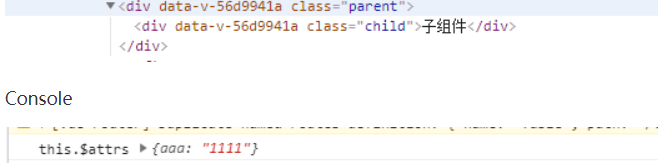
总结:由上述例子可以看出,前提:子组件的props中未注册父组件传递过来的属性。
1.当设置inheritAttrs: true(默认)时,子组件的顶层标签元素中(本例子的div元素)会渲染出父组件传递过来的属性(本例子的aaa=“1111”)。
2.当设置inheritAttrs: false时,子组件的顶层标签元素中(本例子的div元素)不会渲染出父组件传递过来的属性(本例子的aaa=“1111”)。
3.不管inheritAttrs为true或者false,子组件中都能通过$attrs属性获取到父组件中传递过来的属性。
-
$listeners
$listeners会被展开并监听//父组件 <template> <div > <child @click="onClick"></child> </div> </template> <script> export default { data() { return { } }, methods: { onClick() { console.log("hee",this) //此处的this是父组件 } }, } </script> //子组件 child <template> <div > <!-- $listeners会被展开并监听 --> <p v-on='$listeners'>child</p> </div> </template>
祖先和后代之间传值provide/inject
可以跨层级传值,在开发通用组件库时可以用来传递一些深层次的值
// 祖先
<script>
	export default {
		provide() {
			return {foo: 'foo'},
			cop:this     //此处的this是祖先,可以传给后代,但很少这么用,他不是响应式
		}
	}
</script>

// 后代
<template>
    <div >
		<p>{{foo}}</p>
    </div>
</template>
<script>
	export default {
		inject: ['foo']
	}
</script>
为了避免父组件传递过来的值与子组件命名冲突,可以给子组件中接收时给它取别名,修改如下所示:
// 后代
<template>
    <div >
		<p>{{bar}}</p>
    </div>
</template>
<script>
	export default {
		inject: {bar : {from:'foo'}}
	}
</script>
自定义组件实现双向绑定v-model
要实现value组件的绑定和input事件,这样再自定义组件外面才能使用v-modle
组件Kinput
<template>
    <div >
		<input type="text" :value="value" @input="onInput"></input>
    </div>
</template>
<script>
	export default {
              props:{
			       value:{
			       	type:String,
			       	default:' '
			       },
			        type:{
			       	type:String,
			       	default:' text'
			       },
			  },
			  method:{
			  	onInput(e){
			  		this.$emit('input',e.e.target.value)
			  	}
			  }

	}
</script>
父组件使用:
<template>
    <div >
		<Kinput v-model='username' ></Kinput>
    </div>
</template>
<script>
	inport Kinput from .@components/form/Kinput.vue.
	export default {
	data(){
		username:''
	},
   compoents{
   	Kinput
   }

	}
</script>





 扫一扫
扫一扫


 1万+
1万+

 被折叠的 条评论
为什么被折叠?
被折叠的 条评论
为什么被折叠?
 到【灌水乐园】发言





