


 本文介绍了如何在ueditor的基础上,通过自定义UploadImageServlet,实现前端向服务器上传图片的功能,包括处理multipartcontent、文件类型检查和路径重定向。
这里以上传图片为例
-
先决条件
- 你已经看完了上一篇 : 对 ueditor 文件上传的源码的理解,因为我是使用上一篇的开发环境
-
修改前台上传图片访问路径
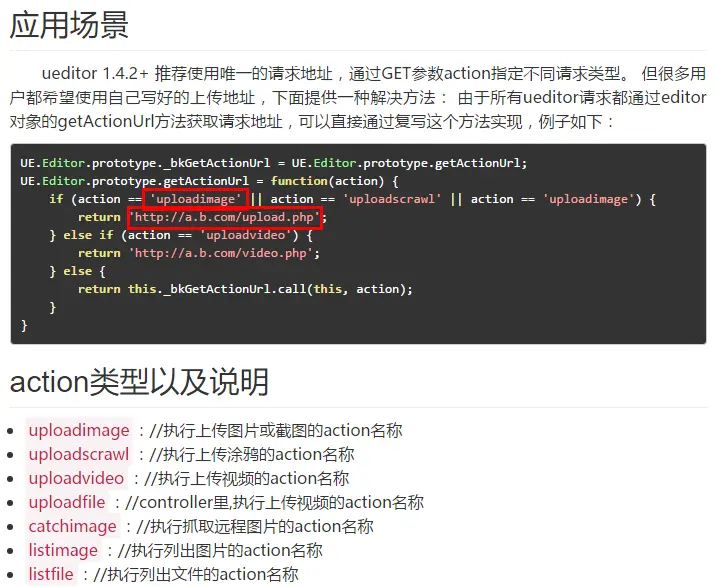
- 官方说明:
-
新建 diyindex.html
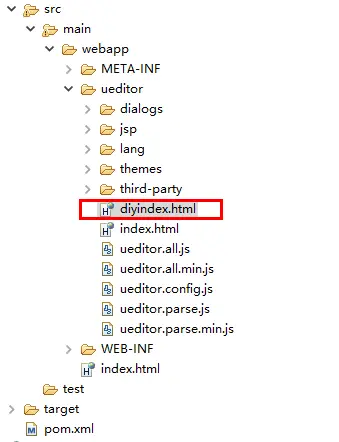
- diyindex.html 代码
<!DOCTYPE HTML PUBLIC "-//W3C//DTD HTML 4.01 Transitional//EN" "http://www.w3.org/TR/html4/loose.dtd"> <html> <head> <title>使用自己定义的上传类</title> <meta http-equiv="Content-Type" content="text/html;charset=utf-8"/> <script type="text/javascript" charset="utf-8" src="ueditor.config.js"></script> <script type="text/javascript" charset="utf-8" src="ueditor.all.min.js"> </script> <!--建议手动加在语言,避免在ie下有时因为加载语言失败导致编辑器加载失败--> <!--这里加载的语言文件会覆盖你在配置项目里添加的语言类型,比如你在配置项目里配置的是英文,这里加载的中文,那最后就是中文--> <script type="text/javascript" charset="utf-8" src="lang/zh-cn/zh-cn.js"></script> <style type="text/css"> div{ width:100%; } </style> </head> <body> <div> <h1>使用自己定义的上传类</h1> <textarea id="editor" type="text/plain" style="width:1024px;height:500px;"></textarea> </div> <script type="text/javascript"> UE.Editor.prototype._bkGetActionUrl = UE.Editor.prototype.getActionUrl; UE.Editor.prototype.getActionUrl = function(action) { if (action == 'uploadimage' ) { return 'http://localhost:8080/_ueditor/UploadImageServlet'; } else { return this._bkGetActionUrl.call(this, action); } } var ue = UE.getEditor('editor'); </script> </body> </html>- 注意:
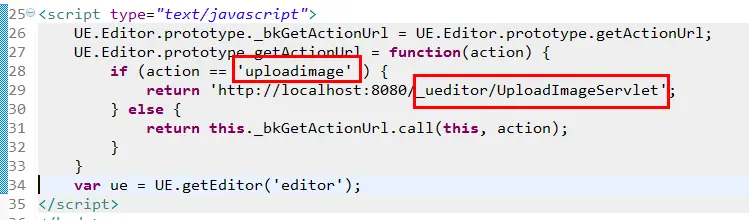
-
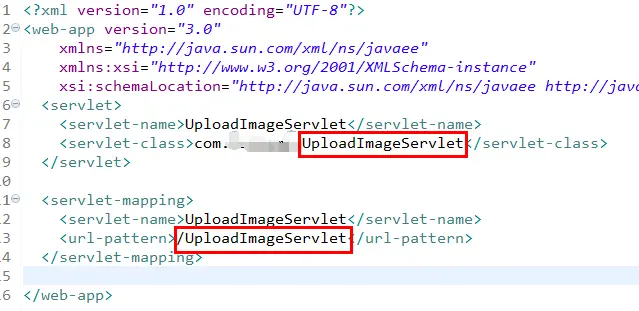
新建 UploadImageServlet 接受前段上传请求、保存图片、返回信息。
-
web.xml 中
-
UploadImageServlet 代码
-
属性
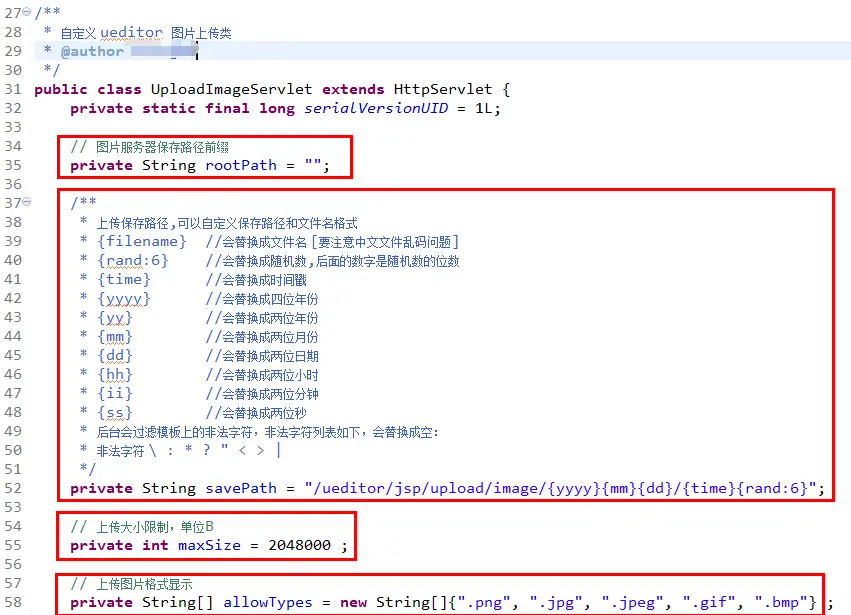
-
doPost 方法代码
protected void doPost(HttpServletRequest request, HttpServletResponse response) throws ServletException, IOException { System.out.println("------- ueditor 图片上传 -------"); FileItemStream fileStream = null; boolean isAjaxUpload = request.getHeader( "X_Requested_With" ) != null; if (!ServletFileUpload.isMultipartContent(request)) { sendData( response, false, AppInfo.NOT_MULTIPART_CONTENT , null); return ; } ServletFileUpload upload = new ServletFileUpload( new DiskFileItemFactory()); if ( isAjaxUpload ) { upload.setHeaderEncoding( "UTF-8" ); } try { FileItemIterator iterator = upload.getItemIterator(request); while (iterator.hasNext()) { fileStream = iterator.next(); if (!fileStream.isFormField()) break; fileStream = null; } if (fileStream == null) { sendData( response, false, AppInfo.NOTFOUND_UPLOAD_DATA , null); return ; } // 得到 得到 新路径格式+名称格式 String savePath = this.savePath; // 得到 原文件名 String originFileName = fileStream.getName(); // 得到 原文件名后缀 String suffix = FileType.getSuffixByFilename(originFileName); // 将 originFileName 去掉原文件名后缀 originFileName = originFileName.substring(0, originFileName.length() - suffix.length()); // 得到 新路径格式+名称格式+后缀 savePath = savePath + suffix; // 得到 文件上传大小限制,单位B int maxSize = this.maxSize; // 得到允许上传的图片格式数组 String[] allowTypes = this.allowTypes; if (!validType(suffix, allowTypes) ) { sendData( response, false, AppInfo.NOT_ALLOW_FILE_TYPE , null); return ; } // 根据 新路径格式+名称格式+后缀 以及 原文件名 产生新的保存路径和名称 savePath = PathFormat.parse(savePath, originFileName); // 得到 保存至图片服务器的 图片访问路径前缀 String rootPath = request.getSession().getServletContext().getRealPath( "/" ); rootPath = rootPath.substring( 0 , rootPath.length() ); String physicalPath = rootPath + savePath; // 将上传图片保存至 硬盘 InputStream is = fileStream.openStream(); State storageState = StorageManager.saveFileByInputStream(is, physicalPath , maxSize); is.close(); if (storageState.isSuccess()) { storageState.putInfo("url", PathFormat.format(savePath)); storageState.putInfo("type", suffix); storageState.putInfo("original", originFileName + suffix); } sendData( response, true, 0 , storageState); return ; } catch (FileUploadException e) { sendData( response, false, AppInfo.PARSE_REQUEST_ERROR , null); return ; } catch (IOException e) { } sendData( response, false, AppInfo.IO_ERROR , null); return ; } -
其他方法
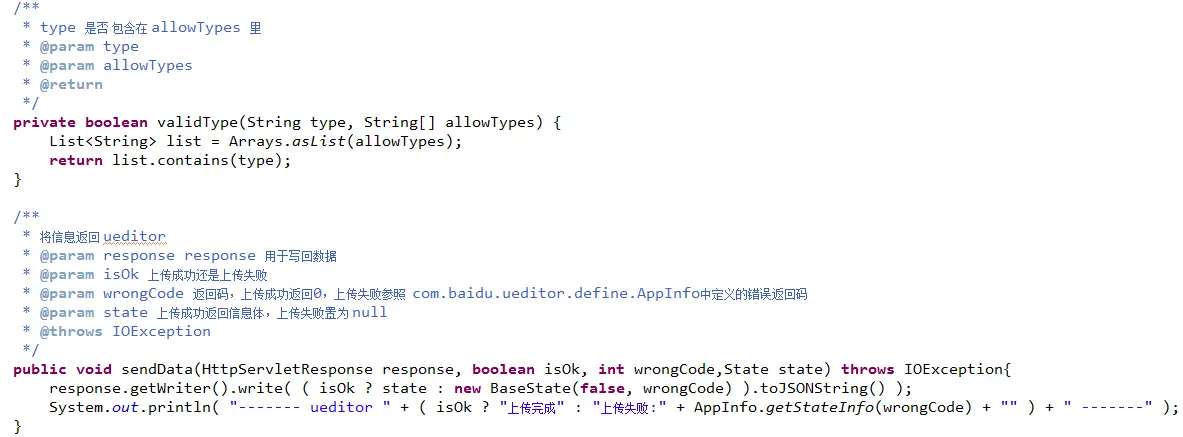
-
-
-
注意
UploadImageServlet 中的
 // 图片服务器保存路径前缀
 private String rootPath = "";
与 config.json 中的

需要按需配置!





 扫一扫
扫一扫


 6362
6362

 被折叠的 条评论
为什么被折叠?
被折叠的 条评论
为什么被折叠?
 到【灌水乐园】发言





