





注意!!!
此教程是基于《【SpringMVC】7.REST风格的CRUD实战(一)之前期工作》来讲解的,在阅读前请务必查阅此文章。
一、前情提要
在之前的第一篇文章《【SpringMVC】7.REST风格的CRUD实战(一)之前期工作》中,我们明确了API接口要求
修改操作
- 显示修改页面
- URI:emp/{id}
- 请求方式:GET
- 显示效果:回显表单。
修改员工信息
- URI:emp
- 请求方式:PUT
- 显示效果:完成修改,重定向到 list 页面
- 注意:lastName不能被修改
二、具体步骤
1.在EmployeeHandler编写相关的Handler方法
input方法适用于表单回显
update方法用于更新数据库的内容
getEmployee方法使用了@ModelAttribute是为了更新数据库时,如果只更新了一项,不会让employee的其他属性都为null,@ModelAttribute的解释请看《【SpringMVC】5.处理模型数据》
package com.springmvc.crud.handlers;

import java.util.Map;

import org.springframework.beans.factory.annotation.Autowired;
import org.springframework.stereotype.Controller;
import org.springframework.web.bind.annotation.ModelAttribute;
import org.springframework.web.bind.annotation.PathVariable;
import org.springframework.web.bind.annotation.RequestBody;
import org.springframework.web.bind.annotation.RequestMapping;
import org.springframework.web.bind.annotation.RequestMethod;
import org.springframework.web.bind.annotation.RequestParam;
import org.springframework.web.bind.annotation.ResponseBody;

import com.springmvc.crud.dao.DepartmentDao;
import com.springmvc.crud.dao.EmployeeDao;
import com.springmvc.crud.entities.Employee;

@Controller
public class EmployeeHandler {

	@Autowired
	private EmployeeDao employeeDao;

	@Autowired
	private DepartmentDao departmentDao;

	@ModelAttribute
	public void getEmployee(@RequestParam(value="id",required=false) Integer id,Map<String,Object> map){
		if(id != null){
			map.put("employee", employeeDao.get(id));
		}
	}

	@RequestMapping(value="/emp",method=RequestMethod.PUT)
	public String update(Employee employee){
		employeeDao.save(employee);
		return "redirect:/emps";
	}

	@RequestMapping(value="emp/{id}",method=RequestMethod.GET)
	public String input(@PathVariable("id") Integer id,Map<String, Object> map){
		map.put("employee", employeeDao.get(id));
		map.put("departments", departmentDao.getDepartments());
		return "input";
	}
}
2.input.jsp的相关代码
这里使用了SpringMVC所 提供的表单标签,为能能够更快地回显表单,减少工作量。
<%@ page language="java" import="java.util.*" pageEncoding="UTF-8"%>
<%@ taglib prefix="form" uri="http://www.springframework.org/tags/form"%>
<%@ taglib prefix="c" uri="http://java.sun.com/jsp/jstl/core"%>
<!DOCTYPE HTML PUBLIC "-//W3C//DTD HTML 4.01 Transitional//EN">
<html>
<head>
<title>My JSP 'input.jsp' starting page</title>

</head>

<body>
	<!--
  	为什么使用form标签呢?
  	1.因为可以更快速地开发出表单页面,而且可以更方便地进行表单值的回显
  	2.注意
  		可以通过modelAttribute 属性指定绑定的模型属性,
  		若没有指定该属性,则默认从request 域对象中读取command的表单bean,
  		如果也不存在,则报错java.lang.IllegalStateException: Neither BindingResult nor plain target object for bean name 'command' available as request attribute。
   -->
	<form:form action="${pageContext.request.contextPath }/emp" method="POST" modelAttribute="employee">
	<c:if test="${employee.id == null }">
		<!-- path属性对应html表单标签的name -->
  		LastName:<form:input path="lastName" />
  		<br>
	</c:if>
	<c:if test="${employee.id != null }">
		<form:hidden path="id"/>
		<input type="hidden" name="_method" value="PUT">
		<%--
		对于_method 不能使用form:hidden 标签,因为ModelAttribute 对应的bean中没有 _method 属性--%>
		<%-- <form:hidden path="_method"/> --%>
		<br>
	</c:if>

  	Email:<form:input path="email" />
		<br>
		<%
			Map<String, String> genders = new HashMap<String, String>();
				genders.put("1", "Male");
				genders.put("0", "Female");
				request.setAttribute("genders", genders);
		%>
  	 Gender:<form:radiobuttons path="gender" items="${genders }" />
		<br>
  	 Department:<form:select path="department.id" items="${departments }"
			itemLabel="departmentName" itemValue="id"></form:select>
		<br />
		<input type="submit" value="Submit">
	</form:form>
</body>
</html>
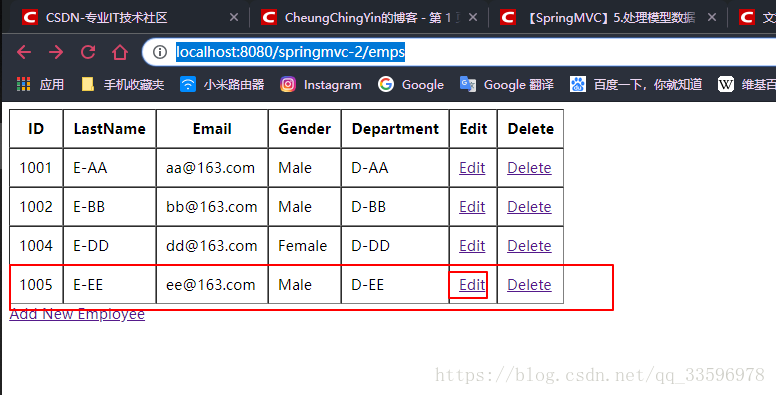
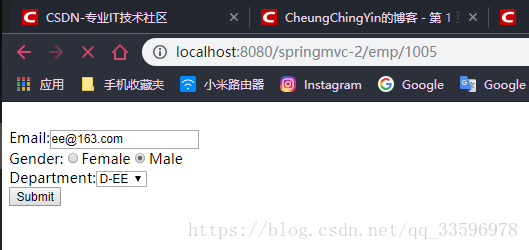
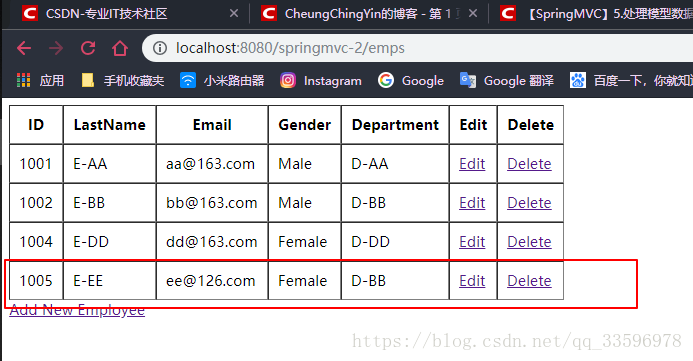
3.效果展示
启动tomcat,访问 http://localhost:8080/springmvc-2/emps





 扫一扫
扫一扫


 1657
1657

 被折叠的 条评论
为什么被折叠?
被折叠的 条评论
为什么被折叠?
 到【灌水乐园】发言





