



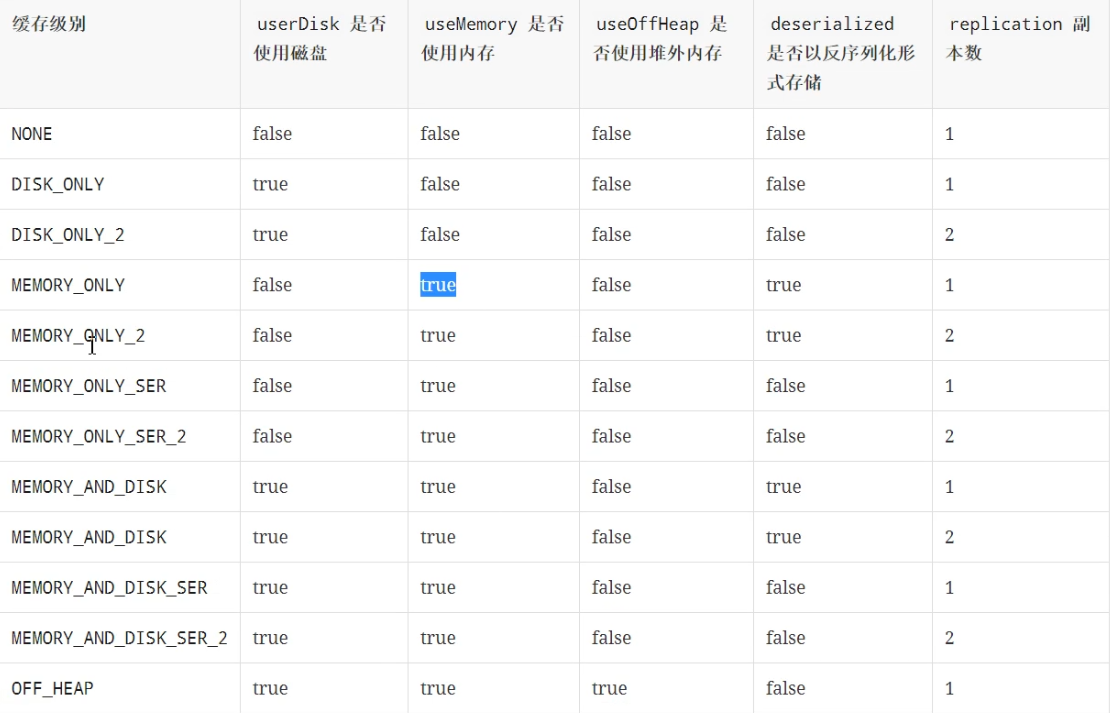
 本文介绍了一个使用Apache Spark进行IP访问频率统计的例子。通过读取access.log文件,将数据转换为RDD,并利用map和reduceByKey操作统计每个IP的访问次数。为了提高效率,使用了persist方法缓存中间结果,默认缓存级别为MEMORY_ONLY。最后展示了如何获取访问次数最多和最少的IP。
  /**
   * 统计访问次数最多的ip
   * None     0.244744 s
   * cache    0.126583 s
   * persist  0.132369 s
   *
   * cache 底层 调用的 是 persist
   * persist 默认的 缓存级别是 StorageLevel.MEMORY_ONLY
   */
  @Test
  def prepare(): Unit = {
    val resouce: RDD[String] = sc.textFile("dataset/access.log")
    val result: RDD[(String, Int)] = resouce.map(item => (item.split(" ")(0), 1))
      .reduceByKey((curr, agg) => curr + agg)
      .persist(StorageLevel.MEMORY_ONLY)

    val max: Array[(String, Int)] = result.sortBy(item => item._2, ascending = false).take(1)
    val min: Array[(String, Int)] = result.sortBy(item => item._2, ascending = true).take(1)
    max.foreach(println(_))
    min.foreach(println(_))
  }
源码 RDD.scala
  /**
   * Set this RDD's storage level to persist its values across operations after the first time
   * it is computed. This can only be used to assign a new storage level if the RDD does not
   * have a storage level set yet. Local checkpointing is an exception.
   */
  def persist(newLevel: StorageLevel): this.type = {
    if (isLocallyCheckpointed) {
      // This means the user previously called localCheckpoint(), which should have already
      // marked this RDD for persisting. Here we should override the old storage level with
      // one that is explicitly requested by the user (after adapting it to use disk).
      persist(LocalRDDCheckpointData.transformStorageLevel(newLevel), allowOverride = true)
    } else {
      persist(newLevel, allowOverride = false)
    }
  }

  /**
   * Persist this RDD with the default storage level (`MEMORY_ONLY`).
   */
  def persist(): this.type = persist(StorageLevel.MEMORY_ONLY)

  /**
   * Persist this RDD with the default storage level (`MEMORY_ONLY`).
   */
  def cache(): this.type = persist()





 扫一扫
扫一扫


 935
935

 被折叠的 条评论
为什么被折叠?
被折叠的 条评论
为什么被折叠?
 到【灌水乐园】发言





