



 本文详细解析了SpringMVC中DispatcherServlet处理请求的过程,包括Service方法的实现、不同请求方式的处理、关键方法如processRequest、doDispatch及异常处理机制。
springmvc–DispatcherServlet处理请求过程
文章目录
- springmvc--`DispatcherServlet`处理请求过程
- 1 `DispatcherServlet`
- 1.1 `FrameworkServlet`实现`Service()`方法
- 1.2 `HttpServlet`实现`Service()`方法
- 1.3 `FrameworkServlet`重写`doXXX()`方法处理`XXX`方式请求
- 1.4 `processRequest()`方法
- 1.5 `DispatcherServlet`重写`doService()`方法,处理请求
- 1.6 `doDispatch()`方法,`springmvc`完成请求处理的真正方法
- 1.6.1 `checkMultipart(HttpServletRequest request)`方法,检查是不是文件上传请求
- 1.6.2 `getHandler(HttpServletRequest request)`方法,获取`HandlerExecutionChain`处理器执行链
- 1.6.3 `getHandlerAdapter(Object handler)`方法,获取当前处理器对应的`HandlerAdapter`处理器适配器
- 1.6.4 `pplyDefaultViewName(HttpServletRequest request, @Nullable ModelAndView mv)`方法,用户未指定视图就使用默认视图名
- 1.6.5 `processDispatchResult(HttpServletRequest request, HttpServletResponse response,@Nullable HandlerExecutionChain mappedHandler, @Nullable ModelAndView mv,@Nullable Exception exception)`方法,完成请求结果响应
- 2 `HttpMethod`,请求方式的枚举
- 3 `RequestContextHolder`,请求域属性持有者,线程内共享
- 4 `ServletRequestAttributes` 请求域属性
1 DispatcherServlet
DispatcherServlet它就是一个Servlet,所以和普通的Servlet一样,它也是使用Service()方法完成请求的处理过程。
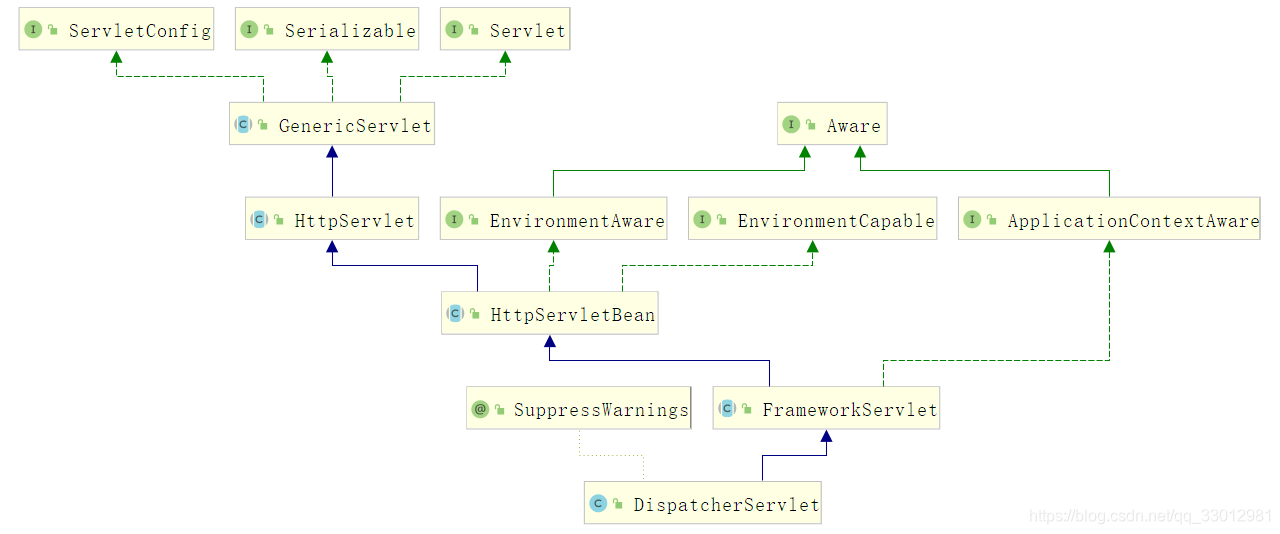
1.1 FrameworkServlet实现Service()方法
/**
 * Override the parent class implementation in order to intercept PATCH requests.
 */
@Override
protected void service(HttpServletRequest request, HttpServletResponse response)
    throws ServletException, IOException {

    //解析该次请求的请求方式,见2
    HttpMethod httpMethod = HttpMethod.resolve(request.getMethod());
    //PATCH方式请求或未指定请求方式
    if (httpMethod == HttpMethod.PATCH || httpMethod == null) {
        processRequest(request, response);
    }
    //非PATCH方式请求
    else {
        super.service(request, response);
    }
}
FrameworkServlet重写它父类HttpServlet的Service()方法主要是为了增加对PATCH方式请求的处理。我们可以看到,对于非
PATCH方式请求,仍然按照父类HttpServlet的处理方式进行处理。
1.2 HttpServlet实现Service()方法
/**
 * Receives standard HTTP requests from the public
 * <code>service</code> method and dispatches
 * them to the <code>do</code><i>XXX</i> methods defined in
 * this class. This method is an HTTP-specific version of the
 * {@link javax.servlet.Servlet#service} method. There's no
 * need to override this method.
 *
 * @param req   the {@link HttpServletRequest} object that
 *                  contains the request the client made of
 *                  the servlet
 *
 * @param resp  the {@link HttpServletResponse} object that
 *                  contains the response the servlet returns
 *                  to the client
 *
 * @exception IOException   if an input or output error occurs
 *                              while the servlet is handling the
 *                              HTTP request
 *
 * @exception ServletException  if the HTTP request
 *                                  cannot be handled
 *
 * @see javax.servlet.Servlet#service
 */
protected void service(HttpServletRequest req, HttpServletResponse resp)
    throws ServletException, IOException
{
    //获取请求方式
    String method = req.getMethod();

    /********************************GET请求***********************************/
    if (method.equals(METHOD_GET)) {
        /**
         * 获取HttpServletRequest对象上次修改时间,
         * 默认直接返回-1,spring未重写该方法
         */
        long lastModified = getLastModified(req);
        if (lastModified == -1) {
            // servlet doesn't support if-modified-since, no reason
            // to go through further expensive logic
            //处理GET请求,该方法被子类FrameworkServlet重写了
            doGet(req, resp);
        } else {
            long ifModifiedSince = req.getDateHeader(HEADER_IFMODSINCE);
            if (ifModifiedSince < lastModified) {
                // If the servlet mod time is later, call doGet()
                // Round down to the nearest second for a proper compare
                // A ifModifiedSince of -1 will always be less
                maybeSetLastModified(resp, lastModified);
                doGet(req, resp);
            } else {
                resp.setStatus(HttpServletResponse.SC_NOT_MODIFIED);
            }
        }

    }
    /********************************HEAD请求***********************************/
    else if (method.equals(METHOD_HEAD)) {
        long lastModified = getLastModified(req);
        maybeSetLastModified(resp, lastModified);
        doHead(req, resp);

    }
    /********************************POST请求***********************************/
    else if (method.equals(METHOD_POST)) {
        doPost(req, resp);

    }
    /********************************PUT请求***********************************/
    else if (method.equals(METHOD_PUT)) {
        doPut(req, resp);

    }
    /********************************DELETE请求***********************************/
    else if (method.equals(METHOD_DELETE)) {
        doDelete(req, resp);

    }
    /********************************OPTIONS请求***********************************/
    else if (method.equals(METHOD_OPTIONS)) {
        doOptions(req,resp);

    }
    /********************************TRACE请求***********************************/
    else if (method.equals(METHOD_TRACE)) {
        doTrace(req,resp);

    }
    /********************************其他方式请求***********************************/
    else {
        //
        // Note that this means NO servlet supports whatever
        // method was requested, anywhere on this server.
        //

        String errMsg = lStrings.getString("http.method_not_implemented");
        Object[] errArgs = new Object[1];
        errArgs[0] = method;
        errMsg = MessageFormat.format(errMsg, errArgs);

        resp.sendError(HttpServletResponse.SC_NOT_IMPLEMENTED, errMsg);
    }
}
1.3 FrameworkServlet重写doXXX()方法处理XXX方式请求
GET、POST、PUT、DELETE这4种方式的请求全部委派给processRequest()方法处理,别忘了,还有一个PATCH方式,在1.1章节中,它也被委派给了processRequest()方法处理
/**
 * Delegate GET requests to processRequest/doService.
 * <p>Will also be invoked by HttpServlet's default implementation of {@code doHead},
 * with a {@code NoBodyResponse} that just captures the content length.
 * @see #doService
 * @see #doHead
 */
@Override
protected final void doGet(HttpServletRequest request, HttpServletResponse response)
    throws ServletException, IOException {

    processRequest(request, response);
}

/**
 * Delegate POST requests to {@link #processRequest}.
 * @see #doService
 */
@Override
protected final void doPost(HttpServletRequest request, HttpServletResponse response)
    throws ServletException, IOException {

    processRequest(request, response);
}

/**
 * Delegate PUT requests to {@link #processRequest}.
 * @see #doService
 */
@Override
protected final void doPut(HttpServletRequest request, HttpServletResponse response)
    throws ServletException, IOException {

    processRequest(request, response);
}

/**
 * Delegate DELETE requests to {@link #processRequest}.
 * @see #doService
 */
@Override
protected final void doDelete(HttpServletRequest request, HttpServletResponse response)
    throws ServletException, IOException {

    processRequest(request, response);
}
OPTIONS、TRACE这2种方式的请求则先由FrameworkServlet类进行预处理,符合条件再交由父类进行处理
/**
 * Delegate OPTIONS requests to {@link #processRequest}, if desired.
 * <p>Applies HttpServlet's standard OPTIONS processing otherwise,
 * and also if there is still no 'Allow' header set after dispatching.
 * @see #doService
 */
@Override
protected void doOptions(HttpServletRequest request, HttpServletResponse response)
    throws ServletException, IOException {

    if (this.dispatchOptionsRequest || CorsUtils.isPreFlightRequest(request)) {
        processRequest(request, response);
        if (response.containsHeader("Allow")) {
            // Proper OPTIONS response coming from a handler - we're done.
            return;
        }
    }

    // Use response wrapper in order to always add PATCH to the allowed methods
    super.doOptions(request, new HttpServletResponseWrapper(response) {
        @Override
        public void setHeader(String name, String value) {
            if ("Allow".equals(name)) {
                value = (StringUtils.hasLength(value) ? value + ", " : "") + HttpMethod.PATCH.name();
            }
            super.setHeader(name, value);
        }
    });
}

/**
 * Delegate TRACE requests to {@link #processRequest}, if desired.
 * <p>Applies HttpServlet's standard TRACE processing otherwise.
 * @see #doService
 */
@Override
protected void doTrace(HttpServletRequest request, HttpServletResponse response)
    throws ServletException, IOException {

    if (this.dispatchTraceRequest) {
        processRequest(request, response);
        if ("message/http".equals(response.getContentType())) {
            // Proper TRACE response coming from a handler - we're done.
            return;
        }
    }
    super.doTrace(request, response);
}
1.4 processRequest()方法
GET、POST、PUT、DELETE、PATCH这5种方式的请求都由该方法处理
/**
 * Process this request, publishing an event regardless of the outcome.
 * <p>The actual event handling is performed by the abstract
 * {@link #doService} template method.
 */
protected final void processRequest(HttpServletRequest request, HttpServletResponse response)
    throws ServletException, IOException {

    long startTime = System.currentTimeMillis();
    Throwable failureCause = null;

    //这两种创建过程差不多
    //获取区域上下文(该对象线程内共享)
    LocaleContext previousLocaleContext = LocaleContextHolder.getLocaleContext();
    //创建一个新的区域上下文
    LocaleContext localeContext = buildLocaleContext(request);
     //获取请求域属性(该对象线程内共享),见3
    RequestAttributes previousAttributes = RequestContextHolder.getRequestAttributes();
     //创建一个新的请求域属性,见1.4.1
    ServletRequestAttributes requestAttributes = buildRequestAttributes(request, response, previousAttributes);

    //获取异步管理器
    WebAsyncManager asyncManager = WebAsyncUtils.getAsyncManager(request);
    asyncManager.registerCallableInterceptor(FrameworkServlet.class.getName(), new RequestBindingInterceptor());

    //初始化ContextHolder,见1.4.2
    initContextHolders(request, localeContext, requestAttributes);

    try {
        //处理请求见,1.5
        doService(request, response);
    }
    catch (ServletException | IOException ex) {
        failureCause = ex;
        throw ex;
    }
    catch (Throwable ex) {
        failureCause = ex;
        throw new NestedServletException("Request processing failed", ex);
    }

    finally {
        //重新保存ContextHolders,见1.4.3
        resetContextHolders(request, previousLocaleContext, previousAttributes);
        //设置请求已经被处理完成,见1.4.4
        if (requestAttributes != null) {
            requestAttributes.requestCompleted();
        }
        //输出结果日志
        logResult(request, response, failureCause, asyncManager);
        //发布请求被处理完成事件,见1.4.5
        publishRequestHandledEvent(request, response, startTime, failureCause);
    }
}
1.4.1 创建一个新的 ServletRequestAttributes请求域属性
/**
 * Build ServletRequestAttributes for the given request (potentially also
 * holding a reference to the response), taking pre-bound attributes
 * (and their type) into consideration.
 * @param request current HTTP request
 * @param response current HTTP response
 * @param previousAttributes pre-bound RequestAttributes instance, if any
 * @return the ServletRequestAttributes to bind, or {@code null} to preserve
 * the previously bound instance (or not binding any, if none bound before)
 * @see RequestContextHolder#setRequestAttributes
 */
@Nullable
protected ServletRequestAttributes buildRequestAttributes(HttpServletRequest request,
                                                          @Nullable HttpServletResponse response, @Nullable RequestAttributes previousAttributes) {

    //先前不,或者是ServletRequestAttributes类型的就重新在创建一个
    if (previousAttributes == null || previousAttributes instanceof ServletRequestAttributes) {
        return new ServletRequestAttributes(request, response);
    }
    //存在,则返回null
    else {
        return null;  // preserve the pre-bound RequestAttributes instance
    }
}
第一次通过
RequestContextHolder.getRequestAttributes()方法获取的请求域属性肯定是null,因为此时我们并没有向RequestContextHolder中放入对象。此时会创建一个
ServletRequestAttributes类型的请求域属性。
1.4.2 初始化ContextHolder
private void initContextHolders(HttpServletRequest request,
                                @Nullable LocaleContext localeContext, @Nullable RequestAttributes requestAttributes) {

    if (localeContext != null) {
        LocaleContextHolder.setLocaleContext(localeContext, this.threadContextInheritable);
    }
    if (requestAttributes != null) {
        RequestContextHolder.setRequestAttributes(requestAttributes, this.threadContextInheritable);
    }
}
将创建的
LocaleContext保存到LocaleContextHolder中将创建的
RequestAttributes保存到RequestContextHolder中保存之后,就可以在线程任意地方获取到
LocaleContext、RequestAttributes
1.4.3 重新保存ContextHolders
private void resetContextHolders(HttpServletRequest request,
                                 @Nullable LocaleContext prevLocaleContext, @Nullable RequestAttributes previousAttributes) {

    LocaleContextHolder.setLocaleContext(prevLocaleContext, this.threadContextInheritable);
    RequestContextHolder.setRequestAttributes(previousAttributes, this.threadContextInheritable);
}
1.4.4 设置请求已经被处理完成
/**
 * Signal that the request has been completed.
 * <p>Executes all request destruction callbacks and updates the
 * session attributes that have been accessed during request processing.
 */
public void requestCompleted() {
   executeRequestDestructionCallbacks();
   updateAccessedSessionAttributes();
    //请求非激活状态,表示请求已经被处理完成
   this.requestActive = false;
}
1.4.5 发布请求被处理事件
//是否允许在每个请求被处理完成后发布一个事件
private boolean publishEvents = true;


private void publishRequestHandledEvent(HttpServletRequest request, HttpServletResponse response,
                                        long startTime, @Nullable Throwable failureCause) {

    if (this.publishEvents && this.webApplicationContext != null) {
        // Whether or not we succeeded, publish an event.
        long processingTime = System.currentTimeMillis() - startTime;
        //使用上下文发布一个事件
        this.webApplicationContext.publishEvent(
            new ServletRequestHandledEvent(this,
                                           request.getRequestURI(), request.getRemoteAddr(),
                                           request.getMethod(), getServletConfig().getServletName(),
                                           WebUtils.getSessionId(request), getUsernameForRequest(request),
                                           processingTime, failureCause, response.getStatus()));
    }
}
使用上下文的
publishEvent()方法发布一个ServletRequestHandledEvent事件,该事件会携带请求的很多信息,比如请求路径,请求方式,请求会话id,响应状态等等。用户可以使用一个监听器来监听该事件,记录请求日志
1.5 DispatcherServlet重写doService()方法,处理请求
/**
 * Exposes the DispatcherServlet-specific request attributes and delegates to {@link #doDispatch}
 * for the actual dispatching.
 */
@Override
protected void doService(HttpServletRequest request, HttpServletResponse response) throws Exception {
    //日志打印
    logRequest(request);

    // Keep a snapshot of the request attributes in case of an include,
    // to be able to restore the original attributes after the include.
    Map<String, Object> attributesSnapshot = null;
    /**
     * 检查是不是一个include请求,见1.5.1
     * 就是request域属性中是否包含javax.servlet.include.request_uri属性
     */
    if (WebUtils.isIncludeRequest(request)) {
        attributesSnapshot = new HashMap<>();
        Enumeration<?> attrNames = request.getAttributeNames();
        while (attrNames.hasMoreElements()) {
            String attrName = (String) attrNames.nextElement();
            if (this.cleanupAfterInclude || attrName.startsWith(DEFAULT_STRATEGIES_PREFIX)) {
                attributesSnapshot.put(attrName, request.getAttribute(attrName));
            }
        }
    }

    // Make framework objects available to handlers and view objects.
    //向request域属性中放入一些springmvc对象,见1.5.2
    request.setAttribute(WEB_APPLICATION_CONTEXT_ATTRIBUTE, getWebApplicationContext());
    request.setAttribute(LOCALE_RESOLVER_ATTRIBUTE, this.localeResolver);
    request.setAttribute(THEME_RESOLVER_ATTRIBUTE, this.themeResolver);
    request.setAttribute(THEME_SOURCE_ATTRIBUTE, getThemeSource());

    /**
     * onRefresh()方法初始化了springmvc的9大组件,这里肯定不为null
     */
    if (this.flashMapManager != null) {
        //这里得到请求中包含数据
        FlashMap inputFlashMap = this.flashMapManager.retrieveAndUpdate(request, response);
        if (inputFlashMap != null) {
            /**
             * 将这些数据保存到请求域中了
             * 这里很重要,后面HandlerAdapter创建Model的之后,会获取这个请求域属性中的数据
             * 然后保存到Model对象里面
             */
            request.setAttribute(INPUT_FLASH_MAP_ATTRIBUTE, Collections.unmodifiableMap(inputFlashMap));
        }
        request.setAttribute(OUTPUT_FLASH_MAP_ATTRIBUTE, new FlashMap());
        request.setAttribute(FLASH_MAP_MANAGER_ATTRIBUTE, this.flashMapManager);
    }

    try {
        //经过准备工作之后,处理请求,见1.6
        doDispatch(request, response);
    }
    finally {
        if (!WebAsyncUtils.getAsyncManager(request).isConcurrentHandlingStarted()) {
            // Restore the original attribute snapshot, in case of an include.
            if (attributesSnapshot != null) {
                restoreAttributesAfterInclude(request, attributesSnapshot);
            }
        }
    }
}
1.5.1 检查是不是一个include请求
public static final String INCLUDE_REQUEST_URI_ATTRIBUTE = "javax.servlet.include.request_uri";

/**
 * Determine whether the given request is an include request,
 * that is, not a top-level HTTP request coming in from the outside.
 * <p>Checks the presence of the "javax.servlet.include.request_uri"
 * request attribute. Could check any request attribute that is only
 * present in an include request.
 * @param request current servlet request
 * @return whether the given request is an include request
 */
public static boolean isIncludeRequest(ServletRequest request) {
    //域属性中javax.servlet.include.request_uri对应的值不为null就是include请求
    return (request.getAttribute(INCLUDE_REQUEST_URI_ATTRIBUTE) != null);
}
1.5.2 向request域属性中放入一些springmvc对象
request.setAttribute(WEB_APPLICATION_CONTEXT_ATTRIBUTE, getWebApplicationContext());
request.setAttribute(LOCALE_RESOLVER_ATTRIBUTE, this.localeResolver);
request.setAttribute(THEME_RESOLVER_ATTRIBUTE, this.themeResolver);
request.setAttribute(THEME_SOURCE_ATTRIBUTE, getThemeSource());
一共向
request域属性中放入4个对象,分别为web上下文对象,LocaleResolver,ThemeResolver,ThemeSource
ThemeSource实际上就是当前web上下文对象,XmlWebApplicationContext实现了这个接口。
1.6 doDispatch()方法,springmvc完成请求处理的真正方法
/**
 * Process the actual dispatching to the handler.
 * <p>The handler will be obtained by applying the servlet's HandlerMappings in order.
 * The HandlerAdapter will be obtained by querying the servlet's installed HandlerAdapters
 * to find the first that supports the handler class.
 * <p>All HTTP methods are handled by this method. It's up to HandlerAdapters or handlers
 * themselves to decide which methods are acceptable.
 * @param request current HTTP request
 * @param response current HTTP response
 * @throws Exception in case of any kind of processing failure
 */
protected void doDispatch(HttpServletRequest request, HttpServletResponse response) throws Exception {
    HttpServletRequest processedRequest = request;
    HandlerExecutionChain mappedHandler = null;
    boolean multipartRequestParsed = false;

    WebAsyncManager asyncManager = WebAsyncUtils.getAsyncManager(request);

    try {
        ModelAndView mv = null;
        Exception dispatchException = null;

        try {
            //文件上传请求,见1.6.1
            processedRequest = checkMultipart(request);
            multipartRequestParsed = (processedRequest != request);

            // Determine handler for the current request.
            //获取处理器执行链,见1.6.2
            mappedHandler = getHandler(processedRequest);
            if (mappedHandler == null) {
                noHandlerFound(processedRequest, response);
                return;
            }

            // Determine handler adapter for the current request.
            //获取处理器适配器,见1.6.3
            HandlerAdapter ha = getHandlerAdapter(mappedHandler.getHandler());

            // Process last-modified header, if supported by the handler.
            String method = request.getMethod();
            boolean isGet = "GET".equals(method);
            if (isGet || "HEAD".equals(method)) {
                long lastModified = ha.getLastModified(request, mappedHandler.getHandler());
                if (new ServletWebRequest(request, response).checkNotModified(lastModified) && isGet) {
                    return;
                }
            }

            //执行所有拦截器的preHandle()方法
            if (!mappedHandler.applyPreHandle(processedRequest, response)) {
                return;
            }

            // Actually invoke the handler.
            //执行处理器并返回一个ModelAndView对象
            mv = ha.handle(processedRequest, response, mappedHandler.getHandler());

            if (asyncManager.isConcurrentHandlingStarted()) {
                return;
            }

            //用户未指定视图就使用默认的视图名,见1.6.4
            applyDefaultViewName(processedRequest, mv);
            //执行所有拦截器的postHandle()方法
            mappedHandler.applyPostHandle(processedRequest, response, mv);
        }
        catch (Exception ex) {
            dispatchException = ex;
        }
        catch (Throwable err) {
            // As of 4.3, we're processing Errors thrown from handler methods as well,
            // making them available for @ExceptionHandler methods and other scenarios.
            dispatchException = new NestedServletException("Handler dispatch failed", err);
        }
        //响应请求处理结果,见1.6.5
        processDispatchResult(processedRequest, response, mappedHandler, mv, dispatchException);
    }
    catch (Exception ex) {
        triggerAfterCompletion(processedRequest, response, mappedHandler, ex);
    }
    catch (Throwable err) {
        triggerAfterCompletion(processedRequest, response, mappedHandler,
                               new NestedServletException("Handler processing failed", err));
    }
    finally {
        if (asyncManager.isConcurrentHandlingStarted()) {
            // Instead of postHandle and afterCompletion
            if (mappedHandler != null) {
                mappedHandler.applyAfterConcurrentHandlingStarted(processedRequest, response);
            }
        }
        else {
            // Clean up any resources used by a multipart request.
            if (multipartRequestParsed) {
                cleanupMultipart(processedRequest);
            }
        }
    }
}
总结一下方法流程
- 首先判断是不是文件上传请求,是文件上传请求就文件上传解析器将该请求解析为文件上传请求
- 遍历所有的
HandlerMapping,找到第一个支持该处理该请求的HandlerMapping,然后执行这个HandlerMapping的getHandler(request)方法,得到该请求的处理器执行链(里面包括拦截器和处理器)- 遍历所有的
HandlerAdapter,找到第一个支持该处理器的HandlerAdapter- 执行所有拦截器的
preHandle()方法- 调用这个
HandlerAdapter的handle()方法,完成处理器调用并返回一个ModelAndView对象- 如果用户未指定视图,则使用默认视图名(由
springmvc中RequestToViewNameTranslator视图名转换器获取默认视图名)- 执行所有拦截器的
postHandle()方法- 如果上述过程发生了异常,就会使用
springmvc中9大组件之一的HandlerExceptionResolver处理器异常解析器来完成异常解析,得到响应的ModelAndView对象- 如果需要响应视图,就进行视图渲染
- 执行所有拦截器的
afterCompletion()方法
1.6.1 checkMultipart(HttpServletRequest request)方法,检查是不是文件上传请求
/**
 * Convert the request into a multipart request, and make multipart resolver available.
 * <p>If no multipart resolver is set, simply use the existing request.
 * @param request current HTTP request
 * @return the processed request (multipart wrapper if necessary)
 * @see MultipartResolver#resolveMultipart
 */
protected HttpServletRequest checkMultipart(HttpServletRequest request) throws MultipartException {
    //配置了文件上传解析器,且经过文件上传解析器判断为文件上传请求
    if (this.multipartResolver != null && this.multipartResolver.isMultipart(request)) {
        if (WebUtils.getNativeRequest(request, MultipartHttpServletRequest.class) != null) {
            if (request.getDispatcherType().equals(DispatcherType.REQUEST)) {
                logger.trace("Request already resolved to MultipartHttpServletRequest, e.g. by MultipartFilter");
            }
        }
        else if (hasMultipartException(request)) {
            logger.debug("Multipart resolution previously failed for current request - " +
                         "skipping re-resolution for undisturbed error rendering");
        }
        else {
            try {
                //使用文件上传解析器将该请求解析为文件上传请求
                return this.multipartResolver.resolveMultipart(request);
            }
            catch (MultipartException ex) {
                if (request.getAttribute(WebUtils.ERROR_EXCEPTION_ATTRIBUTE) != null) {
                    logger.debug("Multipart resolution failed for error dispatch", ex);
                    // Keep processing error dispatch with regular request handle below
                }
                else {
                    throw ex;
                }
            }
        }
    }
    // If not returned before: return original request.
    //非文件上传请求,直接返回当前request
    return request;
}
springmvc默认是没有配置MultipartResolver的,如果用户需要支持文件上传,自行配置文件上传解析器
1.6.2 getHandler(HttpServletRequest request)方法,获取HandlerExecutionChain处理器执行链
/**
 * Return the HandlerExecutionChain for this request.
 * <p>Tries all handler mappings in order.
 * @param request current HTTP request
 * @return the HandlerExecutionChain, or {@code null} if no handler could be found
 */
@Nullable
protected HandlerExecutionChain getHandler(HttpServletRequest request) throws Exception {
    if (this.handlerMappings != null) {
        for (HandlerMapping mapping : this.handlerMappings) {
            //获取当前请求的处理器执行链
            HandlerExecutionChain handler = mapping.getHandler(request);
            if (handler != null) {
                return handler;
            }
        }
    }
    return null;
}
该方法遍历
DispatcherServlet持有的HandlerMapping处理器映射器,执行getHandler(request)方法,找到第一个支持该请求的HandlerExecutionChain处理器执行链。如果想深入了解如何获取请求的处理器执行链,见下一篇文章
springmvc--3--HandlerMapping处理器映射器
1.6.3 getHandlerAdapter(Object handler)方法,获取当前处理器对应的HandlerAdapter处理器适配器
/**
 * Return the HandlerAdapter for this handler object.
 * @param handler the handler object to find an adapter for
 * @throws ServletException if no HandlerAdapter can be found for the handler. This is a fatal error.
 */
protected HandlerAdapter getHandlerAdapter(Object handler) throws ServletException {
    if (this.handlerAdapters != null) {
        for (HandlerAdapter adapter : this.handlerAdapters) {
            //该处理器适配器支持此处理器
            if (adapter.supports(handler)) {
                return adapter;
            }
        }
    }
    throw new ServletException("No adapter for handler [" + handler +
                               "]: The DispatcherServlet configuration needs to include a HandlerAdapter that supports this handler");
}
该方法遍历
DispatcherServlet持有的HandlerAdapter处理器适配器,执行upports(handler)方法,找到第一个支持该处理器的HandlerAdapter处理器适配器。如果想深入了解如何获取处理器的
HandlerAdapter,见文章springmvc--4--HandlerAdapter处理器适配器
1.6.4 pplyDefaultViewName(HttpServletRequest request, @Nullable ModelAndView mv)方法,用户未指定视图就使用默认视图名
/** RequestToViewNameTranslator used by this servlet. */
@Nullable
private RequestToViewNameTranslator viewNameTranslator;


/**
 * Do we need view name translation?
 */
private void applyDefaultViewName(HttpServletRequest request, @Nullable ModelAndView mv) throws Exception {
    //未指定视图名,但是创建了ModelAndView
    if (mv != null && !mv.hasView()) {
        //获取默认的视图名
        String defaultViewName = getDefaultViewName(request);
        if (defaultViewName != null) {
            mv.setViewName(defaultViewName);
        }
    }
}


/**
 * Translate the supplied request into a default view name.
 * @param request current HTTP servlet request
 * @return the view name (or {@code null} if no default found)
 * @throws Exception if view name translation failed
 */
@Nullable
protected String getDefaultViewName(HttpServletRequest request) throws Exception {
    /**
     * 使用ViewNameTranslator组件解析得到默认的视图名
     * 该组件是springmvc9大组件之一,默认为DefaultRequestToViewNameTranslator
     */
    return (this.viewNameTranslator != null ? this.viewNameTranslator.getViewName(request) : null);
}
1.6.5 processDispatchResult(HttpServletRequest request, HttpServletResponse response,@Nullable HandlerExecutionChain mappedHandler, @Nullable ModelAndView mv,@Nullable Exception exception)方法,完成请求结果响应
/**
 * Handle the result of handler selection and handler invocation, which is
 * either a ModelAndView or an Exception to be resolved to a ModelAndView.
 */
private void processDispatchResult(HttpServletRequest request, HttpServletResponse response,
                                   @Nullable HandlerExecutionChain mappedHandler, @Nullable ModelAndView mv,
                                   @Nullable Exception exception) throws Exception {

    boolean errorView = false;

    if (exception != null) {
        //模型视图异常
        if (exception instanceof ModelAndViewDefiningException) {
            logger.debug("ModelAndViewDefiningException encountered", exception);
            mv = ((ModelAndViewDefiningException) exception).getModelAndView();
        }
        //其他异常
        else {
            //获取处理器
            Object handler = (mappedHandler != null ? mappedHandler.getHandler() : null);
            //使用异常解析器解析异常,确定该异常的响应结果
            mv = processHandlerException(request, response, handler, exception);
            errorView = (mv != null);
        }
    }

    // Did the handler return a view to render?
    //视图渲染
    if (mv != null && !mv.wasCleared()) {
        render(mv, request, response);
        if (errorView) {
            WebUtils.clearErrorRequestAttributes(request);
        }
    }
    else {
        if (logger.isTraceEnabled()) {
            logger.trace("No view rendering, null ModelAndView returned.");
        }
    }

    if (WebAsyncUtils.getAsyncManager(request).isConcurrentHandlingStarted()) {
        // Concurrent handling started during a forward
        return;
    }

    //执行所有拦截器的afterCompletion()方法
    if (mappedHandler != null) {
        // Exception (if any) is already handled..
        mappedHandler.triggerAfterCompletion(request, response, null);
    }
}
1.6.5.1 使用异常解析器解析异常,确定该异常的响应结果
/** List of HandlerExceptionResolvers used by this servlet. */
@Nullable
private List<HandlerExceptionResolver> handlerExceptionResolvers;


/**
 * Determine an error ModelAndView via the registered HandlerExceptionResolvers.
 * @param request current HTTP request
 * @param response current HTTP response
 * @param handler the executed handler, or {@code null} if none chosen at the time of the exception
 * (for example, if multipart resolution failed)
 * @param ex the exception that got thrown during handler execution
 * @return a corresponding ModelAndView to forward to
 * @throws Exception if no error ModelAndView found
 */
@Nullable
protected ModelAndView processHandlerException(HttpServletRequest request, HttpServletResponse response,
                                               @Nullable Object handler, Exception ex) throws Exception {

    // Success and error responses may use different content types
    request.removeAttribute(HandlerMapping.PRODUCIBLE_MEDIA_TYPES_ATTRIBUTE);

    // Check registered HandlerExceptionResolvers...
    ModelAndView exMv = null;
    //遍历所有的异常解析器对象,得到第一个解析异常成功的结果
    if (this.handlerExceptionResolvers != null) {
        for (HandlerExceptionResolver resolver : this.handlerExceptionResolvers) {
            exMv = resolver.resolveException(request, response, handler, ex);
            if (exMv != null) {
                break;
            }
        }
    }
    //异常解析成功,然后验证ModelAndView
    if (exMv != null) {
        if (exMv.isEmpty()) {
            request.setAttribute(EXCEPTION_ATTRIBUTE, ex);
            return null;
        }
        // We might still need view name translation for a plain error model...
        if (!exMv.hasView()) {
            String defaultViewName = getDefaultViewName(request);
            if (defaultViewName != null) {
                exMv.setViewName(defaultViewName);
            }
        }
        if (logger.isTraceEnabled()) {
            logger.trace("Using resolved error view: " + exMv, ex);
        }
        else if (logger.isDebugEnabled()) {
            logger.debug("Using resolved error view: " + exMv);
        }
        WebUtils.exposeErrorRequestAttributes(request, ex, getServletName());
        return exMv;
    }

    throw ex;
}
使用视图解析器解析异常然后返回一个
ModelAndView对象
1.6.5.2 视图渲染
/**
 * Render the given ModelAndView.
 * <p>This is the last stage in handling a request. It may involve resolving the view by name.
 * @param mv the ModelAndView to render
 * @param request current HTTP servlet request
 * @param response current HTTP servlet response
 * @throws ServletException if view is missing or cannot be resolved
 * @throws Exception if there's a problem rendering the view
 */
protected void render(ModelAndView mv, HttpServletRequest request, HttpServletResponse response) throws Exception {
    // Determine locale for request and apply it to the response.
    Locale locale =
        (this.localeResolver != null ? this.localeResolver.resolveLocale(request) : request.getLocale());
    response.setLocale(locale);

    View view;
    String viewName = mv.getViewName();
    //视图名
    if (viewName != null) {
        // We need to resolve the view name.
        //使用视图解析器解析视图名,得到对应的视图对象
        view = resolveViewName(viewName, mv.getModelInternal(), locale, request);
        //解析不到视图对象就抛出异常
        if (view == null) {
            throw new ServletException("Could not resolve view with name '" + mv.getViewName() +
                                       "' in servlet with name '" + getServletName() + "'");
        }
    }
    //视图对象(处理器中可以直接返回视图对象)
    else {
        // No need to lookup: the ModelAndView object contains the actual View object.
        view = mv.getView();
        if (view == null) {
            throw new ServletException("ModelAndView [" + mv + "] neither contains a view name nor a " +
                                       "View object in servlet with name '" + getServletName() + "'");
        }
    }

    // Delegate to the View object for rendering.
    if (logger.isTraceEnabled()) {
        logger.trace("Rendering view [" + view + "] ");
    }
    try {
        if (mv.getStatus() != null) {
            response.setStatus(mv.getStatus().value());
        }
        //使用视图对象的render()方法完成视图渲染过程
        view.render(mv.getModelInternal(), request, response);
    }
    catch (Exception ex) {
        if (logger.isDebugEnabled()) {
            logger.debug("Error rendering view [" + view + "]", ex);
        }
        throw ex;
    }
}
该方法先获取
ModelAndView对象中的视图名,然后使用视图解析器解析视图,得到视图对象,最后调用视图对象的render()方法渲染视图
2 HttpMethod,请求方式的枚举
public enum HttpMethod {

    //8种请求方式
    GET, HEAD, POST, PUT, PATCH, DELETE, OPTIONS, TRACE;


    private static final Map<String, HttpMethod> mappings = new HashMap<>(16);

    /**
     * 将8个枚举常量放入mappings集合中
     * values()方法是枚举自带的方法,获取所有的枚举常量
     * name()方法获取枚举常量的名字
     */
    static {
        for (HttpMethod httpMethod : values()) {
            mappings.put(httpMethod.name(), httpMethod);
        }
    }


    /**
     * Resolve the given method value to an {@code HttpMethod}.
     * @param method the method value as a String
     * @return the corresponding {@code HttpMethod}, or {@code null} if not found
     * @since 4.2.4
     */
    @Nullable
    public static HttpMethod resolve(@Nullable String method) {
        //从mappings集合中找到对应请求方式的枚举常量
        return (method != null ? mappings.get(method) : null);
    }


    /**
     * Determine whether this {@code HttpMethod} matches the given
     * method value.
     * @param method the method value as a String
     * @return {@code true} if it matches, {@code false} otherwise
     * @since 4.2.4
     */
    public boolean matches(String method) {
        //判断请求方式对应的枚举常量是否相等
        return (this == resolve(method));
    }

}
- 规定了
8中请求方式的枚举常量resolve(method)方法解析对应请求方式的枚举常量matches(String method)方法判断两种请求方式时候相同
3 RequestContextHolder,请求域属性持有者,线程内共享
public abstract class RequestContextHolder  {

    private static final boolean jsfPresent =
        ClassUtils.isPresent("javax.faces.context.FacesContext", RequestContextHolder.class.getClassLoader());

    //当前请求的域属性
    private static final ThreadLocal<RequestAttributes> requestAttributesHolder =
        new NamedThreadLocal<>("Request attributes");

    //继承的请求的域属性
    private static final ThreadLocal<RequestAttributes> inheritableRequestAttributesHolder =
        new NamedInheritableThreadLocal<>("Request context");


    /**
     * Return the RequestAttributes currently bound to the thread.
     * @return the RequestAttributes currently bound to the thread,
     * or {@code null} if none bound
     */
    @Nullable
    public static RequestAttributes getRequestAttributes() {
        //可以看到,先获取当前请求的域属性,如果不存在就获取继承的域属性
        RequestAttributes attributes = requestAttributesHolder.get();
        if (attributes == null) {
            attributes = inheritableRequestAttributesHolder.get();
        }
        return attributes;
    }
}
- 请求的域属性是是线程内共享的
- 我们可以直接在程序中使用
RequestContextHolder.getRequestAttributes()来获取当前请求的域属性
4 ServletRequestAttributes 请求域属性
这个类用来保存当前请求的域属性,下面是它的类图
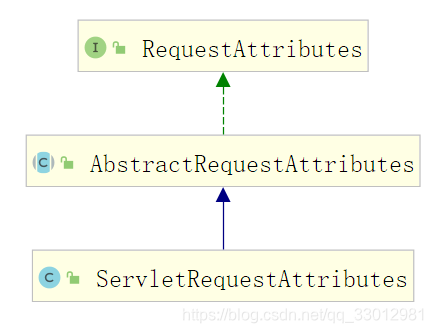
先来看一下RequestAttributes接口提供的方法
public interface RequestAttributes {

    /**
     * springmvc新增的两种作用域
     * request 当前请求
     * session 当前会话
     */
    int SCOPE_REQUEST = 0;
    int SCOPE_SESSION = 1;
    String REFERENCE_REQUEST = "request";
    String REFERENCE_SESSION = "session";


    //取值,获取指定名字和作用域对应的属性值
    @Nullable
    Object getAttribute(String name, int scope);

    //设值
    void setAttribute(String name, Object value, int scope);

    //删除
    void removeAttribute(String name, int scope);

    //获取作用域为scope的所有属性名
    String[] getAttributeNames(int scope);

    void registerDestructionCallback(String name, Runnable callback, int scope);

    @Nullable
    Object resolveReference(String key);

    //获取sessionId
    String getSessionId();

    Object getSessionMutex();

}
从上面不难看出,该接口定义了
域属性的设置和获取规范。并且增加了2种作用域类型request和session
接下来再看看ServletRequestAttributes类
public class ServletRequestAttributes extends AbstractRequestAttributes {

    /**
    * Constant identifying the {@link String} prefixed to the name of a
    * destruction callback when it is stored in a {@link HttpSession}.
    */
    public static final String DESTRUCTION_CALLBACK_NAME_PREFIX =
        ServletRequestAttributes.class.getName() + ".DESTRUCTION_CALLBACK.";

    protected static final Set<Class<?>> immutableValueTypes = new HashSet<>(16);

    static {
        immutableValueTypes.addAll(NumberUtils.STANDARD_NUMBER_TYPES);
        immutableValueTypes.add(Boolean.class);
        immutableValueTypes.add(Character.class);
        immutableValueTypes.add(String.class);
    }


    //当前请求对象
    private final HttpServletRequest request;

    //响应对象
    @Nullable
    private HttpServletResponse response;

    //当前请求所在的会话对象
    @Nullable
    private volatile HttpSession session;

    //session域属性值的缓存
    private final Map<String, Object> sessionAttributesToUpdate = new ConcurrentHashMap<>(1);


    /**
     * 构造域属性的时候,保存请求对象和响应对象,见1.4.1
     */
    public ServletRequestAttributes(HttpServletRequest request, @Nullable HttpServletResponse response) {
        this(request);
        this.response = response;
    }
    public ServletRequestAttributes(HttpServletRequest request) {
        Assert.notNull(request, "Request must not be null");
        this.request = request;
    }


    /**
    * Exposes the {@link HttpSession} that we're wrapping.
    * @param allowCreate whether to allow creation of a new session if none exists yet
    */
    @Nullable
    protected final HttpSession getSession(boolean allowCreate) {
        //当前请求是活跃状态
        if (isRequestActive()) {
            HttpSession session = this.request.getSession(allowCreate);
            this.session = session;
            return session;
        }
        else {
            // Access through stored session reference, if any...
            HttpSession session = this.session;
            if (session == null) {
                if (allowCreate) {
                    throw new IllegalStateException(
                        "No session found and request already completed - cannot create new session!");
                }
                else {
                    session = this.request.getSession(false);
                    this.session = session;
                }
            }
            return session;
        }
    }


    @Override
    public Object getAttribute(String name, int scope) {
        //request作用域
        if (scope == SCOPE_REQUEST) {
            if (!isRequestActive()) {
                throw new IllegalStateException(
                    "Cannot ask for request attribute - request is not active anymore!");
            }
            //通过request.getAttribute(name)获取域属性值
            return this.request.getAttribute(name);
        }
        //session作用域
        else {
            //获取当前请求的session对象
            HttpSession session = getSession(false);
            if (session != null) {
                try {
                    //
                    Object value = session.getAttribute(name);
                    //缓存取到得值
                    if (value != null) {
                        this.sessionAttributesToUpdate.put(name, value);
                    }
                    return value;
                }
                catch (IllegalStateException ex) {
                    // Session invalidated - shouldn't usually happen.
                }
            }
            return null;
        }
    }

    @Override
    public void setAttribute(String name, Object value, int scope) {
        if (scope == SCOPE_REQUEST) {
            if (!isRequestActive()) {
                throw new IllegalStateException(
                    "Cannot set request attribute - request is not active anymore!");
            }
            this.request.setAttribute(name, value);
        }
        else {
            HttpSession session = obtainSession();
            //更新session的域属性值会删除缓存
            this.sessionAttributesToUpdate.remove(name);
            session.setAttribute(name, value);
        }
    }
}
ServletRequestAttributes并不缓存域属性的值,它只是对request原生的域属性操作进行封装和规范。ServletRequestAttributes缓存了本次请求的request、response、session对象





 扫一扫
扫一扫


 3827
3827

 被折叠的 条评论
为什么被折叠?
被折叠的 条评论
为什么被折叠?
 到【灌水乐园】发言





