NFS服务器挂载失败问题

NFS挂载根文件系统及解决遇到的问题 首先,对挂载系统所需的内容的保存路径及IP地址做一个说明:(1)我的根文件路径(/opt/EmbedSky/root-2.6.1) ;(2)我的内核文件路径(/usr/local/arm/linux-2.6.30.4);(3)我的虚拟机eth0的IP=192.168.2.118;(4)我开发板的IP=192.168.2.115;(5)网关地址IP=192.168.2.154   1.选择NFS挂 阅读详情

问题

mount.nfs: requested NFS version or transport protocol is not supported

背景:现在做嵌入式开发,需要在板端挂载服务器,读取服务器文件。挂载中遇到该问题。
挂载命令长这样

mount -t nfs -o nolock (XXX.IP):/mnt/disk1/zixi01.chen/work /mnt

修改方法

  • 安装nfs服务
apt install nfs-server
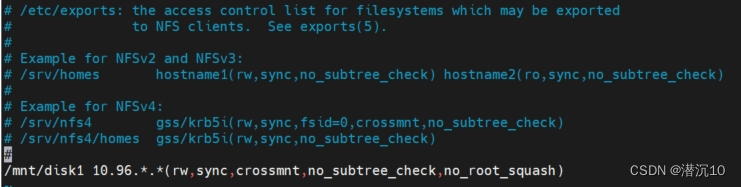
  • 修改NFS配置文件
sudo vim /etc/exports

在这里插入图片描述
/mnt/disk1 10.96..(rw,sync,crossmnt,no_subtree_check,no_root_squash)

  • 配置生效
sudo exportfs  -ar
  • 重启NFS服务
sudo service nfs-server restart
Linux下安装FastDFS及生成缩略图 1. 安装编译环境 yum install git gcc gcc-c++ make automake vim wget libevent -y 2. 安装libfastcommon基础库 mkdir /root/fastdfs cd /root/fastdfs git clone https://github.com/happyfish100/libfastcommon.git --depth 1 cd libfastcommon/ ./make.sh && ./make.sh ins 阅读详情

相关推荐

Unity 调用安卓内部安装apk

一、申请权限 应用内安装其他应用的权限属于特殊权限,需要在特殊申请。 Uri packageURI = Uri.parse("package:" + mContext.getPackageName()); Intent intent = new Intent(Settings.ACTION_MANAGE_UNKNOWN_APP_SOURCES, packageURI); startA...

BDDNH的博客 1238

mount挂载时报错:mount.nfs: requested NFS version or transport protocol is not supported

(2)从nfs-server的状态信息里可知,是在解析"/etc/exports"文件时,出现未知关键字“no_subtree”,解析失败从而导致nfs服务器启动失败;只需要将“no-subtree”修改为“no-subtree-check”,然后重新启动nfs服务器(/etc/init.d/nfs-kernel-server restart)即可;(1)检查nfs服务器状态:systemctl status nfs-kernel-server;

weixin_42031299的博客 9623

VH6501干扰仪的使用

触发模式方法备注External Trigger(外部触发)使用VH6501的I/O口作为触发源Frame Trigger(报文触发)设定被干扰报文的触发位置,并发送干扰位序列/报文software Trigger(软件触发)配置好干扰序列后直接发送Error Frame Trigger(错误帧触发)基于错误帧标识位为触发条件触发干扰Direction Trigger(发送方向触发)根据TX/RX发送/接收方作为触发条件Inverted Trigger(反向触发)

帮助100万人颠覆负面潜意识,实现人生蜕变,培养1万名潜意识开发导师 9047

mount.nfs: requested NFS version or transport protocol is not supported

错误信息说明需求的nfs版本或传输协议不支持,意思是服务器端的nfs版本和客户端的nfs版本不同,百度发现网上都说该错误是内核配置有问题引发的,说是内核配置没有启用nfs导致。但是始终没有找到网上所说的修改内核配置的方法。 服务端 [root@nfs01 ~]# nfsstat -s 查看版本信息 Server rpc stats: calls badcalls badclnt ...

热气球 2万+

Bertopic库安装(二)

Bertopic库安装

weixin_43392789的博客 4893

STM8开发环境搭建(STVD + COSMIC)

一、STM8开发IDE 1. STVD + COSMIC ST Visual Develop (STVD)只支持汇编开发,C语言开发需要再安装COSMIC,配套起来使用。 2. IAR IAR也可以用来开发STM8 下面介绍STVD + COSMIC的搭建方式 二、环境搭建 1. STVD下载、安装 直接从官网下载:https://www.st.com/en/development-tools/stvd-stm8.html 安装很简单,基本下一步往下点。 2. COSMIC下载、安装 对于stm8可以使用3

a183635870的博客 1万+

NFS挂载报错:requested NFS version or transport protocol is not supported

nfs客户端挂载时报错:

weixin_45014413的博客 3713

TSMaster实战:手把手教你用C小程序发送自定义CAN报文(附完整代码)

本文详细解析了如何使用TSMaster的C小程序功能实现自定义CAN报文发送,涵盖环境配置、DBC集成、按键触发等实战技巧。通过完整代码示例和高级调试方法,帮助汽车电子工程师快速掌握TSMaster在CAN总线通信中的灵活应用,提升开发效率。

weixin_29184371的博客 571

mount.nfs: requested NFS version or transport protocol is not supported的一种解决方式

可以看到我的Ubuntu网络ip是192.168.5.11,我设置的linux开发板网络ip为192.168.5.9,其实设置成192.168.5.xx都是可以的。前面已经说了,只要我们的linux开发板的ip和Ubuntu的网络ip在同一个网关下,就可以正常通信和挂载nfs。修改配置文件设置 IP,修改一次即可,无需重复配置。可以看到网络设置好之后,mount挂载nfs正常,linux开发板可以共享到Ubuntu的文件了。可以看到,修改了linux开发板的ip后,无法正常ping通Ubuntu了。

m0_72100585的博客 3824

STM32多模式智能小车状态机设计与中断优先级实践

在嵌入式实时系统中,状态机是实现多任务协同与功能切换的核心范式。其本质是通过有限状态集合、明确转移条件和确定性动作,构建可预测、易维护的控制逻辑。基于STM32等资源受限MCU时,需兼顾状态调度效率、中断并发安全与硬件资源约束。关键技术价值体现在:提升系统模块解耦度、支持物理按键与蓝牙双源触发、保障实时响应不丢帧。典型应用场景包括智能小车多模运行(循迹、避障、遥控、定距跟随等)、工业设备工作模式切换及IoT终端低功耗状态管理。本文以STM32F103C8T6平台为例,深入解析全局模式变量设计、双通道状态切换

weixin_42509888的博客 92

Ambari 3.0+BigTop 3.3集群部署实战

Ambari 3.0+BigTop 3.3集群部署

docsz的博客 604

NFS Subdir External Provisioner 常见问题解决方案

NFS Subdir External Provisioner 是一个动态子目录卷供应器,它使用已经配置好的 NFS 服务器来支持 Kubernetes 持久卷(Persistent Volumes)的动态供应。该项目的主要目的是通过持久卷声明(Persistent Volume Claims)自动创建和管理 Kubernetes 中的持久卷。持久卷的命名格式为 `$[namespace]-$[p...

gitblog_01141的博客 1023

11、机器学习中的聚类与隐马尔可夫模型

本文介绍了机器学习中的两种重要方法:聚类算法和隐马尔可夫模型(HMM)。聚类作为无监督学习的代表,适用于发现无标签数据中的结构,常见算法包括K-均值和自组织映射(SOM),并在传感器数据分析等场景中展现应用价值。隐马尔可夫模型则是一种可解释的序列模型,用于从观测数据中推断隐藏状态,广泛应用于语音识别、自然语言处理和生物信息学等领域。文章详细讲解了HMM的核心概念如马尔可夫性质、转移与发射概率,并通过TensorFlow实现了前向算法,展示了其计算观测序列概率的动态规划思想。最后对比了两类方法的应用场景,展望

garlic的博客 178

FTP与NFS服务实战:从配置到应用

local_max_rate=1024000 # 限制速度为1MB/s(单位:字节)chmod -R 777 /share # 临时放宽权限(生产环境慎用):将Web服务器的静态资源(如图片、CSS)存储在NFS共享目录。:实现跨服务器文件共享,适用于静态资源存储、集群数据同步等场景。(192.168.66.143):挂载NFS目录至。(192.168.66.138):提供。:永久黑名单,禁止列出的用户登录。# 客户端安装(Web服务器)# 在Web服务器测试资源访问。:负责RPC通信(端口111)。

XYL6AAD8C的博客 867

精雕软件(JDpaint) 5.5 绿色版

精雕软件(JDpaint) 5.5 绿色版精雕软件(JDpaint) 5.5 绿色版精雕软件(JDpaint) 5.5 绿色版

Devexpress16.2.6破解工具

Devexpress16.2.6破解工具Devexpress16.2.6破解工具Devexpress16.2.6破解工具Devexpress16.2.6破解工具

NFS挂载及写入故障

最近在做架构时,分离出来一台图片服务器,图片服务器是通过NFS(网络文件系统)给两台web服务器提供图片存储的,在编辑NFS配置文件(/etc/exports)时:想了一下,允许访问NFS共享目录的范围用“*”范围太大,不安全;于是想到了定义一个两台web服务器所在的网段来访问NFS服务,其他任何都无权挂载访问,特编辑NFS配置文件(/etc/e...

weixin_33915554的博客 338

C# WinForm 基于DirectShow.dll编写的程序,可边预览边保存视频,音频和图片

基于微软的DirectShow.dll的二次开发1.自动识别连接的摄像头跟麦克风且可以对其进行选择(默认选中第一个)2.可录制wmv和avi两种格式的视频并且都带有音频,avi可以录制的分辨率和帧数进行选择,wmv默认进行了淸晰度优化如不喜欢可去除代码中有相关提示3.可在预览点开之后进行拍照,也可边录制视频边拍照4.添加了视频和音频的压缩功能(酌情使用)这次二次开发发现C#对DirectShow的相关信息太少,这次做完也不敢藏私共享出来,还望大家指正

NFS挂载问题:mount.nfs: access denied by server while mounting 192.168.1.100:/home/rootfs

1.问题描述: 虚拟机上配置并开启好NFS服务器后,为了检测能否成功挂载,所以先在虚拟机上安装一个NFS客户端(sudo apt-get install nfs-common)进行自测。但在执行挂载命令sudo mount -t nfs <Linux主机ip地址>:/nfs_root /mnt -o nolock时提示如下错误:mount.nfs: access denied by server while mounting 192.168.3.12:/home/lzgonline/rootfs

Leon的博客 1万+

深度学习工具包 DeepLearningToolbox

深度学习工具包Deprecation notice.-----This toolbox is outdated and no longer maintained.There are much better tools available for deep learning than this toolbox, e.g. [Theano](http://deeplearning.net/software/theano/), [torch](http://torch.ch/) or [tensorflow](http://www.tensorflow.org/)I would suggest you use one of the tools mentioned above rather than use this toolbox.Best, Rasmus.DeepLearnToolbox================A Matlab toolbox for Deep Learning.Deep Learning is a new subfield of machine learning that focuses on learning deep hierarchical models of data.It is inspired by the human brain's apparent deep (layered, hierarchical) architecture.A good overview of the theory of Deep Learning theory is[Learning Deep Architectures for AI](http://www.iro.umontreal.ca/~bengioy/papers/ftml_book.pdf)For a more informal introduction, see the following videos by Geoffrey Hinton and Andrew Ng.* [The Next Generation of Neural Networks](http://www.youtube.com/watch?v=AyzOUbkUf3M) (Hinton, 2007)* [Recent Developments in Deep Learning](http://www.youtube.com/watch?v=VdIURAu1-aU) (Hinton, 2010)* [Unsupervised Feature Learning and Deep Learning](http://www.youtube.com/watch?v=ZmNOAtZIgIk) (Ng, 2011)If you use this toolbox in your research please cite [Prediction as a candidate for learning deep hierarchical models of data](http://www2.imm.dtu.dk/pubdb/views/publication_details.php?id=6284)```@MASTERSTHESIS\{IMM2012-06284, author = "R. B. Palm", title = "Prediction as a candidate for learning deep hierarchical models of data", year = "2012",}```Contact: rasmusbergpalm at gmail dot comDirectories included in the toolbox-----------------------------------`NN/` - A library for Feedforward Backpropagation Neural Networks`CNN/` - A library for Convolutional Neural Networks`DBN/` - A library for Deep Belief Networks`SAE/` - A library for Stacked Auto-Encoders`CAE/` - A library for Convolutional Auto-Encoders`util/` - Utility functions used by the libraries`data/` - Data used by the examples`tests/` - unit tests to verify toolbox is workingFor references on each library check REFS.mdSetup-----1. Download.2. addpath(genpath('DeepLearnToolbox'));Example: Deep Belief Network---------------------```matlabfunction test_example_DBNload mnist_uint8;train_x = double(train_x) / 255;test_x = double(test_x) / 255;train_y = double(train_y);test_y = double(test_y);%% ex1 train a 100 hidden unit RBM and visualize its weightsrand('state',0)dbn.sizes = [100];opts.numepochs = 1;opts.batchsize = 100;opts.momentum = 0;opts.alpha = 1;dbn = dbnsetup(dbn, train_x, opts);dbn = dbntrain(dbn, train_x, opts);figure; visualize(dbn.rbm{1}.W'); % Visualize the RBM weights%% ex2 train a 100-100 hidden unit DBN and use its weights to initialize a NNrand('state',0)%train dbndbn.sizes = [100 100];opts.numepochs = 1;opts.batchsize = 100;opts.momentum = 0;opts.alpha = 1;dbn = dbnsetup(dbn, train_x, opts);dbn = dbntrain(dbn, train_x, opts);%unfold dbn to nnnn = dbnunfoldtonn(dbn, 10);nn.activation_function = 'sigm';%train nnopts.numepochs = 1;opts.batchsize = 100;nn = nntrain(nn, train_x, train_y, opts);[er, bad] = nntest(nn, test_x, test_y);assert(er < 0.10, 'Too big error');```Example: Stacked Auto-Encoders---------------------```matlabfunction test_example_SAEload mnist_uint8;train_x = double(train_x)/255;test_x = double(test_x)/255;train_y = double(train_y);test_y = double(test_y);%% ex1 train a 100 hidden unit SDAE and use it to initialize a FFNN% Setup and train a stacked denoising autoencoder (SDAE)rand('state',0)sae = saesetup([784 100]);sae.ae{1}.activation_function = 'sigm';sae.ae{1}.learningRate = 1;sae.ae{1}.inputZeroMaskedFraction = 0.5;opts.numepochs = 1;opts.batchsize = 100;sae = saetrain(sae, train_x, opts);visualize(sae.ae{1}.W{1}(:,2:end)')% Use the SDAE to initialize a FFNNnn = nnsetup([784 100 10]);nn.activation_function = 'sigm';nn.learningRate = 1;nn.W{1} = sae.ae{1}.W{1};% Train the FFNNopts.numepochs = 1;opts.batchsize = 100;nn = nntrain(nn, train_x, train_y, opts);[er, bad] = nntest(nn, test_x, test_y);assert(er < 0.16, 'Too big error');```Example: Convolutional Neural Nets---------------------```matlabfunction test_example_CNNload mnist_uint8;train_x = double(reshape(train_x',28,28,60000))/255;test_x = double(reshape(test_x',28,28,10000))/255;train_y = double(train_y');test_y = double(test_y');%% ex1 Train a 6c-2s-12c-2s Convolutional neural network %will run 1 epoch in about 200 second and get around 11% error. %With 100 epochs you'll get around 1.2% errorrand('state',0)cnn.layers = { struct('type', 'i') %input layer struct('type', 'c', 'outputmaps', 6, 'kernelsize', 5) %convolution layer struct('type', 's', 'scale', 2) %sub sampling layer struct('type', 'c', 'outputmaps', 12, 'kernelsize', 5) %convolution layer struct('type', 's', 'scale', 2) %subsampling layer};cnn = cnnsetup(cnn, train_x, train_y);opts.alpha = 1;opts.batchsize = 50;opts.numepochs = 1;cnn = cnntrain(cnn, train_x, train_y, opts);[er, bad] = cnntest(cnn, test_x, test_y);%plot mean squared errorfigure; plot(cnn.rL);assert(er<0.12, 'Too big error');```Example: Neural Networks---------------------```matlabfunction test_example_NNload mnist_uint8;train_x = double(train_x) / 255;test_x = double(test_x) / 255;train_y = double(train_y);test_y = double(test_y);% normalize[train_x, mu, sigma] = zscore(train_x);test_x = normalize(test_x, mu, sigma);%% ex1 vanilla neural netrand('state',0)nn = nnsetup([784 100 10]);opts.numepochs = 1; % Number of full sweeps through dataopts.batchsize = 100; % Take a mean gradient step over this many samples[nn, L] = nntrain(nn, train_x, train_y, opts);[er, bad] = nntest(nn, test_x, test_y);assert(er < 0.08, 'Too big error');%% ex2 neural net with L2 weight decayrand('state',0)nn = nnsetup([784 100 10]);nn.weightPenaltyL2 = 1e-4; % L2 weight decayopts.numepochs = 1; % Number of full sweeps through dataopts.batchsize = 100; % Take a mean gradient step over this many samplesnn = nntrain(nn, train_x, train_y, opts);[er, bad] = nntest(nn, test_x, test_y);assert(er < 0.1, 'Too big error');%% ex3 neural net with dropoutrand('state',0)nn = nnsetup([784 100 10]);nn.dropoutFraction = 0.5; % Dropout fraction opts.numepochs = 1; % Number of full sweeps through dataopts.batchsize = 100; % Take a mean gradient step over this many samplesnn = nntrain(nn, train_x, train_y, opts);[er, bad] = nntest(nn, test_x, test_y);assert(er < 0.1, 'Too big error');%% ex4 neural net with sigmoid activation functionrand('state',0)nn = nnsetup([784 100 10]);nn.activation_function = 'sigm'; % Sigmoid activation functionnn.learningRate = 1; % Sigm require a lower learning rateopts.numepochs = 1; % Number of full sweeps through dataopts.batchsize = 100; % Take a mean gradient step over this many samplesnn = nntrain(nn, train_x, train_y, opts);[er, bad] = nntest(nn, test_x, test_y);assert(er < 0.1, 'Too big error');%% ex5 plotting functionalityrand('state',0)nn = nnsetup([784 20 10]);opts.numepochs = 5; % Number of full sweeps through datann.output = 'softmax'; % use softmax outputopts.batchsize = 1000; % Take a mean gradient step over this many samplesopts.plot = 1; % enable plottingnn = nntrain(nn, train_x, train_y, opts);[er, bad] = nntest(nn, test_x, test_y);assert(er < 0.1, 'Too big error');%% ex6 neural net with sigmoid activation and plotting of validation and training error% split training data into training and validation datavx = train_x(1:10000,:);tx = train_x(10001:end,:);vy = train_y(1:10000,:);ty = train_y(10001:end,:);rand('state',0)nn = nnsetup([784 20 10]); nn.output = 'softmax'; % use softmax outputopts.numepochs = 5; % Number of full sweeps through dataopts.batchsize = 1000; % Take a mean gradient step over this many samplesopts.plot = 1; % enable plottingnn = nntrain(nn, tx, ty, opts, vx, vy); % nntrain takes validation set as last two arguments (optionally)[er, bad] = nntest(nn, test_x, test_y);assert(er < 0.1, 'Too big error');```[![Bitdeli Badge](https://d2weczhvl823v0.cloudfront.net/rasmusbergpalm/deeplearntoolbox/trend.png)](https://bitdeli.com/free "Bitdeli Badge")

云服务器下,与嵌入式板子传递文件的几种方式 |FTP SFTP SCP TFTP NFS | 以及NFS 挂载失败常见问题

云服务器下,与嵌入式板子传递文件的几种方式一、ftp、sftp、scp1、ftp2、sftp3、scp二、tftp1、下载tftp2、创建tftp服务器的文件目录3、修改配置文件/etc/default/tftpd-hpa/etc/xinetd.d/tftp4、重启服务器5、云服务器安全组添加端口6、测试三、nfs1、下载2、创建nfs服务器的文件目录3、修改配置文件4、重启服务器5、云服务器安全组添加端口6、测试 注:本文使用的是阿里云,其他云服务器的安全组配置应该大同小异 想一步到位的可以直接看 三、n

ySh_lC的博客 2019

nfs的rootfs挂载

nfs的rootfs文件系统搭建nfs服务器环境搭建内核bootargs配置NFS 挂载不上的问题 nfs服务器环境搭建 安装配置: sudo apt-get install nfs-kernel-server vi /etc/exports /home/topeet/rootfs *(rw,sync,no_subtree_check,no_root_squash) /etc/init.d/nfs-kernel-server restart 查看nfs共享路径: showmount -e 测试是否能本地挂载

m0_37287937的博客 721

服务器之间挂载及挂载失败解决方法

服务器之间如何挂载 记录下两台linux服务器之间磁盘挂载。服务端:A服务器(192.168.1.2),客户端:B服务器(192.168.1.3)。 1、修改服务端文件: vi /etc/exports 2、添加需要服务端的文件绝对路径,注意在ip后面直接跟里面的配置,不要有空格,我遇到多了空格导致重启报错,例如: /home/testfile 192.168.1.3(insecure,rw,sync,no_root_squash) 3、重启nfs服务 service nfs resatrt 4、查看nfs

weixin_45711146的博客 6649

nfs服务挂载问题及解决方法

先简单介绍一下NFS服务器是什么? NFS server可以看作是一个FILE SERVER,它可以让你的PC通过网络将远端的NFS SERVER共享出来的档案MOUNT到自己的系统中,在CLIENT看来使用NFS的远端文件就象是在使用本地文件一样。 RPC(Remote Procedure Call) NFS本身是没有提供信息传输的协议和功能的,但NFS却能让我们通过网络进行资料的分享,这是因为NFS使用了一些其它的传输协议。而这些传输协议用到这个RPC功能的。可以说NFS本身就是使用RPC的一个程序。或

qq_36458461的博客 1万+

Kubernetes存储搭建NFS挂载失败处理

已经检查如下:1. 检查NFS服务器的配置,确保NFS共享目录已正确配置并且具有适当的权限。确保NFS服务器允许来自Kubernetes节点的访问。2. 确保Kubernetes节点具有正确的网络访问权限,可以从Kubernetes节点ping通NFS服务器。3. 检查Kubernetes节点上的防火墙设置,确保防火墙未阻止与NFS服务器的通信。4. 检查Kubernetes节点上的NFS挂载点目录是否存在,并且具有适当的权限。

阿澈不吃蒜的博客 2227

如何修复 NFS Server Not Responding 或服务器的 NFS 失败问题(转)

如何修复 NFS Server Not Responding 或服务器的 NFS 失败问题(转) 来源:http://hi.baidu.com/wangy0919/blog/item/9f011b36bfb41adfa3cc2b42.html 问题描述NFS Server Not Responding ...vmunix: NFS write failed for ser...

weixin_33675507的博客 744

最新版本Ubuntu使用NFS挂载根文件系统到开发板失败解决方法

然后就是一直启动不了,也在网上找了很多方法,都差不多,但是很多细节方面对于我这样的初学者来说需要注意到,很多地方出错了不懂原理只能挨个挨个试,特别是bootargs太长了容易写错,估计也有minicom用的不太好的原因。:ubuntu下载nfs软件,配置共享文件的目录,修改NFS配置文件(主要用于在版本不匹配时修改);查看并配置内核(主要选中支持NFS用于root挂载),开发板上修改uboot的bootargs使传递给内核用于NFS挂载的根文件的参数。,不能用空格,我就被坑了,找了好久的才发现)

m0_67685887的博客 1175

NanoPi M1 Plus OpenWRT挂载NFS rootfs

学习了韦东山老师的视频才知道可以通过设置内核启动参数来从NFS 挂载rootfs ,于是我在NanoPi M1 Plus 开发板上实际试了下,过程中也终于到一些问题,这里整理一下: 1.服务端要安装 nfs-kernel-server 并开启服务 apt-get install nfs-kernel-server /etc/init.d/nfs-kernel-server start 可以在 /...

我的学习笔记 2622

mac 挂载nfs_MacOS无法挂载NFS Operation not permitted错误解决办法

MacOS无法挂载NFS Operation not permitted错误解决办法新装的Openfiler开启nfs之后,用Macbook的图形界面通过Finder-->前往-->连接服务器无法连接。先在服务器上自己挂自己试了一下,没有问题,说明问题可能在Macbook客户端上。在Macbook上打开终端:sh-3.2# showmount -e 10.0.0.55Exports l...

weixin_31572321的博客 2732

linux nfs挂载时报错,SuSE linux NFS挂载失败案例处理:mount.nfs: access denied

1. 环境描述NFS server和NFS client操作系统版本:bidw2:~ # cat /etc/SuSE-releaseSUSE Linux Enterprise Server 11 (x86_64)VERSION = 11PATCHLEVEL = 1bidw2:~ # uname -aLinux bidw2 2.6.32.59-0.7-default #1 SMP 2012-07-1...

weixin_39985842的博客 344
上一篇: 服务器忘记root密码怎么办?
潜沉10
博客等级 码龄11年 66粉丝 27原创
评论
成就一亿技术人!
拼手气红包6.0元
还能输入1000个字符
 
 条评论被折叠 查看
添加红包

请填写红包祝福语或标题

个

红包个数最小为10个

元

红包金额最低5元

当前余额3.43元 前往充值 >
需支付:10.00元
成就一亿技术人!
领取后你会自动成为博主和红包主的粉丝 规则
hope_wisdom
发出的红包
实付元
使用余额支付
点击重新获取
扫码支付
钱包余额 0

抵扣说明:

1.余额是钱包充值的虚拟货币,按照1:1的比例进行支付金额的抵扣。
2.余额无法直接购买下载,可以购买VIP、付费专栏及课程。

余额充值