



 本文介绍了一种基于Java和Spring Boot开发的评教系统,通过H5前端和Excel数据导入功能,解决了传统评教方式中的成本高、统计复杂问题。系统区分学生、教师和管理员角色,实现个性化报表导出,有效提升效率。
1.背景
本系统解决的痛点:传统纸质评教的弊端:
1、采集成本比较高;
2、采集后人工统计结果的时间成本很高。
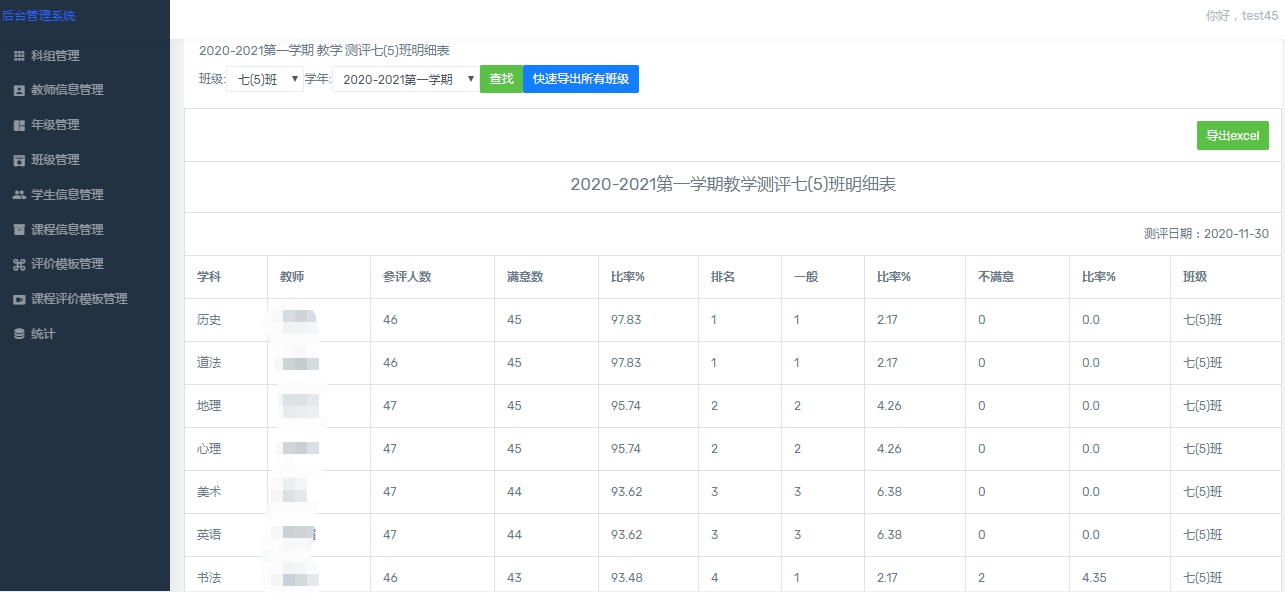
重点:现在互联网上也有很多平台可以用于采集,很多问卷网都能采集,其实采集不算难最麻烦的是采集后的个性化统计。比如:统计全年最优秀的老师是哪个?按班级排名最受欢迎的是哪个?等等,最好就是直接能导出各种统计好的报表。
2.系统介绍
本系统分为三大块:
1、学生端:学号登录后匿名评教自己的所有代课老师
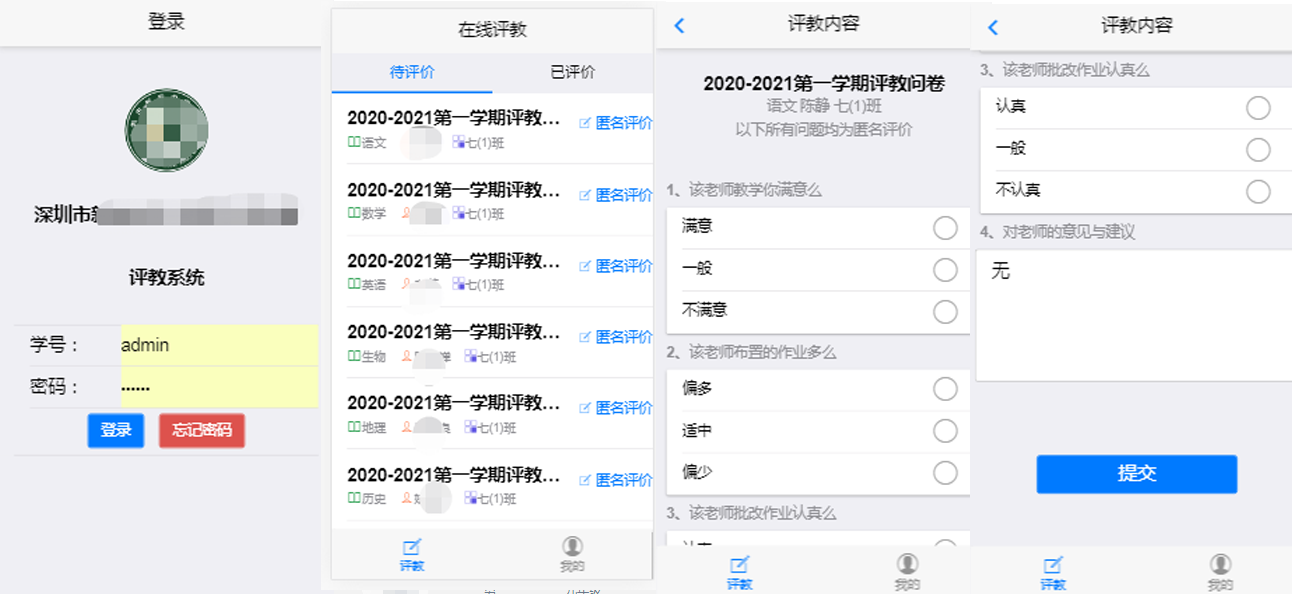
2、教师端:查看学生对自己的满意度等报表
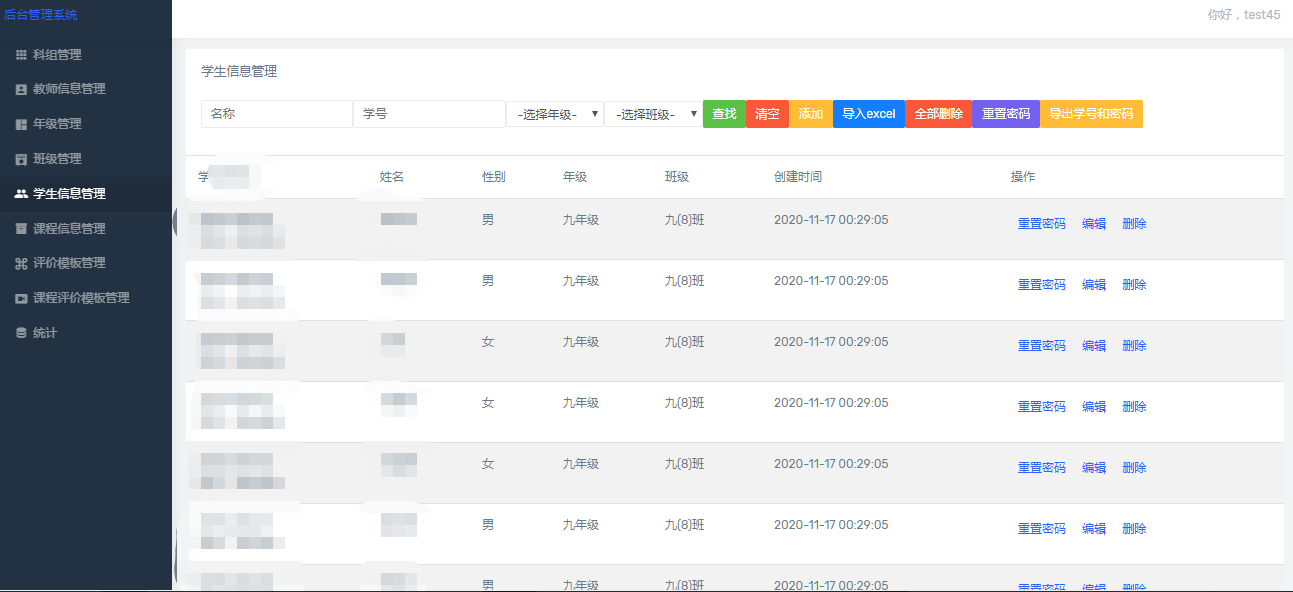
3、管理员(教务处):包括学生管理、班级管理、课程管理、教师管理、评教模板管理、统计等功能
3.相关技术
前端:学生端采用h5开发成适配手机的版本。可以用hbuilder开发页面
后端:用java开发,用springboot快速开发,可以用eclipse也可以用idea。
4.重点
- 评教系统要解决批量录入数据的问题,因为一个学校的学生很多,这里采用导入Excel表格的方式,java代码的话用poi技术实现;
以下是核心导入导出Excel的代码
package com.mfc.ctrl;

import java.text.SimpleDateFormat;
import java.util.Date;
import java.util.HashMap;
import java.util.List;
import java.util.Map;

import javax.servlet.http.HttpServletRequest;
import javax.servlet.http.HttpServletResponse;
import javax.servlet.http.HttpSession;

import org.apache.commons.lang.time.DateUtils;
import org.apache.poi.hssf.usermodel.HSSFCellStyle;
import org.apache.poi.hssf.usermodel.HSSFDataFormat;
import org.apache.poi.hssf.usermodel.HSSFFont;
import org.apache.poi.hssf.usermodel.HSSFRow;
import org.apache.poi.hssf.usermodel.HSSFSheet;
import org.apache.poi.hssf.usermodel.HSSFWorkbook;
import org.apache.poi.ss.util.CellRangeAddress;
import org.springframework.beans.factory.annotation.Autowired;
import org.springframework.stereotype.Controller;
import org.springframework.web.bind.annotation.RequestMapping;
import org.springframework.web.bind.annotation.RequestMethod;
import org.springframework.web.bind.annotation.RequestParam;
import org.springframework.web.bind.annotation.ResponseBody;
import org.springframework.web.multipart.MultipartFile;

import com.mfc.entity.Userinfo;
import com.mfc.service.UserinfoService;
import com.mfc.untils.ExcelUtils;
import com.mfc.untils.ReadExcel;


@Controller
@RequestMapping("/excel")
public class ImportExcelController{
	@Autowired
	private UserinfoService userinfoService;


    //导入excel
    @RequestMapping(value = "/import", method=RequestMethod.POST)
    @ResponseBody
    public Map<String, Object> importExcel(@RequestParam(value="file",required = false) MultipartFile file, HttpServletRequest request,HttpServletResponse response){
        Map<String, Object> map = new HashMap<String, Object>();


        String result = "";
        //创建处理EXCEL的类
        ReadExcel readExcel = new ReadExcel();
        //解析excel,获取上传的事件单
        List<Map<String, Object>> userList = readExcel.getExcelInfo(file);
        if(userList==null) {
        	 result = "读取文件失败,数据不符合模板要求";
        	 map.put("message", result);
             return map;
        }
        //至此已经将excel中的数据转换到list里面了,接下来就可以操作list,可以进行保存到数据库,或者其他操作,
        for(Map<String, Object> user:userList){
        	Userinfo  u=new Userinfo();
        	u.setName(user.get("name").toString());
        	try {
				u.setCts((Date)user.get("cts"));
			} catch (Exception e) {
				// TODO Auto-generated catch block
				e.printStackTrace();
			}
        	userinfoService.add(u);
            int ret = u.getId();
            if(ret == 0){
                result = "插入数据库失败";
            }
        }
        if(userList != null && !userList.isEmpty()){
            result = "上传成功";
        }else{
            result = "上传失败";
        }


        map.put("message", result);
        return map;
    }


    @RequestMapping("/getExcel")
    public void getExcel(Userinfo o,HttpServletResponse response,HttpSession session) throws Exception{


	 	String title="用户表";


    	ExcelUtils excelutils=new ExcelUtils();
    	HSSFWorkbook workbook = new HSSFWorkbook();
        HSSFSheet sheet = workbook.createSheet(title);
        HSSFCellStyle cellStyle = workbook.createCellStyle();


        //大标题
        CellRangeAddress region = new CellRangeAddress(0, 0, 0,2);
        sheet.addMergedRegion(region);


        String []big_titles={title};
        excelutils.createTitle(workbook,sheet,big_titles);


        region = new CellRangeAddress(1, 1, 0,2);
        sheet.addMergedRegion(region);
        HSSFRow row1 = sheet.createRow(1);
        row1.createCell(0).setCellValue("日期:"+ getDate());
        cellStyle = workbook.createCellStyle();
        cellStyle.setAlignment(HSSFCellStyle.ALIGN_RIGHT); // 居中
        row1.getCell(0).setCellStyle(cellStyle);


        cellStyle = workbook.createCellStyle();
        HSSFFont font = workbook.createFont();
        font.setBoldweight(HSSFFont.BOLDWEIGHT_BOLD);
        cellStyle.setFont(font);
        cellStyle.setAlignment(HSSFCellStyle.ALIGN_CENTER); // 居中


        //设置列
        cellStyle = workbook.createCellStyle();
        font.setBoldweight(HSSFFont.BOLDWEIGHT_BOLD);
        cellStyle.setFont(font);
        cellStyle.setAlignment(HSSFCellStyle.ALIGN_CENTER); // 居中
        String []titles={"id","用户名","创建时间"};
        HSSFRow row2 = sheet.createRow(2);


        for(int i=0;i<titles.length;i++){
            row2.createCell(i).setCellValue(titles[i]);
            row2.getCell(i).setCellStyle(cellStyle);
        }


        int rowNum=3;


        List<Userinfo> all_li=userinfoService.queryList(o);


        cellStyle = workbook.createCellStyle();
        cellStyle.setWrapText(true);


        for(Userinfo s:all_li){


        	HSSFRow row = sheet.createRow(rowNum);

            row.createCell(0).setCellValue(s.getId());
            row.createCell(1).setCellValue(s.getName());
            row.createCell(2).setCellValue(s.getCts());


            rowNum++;

        }


        //设置日期格式
        HSSFCellStyle style = workbook.createCellStyle();
        style.setDataFormat(HSSFDataFormat.getBuiltinFormat("m/d/yy h:mm"));


        String fileName = title+".xls";

        //生成excel文件
        excelutils.buildExcelFile(fileName, workbook);

        //浏览器下载excel
        excelutils.buildExcelDocument(fileName,workbook,response);


    }

	 private String getDate() {
		  SimpleDateFormat df = new SimpleDateFormat("yyyy-MM-dd HH:mm:ss");
		  return df.format(new Date());
	}


}
- 学生重复提交的问题。可以把提交按钮设置成点击一次后出现遮罩层,防止学生重复提交导致统计数据不准;
- 高并发的问题,如果全校上千学生一起评的话,这里是采用了2核4G5M带宽的服务器,另外就是统计的业务不要在评教采集的时候执行,改成采集后再点击统计按钮后执行相关代码(或者采用消息队列的方式做流量削峰)





 扫一扫
扫一扫


 864
864


 被折叠的 条评论
为什么被折叠?
被折叠的 条评论
为什么被折叠?
 到【灌水乐园】发言




