





 本文介绍了如何在Springboot项目中配置并连接到MySQL数据库,包括添加必要的依赖库,配置YML文件,以及存放Mapper和XML文件的位置。
连接mysql数据库
架包
 <dependency>
            <groupId>org.springframework.boot</groupId>
            <artifactId>spring-boot-starter-web</artifactId>
        </dependency>

        <!-- 数据库相关架包开始-->
        <dependency>
            <groupId>org.mybatis.spring.boot</groupId>
            <artifactId>mybatis-spring-boot-starter</artifactId>
            <version>2.1.0</version>
        </dependency>

        <dependency>
            <groupId>mysql</groupId>
            <artifactId>mysql-connector-java</artifactId>
            <version>5.1.6</version>
        </dependency>

        <dependency>
            <groupId>com.alibaba</groupId>
            <artifactId>druid</artifactId>
            <version>1.1.10</version>
        </dependency>
<!-- 数据库相关架包结束-->
配置yml
server:
  port: 8093
  servlet:
    context-path: /
spring:
  datasource:
    type: com.alibaba.druid.pool.DruidDataSource
    driver-class-name: com.mysql.jdbc.Driver
    url: jdbc:mysql://localhost:3306/study?characterEncoding=utf-8
    username: root
    password: dscDING1020
    primary:
      initial-size: 5
      max-idle: 10
      max-wait: 10000
      min-idle: 5
      test-on-borrow: false
      test-while-idle: true
      time-between-eviction-runs-millis: 18800
      validation-query: SELECT 1

#mybatis-plush配置
mybatis:
  typeAliasesPackage: com.dsc.**.**.entity
  mapperLocations: classpath:/mapping/*.xml
  configuration:
    log-impl: org.apache.ibatis.logging.stdout.StdOutImpl
    map-underscore-to-camel-case: true #自动开启驼峰规则映射
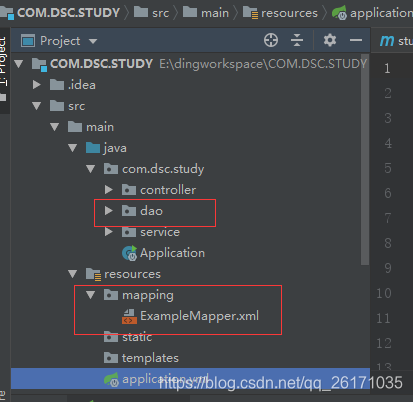
存放mapper和xml地方





 扫一扫
扫一扫


 1502
1502

 被折叠的 条评论
为什么被折叠?
被折叠的 条评论
为什么被折叠?
 到【灌水乐园】发言





