



 本文介绍如何在Spring Boot应用中集成Redis过期通知功能,包括下载和配置Redis,引入所需依赖,创建监听器配置类,实现过期监听逻辑,以及优化Redis配置和工具类。
1.下载windows版本的redis,链接是:https://github.com/microsoftarchive/redis/releases
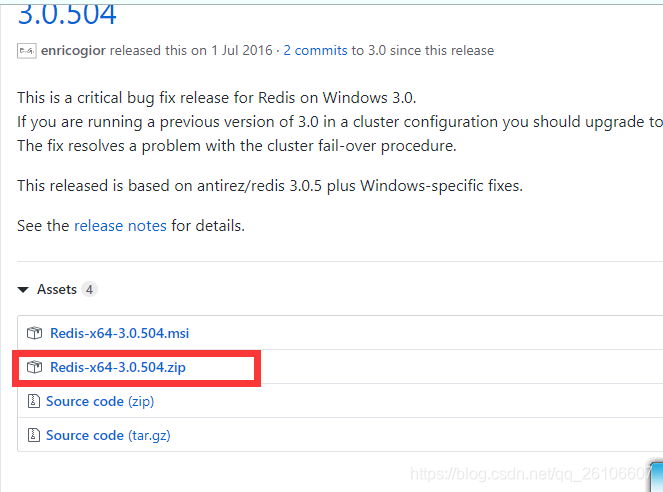
1.1 开启redis过期提醒,linux也是差不多

2.引入jar包
<dependency>
      <groupId>org.springframework.boot</groupId>
      <artifactId>spring-boot-starter-data-redis</artifactId>
    </dependency>
3.创建一个类:RedisListenerConfig,如下:
import org.springframework.context.annotation.Bean;
import org.springframework.context.annotation.Configuration;
import org.springframework.data.redis.connection.RedisConnectionFactory;
import org.springframework.data.redis.listener.RedisMessageListenerContainer;

/**
 * 注册redisTemplate,作为消息队列的发布者
 */
@Configuration
public class RedisListenerConfig {

  @Bean
  public RedisMessageListenerContainer container(RedisConnectionFactory connectionFactory) {

    RedisMessageListenerContainer container = new RedisMessageListenerContainer();
    container.setConnectionFactory(connectionFactory);
    return container;
  }

}
4.创建一个类:RedisKeyExpirationListener,如下:
import com.okancha.mapper.KcTeaRoomConsumeRecordDAOMapper;
import com.okancha.po.KcTeaRoomConsumeRecord;
import org.apache.commons.lang.StringUtils;
import org.springframework.beans.factory.annotation.Autowired;
import org.springframework.data.redis.connection.Message;
import org.springframework.data.redis.listener.KeyExpirationEventMessageListener;
import org.springframework.data.redis.listener.RedisMessageListenerContainer;
import org.springframework.stereotype.Component;
import org.springframework.transaction.annotation.Transactional;

/**
 * 主要作用就是:接收过期的redis消息,获取到key,key就是订单号,然后去更新订单号的状态(说明一下:用户5分钟不支付的话取消用户的订单)
 */
@Transactional
@Component
public class RedisKeyExpirationListener extends KeyExpirationEventMessageListener {

  @Autowired
  private KcTeaRoomConsumeRecordDAOMapper kcTeaRoomConsumeRecordDAOMapper;

  public RedisKeyExpirationListener(RedisMessageListenerContainer listenerContainer) {
    super(listenerContainer);
  }


  @Override
  public void onMessage(Message message, byte[] pattern) {

    String orderCode = message.toString();

    if (!StringUtils.isBlank(orderCode)) {

      // 去数据库把订单状态改成过期,这里是我们的业务逻辑
      KcTeaRoomConsumeRecord kcTeaRoomConsumeRecord = new KcTeaRoomConsumeRecord();
      kcTeaRoomConsumeRecord.setOrderStatus(5); // 5表示订单状态是过期
      kcTeaRoomConsumeRecord.setOrderCode(orderCode);
      kcTeaRoomConsumeRecordDAOMapper.updateKcTeaRoomConsumeRecordByCondition(kcTeaRoomConsumeRecord);
    }

    System.out.println("过期的订单号是: " + orderCode);

  }
}
5.创建一个类:RedisConfig,如下:
import org.springframework.beans.factory.annotation.Autowired;
import org.springframework.context.annotation.Bean;
import org.springframework.context.annotation.Configuration;
import org.springframework.data.redis.connection.RedisConnectionFactory;
import org.springframework.data.redis.core.HashOperations;
import org.springframework.data.redis.core.ListOperations;
import org.springframework.data.redis.core.RedisTemplate;
import org.springframework.data.redis.core.SetOperations;
import org.springframework.data.redis.core.ValueOperations;
import org.springframework.data.redis.core.ZSetOperations;
import org.springframework.data.redis.serializer.StringRedisSerializer;

/**
 * redis配置类
 *
 **/
@Configuration
public class RedisConfig {

  @Autowired
  private RedisConnectionFactory factory;

  @Bean
  public RedisTemplate<String, Object> redisTemplate() {
    RedisTemplate<String, Object> redisTemplate = new RedisTemplate<>();
    redisTemplate.setKeySerializer(new StringRedisSerializer());
    redisTemplate.setHashKeySerializer(new StringRedisSerializer());
    redisTemplate.setHashValueSerializer(new StringRedisSerializer());
    redisTemplate.setValueSerializer(new StringRedisSerializer());
    redisTemplate.setConnectionFactory(factory);
    return redisTemplate;
  }

  @Bean
  public HashOperations<String, String, Object> hashOperations(RedisTemplate<String, Object> redisTemplate) {
    return redisTemplate.opsForHash();
  }

  @Bean
  public ValueOperations<String, String> valueOperations(RedisTemplate<String, String> redisTemplate) {
    return redisTemplate.opsForValue();
  }

  @Bean
  public ListOperations<String, Object> listOperations(RedisTemplate<String, Object> redisTemplate) {
    return redisTemplate.opsForList();
  }

  @Bean
  public SetOperations<String, Object> setOperations(RedisTemplate<String, Object> redisTemplate) {
    return redisTemplate.opsForSet();
  }

  @Bean
  public ZSetOperations<String, Object> zSetOperations(RedisTemplate<String, Object> redisTemplate) {
    return redisTemplate.opsForZSet();
  }

}
6.创建一个类:RedisUtil,如下:
import com.google.gson.Gson;
import com.google.gson.GsonBuilder;
import java.util.Set;
import java.util.concurrent.TimeUnit;
import org.springframework.beans.factory.annotation.Autowired;
import org.springframework.beans.factory.annotation.Value;
import org.springframework.data.redis.core.HashOperations;
import org.springframework.data.redis.core.ListOperations;
import org.springframework.data.redis.core.RedisTemplate;
import org.springframework.data.redis.core.SetOperations;
import org.springframework.data.redis.core.ValueOperations;
import org.springframework.data.redis.core.ZSetOperations;
import org.springframework.stereotype.Component;

@Component
public class RedisUtil {

  /**
   * 是否开启redis缓存  true开启   false关闭
   */
  @Value("${spring.redis.open: #{false}}")
  private boolean open;

  @Autowired(required = false)
  private RedisTemplate<String, Object> redisTemplate;

  @Autowired(required = false)
  private ValueOperations<String, String> valueOperations;

  @Autowired(required = false)
  private HashOperations<String, String, Object> hashOperations;

  @Autowired(required = false)
  private ListOperations<String, Object> listOperations;

  @Autowired(required = false)
  private SetOperations<String, Object> setOperations;

  @Autowired(required = false)
  private ZSetOperations<String, Object> zSetOperations;

  /**
   * 默认过期时长,单位:秒
   */
//  public final static long DEFAULT_EXPIRE = 10;

  /**
   * 不设置过期时长
   */
  public final static long NOT_EXPIRE = -1;

  public final static Gson gson = new GsonBuilder().setPrettyPrinting().serializeNulls().disableHtmlEscaping().create();

  public boolean exists(String key) {
    if (!open) {
      return false;
    }

    return redisTemplate.hasKey(key);
  }

  public void set(String key, Object value, long expire) {
    if (!open) {
      return;
    }
    try {
      valueOperations.set(key, toJson(value));

    } catch (Exception e0) {
      System.out.println(e0.getMessage());
    }
    if (expire != NOT_EXPIRE) {
      redisTemplate.expire(key, expire, TimeUnit.SECONDS);
    }
  }

  public void set(String key, Object value) {
    if (!open) {
      return;
    }
    try {

      valueOperations.set(key, toJson(value));

    } catch (Exception e0) {
      System.out.println(e0.getMessage());
    }
  }

  public <T> T get(String key, Class<T> clazz, long expire) {
    if (!open) {
      return null;
    }

    String value = valueOperations.get(key);
    if (expire != NOT_EXPIRE) {
      redisTemplate.expire(key, expire, TimeUnit.SECONDS);
    }
    return value == null ? null : fromJson(value, clazz);
  }

  public <T> T get(String key, Class<T> clazz) {
    if (!open) {
      return null;
    }

    return get(key, clazz, NOT_EXPIRE);
  }

  public String get(String key, long expire) {
    if (!open) {
      return null;
    }

    String value = valueOperations.get(key);
    if (expire != NOT_EXPIRE) {
      redisTemplate.expire(key, expire, TimeUnit.SECONDS);
    }
    return value;
  }

  public String get(String key) {
    if (!open) {
      return null;
    }

    return get(key, NOT_EXPIRE);
  }

  public void delete(String key) {
    if (!open) {
      return;
    }

    if (exists(key)) {
      redisTemplate.delete(key);
    }
  }

  public void delete(String... keys) {
    if (!open) {
      return;
    }

    for (String key : keys) {
      redisTemplate.delete(key);
    }
  }

  public void deletePattern(String pattern) {
    if (!open) {
      return;
    }

    Set<String> keys = redisTemplate.keys(pattern);
    if (keys.size() > 0) {
      redisTemplate.delete(keys);
    }
  }

  /**
   * Object转成JSON数据
   */
  private String toJson(Object object) {
    if (!open) {
      return null;
    }

    if (object instanceof Integer || object instanceof Long || object instanceof Float ||
        object instanceof Double || object instanceof Boolean || object instanceof String) {
      return String.valueOf(object);
    }

    return gson.toJson(object);
  }

  /**
   * JSON数据,转成Object
   */
  private <T> T fromJson(String json, Class<T> clazz) {
    if (!open) {
      return null;
    }

    return gson.fromJson(json, clazz);
  }


}
7.在application.yml中添加:
  #redis配置
  redis:
    #是否开启redis缓存 true开启 false关闭
    open: true
    #Redis服务器地址
    host: localhost
    #Redis服务器连接端口
    port: 6379
    #Redis数据库索引(默认为0)
    database: 0
    jedis:
      pool:
        #连接池最大连接数(使用0表示没有限制)
        max-active: 500
        #连接池最大阻塞等待时间(使用0表示没有限制)
        max-wait: 3000
        #连接池中的最大空闲连接
        max-idle: 100
        #连接池中的最小空闲连接
        min-idle: 50
        #控制一个pool可分配多少个jedis实例,用来替换上面的redis.maxActive,如果是jedis 2.4以后用该属性
        maxTotal: 500
    #连接超时时间(毫秒)
    timeout: 3000
    #在空闲时检查有效性, 默认false
    testWhileIdle: true
    #是否在从池中取出连接前进行检验,如果检验失败,则从池中去除连接并尝试取出另一个
    testOnBorrow: true
8.下面我们来测试一下:
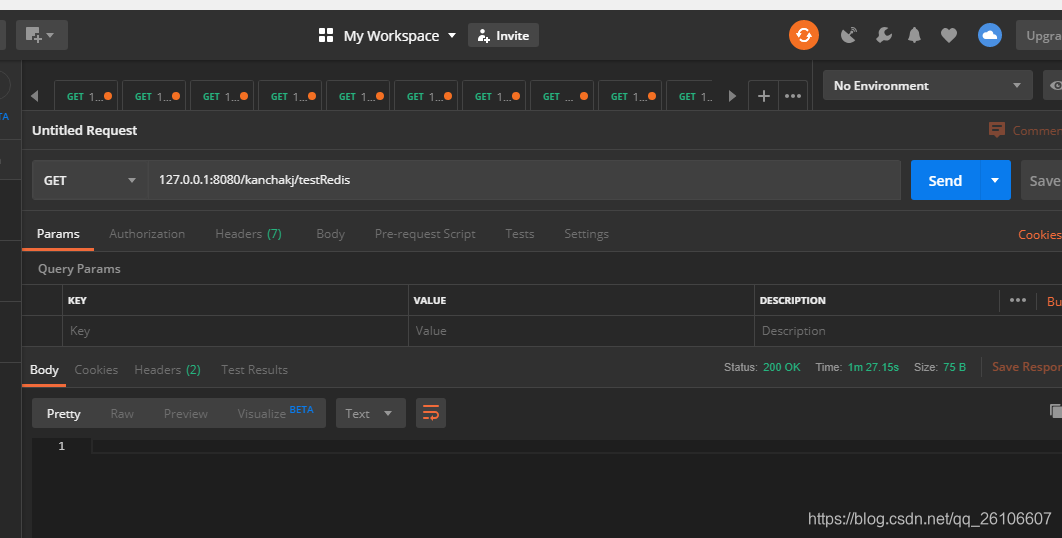
8.1创建一个controller, redisUtil使用@Autowired注入进来的, 如下:
@RequestMapping(value = "testRedis", method = RequestMethod.GET)
  public void testRedis() {

    for (int i = 1; i <= 10000; i++) {

      redisUtil.set("a" + i, "b" + i, 150); // redisUtil是@Autowired注入进来的

    }
  }
postman测试截图
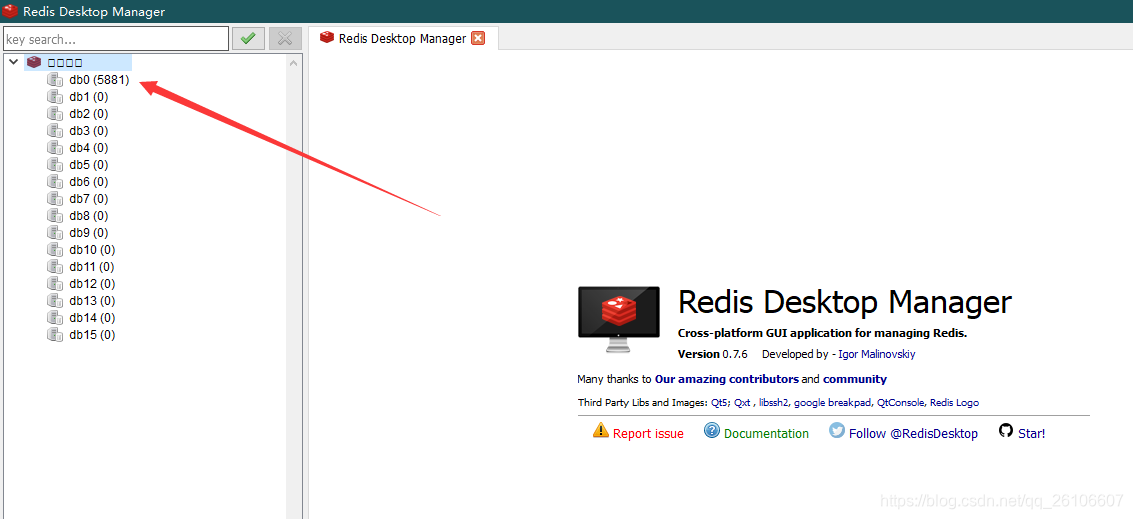
我们来查看redis状态
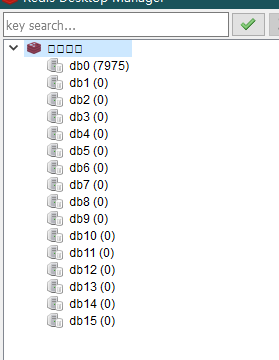
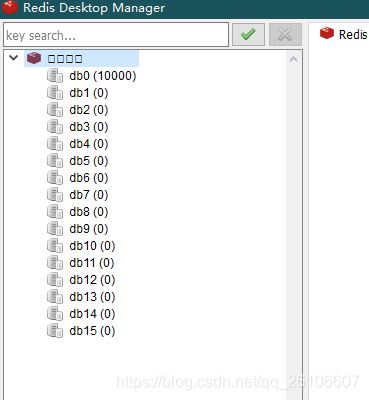
过了150秒之后,我们接收到了redis的过期提醒
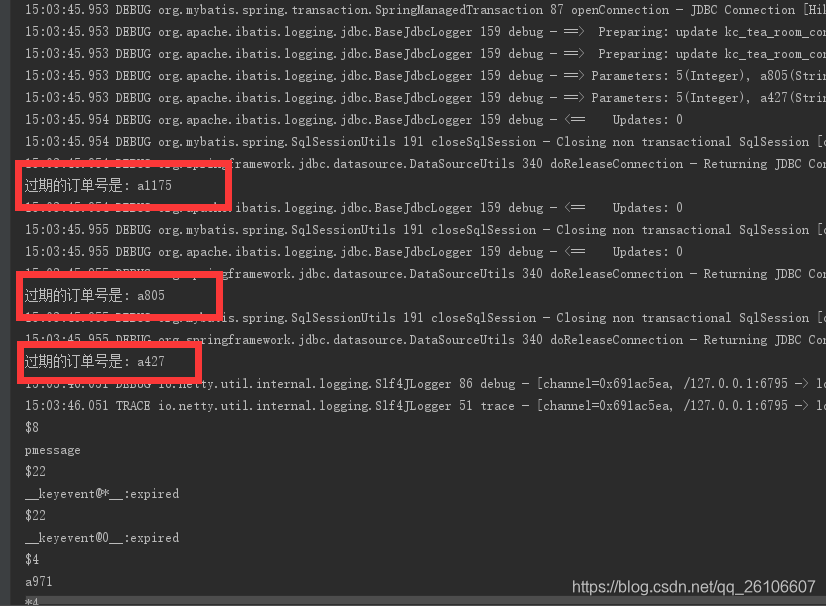
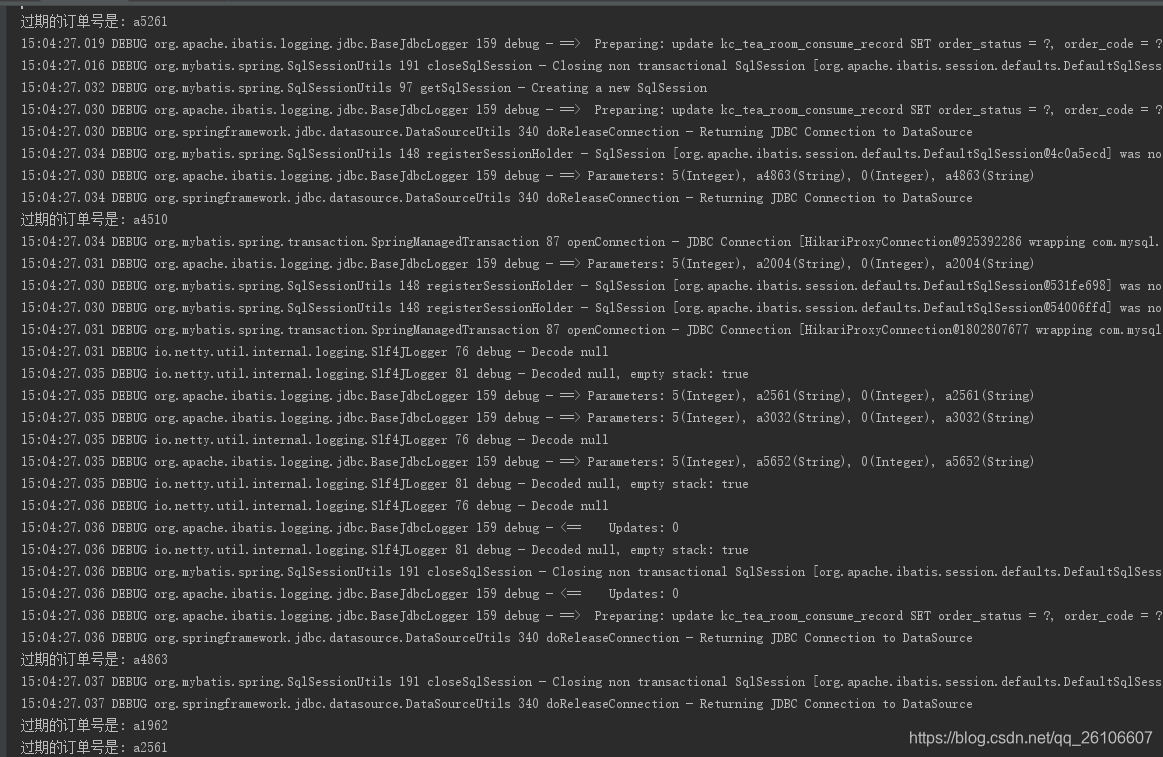
至此结束,感谢大家
后续我又优化了代码,RedisUtil工具类和RedisConfig。 RedisUtil如下:
import java.util.Collection;
import java.util.Date;
import java.util.List;
import java.util.Map;
import java.util.Map.Entry;
import java.util.Set;
import java.util.concurrent.TimeUnit;
import org.springframework.beans.factory.annotation.Autowired;
import org.springframework.data.redis.connection.DataType;
import org.springframework.data.redis.core.Cursor;
import org.springframework.data.redis.core.RedisTemplate;
import org.springframework.data.redis.core.ScanOptions;
import org.springframework.data.redis.core.ZSetOperations.TypedTuple;
import org.springframework.stereotype.Component;

@Component
public class RedisUtil {

  @Autowired(required = true)
  private RedisTemplate<String, String> redisTemplate;

  /** -------------------key相关操作--------------------- */

  /**
   * 删除key
   */
  public void delete(String key) {
    redisTemplate.delete(key);
  }

  /**
   * 批量删除key
   */
  public void delete(Collection<String> keys) {
    redisTemplate.delete(keys);
  }

  /**
   * 是否存在key
   */
  public Boolean hasKey(String key) {
    return redisTemplate.hasKey(key);
  }

  /**
   * 设置过期时间
   */
  public Boolean expire(String key, long timeout, TimeUnit unit) {
    return redisTemplate.expire(key, timeout, unit);
  }

  /**
   * 设置过期时间
   */
  public Boolean expireAt(String key, Date date) {
    return redisTemplate.expireAt(key, date);
  }

  /**
   * 查找匹配的key
   */
  public Set<String> keys(String pattern) {
    return redisTemplate.keys(pattern);
  }

  /**
   * 将当前数据库的 key 移动到给定的数据库 db 当中
   */
  public Boolean move(String key, int dbIndex) {
    return redisTemplate.move(key, dbIndex);
  }

  /**
   * 移除 key 的过期时间,key 将持久保持
   */
  public Boolean persist(String key) {
    return redisTemplate.persist(key);
  }

  /**
   * 返回 key 的剩余的过期时间
   */
  public Long getExpire(String key, TimeUnit unit) {
    return redisTemplate.getExpire(key, unit);
  }

  /**
   * 返回 key 的剩余的过期时间
   */
  public Long getExpire(String key) {
    return redisTemplate.getExpire(key);
  }

  /**
   * 从当前数据库中随机返回一个 key
   */
  public String randomKey() {
    return redisTemplate.randomKey();
  }

  /**
   * 修改 key 的名称
   */
  public void rename(String oldKey, String newKey) {
    redisTemplate.rename(oldKey, newKey);
  }

  /**
   * 仅当 newkey 不存在时,将 oldKey 改名为 newkey
   */
  public Boolean renameIfAbsent(String oldKey, String newKey) {
    return redisTemplate.renameIfAbsent(oldKey, newKey);
  }

  /**
   * 返回 key 所储存的值的类型
   */
  public DataType type(String key) {
    return redisTemplate.type(key);
  }

  /** -------------------string相关操作--------------------- */

  /**
   * 设置指定 key 的值
   */
  public void set(String key, String value) {
    redisTemplate.opsForValue().set(key, value);
  }

  /**
   * 获取指定 key 的值
   */
  public String get(String key) {
    return redisTemplate.opsForValue().get(key);
  }

  /**
   * 返回 key 中字符串值的子字符
   */
  public String getRange(String key, long start, long end) {
    return redisTemplate.opsForValue().get(key, start, end);
  }

  /**
   * 将给定 key 的值设为 value ,并返回 key 的旧值(old value)
   */
  public String getAndSet(String key, String value) {
    return redisTemplate.opsForValue().getAndSet(key, value);
  }

  /**
   * 对 key 所储存的字符串值,获取指定偏移量上的位(bit)
   */
  public Boolean getBit(String key, long offset) {
    return redisTemplate.opsForValue().getBit(key, offset);
  }

  /**
   * 批量获取
   */
  public List<String> multiGet(Collection<String> keys) {
    return redisTemplate.opsForValue().multiGet(keys);
  }

  /**
   * 设置ASCII码, 字符串'a'的ASCII码是97, 转为二进制是'01100001', 此方法是将二进制第offset位值变为value
   *
   * @param offset 位置
   * @param value 值,true为1, false为0
   */
  public boolean setBit(String key, long offset, boolean value) {
    return redisTemplate.opsForValue().setBit(key, offset, value);
  }

  /**
   *
   * @param timeout 过期时间
   * @param unit 时间单位, 天:TimeUnit.DAYS 小时:TimeUnit.HOURS 分钟:TimeUnit.MINUTES 秒:TimeUnit.SECONDS 毫秒:TimeUnit.MILLISECONDS
   */
  public void setEx(String key, String value, long timeout, TimeUnit unit) {
    redisTemplate.opsForValue().set(key, value, timeout, unit);
  }

  /**
   * 只有在 key 不存在时设置 key 的值
   *
   * @return 之前已经存在返回false, 不存在返回true
   */
  public boolean setIfAbsent(String key, String value) {
    return redisTemplate.opsForValue().setIfAbsent(key, value);
  }

  /**
   * 用 value 参数覆写给定 key 所储存的字符串值,从偏移量 offset 开始
   *
   * @param offset 从指定位置开始覆写
   */
  public void setRange(String key, String value, long offset) {
    redisTemplate.opsForValue().set(key, value, offset);
  }

  /**
   * 获取字符串的长度
   */
  public Long size(String key) {
    return redisTemplate.opsForValue().size(key);
  }

  /**
   * 批量添加
   */
  public void multiSet(Map<String, String> maps) {
    redisTemplate.opsForValue().multiSet(maps);
  }

  /**
   * 同时设置一个或多个 key-value 对,当且仅当所有给定 key 都不存在
   *
   * @return 之前已经存在返回false, 不存在返回true
   */
  public boolean multiSetIfAbsent(Map<String, String> maps) {
    return redisTemplate.opsForValue().multiSetIfAbsent(maps);
  }

  /**
   * 增加(自增长), 负数则为自减
   */
  public Long incrBy(String key, long increment) {
    return redisTemplate.opsForValue().increment(key, increment);
  }

  /**
   *
   * @param key
   * @param increment
   * @return
   */
  public Double incrByFloat(String key, double increment) {
    return redisTemplate.opsForValue().increment(key, increment);
  }

  /**
   * 追加到末尾
   */
  public Integer append(String key, String value) {
    return redisTemplate.opsForValue().append(key, value);
  }

  /** -------------------hash相关操作------------------------- */

  /**
   * 获取存储在哈希表中指定字段的值
   */
  public Object hGet(String key, String field) {
    return redisTemplate.opsForHash().get(key, field);
  }

  /**
   * 获取所有给定字段的值
   */
  public Map<Object, Object> hGetAll(String key) {
    return redisTemplate.opsForHash().entries(key);
  }

  /**
   * 获取所有给定字段的值
   */
  public List<Object> hMultiGet(String key, Collection<Object> fields) {
    return redisTemplate.opsForHash().multiGet(key, fields);
  }

  public void hPut(String key, String hashKey, String value) {
    redisTemplate.opsForHash().put(key, hashKey, value);
  }

  public void hPutAll(String key, Map<String, String> maps) {
    redisTemplate.opsForHash().putAll(key, maps);
  }

  /**
   * 仅当hashKey不存在时才设置
   */
  public Boolean hPutIfAbsent(String key, String hashKey, String value) {
    return redisTemplate.opsForHash().putIfAbsent(key, hashKey, value);
  }

  /**
   * 删除一个或多个哈希表字段
   */
  public Long hDelete(String key, Object... fields) {
    return redisTemplate.opsForHash().delete(key, fields);
  }

  /**
   * 查看哈希表 key 中,指定的字段是否存在
   */
  public boolean hExists(String key, String field) {
    return redisTemplate.opsForHash().hasKey(key, field);
  }

  /**
   * 为哈希表 key 中的指定字段的整数值加上增量 increment
   */
  public Long hIncrBy(String key, Object field, long increment) {
    return redisTemplate.opsForHash().increment(key, field, increment);
  }

  /**
   * 为哈希表 key 中的指定字段的整数值加上增量 increment
   */
  public Double hIncrByFloat(String key, Object field, double delta) {
    return redisTemplate.opsForHash().increment(key, field, delta);
  }

  /**
   * 获取所有哈希表中的字段
   */
  public Set<Object> hKeys(String key) {
    return redisTemplate.opsForHash().keys(key);
  }

  /**
   * 获取哈希表中字段的数量
   */
  public Long hSize(String key) {
    return redisTemplate.opsForHash().size(key);
  }

  /**
   * 获取哈希表中所有值
   */
  public List<Object> hValues(String key) {
    return redisTemplate.opsForHash().values(key);
  }

  /**
   * 迭代哈希表中的键值对
   */
  public Cursor<Entry<Object, Object>> hScan(String key, ScanOptions options) {
    return redisTemplate.opsForHash().scan(key, options);
  }

  /** ------------------------list相关操作---------------------------- */

  /**
   * 通过索引获取列表中的元素
   */
  public String lIndex(String key, long index) {
    return redisTemplate.opsForList().index(key, index);
  }

  /**
   * 获取列表指定范围内的元素
   *
   * @param start 开始位置, 0是开始位置
   * @param end 结束位置, -1返回所有
   */
  public List<String> lRange(String key, long start, long end) {
    return redisTemplate.opsForList().range(key, start, end);
  }

  /**
   * 存储在list头部
   */
  public Long lLeftPush(String key, String value) {
    return redisTemplate.opsForList().leftPush(key, value);
  }

  /**
   *
   * @param key
   * @param value
   * @return
   */
  public Long lLeftPushAll(String key, String... value) {
    return redisTemplate.opsForList().leftPushAll(key, value);
  }

  /**
   *
   * @param key
   * @param value
   * @return
   */
  public Long lLeftPushAll(String key, Collection<String> value) {
    return redisTemplate.opsForList().leftPushAll(key, value);
  }

  /**
   * 当list存在的时候才加入
   */
  public Long lLeftPushIfPresent(String key, String value) {
    return redisTemplate.opsForList().leftPushIfPresent(key, value);
  }

  /**
   * 如果pivot存在,再pivot前面添加
   */
  public Long lLeftPush(String key, String pivot, String value) {
    return redisTemplate.opsForList().leftPush(key, pivot, value);
  }

  /**
   *
   * @param key
   * @param value
   * @return
   */
  public Long lRightPush(String key, String value) {
    return redisTemplate.opsForList().rightPush(key, value);
  }

  /**
   *
   * @param key
   * @param value
   * @return
   */
  public Long lRightPushAll(String key, String... value) {
    return redisTemplate.opsForList().rightPushAll(key, value);
  }

  /**
   *
   * @param key
   * @param value
   * @return
   */
  public Long lRightPushAll(String key, Collection<String> value) {
    return redisTemplate.opsForList().rightPushAll(key, value);
  }

  /**
   * 为已存在的列表添加值
   */
  public Long lRightPushIfPresent(String key, String value) {
    return redisTemplate.opsForList().rightPushIfPresent(key, value);
  }

  /**
   * 在pivot元素的右边添加值
   */
  public Long lRightPush(String key, String pivot, String value) {
    return redisTemplate.opsForList().rightPush(key, pivot, value);
  }

  /**
   * 通过索引设置列表元素的值
   *
   * @param index 位置
   */
  public void lSet(String key, long index, String value) {
    redisTemplate.opsForList().set(key, index, value);
  }

  /**
   * 移出并获取列表的第一个元素
   *
   * @return 删除的元素
   */
  public String lLeftPop(String key) {
    return redisTemplate.opsForList().leftPop(key);
  }

  /**
   * 移出并获取列表的第一个元素, 如果列表没有元素会阻塞列表直到等待超时或发现可弹出元素为止
   *
   * @param timeout 等待时间
   * @param unit 时间单位
   */
  public String lBLeftPop(String key, long timeout, TimeUnit unit) {
    return redisTemplate.opsForList().leftPop(key, timeout, unit);
  }

  /**
   * 移除并获取列表最后一个元素
   *
   * @return 删除的元素
   */
  public String lRightPop(String key) {
    return redisTemplate.opsForList().rightPop(key);
  }

  /**
   * 移出并获取列表的最后一个元素, 如果列表没有元素会阻塞列表直到等待超时或发现可弹出元素为止
   *
   * @param timeout 等待时间
   * @param unit 时间单位
   */
  public String lBRightPop(String key, long timeout, TimeUnit unit) {
    return redisTemplate.opsForList().rightPop(key, timeout, unit);
  }

  /**
   * 移除列表的最后一个元素,并将该元素添加到另一个列表并返回
   */
  public String lRightPopAndLeftPush(String sourceKey, String destinationKey) {
    return redisTemplate.opsForList().rightPopAndLeftPush(sourceKey,
        destinationKey);
  }

  /**
   * 从列表中弹出一个值,将弹出的元素插入到另外一个列表中并返回它; 如果列表没有元素会阻塞列表直到等待超时或发现可弹出元素为止
   */
  public String lBRightPopAndLeftPush(String sourceKey, String destinationKey,
      long timeout, TimeUnit unit) {
    return redisTemplate.opsForList().rightPopAndLeftPush(sourceKey,
        destinationKey, timeout, unit);
  }

  /**
   * 删除集合中值等于value得元素
   *
   * @param index index=0, 删除所有值等于value的元素; index>0, 从头部开始删除第一个值等于value的元素; index<0, 从尾部开始删除第一个值等于value的元素;
   */
  public Long lRemove(String key, long index, String value) {
    return redisTemplate.opsForList().remove(key, index, value);
  }

  /**
   * 裁剪list
   */
  public void lTrim(String key, long start, long end) {
    redisTemplate.opsForList().trim(key, start, end);
  }

  /**
   * 获取列表长度
   */
  public Long lLen(String key) {
    return redisTemplate.opsForList().size(key);
  }

  /** --------------------set相关操作-------------------------- */

  /**
   * set添加元素
   */
  public Long sAdd(String key, String... values) {
    return redisTemplate.opsForSet().add(key, values);
  }

  /**
   * set移除元素
   */
  public Long sRemove(String key, Object... values) {
    return redisTemplate.opsForSet().remove(key, values);
  }

  /**
   * 移除并返回集合的一个随机元素
   */
  public String sPop(String key) {
    return redisTemplate.opsForSet().pop(key);
  }

  /**
   * 将元素value从一个集合移到另一个集合
   */
  public Boolean sMove(String key, String value, String destKey) {
    return redisTemplate.opsForSet().move(key, value, destKey);
  }

  /**
   * 获取集合的大小
   */
  public Long sSize(String key) {
    return redisTemplate.opsForSet().size(key);
  }

  /**
   * 判断集合是否包含value
   */
  public Boolean sIsMember(String key, Object value) {
    return redisTemplate.opsForSet().isMember(key, value);
  }

  /**
   * 获取两个集合的交集
   */
  public Set<String> sIntersect(String key, String otherKey) {
    return redisTemplate.opsForSet().intersect(key, otherKey);
  }

  /**
   * 获取key集合与多个集合的交集
   */
  public Set<String> sIntersect(String key, Collection<String> otherKeys) {
    return redisTemplate.opsForSet().intersect(key, otherKeys);
  }

  /**
   * key集合与otherKey集合的交集存储到destKey集合中
   */
  public Long sIntersectAndStore(String key, String otherKey, String destKey) {
    return redisTemplate.opsForSet().intersectAndStore(key, otherKey,
        destKey);
  }

  /**
   * key集合与多个集合的交集存储到destKey集合中
   */
  public Long sIntersectAndStore(String key, Collection<String> otherKeys,
      String destKey) {
    return redisTemplate.opsForSet().intersectAndStore(key, otherKeys,
        destKey);
  }

  /**
   * 获取两个集合的并集
   */
  public Set<String> sUnion(String key, String otherKeys) {
    return redisTemplate.opsForSet().union(key, otherKeys);
  }

  /**
   * 获取key集合与多个集合的并集
   */
  public Set<String> sUnion(String key, Collection<String> otherKeys) {
    return redisTemplate.opsForSet().union(key, otherKeys);
  }

  /**
   * key集合与otherKey集合的并集存储到destKey中
   */
  public Long sUnionAndStore(String key, String otherKey, String destKey) {
    return redisTemplate.opsForSet().unionAndStore(key, otherKey, destKey);
  }

  /**
   * key集合与多个集合的并集存储到destKey中
   */
  public Long sUnionAndStore(String key, Collection<String> otherKeys,
      String destKey) {
    return redisTemplate.opsForSet().unionAndStore(key, otherKeys, destKey);
  }

  /**
   * 获取两个集合的差集
   */
  public Set<String> sDifference(String key, String otherKey) {
    return redisTemplate.opsForSet().difference(key, otherKey);
  }

  /**
   * 获取key集合与多个集合的差集
   */
  public Set<String> sDifference(String key, Collection<String> otherKeys) {
    return redisTemplate.opsForSet().difference(key, otherKeys);
  }

  /**
   * key集合与otherKey集合的差集存储到destKey中
   */
  public Long sDifference(String key, String otherKey, String destKey) {
    return redisTemplate.opsForSet().differenceAndStore(key, otherKey,
        destKey);
  }

  /**
   * key集合与多个集合的差集存储到destKey中
   */
  public Long sDifference(String key, Collection<String> otherKeys,
      String destKey) {
    return redisTemplate.opsForSet().differenceAndStore(key, otherKeys,
        destKey);
  }

  /**
   * 获取集合所有元素
   */
  public Set<String> setMembers(String key) {
    return redisTemplate.opsForSet().members(key);
  }

  /**
   * 随机获取集合中的一个元素
   */
  public String sRandomMember(String key) {
    return redisTemplate.opsForSet().randomMember(key);
  }

  /**
   * 随机获取集合中count个元素
   */
  public List<String> sRandomMembers(String key, long count) {
    return redisTemplate.opsForSet().randomMembers(key, count);
  }

  /**
   * 随机获取集合中count个元素并且去除重复的
   */
  public Set<String> sDistinctRandomMembers(String key, long count) {
    return redisTemplate.opsForSet().distinctRandomMembers(key, count);
  }

  /**
   *
   * @param key
   * @param options
   * @return
   */
  public Cursor<String> sScan(String key, ScanOptions options) {
    return redisTemplate.opsForSet().scan(key, options);
  }

  /**------------------zSet相关操作--------------------------------*/

  /**
   * 添加元素,有序集合是按照元素的score值由小到大排列
   */
  public Boolean zAdd(String key, String value, double score) {
    return redisTemplate.opsForZSet().add(key, value, score);
  }

  /**
   *
   * @param key
   * @param values
   * @return
   */
  public Long zAdd(String key, Set<TypedTuple<String>> values) {
    return redisTemplate.opsForZSet().add(key, values);
  }

  /**
   *
   * @param key
   * @param values
   * @return
   */
  public Long zRemove(String key, Object... values) {
    return redisTemplate.opsForZSet().remove(key, values);
  }

  /**
   * 增加元素的score值,并返回增加后的值
   */
  public Double zIncrementScore(String key, String value, double delta) {
    return redisTemplate.opsForZSet().incrementScore(key, value, delta);
  }

  /**
   * 返回元素在集合的排名,有序集合是按照元素的score值由小到大排列
   *
   * @return 0表示第一位
   */
  public Long zRank(String key, Object value) {
    return redisTemplate.opsForZSet().rank(key, value);
  }

  /**
   * 返回元素在集合的排名,按元素的score值由大到小排列
   */
  public Long zReverseRank(String key, Object value) {
    return redisTemplate.opsForZSet().reverseRank(key, value);
  }

  /**
   * 获取集合的元素, 从小到大排序
   *
   * @param start 开始位置
   * @param end 结束位置, -1查询所有
   */
  public Set<String> zRange(String key, long start, long end) {
    return redisTemplate.opsForZSet().range(key, start, end);
  }

  /**
   * 获取集合元素, 并且把score值也获取
   */
  public Set<TypedTuple<String>> zRangeWithScores(String key, long start,
      long end) {
    return redisTemplate.opsForZSet().rangeWithScores(key, start, end);
  }

  /**
   * 根据Score值查询集合元素
   *
   * @param min 最小值
   * @param max 最大值
   */
  public Set<String> zRangeByScore(String key, double min, double max) {
    return redisTemplate.opsForZSet().rangeByScore(key, min, max);
  }

  /**
   * 根据Score值查询集合元素, 从小到大排序
   *
   * @param min 最小值
   * @param max 最大值
   */
  public Set<TypedTuple<String>> zRangeByScoreWithScores(String key,
      double min, double max) {
    return redisTemplate.opsForZSet().rangeByScoreWithScores(key, min, max);
  }

  /**
   *
   * @param key
   * @param min
   * @param max
   * @param start
   * @param end
   * @return
   */
  public Set<TypedTuple<String>> zRangeByScoreWithScores(String key,
      double min, double max, long start, long end) {
    return redisTemplate.opsForZSet().rangeByScoreWithScores(key, min, max,
        start, end);
  }

  /**
   * 获取集合的元素, 从大到小排序
   */
  public Set<String> zReverseRange(String key, long start, long end) {
    return redisTemplate.opsForZSet().reverseRange(key, start, end);
  }

  /**
   * 获取集合的元素, 从大到小排序, 并返回score值
   */
  public Set<TypedTuple<String>> zReverseRangeWithScores(String key,
      long start, long end) {
    return redisTemplate.opsForZSet().reverseRangeWithScores(key, start,
        end);
  }

  /**
   * 根据Score值查询集合元素, 从大到小排序
   */
  public Set<String> zReverseRangeByScore(String key, double min,
      double max) {
    return redisTemplate.opsForZSet().reverseRangeByScore(key, min, max);
  }

  /**
   * 根据Score值查询集合元素, 从大到小排序
   */
  public Set<TypedTuple<String>> zReverseRangeByScoreWithScores(
      String key, double min, double max) {
    return redisTemplate.opsForZSet().reverseRangeByScoreWithScores(key,
        min, max);
  }

  /**
   *
   * @param key
   * @param min
   * @param max
   * @param start
   * @param end
   * @return
   */
  public Set<String> zReverseRangeByScore(String key, double min,
      double max, long start, long end) {
    return redisTemplate.opsForZSet().reverseRangeByScore(key, min, max,
        start, end);
  }

  /**
   * 根据score值获取集合元素数量
   */
  public Long zCount(String key, double min, double max) {
    return redisTemplate.opsForZSet().count(key, min, max);
  }

  /**
   * 获取集合大小
   */
  public Long zSize(String key) {
    return redisTemplate.opsForZSet().size(key);
  }

  /**
   * 获取集合大小
   */
  public Long zZCard(String key) {
    return redisTemplate.opsForZSet().zCard(key);
  }

  /**
   * 获取集合中value元素的score值
   */
  public Double zScore(String key, Object value) {
    return redisTemplate.opsForZSet().score(key, value);
  }

  /**
   * 移除指定索引位置的成员
   */
  public Long zRemoveRange(String key, long start, long end) {
    return redisTemplate.opsForZSet().removeRange(key, start, end);
  }

  /**
   * 根据指定的score值的范围来移除成员
   */
  public Long zRemoveRangeByScore(String key, double min, double max) {
    return redisTemplate.opsForZSet().removeRangeByScore(key, min, max);
  }

  /**
   * 获取key和otherKey的并集并存储在destKey中
   */
  public Long zUnionAndStore(String key, String otherKey, String destKey) {
    return redisTemplate.opsForZSet().unionAndStore(key, otherKey, destKey);
  }

  /**
   *
   * @param key
   * @param otherKeys
   * @param destKey
   * @return
   */
  public Long zUnionAndStore(String key, Collection<String> otherKeys,
      String destKey) {
    return redisTemplate.opsForZSet()
        .unionAndStore(key, otherKeys, destKey);
  }

  /**
   * 交集
   */
  public Long zIntersectAndStore(String key, String otherKey,
      String destKey) {
    return redisTemplate.opsForZSet().intersectAndStore(key, otherKey,
        destKey);
  }

  /**
   * 交集
   */
  public Long zIntersectAndStore(String key, Collection<String> otherKeys,
      String destKey) {
    return redisTemplate.opsForZSet().intersectAndStore(key, otherKeys,
        destKey);
  }

  /**
   *
   * @param key
   * @param options
   * @return
   */
  public Cursor<TypedTuple<String>> zScan(String key, ScanOptions options) {
    return redisTemplate.opsForZSet().scan(key, options);
  }
}
优化了RedisConfig配置类,如下:
package com.okancha.utils.redis;

import org.springframework.beans.factory.annotation.Autowired;
import org.springframework.context.annotation.Bean;
import org.springframework.context.annotation.Configuration;
import org.springframework.data.redis.connection.RedisConnectionFactory;
import org.springframework.data.redis.core.HashOperations;
import org.springframework.data.redis.core.RedisTemplate;
import org.springframework.data.redis.serializer.StringRedisSerializer;

/**
 * redis配置类
 **/
@Configuration
public class RedisConfig {

  @Autowired
  private RedisConnectionFactory factory;

  @Bean
  public RedisTemplate<String, Object> redisTemplate() {
    RedisTemplate<String, Object> redisTemplate = new RedisTemplate<>();
    redisTemplate.setKeySerializer(new StringRedisSerializer());
    redisTemplate.setHashKeySerializer(new StringRedisSerializer());
    redisTemplate.setHashValueSerializer(new StringRedisSerializer());
    redisTemplate.setValueSerializer(new StringRedisSerializer());
    redisTemplate.setConnectionFactory(factory);
    return redisTemplate;
  }

  @Bean
  public HashOperations<String, String, Object> hashOperations(RedisTemplate<String, Object> redisTemplate) {
    return redisTemplate.opsForHash();
  }

//  @Bean
//  public ValueOperations<String, String> valueOperations(RedisTemplate<String, String> redisTemplate) {
//    return redisTemplate.opsForValue();
//  }

//  @Bean
//  public ListOperations<String, Object> listOperations(RedisTemplate<String, Object> redisTemplate) {
//    return redisTemplate.opsForList();
//  }

//  @Bean
//  public SetOperations<String, Object> setOperations(RedisTemplate<String, Object> redisTemplate) {
//    return redisTemplate.opsForSet();
//  }

//  @Bean
//  public ZSetOperations<String, Object> zSetOperations(RedisTemplate<String, Object> redisTemplate) {
//    return redisTemplate.opsForZSet();
//  }

}





 扫一扫
扫一扫


 788
788


 到【灌水乐园】发言



