



 本文分享如何在Vue项目中利用ifelse快速判断变量a、b、c和d是否为空,展示了Vue编译后的高效特性。通过实例和源码解析,了解Vue预编译对提升代码执行速度的作用。

前言
今年工作比较忙,比较没有时间写博客,最近抽空写了一下,还是保持一下更新博客的习惯比较好 ^ _ ^。
最近在写一个项目用到Vue3 + Vite4,发现一个对字符串和数字进行判空的方法,既简单又简洁,这版推荐给大家使用。
提示:以下是本篇文章正文内容,下面案例可供参考
一、示例代码
这边演示使用if else进行判断可读性比较高
  let a = undefined
  let b = null
  let c: string = '123'
  let d: number = 123

  if (a) {
    console.log('a的类型:' + typeof a + ',a不为空')
  } else {
    console.log('a的类型:' + typeof a + ',a为空')
  }

  if (b) {
    console.log('b的类型:' + typeof b + ',b不为空')
  } else {
    console.log('b的类型:' + typeof b + ',b为空')
  }

  if (c) {
    console.log('c的类型:' + typeof c + ',c不为空')
  } else {
    console.log('c的类型:' + typeof c + ',c为空')
  }

  if (d) {
    console.log('d的类型' + typeof d + ',d不为空')
  } else {
    console.log('d的类型' + typeof d + ',d为空')
  }
二、输出结果

a、b都是空。
c是字符串不为空。
d是数字不为空。
三、源码解析
以下是Vue编译后的代码
  let a = null

  let b = null

  let c = "123"

  let d = 123

  console.log("a的类型:" + typeof a + ",a为空")

  console.log("b的类型:" + typeof b + ",b为空")

  console.log("c的类型:" + typeof c + ",c不为空")

  console.log("d的类型" + typeof d + ",d不为空")
这边对编译后的代码进行格式化了一下
这样可读性比较好,便于理解
代码中很明显
在声明变量的时候
undefined变量不会初始化
在预编译的时候就已经对变量进行了判断并直接输出了结果
四、总结
这个方法,在Vue编译的过程中,会预先对变量进行判断并直接输出结果。
Vue速度快的原因之一在于这个预编译,减少了大量的冗余的判断。
提示:此方法在非Vue项目中使用可能无效,因为此方法必须经过Vue编译后才能生效
五、补充
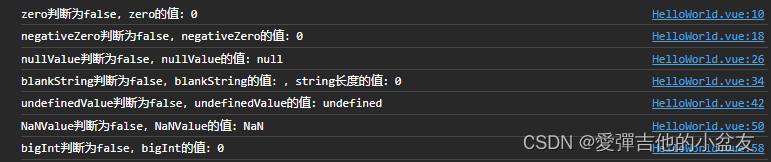
以上原理在JavaScript中成为“假值(Falsy)”。
JavaScript中一共有8个假值,如下:
| 值 | 说明 | 类型 |
|---|---|---|
| false | false关键字 | boolean |
| 0 | 数值零 | number |
| -0 | 数值负零 | number |
| 0n | 当 BigInt 作为布尔值使用时,遵从其作为数值的规则。0n 是 false,In是true | bigInt |
| “”, ‘’, `` | 这是一个空字符串 (字符串的长度为零). JavaScript 中的字符串可用双引号 “”, 单引号 ‘’, 或 模板字面量 `` 定义 | string |
| null | null - 缺少值 | object |
| undefined | undefined - 原始值 | undefined |
| NaN | NaN(Not a Number) - 非数值 | number |
提示:此表格内容参考自MDN
在原生JavaScript代码和Vue中都可以使用这个假值判断,代码如下:
提示:此处省略false关键字的判断
  // 这边使用TypeScript语法,提高代码可读性
  // 数值零,类型number
  let zero: number = 0
  if (zero) {
    console.log(`zero判断为true,zero的值:${zero}`)
  } else {
    console.log(`zero判断为false,zero的值:${zero}`)
  }

  //数值负零,类型number
  let negativeZero: number = -0 //数值负零,类型number
  if (negativeZero) {
    console.log(`negativeZero判断为true,negativeZero的值:${negativeZero}`)
  } else {
    console.log(`negativeZero判断为false,negativeZero的值:${negativeZero}`)
  }

  // null - 缺少值
  let nullValue: null = null
  if (nullValue) {
    console.log(`nullValue判断为true,nullValue的值:${nullValue}`)
  } else {
    console.log(`nullValue判断为false,nullValue的值:${nullValue}`)
  }

  //这是一个空字符串 (字符串的长度为零). JavaScript 中的字符串可用双引号 "", 单引号 '', 或 模板字面量 `` 定义,类型为string
  let blankString: string = ''
  if (blankString) {
    console.log(`blankString判断为true,blankString的值:${blankString},string长度的值:${blankString.length}`)
  } else {
    console.log(`blankString判断为false,blankString的值:${blankString},string长度的值:${blankString.length}`)
  }

  // undefined - 原始值,类型undefined
  let undefinedValue: undefined = undefined
  if (undefinedValue) {
    console.log(`undefinedValue判断为true,undefinedValue的值:${undefinedValue}`)
  } else {
    console.log(`undefinedValue判断为false,undefinedValue的值:${undefinedValue}`)
  }

  //NaN(Not a Number) - 非数值,类型number
  let NaNValue: number = NaN
  if (NaNValue) {
    console.log(`NaNValue判断为true,NaNValue的值:${NaNValue}`)
  } else {
    console.log(`NaNValue判断为false,NaNValue的值:${NaNValue}`)
  }

  // bigInt = On, 当 BigInt 作为布尔值使用时,遵从其作为数值的规则。0n 是 false,In是true,类型bigInt
  let bigInt = BigInt(false)
  if (bigInt) {
    console.log(`bigInt判断为true,bigInt的值:${bigInt}`)
  } else {
    console.log(`bigInt判断为false,bigInt的值:${bigInt}`)
  }
浏览器控制台输出结果如下:
六、结语
好一段时间没有发博客了,忙工作忙生活啦 ~ ~ 嘻 嘻 > - <







 扫一扫
扫一扫


 被折叠的 条评论
为什么被折叠?
被折叠的 条评论
为什么被折叠?
 到【灌水乐园】发言





