





 本文介绍了在使用selenium进行web自动化测试时,遇到元素class属性值带有空格导致定位失败的问题。通过分析HTML的class属性和错误日志,提出了两种解决方案:一是使用class值中的单个唯一类型进行定位;二是利用css_selector方法进行更精确的定位。文章还提及了Appium和安卓自动化测试的相关内容。
- 前言
- 由于web页面元素class属性值带有空格,导致直接使用class属性值元素定位失败
- 如: class=“inputstyle password” ,直接使用定位:driver.find_element_by_class_name(“inputstyle password”).send_keys(“1111”)
- **html classname值描述: **规定元素的类的名称。如需为一个元素规定多个类,用空格分隔类名。
- W3cschool 对于class属性介绍
- 报错日志
selenium.common.exceptions.NoSuchElementException: Message: no such element: Unable to locate element: {"method":"css selector","selector":".inputstyle password"}
  (Session info: chrome=81.0.4044.138)
-
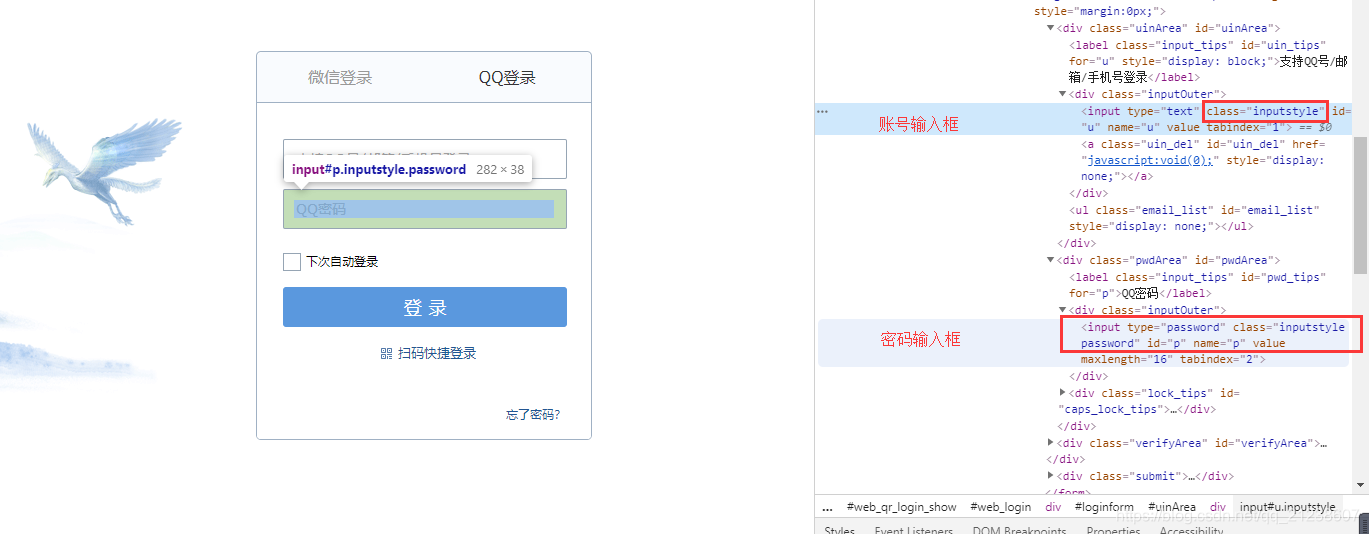
示例:QQ邮箱 - 账号/密码输入框
-
账号输入框:class = inputstyle
-
密码输入框:class = inputstyle password
-
-
解决办法
- 方法一:driver.find_element_by_class_name方式定位
- 控件class值包含多个类,可使用任意单个唯一类型来定位,如:inputstyle、password
- 但是由于账号输入框class属性值为inputstyle,需取唯一属性,故密码输入框只能使用password
driver.find_element_by_class_name("password").send_keys("1111")- 方法2:driver.find_element_by_css_selector
# class属性定位 driver.find_element_by_css_selector("[class='inputstyle password']").send_keys("1111") # 各空格变"." driver.find_element_by_css_selector(".inputstyle.password").send_keys("1111") # 单个唯一属性 driver.find_element_by_css_selector(".password").send_keys("5555") - 方法一:driver.find_element_by_class_name方式定位
-
示例代码
from selenium import webdriver
import time


driver = webdriver.Chrome()
driver.get("https://mail.qq.com/")
driver.implicitly_wait(10)

driver.switch_to.frame("login_frame")

# 由于当前PC已登录QQ,需从快速登录切换至账号密码登录方式
# 若无可注释
driver.find_element_by_class_name("switch_btn").click()

# 报错用法
# driver.find_element_by_class_name("inputstyle password").send_keys("1111")

# inputstyle 为账号输入框class属性值,即会输入至账号输入框
driver.find_element_by_class_name("inputstyle").clear()
driver.find_element_by_class_name("inputstyle").send_keys("1111")
time.sleep(2)

# password 为密码输入框唯一属性值,即正常输入至密码输入框
driver.find_element_by_class_name("password").clear()
driver.find_element_by_class_name("password").send_keys("2222")
time.sleep(2)

# css_selector定位:取class属性定位,即正常输入至密码输入框
driver.find_element_by_css_selector("[class='inputstyle password']").clear()
driver.find_element_by_css_selector("[class='inputstyle password']").send_keys("3333")
time.sleep(2)

# css_selector定位:“.”替换空格,即正常输入至密码输入框
driver.find_element_by_css_selector(".inputstyle.password").clear()
driver.find_element_by_css_selector(".inputstyle.password").send_keys("4444")
time.sleep(2)

# css_selector定位:“.”替换空格并取唯一属性值,即正常输入至密码输入框
driver.find_element_by_css_selector(".password").clear()
driver.find_element_by_css_selector(".password").send_keys("5555")
time.sleep(2)

# css_selector定位:“.”替换空格,inputstyle为账号输入框唯一属性值,即正常输入至账号输入框
driver.find_element_by_css_selector(".inputstyle").clear()
driver.find_element_by_css_selector(".inputstyle").send_keys("5555")
Key words
Appium、selenium、class定位报错、web自动化、安卓自动化、class定位、控件定位





 扫一扫
扫一扫


 5437
5437

 被折叠的 条评论
为什么被折叠?
被折叠的 条评论
为什么被折叠?
 到【灌水乐园】发言





