



 本文介绍如何使用Appium和Python在Android APP自动化测试中获取已定位元素的属性值,包括text、size、location、tag_name、content-desc等关键属性。
Appium:获取已定位的元素属性值
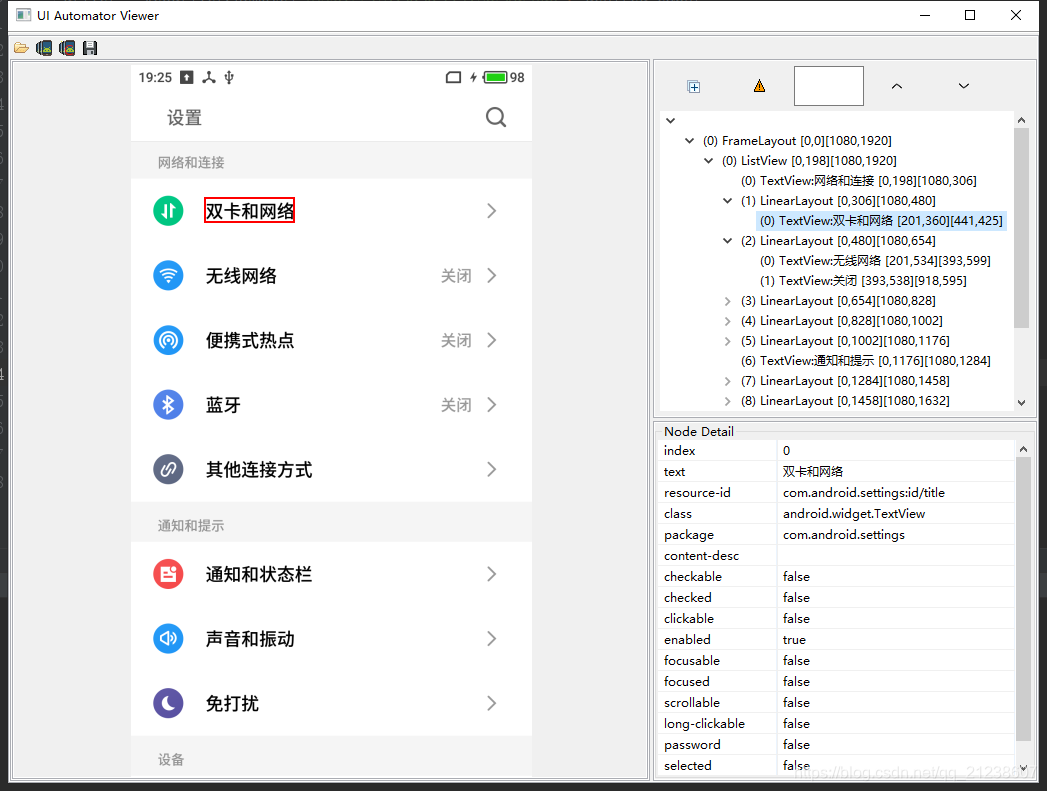
text
# 已“设置-双卡与网络”为例

loc = driver.find_element_by_xpath("//*[@text='双卡和网络']")

# 获取text属性
print(loc.text)
print(loc.get_attribute("text"))
size & location
loc = driver.find_element_by_xpath("//*[@text='双卡和网络']")

# size, 返回字典:{'height': XXX, 'width': XXX}
print(loc.size)

# location, 返回字典:{'x': XXX, 'y': XXX}
print(loc.location)
tag_name
loc = driver.find_element_by_xpath("//*[@text='双卡和网络']")

# 获取tag_name属性
print(loc.tag_name)
get_attribute
loc = driver.find_element_by_xpath("//*[@text='双卡和网络']")

# resourceId
print(loc.get_attribute("resourceId"))

# className
print(loc.get_attribute("className"))

# 其他属性,如:enabled、checked
print(loc.get_attribute("enabled"))
print(loc.get_attribute("checked"))
content-desc 属性值
# content-desc属性值为空 → 打印:text
loc = driver.find_element_by_xpath('//*[@text="双卡和网络"]')
print(loc.get_attribute('name'))

# content-desc属性值不为空 → 打印:content-desc值
search = driver.find_element_by_id("com.android.settings:id/search")	# 右上角搜索按钮
print(search.get_attribute('name'))
参考代码
from appium import webdriver


desired_caps = {}
desired_caps['platformName'] = 'Android'
desired_caps['platformVersion'] = '5.1.0'
desired_caps['deviceName'] = '127.0.0.1:62001'	# 夜神模拟器
desired_caps['appPackage'] = 'com.android.settings'
desired_caps['appActivity'] = 'com.android.settings.Settings'
desired_caps['noReset'] = "False"

driver = webdriver.Remote('http://127.0.0.1:4723/wd/hub', desired_caps)
import time
time.sleep(5)

loc = driver.find_element_by_xpath('//*[@text="双卡和网络"]')
search = driver.find_element_by_id("com.android.settings:id/search")

print(loc.text)		# 双卡和网络
print(loc.get_attribute("text"))		# 双卡和网络

print(loc.tag_name)		# android.widget.TextView

print(loc.get_attribute("resourceId"))		# com.android.settings:id/title
print(loc.get_attribute("className"))		# android.widget.TextView
print(loc.get_attribute("enabled"))		# true
print(loc.get_attribute("checked"))		# false
print(loc.size)		# {'height': 65, 'width': 240}
print(loc.location)		{'x': 201, 'y': 360}

print(loc.get_attribute('name'))		# 双卡和网络
print(search.get_attribute('name'))		# 搜索
Words
Appium、python + appium、获取元素属性值、APP自动化、UI自动化、测试





 扫一扫
扫一扫


 2777
2777

 被折叠的 条评论
为什么被折叠?
被折叠的 条评论
为什么被折叠?
 到【灌水乐园】发言





