



 本文总结了Java IO流的基本概念,包括输入流、输出流、字节流与字符流的区别,以及如何使用FileOutputStream、FileWriter进行文件读写。还探讨了缓冲流提高效率的原理,并介绍了对象的序列化与反序列化。最后,文章详细阐述了NIO的Channel、Buffer以及NIO相对于传统IO的优势。
之前一直对JavaIO不太熟悉,在这里做个小结
Java是以流的方式抽象表示不同的输入、输出源。按流的流向分,可以分为输入流和输出流;按操作的数据单元分,可以分为字节流和字符流。
Java的IO流主要有以下四种抽象基类,无法直接创建实例

向文件中写入数据:
写入数据的原理(内存–>硬盘):
Java程序–>JVM–>OS–>OS调用写数据的方法–>把数据写入到文件中
向文件中写入数据一般常用FileOutputStream和FileWriter
FileOutputStream:文件字节输出流,继承了InputStream
使用步骤:
1、创建一个FileOutputStream对象,构造方法中传入写入数据的目的地
2、调用FileOutputStream对象中的方法write,将数据写入到文件中
3、释放资源
FileOutputStream的构造方法

write方法的用法如下:

//使用字节输出流
 public static void main(String[] args) throws IOException {
       FileOutputStream fos=new FileOutputStream("E:\\java_repository\\123.txt");
       String a="你好";
        fos.write(a.getBytes());
        fos.close();
    }
FileWriter:文件字符输出流,继承了Writer
使用步骤:
1、创建FileWriter对象,构造方法中绑定要写入数据的目的地
2、使用FileWriter中的方法write,将数据写入到内存缓冲区中(把字节转换成字符)
3、使用FileWriter中的方法flush,把内存缓冲区的数据刷新到文件中
4、释放资源
write方法:

    public static void main(String[] args) throws IOException
    {
        FileWriter fileWriter=new FileWriter("E:\\java_repository\\a.txt");
        fileWriter.write("你好");
        fileWriter.flush();
        fileWriter.close();
    }
flush和close的区别:
flush:刷新缓冲区,流对象可以继续使用
close:刷新缓冲区,再通知系统释放资源,流对象不能再使用了
从文件中读取数据
读取数据的原理(硬盘–>内存):
Java程序–>JVM–>OS–>OS读取数据的方法–>读取文件
从文件中读取数据一般常用FileInputStream和FileReader
FileInputStream:文件字节输入流,继承InputStream
使用步骤:
1、创建FileInputStream对象,构造方法中绑定要读取数据的目的地
2、使用FileWriter中的方法read,读取文件
3、释放资源
构造方法:

read方法:读取到文件的末尾返回-1

    //一次读一个字节
    private static void input1() throws IOException {
        FileInputStream fileInputStream=new FileInputStream("E:\\java_repository\\a.txt");
        int len=0;//记录读取到的字节
        while((len=fileInputStream.read())!=-1)
            System.out.println(len);
        fileInputStream.close();
    }
    //一次读多个字节
    private static void input2() throws IOException {
        FileInputStream fileInputStream=new FileInputStream("E:\\java_repository\\a.txt");
        byte[] b=new byte[100];
        int len=fileInputStream.read(b);//从输入流读取一定量的字节,储存在缓存区数组b中
        System.out.println(new String(b));
        fileInputStream.close();
    }
得到了文件中的字节数据,是以二进制码的形式表示的
FileReader:文件字符输入流,继承InputStreamReader和Reader
使用步骤:
1、创建FileReader对象,构造方法中绑定要读取数据的目的地
2、使用FileReader中的方法read,读取文件
3、释放资源

    public static void main(String[] args) throws IOException {
        FileReader fileReader=new FileReader("E:\\java_repository\\c.txt");
        char[] c=new char[100];
        fileReader.read(c);
        System.out.println(new String(c));
        fileReader.close();
    }
普通IO流的效率
由于普通IO流需要反复对硬盘进行读取、写入,每次只操作一个字节,效率是比较低的
    public static void main(String[] args) throws IOException {
        long start=System.currentTimeMillis();
        FileOutputStream fos=new FileOutputStream("E:\\java_repository\\2.jpg");
        FileInputStream fis=new FileInputStream("E:\\java_repository\\1.jpg");
        int len=0;
        while((len=fis.read())!=-1)
        {
            fos.write(len);
        }
        fos.close();
        fis.close();
        long end=System.currentTimeMillis();
        System.out.println("普通流复制时间:"+(end-start)+"ms");
    }
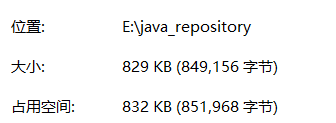
复制一个800多K的图片需要花费12s

如果使用数组作为缓存区,一次存储多个字节、可以大大提高效率
 private static void copy2() throws IOException {
        long start=System.currentTimeMillis();
        FileOutputStream fos=new FileOutputStream("E:\\java_repository\\2.jpg");
        FileInputStream fis=new FileInputStream("E:\\java_repository\\1.jpg");
        int len=0;
        byte[] b=new byte[1024];
        while((len=fis.read(b))!=-1)
        {
            fos.write(b,0,len);
        }
        fos.close();
        fis.close();
        long end=System.currentTimeMillis();
        System.out.println("普通流复制时间:"+(end-start)+"ms");
    }

缓冲流
Java还提供了缓冲流来减少系统IO次数,提高读写的效率
字节缓冲流:BufferedInputStream 、BufferedOutputStream
字符缓冲流:BufferedReader、BufferedWriter
原理:给基本的字节输入、输出流增加一个内置的缓冲区(数组),提高读写效率
字节缓冲输出流:
    public static void output1() throws IOException {
        BufferedOutputStream bufferedOutputStream=new BufferedOutputStream(new FileOutputStream("E:\\java_repository\\c.txt"));
        String a="你好";
        bufferedOutputStream.write(a.getBytes());
        bufferedOutputStream.flush();
        bufferedOutputStream.close();
    }
字节缓冲输入流:
    public static void input01() throws IOException {
        BufferedInputStream bufferedInputStream=new BufferedInputStream(new FileInputStream("E:\\java_repository\\c.txt"));
        int len=0;
        while((len=bufferedInputStream.read())!=-1)
            System.out.println(len);
        bufferedInputStream.close();
    }
    public static void input02() throws IOException {
        BufferedReader bufferedReader=new BufferedReader(new FileReader("E:\\java_repository\\123.txt"));
        char[] c=new char[100];
        bufferedReader.read(c);
        System.out.println(c);
        bufferedReader.close();
    }
现在再使用缓冲流对文件进行复制操作,可以发现读写效率得到很大提升
//一次读取一个字节
 private static void copy4() throws IOException {
        long start=System.currentTimeMillis();
        BufferedOutputStream bufferedOutputStream=new BufferedOutputStream(new FileOutputStream("E:\\java_repository\\2.jpg"));
        BufferedInputStream bufferedInputStream=new BufferedInputStream(new FileInputStream("E:\\java_repository\\1.jpg"));
        int len=0;
        while((len=bufferedInputStream.read())!=-1)
        {
            bufferedOutputStream.write(len);
        }
        bufferedInputStream.close();
        bufferedOutputStream.close();
        long end=System.currentTimeMillis();
        System.out.println("缓冲流复制时间:"+(end-start)+"ms");
    }

  //一次读取多个字节
    private static void copy3() throws IOException {
        long start=System.currentTimeMillis();
        BufferedOutputStream bufferedOutputStream=new BufferedOutputStream(new FileOutputStream("E:\\java_repository\\2.jpg"));
        BufferedInputStream bufferedInputStream=new BufferedInputStream(new FileInputStream("E:\\java_repository\\1.jpg"));
        int len=0;
        byte[] b=new byte[1024];
        while((len=bufferedInputStream.read(b))!=-1)
        {
            bufferedOutputStream.write(b,0,len);
        }
        bufferedInputStream.close();
        bufferedOutputStream.close();
        long end=System.currentTimeMillis();
        System.out.println("缓冲流复制时间:"+(end-start)+"ms");
    }

对象的序列化
对象的序列化就是把对象以流的形式,写入到文件中保存
对象的序列化流:ObjectOutputStream
对象的反序列化
把文件中保存的对象,以流的形式读取出来
对象的反序列化流:ObjectIntputStream
一个对象要想实现序列化的条件:
1、该类必须实现Serializable接口
2、该类的所有属性必须是可序列化的,如果一个属性不需要可序列化,该对象必须注明是瞬态的,使用transient关键字
示例:
package io;

import java.io.*;

public class IoObjectStream {
    public static void main(String[] args) throws IOException, ClassNotFoundException {
       output();
       input();
    }

    private static void input() throws IOException, ClassNotFoundException {
        ObjectInputStream objectInputStream=new ObjectInputStream(new FileInputStream("E:\\java_repository\\e.txt"));
        Object o=objectInputStream.readObject();
        objectInputStream.close();
        System.out.println(o);
    }

    private static void output() throws IOException {
        FileOutputStream fileOutputStream=new FileOutputStream("E:\\java_repository\\e.txt");
        ObjectOutputStream objectOutputStream=new ObjectOutputStream(fileOutputStream);
        objectOutputStream.writeObject(new Person("张三",23));
        objectOutputStream.close();
    }
}
问题:
每次修改类,都会给该类生成新的序列号,导致InvalidClassException
解决方法:
手动给该类增加序列号
static final long serialVersionUID=42L;
NIO
前面介绍的输入输出流都是阻塞式的输入、输出,比如使用InputStream的read()方法从流中读取数据,如果数据源中没有数据,也会阻塞该线程的执行。而且传统的输入、输出流都是阻塞式的输入输出。传统的输入、输出流一次只能处理一个字节,因此输入输出流效率不高。
JAVANIO用内存映射文件的方式来处理输入输出,NIO将文件或者文件的一段区域映射到内存中,就可以像访问内存一样访问文件了。
Channel和Buffer是NIO的两个核心对象。Channel是对传统输入输出的模拟,NIO中所有的数据都在通道中传输:Channel与传统的inputStream、OutputStream最大的区别在于提供了一个map()方法,通过map()方法可以将一块数据都映射到内存中,NIO是面向块的处理。Buffer是一个容器,本质上是数组。发送到Channel和从Channel中读取的数据都必须先放在Buffer中。
Buffer有3个重要概念:容器(capacity)、界限(limit)和位置(position)。
容器:表示Buffer的最大数据容量
界限:第一个不应该被读出或者写入的缓冲区位置索引。位于limit后的数据不可被读也不可被写
位置:指明下一个可以被读出或者写入的缓冲区位置索引。
测试代码:
public class BufferTest {
    public static void main(String[] args) {
        CharBuffer buffer=CharBuffer.allocate(64);
        System.out.println("capacity:"+buffer.capacity());
        System.out.println("limit:"+buffer.limit());
        System.out.println("position:"+buffer.position());
        buffer.put('a');
        buffer.put('b');
        buffer.put('c');
        System.out.println("limit="+buffer.limit()+" position="+buffer.position());
        buffer.flip();
        System.out.println("执行flip()后,limit="+buffer.limit()+" position="+buffer.position());
        System.out.println(buffer.get());
        System.out.println("取出一个元素后,limit="+buffer.limit()+" position="+buffer.position());
        buffer.clear();
        System.out.println("执行clear,limit="+buffer.limit()+" position="+buffer.position());
        System.out.println(buffer.get());
    }
}
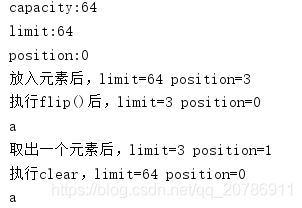
flip() 使缓冲区为一系列新的通道写入或相对获取 操作做好准备:它将限制设置为当前位置(相当于设置一个标志,说明只想处理从0到该位置的内容,即将这些内容视为此次的有效数据)
clear() 使缓冲区为一系列新的通道读取或相对放置 操作做好准备:它将限制设置为容量大小,将位置设置为 0,并不是清除数据。
Channel类与传统的流对象类似,但是与传统的流对象有两个主要区别
(1)Channel可以将指定文件的部分或者全部直接映射成Buffer。
(2)程序不能直接访问Channel中的数据,只能通过Buffer与Channel进行交互。
所有Channel都不应该通过构造器来创建,而是通过传统的InputStream、OutputStream的getChannel()方法来返回对应的Channel。
使用通道向文本输出内容
public class ChannelOutput{
    public static void main(String[] args) throws IOException {
        File f=new File("E:\\java_repository\\g.txt");
        FileOutputStream fileOutputStream=new FileOutputStream(f);
        FileChannel fileChannel=fileOutputStream.getChannel();
        String info[]={"ABC","123"};
        ByteBuffer byteBuffer=ByteBuffer.allocate(1024);
        for(int i=0;i<info.length;i++)
        {
            byteBuffer.put(info[i].getBytes());
        }
          byteBuffer.flip();
        fileChannel.write(byteBuffer);
        fileChannel.close();
        fileOutputStream.close();
    }
}
使用通道文本读取内容
public class ChannelRead {
    public static void main(String[] args) throws IOException {
        FileInputStream fileInputStream=new FileInputStream("E:\\java_repository\\g.txt");
        FileChannel fileChannel=fileInputStream.getChannel();
        ByteBuffer byteBuffer=ByteBuffer.allocate(1024);
        int temp=-1;
        while((temp=fileChannel.read(byteBuffer))!=-1)//读取通道数据到缓冲区中,非-1就代表有数据
        {
            byteBuffer.clear();
            byte[] b= byteBuffer.array();
            System.out.println(new String(b));
        }
    }
}





 扫一扫
扫一扫


 1409
1409

 被折叠的 条评论
为什么被折叠?
被折叠的 条评论
为什么被折叠?
 到【灌水乐园】发言





