



 当使用Maven打包应用时,如果发现无法通过`java -jar`命令运行,原因在于缺少主清单属性,这使得无法找到主类入口。解决方法是在Maven配置中添加相应插件,确保打包过程中包含主清单属性。正确配置后,执行打包操作,应用即可正常运行。
直接用maven打的包是无法用java -jar命令运行的 因为没办法找到入口类, 即main方法
那么需要加上maven的插件配置
<?xml version="1.0" encoding="UTF-8"?>
<project xmlns="http://maven.apache.org/POM/4.0.0"
         xmlns:xsi="http://www.w3.org/2001/XMLSchema-instance"
         xsi:schemaLocation="http://maven.apache.org/POM/4.0.0 http://maven.apache.org/xsd/maven-4.0.0.xsd">
    <modelVersion>4.0.0</modelVersion>

    <groupId>com.laixiaoxing</groupId>
    <artifactId>ioc-contaner</artifactId>
    <version>1.0-SNAPSHOT</version>
<build>
    <plugins>
        <plugin>
            <groupId>org.apache.maven.plugins</groupId>
            <artifactId>maven-shade-plugin</artifactId>
            <version>3.2.1</version>
            <executions>
                <execution>
                    <phase>package</phase>
                    <goals>
                        <goal>shade</goal>
                    </goals>
                    <configuration>
                        <transformers>
                            <transformer implementation="org.apache.maven.plugins.shade.resource.ManifestResourceTransformer">
                                <mainClass>com.hello.hello</mainClass>
                            </transformer>
                        </transformers>
                    </configuration>
                </execution>
            </executions>
        </plugin>
    </plugins>
</build>

</project>
代码如下
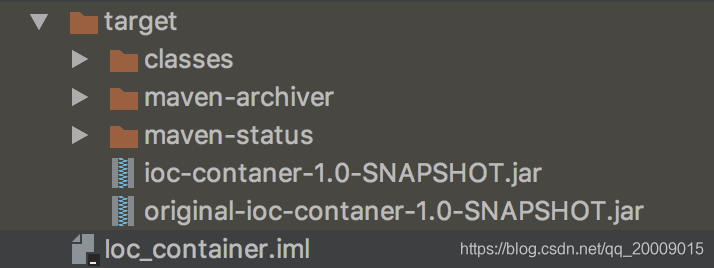
打包之后
package com.hello;

/**
 * @ClassName hello
 * @Author laixiaoxing
 * @Date 2019/5/9 上午11:00
 * @Description TODO
 * @Version 1.0
 */
public class hello {

    public static void main(String[] args) {
        System.out.println(args[0]+"是沙雕");
    }
}
打包之后
运行结果






 扫一扫
扫一扫


 272
272

 被折叠的 条评论
为什么被折叠?
被折叠的 条评论
为什么被折叠?
 到【灌水乐园】发言





