


一、nginx的进程结构
web 请求处理机制
多进程方式:服务器每接收到一个客户端请求就有服务器的主进程生成一个子进程响应客户端,直
到用户关闭连接,这样的优势是处理速度快,子进程之间相互独立,但是如果访问过大会导致服务
器资源耗尽而无法提供请求
多线程方式:与多进程方式类似,但是每收到一个客户端请求会有服务进程派生出一个线程和此客
户端进行交互,一个线程的开销远远小于一个进程,因此多线程方式在很大程度减轻了 web 服务器
对系统资源的要求,但是多线程也有自己的缺点,即当多个线程位于同一个进程内工作的时候,可
以相互访问同样的内存地址空间,所以他们相互影响,一旦主进程挂掉则所有子线程都不能工作
了, IIS服务器使用了多线程的方式,需要间隔一段时间就重启一次才能稳定。Nginx 是多进程组织模型,而且是一个由 Master 主进程和 Worker 工作进程组成。
主进程 (master process) 的功能:
对外接口:接收外部的操作(信号)
对内转发:根据外部的操作的不同,通过信号管理 Worker
监控:监控 worker 进程的运行状态,worker 进程异常终止后,自动重启 worker 进程
读取Nginx 配置文件并验证其有效性和正确性
建立、绑定和关闭socket连接
按照配置生成、管理和结束工作进程
接受外界指令,比如重启、升级及退出服务器等指令
不中断服务,实现平滑升级,重启服务并应用新的配置
开启日志文件,获取文件描述符
不中断服务,实现平滑升级,升级失败进行回滚处理
编译和处理perl脚本
工作进程( worker process )的功能:
所有 Worker 进程都是平等的
实际处理:网络请求,由 Worker 进程处理
Worker进程数量:一般设置为核心数,充分利用CPU资源,同时避免进程数量过多,导致进程竞争
CPU资源,
增加上下文切换的损耗
接受处理客户的请求
将请求依次送入各个功能模块进行处理
I/O调用,获取响应数据
与后端服务器通信,接收后端服务器的处理结果
缓存数据,访问缓存索引,查询和调用缓存数据
发送请求结果,响应客户的请求
接收主程序指令,比如重启、升级和退出等
二、nginx的安装
Nginx 版本
Mainline version 主要开发版本,一般为奇数版本号,比如1.19
Stable version 当前最新稳定版,一般为偶数版本,如:1.20
Legacy versions 旧的稳定版,一般为偶数版本,如:1.18
Nginx安装可以使用yum或源码安装,但是推荐使用源码编译安装
yum 的版本比较旧
编译安装可以更方便自定义相关路径
使用源码编译可以自定义相关功能,更方便业务的上的使用
源码编译:
[root@Nginx ~]# dnf install gcc pcre-devel zlib-devel openssl-devel -y
[root@Nginx nginx-1.24.0]# useradd -s /sbin/nologin -M nginx
[root@Nginx nginx]# tar zxf nginx-1.24.0.tar.gz
[root@Nginx nginx-1.24.0]# useradd -s /sbin/nologin -M nginx
[root@Nginx nginx]# cd nginx-1.24.0/
[root@Nginx nginx-1.24.0]# ls
auto CHANGES.ru configure html Makefile objs src
CHANGES conf contrib LICENSE man README
[root@Nginx nginx-1.24.0]# ./configure --prefix=/usr/local/nginx \
--user=nginx \ # 指定nginx运行用户
--group=nginx \ # 指定nginx运行组
--with-http_ssl_module \ # 支持https://
--with-http_v2_module \ # 支持http版本2
--with-http_realip_module \ # 支持ip透传
--with-http_stub_status_module \ # 支持状态页面
--with-http_gzip_static_module \ # 支持压缩
--with-pcre \ # 支持正则
--with-stream \ # 支持tcp反向代理
--with-stream_ssl_module \ # 支持tcp的ssl加密
--with-stream_realip_module # 支持tcp的透传ip
[root@Nginx nginx-1.24.0]# make && make install
[root@Nginx ~]# vim ~/.bash_profile
export PATH=$PATH:/usr/local/nginx/sbin
[root@Nginx ~]# source ~/.bash_profile
[root@Nginx ~]# nginx -V
nginx version: nginx/1.24.0
built by gcc 11.4.1 20231218 (Red Hat 11.4.1-3) (GCC)
built with OpenSSL 3.0.7 1 Nov 2022
TLS SNI support enabled
configure arguments: --group=nginx --with-http_ssl_module --with-http_v2_module -
-with-http_realip_module --with-http_stub_status_module --with
http_gzip_static_module --with-pcre --with-stream --with-stream_ssl_module --
with-stream_realip_module
编辑启动文件:
[root@Nginx ~]# vim /lib/systemd/system/nginx.service
[Unit]
Description=The NGINX HTTP and reverse proxy server
After=syslog.target network-online.target remote-fs.target nss-lookup.target
Wants=network-online.target
[Service]
Type=forking
PIDFile=/usr/local/nginx/logs/nginx.pid
ExecStartPre=/usr/local/nginx/sbin/nginx -t
ExecStart=/usr/local/nginx/sbin/nginx
ExecReload=/usr/local/nginx/sbin/nginx -s reload
ExecStop=/bin/kill -s QUIT $MAINPID
PrivateTmp=true
[Install]
WantedBy=multi-user.target
[root@Nginx ~]# systemctl daemon-reload
[root@Nginx ~]# systemctl start nginx
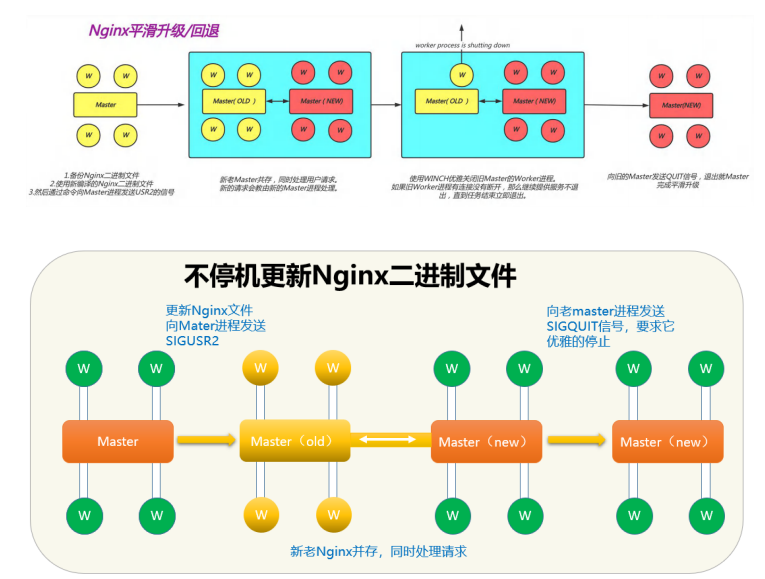
[root@Nginx nginx]# tar zxf nginx-1.26.1.tar.gz
[root@Nginx nginx]# cd nginx-1.26.1/
#开始编译新版本
[root@Nginx nginx-1.26.1]# ./configure --with-http_ssl_module --with
http_v2_module --with-http_realip_module --with-http_stub_status_module --with
http_gzip_static_module --with-pcre --with-stream --with-stream_ssl_module --
with-stream_realip_module
#只要make无需要make install[root@Nginx nginx-1.26.1]# make
#查看两个版本
[root@Nginx nginx-1.26.1]# ll objs/nginx /usr/local/nginx/sbin/nginx
-rwxr-xr-x 1 root root 1239416 Jul 18 15:08 objs/nginx
-rwxr-xr-x 1 root root 5671488 Jul 18 11:41 /usr/local/nginx/sbin/nginx
#把之前的旧版的nginx命令备份
[root@Nginx ~]# cd /usr/local/nginx/sbin/
[root@Nginx sbin]# cp nginx nginx.24
#把新版本的nginx命令复制过去
[root@Nginx sbin]# \cp -f /root/nginx/nginx-1.26.1/objs/nginx
/usr/local/nginx/sbin
#检测一下有没有问题
[root@Nginx sbin]# nginx -t
nginx: the configuration file /usr/local/nginx/conf/nginx.conf syntax is ok
nginx: configuration file /usr/local/nginx/conf/nginx.conf test is successful
[root@Nginx sbin]# kill -USR2 48732 #nginx worker ID
#USR2 平滑升级可执行程序,将存储有旧版本主进程PID的文件重命名为nginx.pid.oldbin,并启动新的
nginx
#此时两个master的进程都在运行,只是旧的master不在监听,由新的master监听80
#此时Nginx开启一个新的master进程,这个master进程会生成新的worker进程,这就是升级后的Nginx进
程,此时老的进程不会自动退出,但是当接收到新的请求不作处理而是交给新的进程处理。
[root@Nginx sbin]# ps aux | grep nginx
root 48732 0.0 0.1 9868 2436 ? Ss 14:17 0:00 nginx: master
process /usr/local/nginx/sbin/nginx
nobody 48733 0.0 0.2 14200 4868 ? S 14:17 0:00 nginx: worker
process
root 52075 0.0 0.3 9876 6528 ? S 15:41 0:00 nginx: master
process /usr/local/nginx/sbin/nginx
nobody 52076 0.0 0.2 14208 4868 ? S 15:41 0:00 nginx: worker
process
[root@Nginx sbin]# curl -I localhost
HTTP/1.1 200 OK
Server: nginx/1.24.0 ##依旧是旧版本生生效
Date: Thu, 18 Jul 2024 07:45:58 GMT
Content-Type: text/html
Content-Length: 615
Last-Modified: Thu, 18 Jul 2024 03:41:13 GMT
Connection: keep-alive
ETag: "66988ed9-267"
Accept-Ranges: bytes
#回收旧版本
[root@Nginx sbin]# kill -WINCH 48732
[root@Nginx sbin]# ps aux | grep nginx
root 48732 0.0 0.1 9868 2436 ? Ss 14:17 0:00 nginx: master
process /usr/local/nginx/sbin/nginx
root 52075 0.0 0.3 9876 6528 ? S 15:41 0:00 nginx: master
process /usr/local/nginx/sbin/nginxnobody 52076 0.0 0.2 14208 4868 ? S 15:41 0:00 nginx: worker
process
#检测版本信息
[root@Nginx sbin]# curl -I localhost
HTTP/1.1 200 OK
Server: nginx/1.26.1 #新版本生效
Date: Thu, 18 Jul 2024 07:59:45 GMT
Content-Type: text/html
Content-Length: 615
Last-Modified: Thu, 18 Jul 2024 03:41:13 GMT
Connection: keep-alive
ETag: "66988ed9-267"
Accept-Ranges: bytes
#回滚
#如果升级的版本发现问题需要回滚,可以重新拉起旧版本的worker
[root@Nginx sbin]# cp nginx nginx.26
[root@Nginx sbin]# ls
nginx nginx.24 nginx.26
[root@Nginx sbin]# mv nginx.24 nginx
mv: overwrite 'nginx'? y
[root@Nginx sbin]# kill -HUP 48732
[root@Nginx sbin]# ps aux | grep nginx
root 48732 0.0 0.1 9868 2436 ? Ss 14:17 0:00 nginx: master
process /usr/local/nginx/sbin/nginx
root 52075 0.0 0.3 9876 6528 ? S 15:41 0:00 nginx: master
process /usr/local/nginx/sbin/nginx
nobody 52076 0.0 0.2 14208 5124 ? S 15:41 0:00 nginx: worker
process
nobody 52130 0.0 0.2 14200 4868 ? S 16:30 0:00 nginx: worker
process
[root@Nginx sbin]# kill -WINCH 52075
[root@Nginx sbin]# ps aux | grep nginx
root 48732 0.0 0.1 9868 2436 ? Ss 14:17 0:00 nginx: master
process /usr/local/nginx/sbin/nginx
root 52075 0.0 0.3 9876 6528 ? S 15:41 0:00 nginx: master
process /usr/local/nginx/sbin/nginx
nobody 52130 0.0 0.2 14200 4868 ? S 16:30 0:00 nginx: worker
process
root 52137 0.0 0.1 221664 2176 pts/0 S+ 16:31 0:00 grep --
color=auto nginx
[root@Nginx sbin]# curl -I localhost
HTTP/1.1 200 OK
Server: nginx/1.24.0 ##版本回滚完成
Date: Thu, 18 Jul 2024 08:31:51 GMT
Content-Type: text/html
Content-Length: 615
Last-Modified: Thu, 18 Jul 2024 03:41:13 GMT
Connection: keep-alive
ETag: "66988ed9-267"
Accept-Ranges: bytes
查看nginx版本发现版本已经更新
新建 PC web 站点
#定义子配置文件路径
[root@Nginx ~]# mkdir /usr/local/nginx/conf.d/
[root@centos8 ~]# vim /usr/local/nginx/conf/nginx.conf
http {
......
include /apps/nginx/conf/conf.d/*.conf; #在配置文件的最后面添加此行
#注意不要放在最前面,会导致前面的命令无法
生效
}
#创建虚拟主机网站配置
[root@Nginx ~]# vim /usr/local/nginx/conf.d/vhosts.conf
server {
listen 80;
server_name qii.qizhiang.org;
location / {
root /webdata/nginx/timinglee.org/lee/html;
}
}
[root@Nginx ~]# mkdir -p /webdata/nginx/qizhiang.org/qii/html
[root@Nginx ~]# echo qii.qizhiang.org >
/webdata/nginx/qizhiang.org/qii/html/index.html
[root@Nginx ~]# nginx -s reload
#访问测试
[root@node100 ~]# curl qii.qizhiang.org #注意在访问主机中设解析
qii.qizhiang.org
[root@Nginx ~]# htpasswd -cmb /usr/local/nginx/conf/.htpasswd admin lee #-b 表
示非交互建立用户认证
Adding password for user admin
[root@Nginx ~]# htpasswd -mb /usr/local/nginx/conf/.htpasswd lee lee
Adding password for user lee
[root@Nginx ~]# cat /usr/local/nginx/conf/.htpasswd
admin:$apr1$haGCKgCT$myogggALmqNecTyNupsWQ/
lee:$apr1$H97AyQPF$kGU.Tc4zn1E4Zkp/M4R6G.
[root@Nginx ~]# mkdir /webdata/nginx/timinglee.org/lee/login
[root@Nginx ~]# echo login > /webdata/nginx/timinglee.org/lee/login/index.html
[root@Nginx ~]# vim /usr/local/nginx/conf.d/vhosts.conf
server {
listen 80;
server_name lee.timinglee.org;
location /login {
root /webdata/nginx/timinglee.org/lee;
index index.html;
auth_basic "login password";
auth_basic_user_file "/usr/local/nginx/conf/.htpasswd";
}
}
#重启Nginx并访问测试
[root@node100 ~]# curl lee.timinglee.org/login/ -u lee:lee
login
[root@node100 ~]# curl lee.timinglee.org/login/ -u admin:lee
login
[root@Nginx ~]# mkdir /webdata/nginx/timinglee/lee/errors -p
[root@Nginx ~]# echo error page > /webdata/nginx/timinglee/lee/errors/40x.html
server {
listen 80;
server_name lee.timinglee.org;
error_page 404 /40x.html
location = /40x.html {
root /webdata/nginx/timinglee/lee/errors;
}
}
测试:
[root@node100 ~]# curl lee.timinglee.org/haha
error page
自定义错误日志
[root@Nginx ~]# mkdir "/var/log/nginx" -p
[root@Nginx ~]# vim /usr/local/nginx/conf.d/vhosts.conf
server {
listen 80;
server_name lee.timinglee.org;
error_page 404 /40x.html;
access_log /var/log/nginx/access.log;
error_log /var/log/nginx/error.log;
location = /40x.html {
root /webdata/nginx/timinglee/lee/errors;
}
}
#重启nginx并访问不存在的页面进行测试并验证是在指定目录生成新的日志文件
[root@Nginx ~]# echo "index.html is not exist" >
/webdata/nginx/timinglee.org/lee/error/default.html
[root@Nginx ~]# vim /usr/local/nginx/conf.d/vhosts.conf
server {
listen 80;
server_name lee.timinglee.org;
root /webdata/nginx/timinglee.org/lee;
error_page 404 /40x.html;
access_log /var/log/nginx/access.log;
error_log /var/log/nginx/error.log;
try_files $uri $uri.html $uri/index.html /error/default.html;
location = /40x.html {
root /webdata/nginx/timinglee/lee/errors;
}
}
[root@Nginx ~]# mkdir /webdata/nginx/timinglee.org/lee/data
[root@Nginx ~]# cp /usr/local/nginx/logs/access.log
/webdata/nginx/timinglee.org/lee/data/data.txt
[root@Nginx ~]# echo test > /webdata/nginx/timinglee.org/lee/data/test.html #
小于1k的文件测试是否会压缩
[root@Nginx ~]# vim /usr/local/nginx/conf/nginx.conf
@@@@省略内容@@@@
gzip on;
gzip_comp_level 5;
gzip_min_length 1k;
gzip_types text/plain application/javascript application/x-javascript text/css
application/xml text/javascript application/x-httpd-php image/gif image/png;
gzip_vary on;
#重启Nginx并访问测试:
[root@client ~]# curl --head --compressed lee.timinglee.org/data/test.html
HTTP/1.1 200 OK
Server: nginx/1.26.1
Date: Sun, 21 Jul 2024 15:42:46 GMT
Content-Type: text/html
Content-Length: 5
Last-Modified: Sun, 21 Jul 2024 15:40:35 GMT
Connection: keep-alive
ETag: "669d2bf3-5"
Accept-Ranges: bytes
[root@client ~]# curl --head --compressed lee.timinglee.org/data/data.txt
HTTP/1.1 200 OK
Server: nginx/1.26.1
Date: Sun, 21 Jul 2024 15:43:17 GMT
Content-Type: text/plain
Last-Modified: Sun, 21 Jul 2024 15:40:13 GMT
Connection: keep-alive
Vary: Accept-Encoding
ETag: W/"669d2bdd-3e25b5"
Content-Encoding: gzip
[root@Nginx nginx-1.26.1]# vim src/core/nginx.h
#define nginx_version 1026001
#define NGINX_VERSION "1.0"
#define NGINX_VER "HAHA/" NGINX_VERSION
set $name timinglee;
echo $name;
set $my_port $server_port;
echo $my_port;
echo "$server_name:$server_port";
[root@Nginx ~]# vim /usr/local/nginx/conf.d/vhosts.conf
server {
listen 80;
server_name lee.timinglee.org;
root /webdata/nginx/timinglee.org/lee;
location /var {
default_type text/html;
set $name timinglee;
echo $name;
set $web_port $server_port;
echo $web_port;
}
}
测试输出
[root@client ~]# curl lee.timinglee.org/var
timinglee
80
[root@centos8 ~]#vim /apps/nginx/conf.d/pc.conf
server {
listen 443 ssl;
listen 80;
ssl_certificate /apps/nginx/certs/www.timinglee.org.crt;
ssl_certificate_key /apps/nginx/certs/www.timinglee.org.key;
ssl_session_cache shared:sslcache:20m;
ssl_session_timeout 10m;
server_name www.timniglee.org;
location / { #针对全站跳转
root /data/nginx/html/pc;
index index.html;
if ($scheme = http ){ #如果没有加条件判断,会导致死循环
rewrite / https://$host redirect;
}
}
location /login { #针对特定的URL进行跳转https
if ($scheme = http ){ #如果没有加条件判断,会导致死循环
rewrite / https://$host/login redirect;
}
}
}
#重启Nginx并访问测试
[root@centos7 ~]#curl -ikL www.timinglee.org
HTTP/1.1 302 Moved Temporarily
Server: nginx/1.18.0
Date: Thu, 08 Oct 2020 15:23:48 GMT
Content-Type: text/html
Content-Length: 145
Connection: keep-alive
Location: https://www.timinglee.org
HTTP/1.1 200 OK
Server: nginx/1.18.0
Date: Thu, 08 Oct 2020 15:23:48 GMT
Content-Type: text/html
Content-Length: 7
Last-Modified: Sat, 26 Sep 2020 01:18:32 GMT
Connection: keep-alive
ETag: "5f6e96e8-7"
Accept-Ranges: bytes
pc web
#新建一个主机172.25.254.20,盗取另一台主机lee.timinglee.org/images/lee.png的图片
[root@client ~]# yum install httpd -y
[root@client html]# vim /var/www/html/index.html
#准备盗链web页面:
<html>
<head>
<meta http-equiv=Content-Type content="text/html;charset=utf-8">
<title>盗链</title>
</head>
<body>
<img src="http://www.timinglee.org/images/lee.png" >
<h1 style="color:red">欢迎大家</h1>
<p><a href=http://www.timinglee.org>狂点老李</a>出门见喜</p>
</body>
</html>
~
#重启apache并访问http://172.25.254.20 测试
#验证两个域名的日志,是否会在被盗连的web站点的日志中出现以下盗链日志信息:
[root@Nginx ~]# cat /usr/local/nginx/logs/access.log
172.25.254.1 - - [22/Jul/2024:09:50:01 +0800] "GET /images/logo.png HTTP/1.1" 304
0 "http://172.25.254.20/" "Mozilla/5.0 (Windows NT 10.0; Win64; x64)
AppleWebKit/537.36 (KHTML, like Gecko) Chrome/126.0.0.0 Safari/537.36
Edg/126.0.0.0"
172.25.254.1 - - [22/Jul/2024:09:50:18 +0800] "GET / HTTP/1.1" 304 0
"http://172.25.254.20/" "Mozilla/5.0 (Windows NT 10.0; Win64; x64)
AppleWebKit/537.36 (KHTML, like Gecko) Chrome/126.0.0.0 Safari/537.36
Edg/126.0.0.0
[root@Nginx ~]# vim /usr/local/nginx/conf.d/vhosts.conf
server {
listen 80;
六 Nginx 反向代理功能
反向代理:reverse proxy,指的是代理外网用户的请求到内部的指定的服务器,并将数据返回给用户的
一种方式,这是用的比较多的一种方式。
Nginx 除了可以在企业提供高性能的web服务之外,另外还可以将 nginx 本身不具备的请求通过某种预
定义的协议转发至其它服务器处理,不同的协议就是Nginx服务器与其他服务器进行通信的一种规范,主
要在不同的场景使用以下模块实现不同的功能
server_name www.timinglee.org;
root /data/web/html;
index index.html;
location / {
valid_referers none blocked server_names *.timinglee.org ~/.baidu/.;
if ($invalid_referer){
return 404;
}
}
location /images {
valid_referers none blocked server_names *.timinglee.org ~/.baidu/.;
if ($invalid_referer){
rewrite ^/ http://www.timinglee.org/daolian.png permanent; #注意此图片
不能和正常图片放在一个目录中
}
}
}
#重启Nginx并访问测试
http://172.25.254.20
nginx的反向代理
[root@centos8 ~]# cat /apps/nginx/conf/conf.d/pc.conf
server {
listen 80;
server_name www.timinglee.org;
location / {
proxy_pass http://172.25.254.30;
}
}
#重启Nginx 并访问测试
server {
listen 80;
server_name www.timinglee.org;
location / {
proxy_pass http://172.25.254.30;
}
location ~ /static {
proxy_pass http://172.25.254.20:8080;
}
}
#后端web服务器必须要有相对于的访问URL
[root@apache20 ~]# mkdir /var/www/html/static
[root@apache20 ~]# echo static 172.25.254.20 > /var/www/html/static/index.html
[root@apache30 ~]# echo 172.25.254.30 > /var/www/html/index.html
#重启Nginx并访问测试:
[2024-07-25 17:09.35] ~
[Administrator.DESKTOP-P19CNDN] ➤ curl www.timinglee.org/static/
static 172.25.254.20
[2024-07-25 17:09.39] ~
[Administrator.DESKTOP-P19CNDN] ➤ curl www.timinglee.org
172.25.254.30
配置nginx的缓存
[root@Nginx ~]# vim /apps/nginx/conf/nginx.conf
@@@@内容省略@@@@
#gzip on;
proxy_cache_path /apps/nginx/proxy_cache levels=1:2:2 keys_zone=proxycache:20m
inactive=120s max_size=1g; #配置在nginx.conf http配置段
[root@Nginx ~]# vim /apps/nginx/conf.d/vhost.conf
location ~ /static { #要缓存的URL 或者放在server配置项对所有URL都进行缓存
proxy_pass http://172.25.254.20:8080;
proxy_cache proxycache;
proxy_cache_key $request_uri;
proxy_cache_valid 200 302 301 10m;
proxy_cache_valid any 1m; #必须指定哪些响应码的缓存
}
#/data/nginx/proxycache/ 目录会自动生成
[root@Nginx ~]# ll /apps/nginx/proxy_cache/ -d
drwx------ 3 nginx root 4096 7月 25 20:07 /apps/nginx/proxy_cache/
[root@Nginx ~]# tree /apps/nginx/proxy_cache/
/data/nginx/proxycache/
0 directories, 0 files
#访问web并验证缓存目录
[root@apache30 ~]# ab -n1000 -c100 http://www.timinglee.org/static/index.html
[root@centos8 ~]# ab -n 2000 -c200 http://www.timinglee.org/static/log.html
Concurrency Level: 100
Time taken for tests: 10.535 seconds
Complete requests: 1000
Failed requests: 0
Total transferred: 2011251000 bytes
HTML transferred: 2010991000 bytes
Requests per second: 94.92 [#/sec] (mean)
Time per request: 1053.507 [ms] (mean)
Time per request: 10.535 [ms] (mean, across all concurrent requests)
Transfer rate: 186435.60 [Kbytes/sec] received
#验证缓存目录结构及文件大小
[root@Nginx ~]# tree /apps/nginx/proxy_cache/
/apps/nginx/proxy_cache/
└── e
└── 50
└── 99
└── 319432ef3663735a9d3cb4e0c1d9950e
3 directories, 0 files
[root@apache20 ~]# yum install httpd -y
[root@apache20 ~]# echo "web1 172.25.254.20" > /var/www/html/index.html
[root@apache20 ~]# systemctl enable --now httpd
[root@apache30 ~]# yum install httpd -y
[root@apache30 ~]# echo "web2 172.25.254.30" >> /var/www/html/index.html
[root@apache30 ~]# systemctl enable --now httpd
#访问测试
[root@centos8 ~]# curl http://172.25.254.20
web1 172.25.254.20
[root@centos8 ~]# curl http://172.25.254.30
web2 172.25.254.30
[root@centos8 ~]# cat /apps/nginx/conf/conf.d/pc.conf
upstream webserver {
#ip_hash;
#hash $request_uri consistent;
#hash $cookie_lee
#least_conn;
server 172.25.254.20:8080 weight=1 fail_timeout=15s max_fails=3;
server 172.25.254.30:80 weight=1 fail_timeout=15s max_fails=3;
server 172.25.254.10:80 backup;
}
server {
listen 80;
server_name www.timinglee.org;
location ~ / {
proxy_pass http://webserver;
}
}
#重启Nginx 并访问测试
[Administrator.DESKTOP-P19CNDN] ➤ curl www.timinglee.org
172.25.254.20 web
[Administrator.DESKTOP-P19CNDN] ➤ curl www.timinglee.org
172.25.254.30 web
#关闭172.25.254.20和172.25.254.30,测试nginx backup服务器可用性:
[Administrator.DESKTOP-P19CNDN] ➤ while true;do curl
http://www.timinglee.org;sleep 1;done
[root@Nginx ~]# vim /apps/nginx/conf.d/vhost.conf
http {
upstream websrvs {
hash $cookie_hello; #hello是cookie的key的名称
server 10.0.0.101:80 weight=2;
server 10.0.0.102:80 weight-1;
}
}
[root@centos8 ~]# vim /apps/nginx/conf/conf.d/pc.conf
upstream webserver {
#ip_hash;
#hash $request_uri consistent;
hash $cookie_lee;
#least_conn;
server 172.25.254.20:8080 weight=1 fail_timeout=15s max_fails=3;
server 172.25.254.30:80 weight=1 fail_timeout=15s max_fails=3;
#server 172.25.254.10:80 backup;
}
server {
listen 80;
server_name www.timinglee.org;
location ~ / {
              proxy_pass http://webserver;
}
}
#测试
[Administrator.DESKTOP-P19CNDN] ➤ curl -b lee=1 www.timinglee.org
负载均衡之mysql
#在apache20中安装mysql
[root@apache20 ~]# yum install mariadb-server -y
[root@apache20 ~]# vim /etc/my.cnf.d/mariadb-server.cnf
[mysqld]
server-id=20
[root@apache20 ~]# systemctl start mariadb
[root@apache20 ~]# mysql -e "grant all on *.* to lee@'%' identified by 'lee';"
[root@apache30 ~]# mysql -ulee -plee -h172.25.254.20 -e "select @@server_id"
+-------------+
| @@server_id |
+-------------+
| 20 |
+-------------+
#在apache30重复以上步骤并在apache20上测试
[root@Nginx ~]# vim /apps/nginx/conf/tcp/tcp.conf
stream {
upstream mysql_server {
server 172.25.254.20:3306 max_fails=3 fail_timeout=30s;
server 172.25.254.30:3306 max_fails=3 fail_timeout=30s;
}
server {
listen 172.25.254.10:3306;
proxy_pass mysql_server;
proxy_connect_timeout 30s;
proxy_timeout 300s;
}
}
#重启nginx并访问测试:
[root@Nginx ~]# nginx -s reload
#测试通过nginx负载连接MySQL:
[root@apache30 ~]# mysql -ulee -plee -h172.25.254.10 -e "select @@server_id"
+-------------+
| @@server_id |
+-------------+
| 20 |
+-------------+
[root@apache30 ~]# mysql -ulee -plee -h172.25.254.10 -e "select @@server_id"
+-------------+
| @@server_id |
+-------------+
| 30 |
+-------------+
#在10.0.0.28停止MySQL服务
[root@apache20 ~]# systemctl stop mariadb
#再次测试访问,只会看到mysql-server1.timinglee.org进行响应
[root@apache30 ~]# mysql -ulee -plee -h172.25.254.10 -e "select @@server_id"
+-------------+
| @@server_id |
+-------------+
| 30 |
+-------------+
[root@apache30 ~]# mysql -ulee -plee -h172.25.254.10 -e "select @@server_id"
+-------------+
| @@server_id |
+-------------+
| 30 |
+-------------+
负载均衡之dns
stream {
upstream dns_server{
server 172.25.254.20:53 max_fails=3 fail_timeout=30s;
server 172.25.254.30:53 max_fails=3 fail_timeout=30s;
}
server {
listen 172.25.254.10:53 udp;
proxy_pass dns_server;
proxy_timeout 1s;
proxy_responses 1; # 使用UDP协议时,设置代理服务器响应客户端期望的数据报文数
# 该值作为会话的终止条件
error_log logs/dns.log;
}
}
测试:
[root@apache30 named]# dig www.timinglee.org @172.25.254.10
; <<>> DiG 9.16.23 <<>> www.timinglee.org @172.25.254.10
;; global options: +cmd
;; Got answer:
;; ->>HEADER<<- opcode: QUERY, status: NOERROR, id: 33888
;; flags: qr aa rd ra; QUERY: 1, ANSWER: 1, AUTHORITY: 0, ADDITIONAL: 1
;; OPT PSEUDOSECTION:
; EDNS: version: 0, flags:; udp: 1232
; COOKIE: 701447f1bdd8acea0100000066a27b465426b2b4bc7f1dc3 (good)
;; QUESTION SECTION:
;www.timinglee.org. IN A
;; ANSWER SECTION:
www.timinglee.org. 86400 IN A 172.25.254.20
;; Query time: 2 msec
;; SERVER: 172.25.254.10#53(172.25.254.10)
;; WHEN: Fri Jul 26 00:20:22 CST 2024
;; MSG SIZE rcvd: 90
[root@apache30 named]# dig www.timinglee.org @172.25.254.10
; <<>> DiG 9.16.23 <<>> www.timinglee.org @172.25.254.10
;; global options: +cmd
;; Got answer:
;; ->>HEADER<<- opcode: QUERY, status: NOERROR, id: 8932
;; flags: qr aa rd ra; QUERY: 1, ANSWER: 1, AUTHORITY: 0, ADDITIONAL: 1
;; OPT PSEUDOSECTION:
; EDNS: version: 0, flags:; udp: 1232
; COOKIE: 8ecb61bbfe2716df0100000066a27b47a3bb0c3d8e537858 (good)
;; QUESTION SECTION:
;www.timinglee.org. IN A
;; ANSWER SECTION:
www.timinglee.org. 86400 IN A 172.25.254.30
;; Query time: 1 msec
;; SERVER: 172.25.254.10#53(172.25.254.10)
;; WHEN: Fri Jul 26 00:20:23 CST 2024
;; MSG SIZE rcvd: 90
CGI
#利用yum解决php依赖
[root@Nginx ~]# yum install -y bzip2 systemd-devel libxml2-devel sqlite-devel
libpng-devel libcurl-devel oniguruma-devel
#解压源码并安装
[root@Nginx ~]# ./configure \
--prefix=/usr/local/php \ #安装路径
--with-config-file-path=/usr/local/php/etc \ #指定配置路径
--enable-fpm \ #用cgi方式启动程序
--with-fpm-user=nginx \ #指定运行用户身份
--with-fpm-group=nginx \
--with-curl \ #打开curl浏览器支持
php相关配置优化
--with-iconv \ #启用iconv函数,转换字符编码
--with-mhash \ #mhash加密方式扩展库
--with-zlib \ #支持zlib库,用于压缩http压缩传输
--with-openssl \ #支持ssl加密
--enable-mysqlnd \ #mysql数据库
--with-mysqli \
--with-pdo-mysql \
--disable-debug \ #关闭debug功能
--enable-sockets \ #支持套接字访问
--enable-soap \ #支持soap扩展协议
--enable-xml \ #支持xml
--enable-ftp \ #支持ftp
--enable-gd \ #支持gd库
--enable-exif \ #支持图片元数据
--enable-mbstring \ #支持多字节字符串
--enable-bcmath \ #打开图片大小调整,用到zabbix监控的时候用到了这个模块
--with-fpm-systemd #支持systemctl 管理cgi
[root@Nginx ~]# cd /usr/local/php/etc
[root@Nginx etc]# cp php-fpm.conf.default php-fpm.conf
[root@Nginx etc]# vim php-fpm.conf
去掉注释
pid = run/php-fpm.pid #指定pid文件存放位置
[root@Nginx etc]# cd php-fpm.d/
[root@Nginx php-fpm.d]# cp www.conf.default www.conf
#生成主配置文件
[root@Nginx php-fpm.d]# cd /root/php-8.3.9/
[root@Nginx php-8.3.9]# cp php.ini-production /usr/local/php/etc/php.ini
[root@Nginx ~]# vim /usr/local/php/etc/php.ini
[Date]
; Defines the default timezone used by the date functions
; https://php.net/date.timezone
date.timezone = Asia/Shanghai #修改时区
#生成启动文件
[root@Nginx ~]# cd /root/php-8.3.9/
[root@Nginx php-8.3.9]# cp sapi/fpm/php-fpm.service /lib/systemd/system/
# Mounts the /usr, /boot, and /etc directories read-only for processes invoked by
this unit.
#ProtectSystem=full #注释该内容
[root@Nginx php-8.3.9]# systemctl start php-fpm.service
[root@Nginx php-8.3.9]# netstat -antlupe | grep php
tcp 0 0 127.0.0.1:9000 0.0.0.0:* LISTEN 0
820758 176202/php-fpm: mas
[root@Nginx ~]# mkdir /data/php -p
[root@centos8 ~]# cat /data/php/index.php #php测试页面
<?php
phpinfo();
[root@Nginx ~]# vim /apps/nginx/conf.d/php.conf
server {
listen 80;
server_name php.timinglee.org;
root /data/php;
location ~ \.php$ {
fastcgi_pass 127.0.0.1:9000;
fastcgi_index index.php;
include fastcgi.conf;
}
}
#重启Nginx并访问web测试
[root@Nginx ~]# nginx -s reload
进行访问测试
[root@Nginx ~]# vim .bash_profile
# .bash_profile
# Get the aliases and functions
if [ -f ~/.bashrc ]; then
. ~/.bashrc
fi
6.3.3 php的动态扩展模块(php的缓存模块)
软件下载:http://pecl.php.net/package/memcache
安装memcache模块
复制测试文件到nginx发布目录中
# User specific environment and startup programs
PATH=$PATH:$HOME/bin:/apps/nginx/sbin:/usr/local/php/bin
export PATH
[root@Nginx ~]# source .bash_profile
[root@Nginx ~]# tar zxf memcache-8.2.tgz
[root@Nginx ~]# cd memcache-8.2/
[root@Nginx memcache-8.2]# yum install autoconf
[root@Nginx memcache-8.2]# phpize
[root@Nginx memcache-8.2]# ./configure && make && make install
Installing shared extensions: /usr/local/php/lib/php/extensions/no-debug-nonzts-20230831/
[root@Nginx memcache-8.2]# ls /usr/local/php/lib/php/extensions/no-debug-non-zts-
20230831/
memcache.so opcache.so


[root@Nginx ~]# cd memcache-8.2/
[root@Nginx memcache-8.2]# ls
autom4te.cache config.log configure.ac example.php Makefile.fragments
README
build config.m4 config.w32 include Makefile.objects runtests.php
config9.m4 config.nice CREDITS libtool memcache.la src
config.h config.status docker LICENSE memcache.php
tests
config.h.in configure Dockerfile Makefile modules
[root@Nginx memcache-8.2]# cp example.php memcache.php /data/php/
[root@Nginx ~]# vim /data/php/memcache.php
配置php加载memcache模块
[root@Nginx ~]# vim /usr/local/php/etc/php.ini
;extension=zip
extension=memcache
;zend_extension=opcache
[root@Nginx ~]# systemctl reload php-fpm
[root@Nginx no-debug-non-zts-20230831]# php -m | grep mem
memcache
部署memcached
[root@Nginx ~]# yum install memcached -y
[root@Nginx ~]# systemctl enable --now memcached.service
[root@Nginx ~]# netstat -antlupe | grep memcache
tcp 0 0 127.0.0.1:11211 0.0.0.0:* LISTEN
976 1037243 186762/memcached
[root@Nginx ~]# cat /etc/sysconfig/memcached
PORT="11211"
USER="memcached"
MAXCONN="1024"
CACHESIZE="64"
OPTIONS="-l 127.0.0.1,::1"
[root@Nginx ~]# tar zxf srcache-nginx-module-0.33.tar.gz
[root@Nginx ~]# tar zxf memc-nginx-module-0.20.tar.gz
[root@Nginx ~]# cd nginx-1.26.1/
[root@Nginx nginx-1.26.1]# ./configure --prefix=/apps/nginx --user=nginx --
group=nginx --with-http_ssl_module --with-http_v2_module --withhttp_realip_module --with-http_stub_status_module --with-http_gzip_static_module
--with-pcre --with-stream --with-stream_ssl_module --with-stream_realip_module --
add-module=/root/memc-nginx-module-0.20 --add-module=/root/srcache-nginx-module-
0.33
[root@Nginx nginx-1.26.1]# make && make install
[root@Nginx ~]# vim /apps/nginx/conf.d/php.conf
upstream memcache {
server 127.0.0.1:11211;
keepalive 512;
}
server {
listen 80;
server_name php.timinglee.org;
root /data/php;
location /memc {
internal;
memc_connect_timeout 100ms;
memc_send_timeout 100ms;
memc_read_timeout 100ms;
set $memc_key $query_string; #使用内置变量$query_string来作为key
set $memc_exptime 300; #缓存失效时间300秒
memc_pass memcache;
}
location ~ \.php$ {
set $key $uri$args; #设定key的值
srcache_fetch GET /memc $key; #检测mem中是否有要访问的php
srcache_store PUT /memc $key; #缓存为加载的php数据
fastcgi_pass 127.0.0.1:9000;
fastcgi_index index.php;
include fastcgi.conf;
}
}
[root@Nginx ~]# systemctl start nginx.service





 扫一扫
扫一扫


 1862
1862

 被折叠的 条评论
为什么被折叠?
被折叠的 条评论
为什么被折叠?
 到【灌水乐园】发言





