



 本文详细介绍了Tkinter中Checkbutton的各种用法,包括基本使用、事件处理、文本修改、变量绑定及状态值设定,适合Tkinter初学者及进阶用户。
1.Checkbutton第一个例子
# -*-coding:utf-8 -*-
'''
第一个checkButton例子
text:设置显示的文本
'''
from tkinter import *
root = Tk()
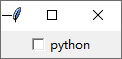
Checkbutton(root, text = 'python').pack()
root.mainloop()
运行效果图:
2.设置CheckButton的事件处理函数
#-*-coding:utf-8-*-
'''
设置CheckButton的事件处理函数
command:指定事件处理函数
'''
from tkinter import *
def callCheckbutton():
    print('you check this button')
root = Tk()
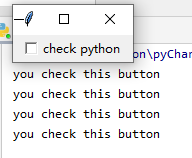
Checkbutton(root, text = 'check python', command = callCheckbutton).pack()
root.mainloop()
运行效果图:点击就会打印:you check this button
3.改变Checkbutton的显示文本
#-*-coding:utf-8-*-
'''
改变Checkbutton的显示文本
text:显示的文本内容
command:指定的事件处理函数
'''
from tkinter import *
def callCheckbutton():
    #改变v的值,即改变Checkbutton的显示值
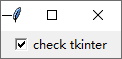
    v.set('check tkinter')
root = Tk()
v = StringVar()
v.set('check python')
#绑定v到Checkbutton的属性textvariable
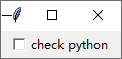
Checkbutton(root, text = 'check python', textvariable = v, command = callCheckbutton).pack()
root.mainloop()
运行效果图:
选中之后文字会变
4.将变量与Checkbutton绑定
#-*-coding:utf-8-*-
'''
将变量与Checkbutton绑定
variable:指定与Checkbutton绑定的变量
Checkbutton自己有值:On和Off值,缺省状态On为1, Off为0
'''
#显示Checkbutton的值
from tkinter import *
root = Tk()
#将一整数与Checkbutton的值绑定,每次点击Checkbutton,将打印出当前的值
v = IntVar()
def callCheckbutton():
    print(v.get())
Checkbutton(root, variable = v, text = 'checkbutton value', command = callCheckbutton).pack()
root.mainloop()
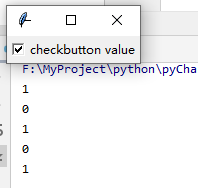
运行效果图:选中输出1,取消选中输出0
5.设置Checkbutton的状态值
# -*-coding:utf-8-*-
'''
设置Checkbutton的状态值
onvalue:指定选中状态时的值
offvalue:指定未选中状态的值
'''
from tkinter import *
root = Tk()
#将一字符串与Checkbutton的值绑定,每次点击Checkbutton,将打印出当前的值
v = StringVar()
def callCheckbutton():
    print(v.get())
#通过设置onvalue和offvalue可以设置Checkbutton的状态值,可以不为整形数值
Checkbutton(root, variable = v, text = 'checkbutton value', onvalue = 'python', offvalue = 'tkinter',
            command = callCheckbutton).pack()
root.mainloop()
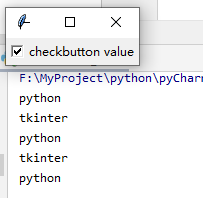
运行效果:选中输出python, 取消选中输出 tkinter






 扫一扫
扫一扫


 9603
9603

 被折叠的 条评论
为什么被折叠?
被折叠的 条评论
为什么被折叠?
 到【灌水乐园】发言





