


 本文档详细介绍了如何在Tomcat服务器上生成证书签名请求(CSR)并安装由GlobalSign提供的SSL证书。包括使用JDK创建密钥库及私钥、生成CSR文件、导入根证书及域证书到密钥库等步骤。
Customer Support > SSL Certificates > Certificate Signing Request Generation - Tomcat - KB1008
To generate a Certificate Signing Request (CSR), perform the following steps:
Please use JDK 1.4 or higher
1. Create a certificate keystore and private key with the following command:
$JAVA_HOME\bin>keytool -genkey -alias your_alaias_name -keyalg RSA -keystore your_keystore_filename
Note: Replace $JAVA_HOME with the directory of your Java Install - If you are a on Windows Server, change directory to \Program Files\Java\javaversionhere\bin

2. Specify the password - must be at least 6 characters long, and MUST be remembered.
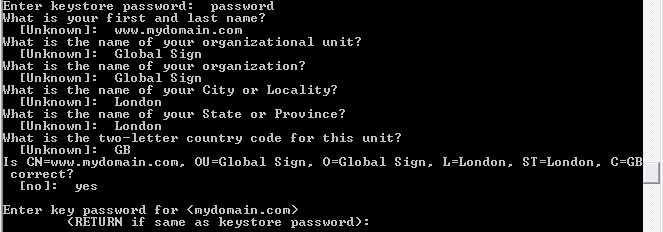
3. You must input the following:
What is your first and last name? *This is the Common Name Field - The Fully Qualified Domain Name MUST be entered here*
[Unknown]: www.globalsign.net
What is the name of your organizational unit?
[Global Sign]: Global Sign
What is the name of your organization?
[Global Sign]: Global Sign
What is the name of your City or Locality?
[London]: London
What is the name of your State or Province?
[London]: London
What is the two-letter country code for this unit?
[GB]: GB
Is CN=www.globalsign.net, OU=Global Sign, O=Global Sign, L=London, ST=London, C=
GB correct?
[no]: yes
Enter key password for <your_alias_name>
(RETURN if same as keystore password):
4. Create the Certificate Signing Request file with the following command:
$JAVA_HOME\bin>keytool -certreq -keyalg RSA -alias your_alias_name -file certreq.csr -keystore your_keystore_filename
Enter keystore password: your_password_here

5. The certreq.txt file will now be generated - this file can be entered into the website. Insure to include:
-----BEGIN NEW CERTIFICATE REQUEST-----
-----END NEW CERTIFICATE REQUEST-----
Customer Support > SSL Certificates > Install SSL Certificate in Tomcat
One GlobalSign has sent you your certificate, copy it into a text editor such as notepad and save as " yourdomain.cer"
Note: You must carry out the following tasks in this order:
Download the GlobalSign Root certificates - these can be found here:
(root.cer是可信赖的根证书可以用浏览器将其导出,也可以用openssl生成自签名的根证书)
1. Import the appropriate root certificates using:
$ keytool -import -trustcacerts -keystore mystore.kdb -alias root - file root.cer
"mystore.kdb" being your keystore.
2. Import the "yourdomain.cer" file using:
keytool -import -trustcacerts -keystore mystore.kdb -alias tomcat -file yourdomain.cer
With "mystore.kdb" being your keystore.
Update server.xml configuration file:
1. Open "$JAKARTA_HOME/conf/server.xml" in a text editor.
2. Find the following section:
- <!--
Define a SSL Coyote HTTP/1.1 Connector on port 8443
-->
<Connector className="org.apache.coyote.tomcat4.CoyoteConnector"
port=" 443" minProcessors="5" maxProcessors="75"
enableLookups="true"
acceptCount="100" debug="0" scheme="https" secure="true"
useURIValidationHack="false" disableUploadTimeout="true"><Factory
className="org.apache.coyote.tomcat4.CoyoteServerSocketFactory"
clientAuth="false"
protocol="TLS"
keystoreFile="mystore.kdb"
keystorePass="YOUR_KEYSTORE_PASSWORD" /></Connector>
3. If you want Tomcat to use the default SSL port, change all instances of the port number "8443" to 443.
4. Start or restart Tomcat





 扫一扫
扫一扫


 被折叠的 条评论
为什么被折叠?
被折叠的 条评论
为什么被折叠?
 到【灌水乐园】发言





