


 这篇文章详细介绍了在ProxmoxVE环境下修改节点名称的步骤,包括更新hosts文件,使用hostnamectl命令设置新名称,以及重新配置IP和网关地址。此外,还涉及到了数据迁移和网络接口配置的调整。
Proxmox VE 修改节点名称
- vi /etc/hosts
- 修改pve为新的名称
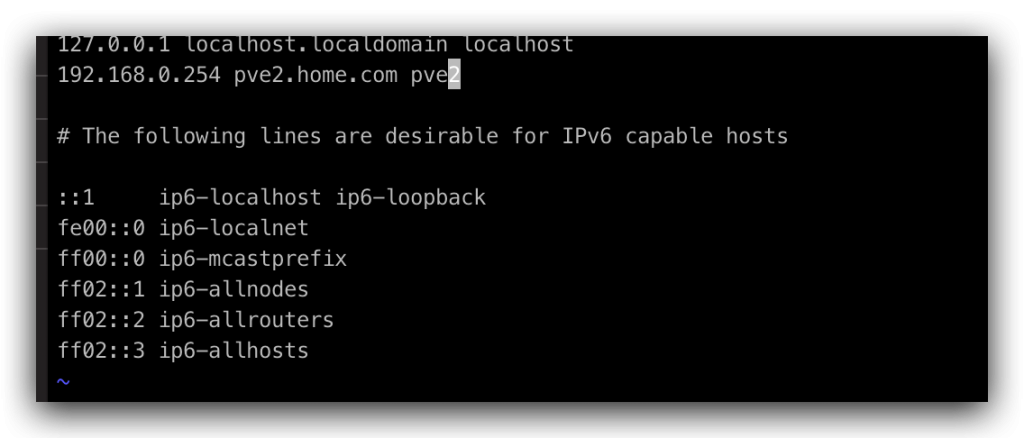
# 修改主机名称为新的名称 hostnamectl set-hostname pve2
- reboot重启
- 移动原来的节点的数据到新的节点
mv /etc/pve/nodes/pve /etc/pve/nodes/pve2/
pve修改ip和网关地址
vi /etc/network/interfaces
root@pve2:~# cat /etc/network/interfaces
auto lo
iface lo inet loopback

iface enp7s0 inet manual

auto vmbr0
iface vmbr0 inet static
	address 192.168.0.254/24
	gateway 192.168.0.1
	bridge-ports enp7s0
	bridge-stp off
	bridge-fd 0

iface enp6s0 inet manual
- 修改hosts里面的ip
- vi /etc/hosts
- 修改issues里面的ip
- vi /etc/issues





 扫一扫
扫一扫


 2万+
2万+

 被折叠的 条评论
为什么被折叠?
被折叠的 条评论
为什么被折叠?
 到【灌水乐园】发言





