


 本文详细介绍了Linux系统的休眠唤醒流程,包括用户请求休眠、设备冻结、内存镜像复制、设备恢复及写入交换空间等步骤。此外,讨论了nomodeset选项对于休眠后黑屏问题的影响,并提供了代码位置及相关调试方法。
目录
总体流程
休眠流程
- User requests for software suspend
- All the running processes are given the
suspendsignal - The devices are frozen so that they don’t change the system state when the snapshot is taken
- The memory image is atomically copied with interrupts disabled
- Frozen devices are awakened so that the image can be written
- The image is written to swap
- Devices are suspended and the system powered off
以上流程中红色部分代码,会导致在休眠过程中屏幕先灭再亮。
根据linux kernel官网文档 Documentation/driver-api/pm/devices.rst的描述,休眠包括以下5个阶段
The general procedure for hibernation is
1) to quiesce all devices ("freeze"),
2)create an image of the system memory while everything is stable,
3)reactivate all devices ("thaw"),
4) write the image to permanent storage,
5)and finally shut down the system ("power off").
The phases used to accomplish this are: ``prepare``,
``freeze``, ``freeze_late``, ``freeze_noirq``, ``thaw_noirq``, ``thaw_early``,
``thaw``, ``complete``, ``prepare``, ``poweroff``, ``poweroff_late``,
``poweroff_noirq``.
nomodeset
https://bbs.deepin.org/zh/post/225536 休眠唤醒后黑屏 nomodeset,如何检测是否需要增加nomodeset,和什么有关系?
https://ubuntuqa.com/article/1416.html 比较详细的介绍
最新的内核已将视频模式设置移入内核。因此,在X服务器启动时,所有针对硬件的时钟速率和视频卡上寄存器的编程都在内核中进行,
而不是在X驱动器中进行。.这样就可以拥有高分辨率的漂亮的启动(启动)屏幕和闪烁从启动启动画面到登录屏幕的免费过渡。
不幸的是,在某些卡上这不能正常工作,并且最终出现黑屏。添加nomodeset参数指示内核在加载X之前不加载视频驱动程序,而改用BIOS模式。
(原文:The newest kernels have moved the video mode setting into the kernel. So all the programming of the hardware specific clock rates and registers on the video card happen in the kernel rather than in the X driver when the X server starts.. This makes it possible to have high resolution nice looking splash (boot) screens and flicker free transitions from boot splash to login screen. Unfortunately, on some cards this doesn’t work properly and you end up with a black screen. Adding the nomodeset parameter instructs the kernel to not load video drivers and use BIOS modes instead until X is loaded.)
代码流程
/代码位置: /kernel/linux-5.12.2/kernel/power/hibernate.c
看起来休眠和唤醒的入口函数都是hibernate函数
休眠的主流程
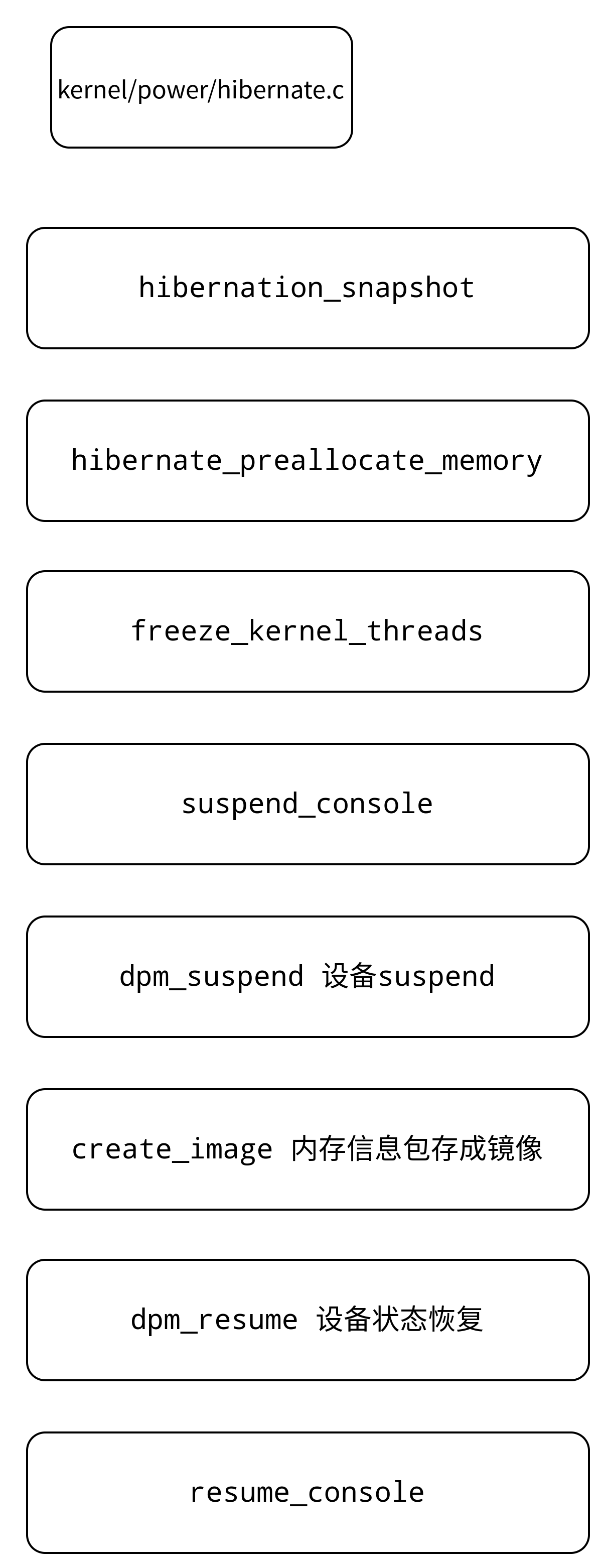
此流程中,console的suspend与resume实际上可以通过cmdline参数no_console_suspend控制。那么其他设备的suspend与resume是否也可以如此?
设备resume的过程及跟踪手段
这里提及resume,主要因为在休眠的过程中,在生成镜像后,会存在将设备resume(被称为thaw)的过程。
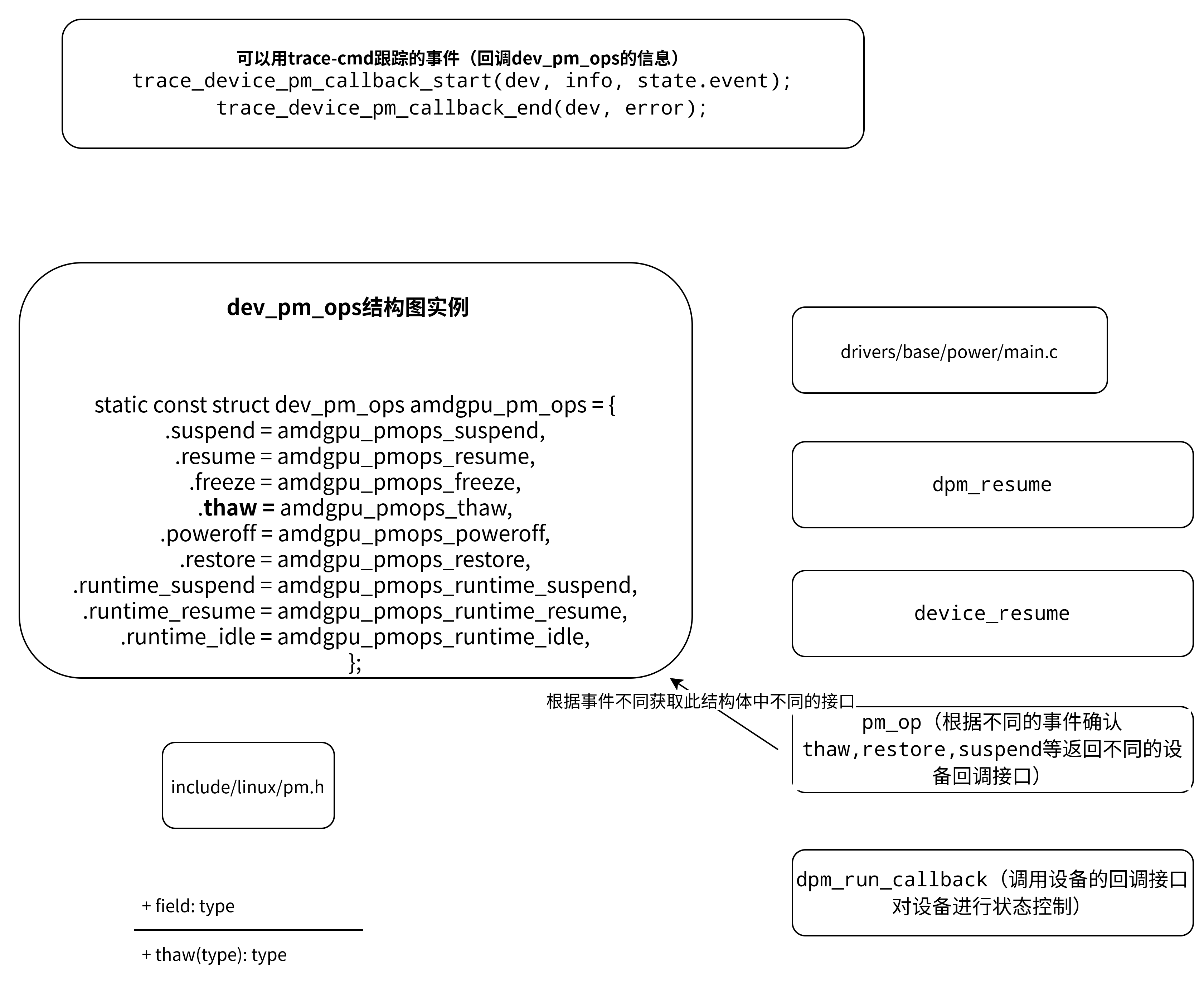
调试接口及方法
分项测试休眠
sudo -i

lsmod > lsmod.output.txt

echo devices > /sys/power/pm_test
echo platform > /sys/power/disk
echo disk > /sys/power/state
dmesg > /tmp/dmesg-devices-platform.txt

echo core > /sys/power/pm_test
echo platform > /sys/power/disk
echo disk > /sys/power/state
dmesg > /tmp/dmesg-core-platform.txt

echo core > /sys/power/pm_test
echo reboot > /sys/power/disk
echo disk > /sys/power/state
dmesg > /tmp/dmesg-core-reboot.txt
https://wiki.ubuntu.com/DebuggingKernelHibernate
swsusp和suspend2 两种休眠技术流程
http://freesoftwaremagazine.com/articles/hibernate_linux/
./drivers/acpi/acpi_video.c: dev_info(&video->device->dev, "Restoring backlight state\n");
static int acpi_video_resume(struct notifier_block *nb,
				unsigned long val, void *ign)
{
	struct acpi_video_bus *video;
	struct acpi_video_device *video_device;
	int i;

	switch (val) {
	case PM_HIBERNATION_PREPARE:
	case PM_SUSPEND_PREPARE:
	case PM_RESTORE_PREPARE:
		return NOTIFY_DONE;
	}

	video = container_of(nb, struct acpi_video_bus, pm_nb);

	dev_info(&video->device->dev, "Restoring backlight state\n");

	for (i = 0; i < video->attached_count; i++) {
		video_device = video->attached_array[i].bind_info;
		if (video_device && video_device->brightness)
			acpi_video_device_lcd_set_level(video_device,
					video_device->brightness->curr);
	}

	return NOTIFY_OK;
}https://wiki.archlinux.org/title/Power_management#Power_management_with_systemd
https://blog.youkuaiyun.com/u013670453/article/details/114867542





 扫一扫
扫一扫


 852
852



 到【灌水乐园】发言



