


看到不少人都在用Python(大多是turtle库)绘制各种图,感觉很哇塞,就稍微整理了下觉得不错的代码分享给大家(这些我都测试过,确实可以生成喔~)
小猪佩奇
效果图:
#!/usr/bin/env python2
# coding=utf-8

import turtle as t

t.pensize(4)
t.hideturtle()
t.colormode(255)
t.color((255,155,192),"pink")
t.setup(840,500)
t.speed(10)

#鼻子
t.pu()
t.goto(-100,100)
t.pd()
t.seth(-30)
t.begin_fill()
a=0.4
for i in range(120):
    if 0<=i<30 or 60<=i<90:
        a=a+0.08
        t.lt(3) #向左转3度
        t.fd(a) #向前走a的步长
    else:
        a=a-0.08
        t.lt(3)
        t.fd(a)
t.end_fill()

t.pu()
t.seth(90)
t.fd(25)
t.seth(0)
t.fd(10)
t.pd()
t.pencolor(255,155,192)
t.seth(10)
t.begin_fill()
t.circle(5)
t.color(160,82,45)
t.end_fill()

t.pu()
t.seth(0)
t.fd(20)
t.pd()
t.pencolor(255,155,192)
t.seth(10)
t.begin_fill()
t.circle(5)
t.color(160,82,45)
t.end_fill()

#头
t.color((255,155,192),"pink")
t.pu()
t.seth(90)
t.fd(41)
t.seth(0)
t.fd(0)
t.pd()
t.begin_fill()
t.seth(180)
t.circle(300,-30)
t.circle(100,-60)
t.circle(80,-100)
t.circle(150,-20)
t.circle(60,-95)
t.seth(161)
t.circle(-300,15)
t.pu()
t.goto(-100,100)
t.pd()
t.seth(-30)
a=0.4
for i in range(60):
    if 0<=i<30 or 60<=i<90:
        a=a+0.08
        t.lt(3) #向左转3度
        t.fd(a) #向前走a的步长
    else:
        a=a-0.08
        t.lt(3)
        t.fd(a)
t.end_fill()

#耳朵
t.color((255,155,192),"pink")
t.pu()
t.seth(90)
t.fd(-7)
t.seth(0)
t.fd(70)
t.pd()
t.begin_fill()
t.seth(100)
t.circle(-50,50)
t.circle(-10,120)
t.circle(-50,54)
t.end_fill()

t.pu()
t.seth(90)
t.fd(-12)
t.seth(0)
t.fd(30)
t.pd()
t.begin_fill()
t.seth(100)
t.circle(-50,50)
t.circle(-10,120)
t.circle(-50,56)
t.end_fill()

#眼睛
t.color((255,155,192),"white")
t.pu()
t.seth(90)
t.fd(-20)
t.seth(0)
t.fd(-95)
t.pd()
t.begin_fill()
t.circle(15)
t.end_fill()

t.color("black")
t.pu()
t.seth(90)
t.fd(12)
t.seth(0)
t.fd(-3)
t.pd()
t.begin_fill()
t.circle(3)
t.end_fill()

t.color((255,155,192),"white")
t.pu()
t.seth(90)
t.fd(-25)
t.seth(0)
t.fd(40)
t.pd()
t.begin_fill()
t.circle(15)
t.end_fill()

t.color("black")
t.pu()
t.seth(90)
t.fd(12)
t.seth(0)
t.fd(-3)
t.pd()
t.begin_fill()
t.circle(3)
t.end_fill()

#腮
t.color((255,155,192))
t.pu()
t.seth(90)
t.fd(-95)
t.seth(0)
t.fd(65)
t.pd()
t.begin_fill()
t.circle(30)
t.end_fill()

#嘴
t.color(239,69,19)
t.pu()
t.seth(90)
t.fd(15)
t.seth(0)
t.fd(-100)
t.pd()
t.seth(-80)
t.circle(30,40)
t.circle(40,80)

#身体
t.color("red",(255,99,71))
t.pu()
t.seth(90)
t.fd(-20)
t.seth(0)
t.fd(-78)
t.pd()
t.begin_fill()
t.seth(-130)
t.circle(100,10)
t.circle(300,30)
t.seth(0)
t.fd(230)
t.seth(90)
t.circle(300,30)
t.circle(100,3)
t.color((255,155,192),(255,100,100))
t.seth(-135)
t.circle(-80,63)
t.circle(-150,24)
t.end_fill()

#手
t.color((255,155,192))
t.pu()
t.seth(90)
t.fd(-40)
t.seth(0)
t.fd(-27)
t.pd()
t.seth(-160)
t.circle(300,15)
t.pu()
t.seth(90)
t.fd(15)
t.seth(0)
t.fd(0)
t.pd()
t.seth(-10)
t.circle(-20,90)

t.pu()
t.seth(90)
t.fd(30)
t.seth(0)
t.fd(237)
t.pd()
t.seth(-20)
t.circle(-300,15)
t.pu()
t.seth(90)
t.fd(20)
t.seth(0)
t.fd(0)
t.pd()
t.seth(-170)
t.circle(20,90)

#脚
t.pensize(10)
t.color((240,128,128))
t.pu()
t.seth(90)
t.fd(-75)
t.seth(0)
t.fd(-180)
t.pd()
t.seth(-90)
t.fd(40)
t.seth(-180)
t.color("black")
t.pensize(15)
t.fd(20)

t.pensize(10)
t.color((240,128,128))
t.pu()
t.seth(90)
t.fd(40)
t.seth(0)
t.fd(90)
t.pd()
t.seth(-90)
t.fd(40)
t.seth(-180)
t.color("black")
t.pensize(15)
t.fd(20)

'更多python代码和学习资料看主页'

#尾巴
t.pensize(4)
t.color((255,155,192))
t.pu()
t.seth(90)
t.fd(70)
t.seth(0)
t.fd(95)
t.pd()
t.seth(0)
t.circle(70,20)
t.circle(10,330)
t.circle(70,30)
皮卡丘
效果图: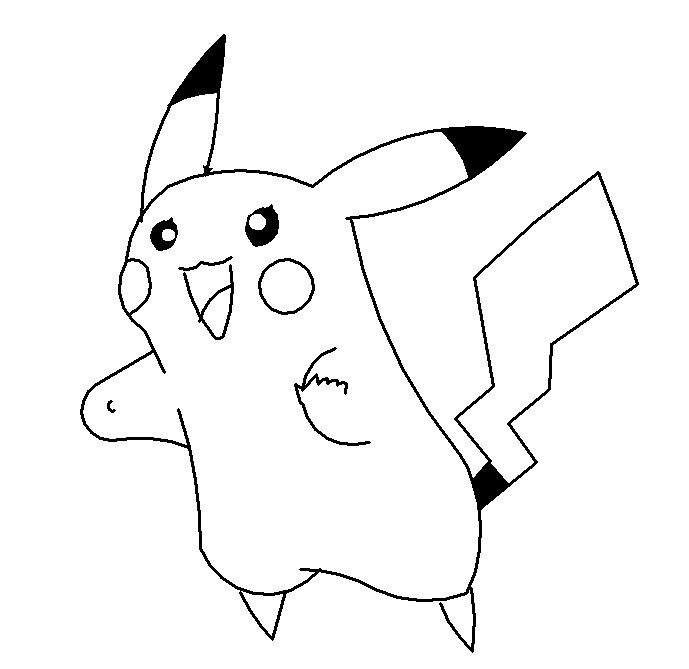
实现代码:
import turtle as t

def infoPrt():
    print('coordinate: ' + str(t.pos()))
    print('angle: ' + str(t.heading()))

t.pensize(3)
t.hideturtle()
t.colormode(255)
t.color("black")
t.setup(700, 650)
t.speed(10)
t.st()
#t.dot()
t.pu()
#t.goto(-150,100)
t.goto(-210,86)
t.pd()
infoPrt()

# 头
print('头')
t.seth(85)
t.circle(-100,50)
#t.seth(78)
#t.circle(-100,25)

infoPrt()

t.seth(25)
t.circle(-170,50)
infoPrt()

# 右耳
print('右耳')
t.seth(40)
#t.circle(-250,52)
t.circle(-250,30)
infoPrt()


# 右耳尖
t.begin_fill()
# 左
t.circle(-250,22)
#t.fillcolor("pink")
# 右
t.seth(227)
t.circle(-270, 15)

prePos = t.pos()
infoPrt()
# 下
t.seth(105)
t.circle(100, 32)
t.end_fill()

t.pu()
t.setpos(prePos)
t.pd()
t.seth(212)
t.circle(-270, 28)

prePos = t.pos()
t.pu()
t.goto(t.xcor()+5,t.ycor()-2)
t.pd()

# 躯干
print('躯干')
t.seth(280)
t.circle(500, 30)
infoPrt()

# 臀部
print('臀部')
t.seth(120)
#t.circle(150, -55)
t.circle(150, -11)
p_tail=t.pos()
t.circle(150, -44)
p_butt=t.pos()
infoPrt()

# 尾巴
t.pu()
t.setpos(p_tail)
t.pd()

t.begin_fill()
t.seth(50)
t.fd(25)
t.seth(-50)
t.fd(30)
p_tail1=t.pos
t.seth(-140)
t.fd(36)
t.end_fill()
t.seth(39)
# 右尾和h1
t.fd(72)
# 右尾和v1
t.seth(125)
t.fd(48)
# 右尾和h2
t.seth(40)
t.fd(53)
# 右尾和v2
t.seth(88)
t.fd(45)
# 右尾和h3
t.seth(35)
t.fd(105)
# 右尾和v3
t.seth(105)
t.circle(850, 8)
#t.fd(105)
t.seth(215)
#t.fd(125)
t.circle(850, 11)
t.seth(280)
t.fd(110)
t.seth(220)
t.fd(50)
t.seth(309)
t.fd(56)

# 底盘
print('底盘')
t.pu()
t.setpos(p_butt)
t.pd()
t.seth(20)
t.circle(120, -45)
infoPrt()

t.seth(330)
t.circle(-150, -30)
infoPrt()

prePos = t.pos()
t.pu()
t.goto(t.xcor()+20,t.ycor())
t.pd()

t.seth(230)
t.circle(-70, 120)
p_bot=t.pos()

# 两脚-right
t.pu()
t.setpos(p_butt)
t.setpos(t.xcor()+5,t.ycor()+5)
t.pd()
t.seth(-86)
t.fd(30)
t.seth(-93)
t.fd(33)
t.seth(-225)
t.circle(-150, 22)
# 两脚-left
t.pu()
t.setpos(p_bot)
t.setpos(t.xcor()+85,t.ycor()-43)
t.pd()
t.seth(-105)
t.fd(50)
t.seth(-225)
t.circle(-150, 22)

# 左躯干
print('躯干')
t.pu()
t.setpos(p_bot)
t.pd()
t.seth(90)
t.circle(450, 13)
p_lfhd = t.pos()
t.circle(450, 5)
t.pu()
t.circle(450, 5)
t.pd()
t.circle(450, 6)
infoPrt()

# 左脸
print('左脸')
t.seth(330)
t.circle(50, -90)
infoPrt()

# 左酒窝
t.seth(30)
t.circle(-15, 120)
t.seth(-70)
t.circle(-30, 90)

# 左手
t.pu()
t.setpos(p_lfhd)
t.pd()
t.seth(160)
t.circle(150, 30)
infoPrt()

t.seth(180)
t.circle(-30, 150)
t.fd(67)

t.pu()
t.setpos(t.xcor()-40,t.ycor()-60)
t.pd()
t.seth(200)
t.circle(-5, 180)

# 右手
t.pu()
t.setpos(p_lfhd)
t.setpos(t.xcor()+180,t.ycor()+5)
t.pd()
t.seth(200)
t.circle(-50, 100)
t.pu()
t.circle(-50, 15)
t.pd()
t.circle(-50, 65)
t.pu()
t.setpos(t.xcor()+10,t.ycor()-45)
t.pd()
#t.seth(270)
#t.circle(-30, -180)
t.seth(80)
t.fd(10)
t.seth(165)
t.circle(10, 60)
t.seth(90)
t.fd(5)
t.seth(165)
t.circle(10, 60)
t.seth(95)
t.fd(5)
t.seth(185)
t.circle(10, 60)
t.seth(105)
t.fd(10)
t.seth(230)
t.fd(20)
t.seth(145)
t.fd(10)
t.seth(285)
t.fd(20)

# 右酒窝
t.pu()
t.setpos(t.xcor()-40,t.ycor()+110)
t.pd()
t.circle(27, 360)

# 嘴
t.pu()
t.setpos(t.xcor()-30,t.ycor()+28)
t.pd()
t.seth(280)
t.circle(-130, 30)
t.seth(270)
t.circle(-6, 160)
t.seth(130)
t.circle(-130, 30)
t.pu()
t.setpos(t.xcor()-5,t.ycor()+5)
t.pd()
t.seth(160)
t.circle(-20, -70)
t.seth(160)
t.circle(-30, -60)
t.pu()
t.setpos(t.xcor(),t.ycor()-28)
t.pd()
t.seth(200)
t.circle(50, 58)

# 左眼
t.pu()
t.setpos(t.xcor()-40,t.ycor()+90)
t.pd()
t.circle(5)
t.pu()
t.setpos(t.xcor()+5,t.ycor()+10)
t.pd()
t.begin_fill()
t.seth(190)
t.circle(15, 130)
t.seth(310)
t.circle(10, 15)
t.seth(0)
t.circle(17, 133)
t.seth(90)
t.circle(10, 15)
t.end_fill()
t.pu()
t.setpos(t.xcor()+2,t.ycor()-15)
t.pd()
t.color("white")
t.begin_fill()
t.circle(5)
t.end_fill()

# 右眼
t.pu()
t.setpos(t.xcor()+85,t.ycor()+15)
t.pd()
t.color("black")
t.circle(5)
t.pu()
t.setpos(t.xcor()+5,t.ycor()+10)
t.pd()
t.begin_fill()
t.seth(190)
t.circle(20, 130)
t.seth(310)
t.circle(10, 15)
t.seth(0)
t.circle(22, 133)
t.seth(90)
t.circle(13, 15)
t.end_fill()
t.pu()
t.setpos(t.xcor()-7,t.ycor()-15)
t.pd()
t.color("white")
t.begin_fill()
t.circle(7)
t.end_fill()

# 左耳
t.color("black")
t.pu()
t.goto(-210,86)
t.setpos(t.xcor()+15,t.ycor()+38)
t.pd()
t.seth(90)
t.circle(-250,30)

t.begin_fill()
# 左
t.circle(-250,18)

# 右
t.seth(270)
t.circle(-270, 12)

prePos = t.pos()
# 下
t.seth(180)
t.circle(100, 30)
t.end_fill()

t.pu()
t.setpos(prePos)
t.pd()
t.seth(270)
t.circle(-270, 18)


t.done()
叮当猫
效果图:
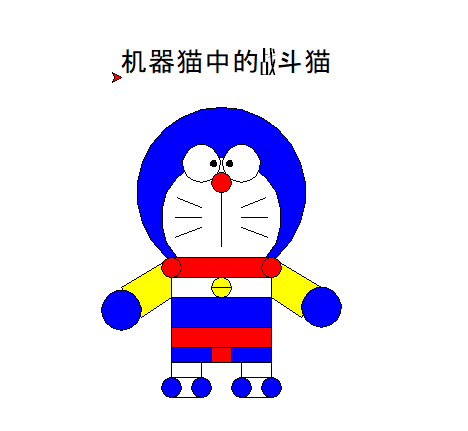
实现代码:
import turtle

turtle.speed(5)
turtle.circle(50)
turtle.begin_fill()           #画头
turtle.circle(85)
turtle.fillcolor("blue")
turtle.end_fill()

# turtle.penup()
# turtle.goto(0,20)
# turtle.pendown()

# turtle.begin_fill()
# turtle.circle(35)
# turtle.fillcolor("white")
# turtle.end_fill()

turtle.begin_fill()                #画脸
turtle.circle(60)
turtle.fillcolor("white")
turtle.end_fill()


turtle.penup()
turtle.goto(-20,95)             #化左眼眶
turtle.pendown()
turtle.begin_fill()
turtle.circle(19)
turtle.fillcolor("white")
turtle.end_fill()


turtle.penup()                  #画右眼眶
turtle.goto(20,95)
turtle.pendown()
turtle.begin_fill()
turtle.circle(19)
turtle.fillcolor("white")
turtle.end_fill()

turtle.penup()                 #化左眼珠
turtle.goto(-8,111)
turtle.pendown()
turtle.begin_fill()
turtle.fillcolor("black")
turtle.circle(3)
turtle.end_fill()


turtle.penup()              #画右眼珠
turtle.goto(8,111)
turtle.pendown()
turtle.begin_fill()
turtle.fillcolor("black")
turtle.circle(3)
turtle.end_fill()

turtle.penup()              #画鼻子
turtle.goto(0,85)
turtle.pendown()
turtle.begin_fill()
turtle.circle(10)
turtle.fillcolor("red")
turtle.end_fill()


turtle.goto(0,30)               #画竖线

turtle.penup()            #左边第一根胡子
turtle.goto(-20,70)
turtle.pendown()
turtle.goto(-45,80)

turtle.penup()                  #左边第二根胡子
turtle.goto(-20,60)
turtle.pendown()
turtle.goto(-47,60)

turtle.penup()                  #左边第三根胡子
turtle.goto(-20,50)
turtle.pendown()
turtle.goto(-47,40)

turtle.penup()                  #右边第三根胡子
turtle.goto(20,50)
turtle.pendown()
turtle.goto(47,40)


turtle.penup()                  #右边第二根胡子
turtle.goto(20,60)
turtle.pendown()
turtle.goto(47,60)


turtle.penup()                  #左边第一根胡子
turtle.goto(20,70)
turtle.pendown()
turtle.goto(45,80)

turtle.penup()                  #右边胳膊1
turtle.goto(50,20)
turtle.pendown()
turtle.goto(100,-10)


turtle.penup()                  #右边胳膊2
turtle.goto(50,-20)
turtle.pendown()
turtle.goto(80,-40)

turtle.begin_fill()
turtle.goto(100,-10)
turtle.goto(50,20)
turtle.goto(50,-20)
turtle.goto(80,-40)
turtle.fillcolor("yellow")
turtle.end_fill()


turtle.penup()                  #右手
turtle.goto(100,-50)
turtle.pendown()
turtle.begin_fill()
turtle.circle(20)
turtle.fillcolor("blue")
turtle.end_fill()


turtle.penup()                  #左边胳膊1
turtle.goto(-50,20)
turtle.pendown()
turtle.goto(-100,-10)


turtle.penup()                  #左边胳膊2
turtle.goto(-50,-20)
turtle.pendown()
turtle.goto(-80,-40)

turtle.begin_fill()
turtle.goto(-100,-10)
turtle.goto(-50,20)
turtle.goto(-50,-20)
turtle.goto(-80,-40)
turtle.fillcolor("yellow")
turtle.end_fill()

turtle.penup()                  #左手
turtle.goto(-100,-53)
turtle.pendown()
turtle.begin_fill()
turtle.circle(20)
turtle.fillcolor("blue")
turtle.end_fill()


turtle.penup()                  #左手
turtle.goto(-50,-20)
turtle.pendown()
turtle.goto(-50,-100)

turtle.penup()                  #左手
turtle.goto(50,-20)
turtle.pendown()
turtle.goto(50,-100)


turtle.begin_fill()
turtle.penup()
turtle.goto(50,-120)
turtle.pendown()
turtle.circle(10)
turtle.fillcolor("blue")
turtle.end_fill()

turtle.begin_fill()
turtle.goto(20,-120)
turtle.circle(10)
turtle.fillcolor("blue")
turtle.end_fill()


turtle.penup()
turtle.goto(50,-100)
turtle.pendown()
turtle.goto(20,-100)


turtle.penup()
turtle.goto(-50,-120)
turtle.pendown()
turtle.begin_fill()
turtle.circle(10)
turtle.goto(-20,-120)
turtle.circle(10)
turtle.fillcolor("blue")
turtle.end_fill()

turtle.penup()
turtle.goto(-20,-100)
turtle.pendown()
turtle.goto(-50,-100)


turtle.penup()
turtle.goto(-20,-100)
turtle.pendown()
turtle.goto(-20,-85)

turtle.goto(20,-85)
turtle.goto(20,-100)

turtle.penup()
turtle.goto(-50,-20)
turtle.pendown()

turtle.begin_fill()
turtle.goto(50,-20)
turtle.goto(50,-85)
turtle.goto(-50,-85)
turtle.goto(-50,-20)
turtle.fillcolor("blue")
turtle.end_fill()


turtle.penup()
turtle.goto(0,-20)    #铃铛
turtle.pendown()
turtle.begin_fill()
turtle.circle(10)
turtle.fillcolor("yellow")
turtle.end_fill()


turtle.penup()
turtle.goto(-10,-10)
turtle.pendown()
turtle.goto(10,-10)


turtle.penup()
turtle.goto(-50,20)
turtle.pendown()
turtle.begin_fill()
turtle.goto(50,20)
turtle.goto(50,0)
turtle.goto(-50,0)
turtle.goto(-50,20)
turtle.fillcolor("red")
turtle.end_fill()


turtle.penup()
turtle.goto(50,0)
turtle.pendown()
turtle.begin_fill()
turtle.circle(10)
turtle.fillcolor("red")
turtle.end_fill()


turtle.penup()
turtle.goto(-50,0)
turtle.pendown()
turtle.begin_fill()
turtle.circle(10)
turtle.fillcolor("red")
turtle.end_fill()


turtle.penup()                  #内裤
turtle.goto(-50,-70)
turtle.pendown()
turtle.begin_fill()
turtle.goto(50,-70)
turtle.goto(50,-50)
turtle.goto(-50,-50)
turtle.goto(-50,-70)
turtle.fillcolor("red")
turtle.end_fill()

turtle.penup()
turtle.goto(-10,-70)
turtle.pendown()
turtle.begin_fill()
turtle.goto(-10,-85)
turtle.goto(10,-85)
turtle.goto(10,-70)
turtle.goto(-10,-70)
turtle.fillcolor("red")
turtle.end_fill()

turtle.penup()
turtle.goto(-100,200)
turtle.pendown()
s = "机器猫中的战斗猫"
turtle.write(s,font = ("Arial",20,
                       "normal"))


turtle.done()
路飞骷颅头
效果图:

#路飞骷髅
import turtle as t
#黄底帽子
t.pu()
t.goto(0,200)
t.circle(-130,-80)
t.pd()
t.colormode(255)
t.pensize(5)
t.color(242,232,184) #帽子黄底RGB
t.begin_fill()
t.pencolor(0,0,0)
t.circle(-130,160)
t.seth(180)
t.fd(255)
t.end_fill()

#红色线条
t.begin_fill()
t.color(221,65,43) #帽子红色带
t.pencolor(0,0,0)
t.seth(80)
t.circle(-130,19)
t.seth(0)
t.fd(225)
t.seth(-59)
t.circle(-130,19)
t.seth(180)
t.fd(255)
t.end_fill()

#帽檐
t.begin_fill()
t.color(242,232,184)
t.pencolor(0,0,0)
t.fd(60)
t.circle(12,180)
t.fd(375)
t.circle(12,180)
t.fd(255 + 60)
t.end_fill()

#脸部下半轮廓
t.pu()
t.setpos(0,-30)
t.seth(-180)
t.circle(-130,-75)
t.pd()
t.circle(-130,150)

#眼睛鼻子
t.pu()
t.color(33,24,24) #眼睛、鼻子RGB
t.setpos(-45,64)
t.seth(-180)
t.pd()
t.begin_fill()
t.circle(33)
t.pu()
t.setpos(45,64)
t.pd()
t.circle(33)
t.end_fill()

t.pu()
t.setpos(0,5)
t.pd()
t.begin_fill()
t.circle(8)
t.end_fill()

#下巴
t.pencolor(0,0,0)
t.pu()
t.setpos(0,0)
t.seth(0)
t.circle(-75,45)
t.pd()
t.circle(-75,270)

#牙齿
t.pu()
t.setpos(0,120)
t.seth(0)
t.circle(-105,136)
t.pd()
t.circle(-105,86)

t.pu()
t.seth(0)
t.goto(0,200)
t.circle(-130,150)
t.pd()
t.circle(-130,60)

t.pu() #牙齿三根竖线
t.setpos(-30,-27)
t.seth(260)
t.pd()
t.fd(52)
t.pu()
t.setpos(30,-27)
t.pd()
t.seth(-260)
t.fd(-52)
t.pu()
t.setpos(0,-30)
t.seth(-90)
t.pd()
t.fd(56)

#上排右侧小爪爪
#释放注释为:上排右侧小爪爪实心金方案
t.pu()
#t.color(255,215,0) #金色的RGB
t.pencolor(0,0,0)
t.setpos(110,145)
t.seth(45)
t.pd()
#t.begin_fill()
t.fd(40)
t.seth(135)
t.circle(-30,235)
t.seth(-20)
t.circle(-30,220)
t.seth(-135)
t.fd(40)
#t.end_fill()

#上排左侧小爪爪
t.pu()
t.pencolor(0,0,0)
t.setpos(-110,145)
t.seth(135)
t.pd()
t.fd(40)
t.seth(45)
t.circle(30,235)
t.seth(-160)
t.circle(30,220)
t.seth(-45)
t.fd(40)

#下排右侧小爪爪
t.pu()
t.setpos(70,-10)
t.seth(-45)
t.pd()
t.fd(70)
t.seth(45)
t.circle(-30,235)
t.seth(-70)
t.circle(-30,255)
t.seth(135)
t.fd(22)

#下排左侧小爪爪
t.pu()
t.setpos(-70,-10)
t.seth(-135)
t.pd()
t.fd(70)
t.seth(135)
t.circle(30,235)
t.seth(-110)
t.circle(30,255)
t.seth(45)
t.fd(22)
是不是感觉很不错呀!



 3155


 扫一扫


 被折叠的 条评论
为什么被折叠?
 到【灌水乐园】发言


